
opencode-zh-desktop
v0.2.2
Published
CDP-based Chinese locale injection for OpenCode Desktop — patches the Electron renderer at runtime via Chrome DevTools Protocol

Maintainers
 mike652638
Readme
opencode-zh-desktop


基于 CDP(Chrome DevTools Protocol)的 OpenCode Desktop 中文注入工具 — 在运行时通过 Electron 的调试协议向渲染进程注入翻译脚本。支持守护进程模式,含自动重启、断线重连和热重载。
opencode-zh-plugin 的配套包(负责 AI 回复语言中文化)。
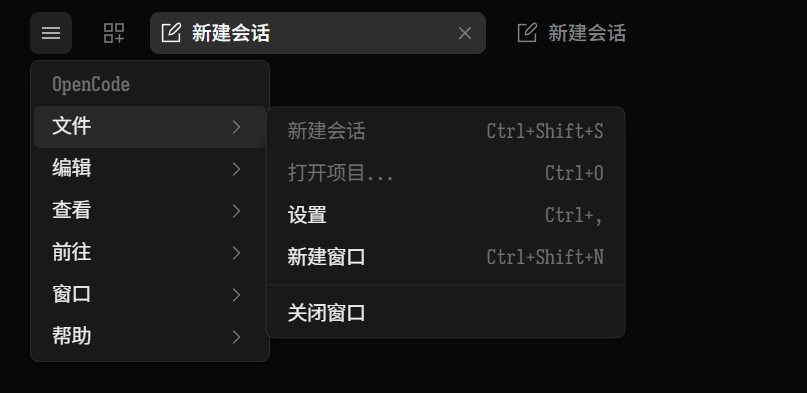
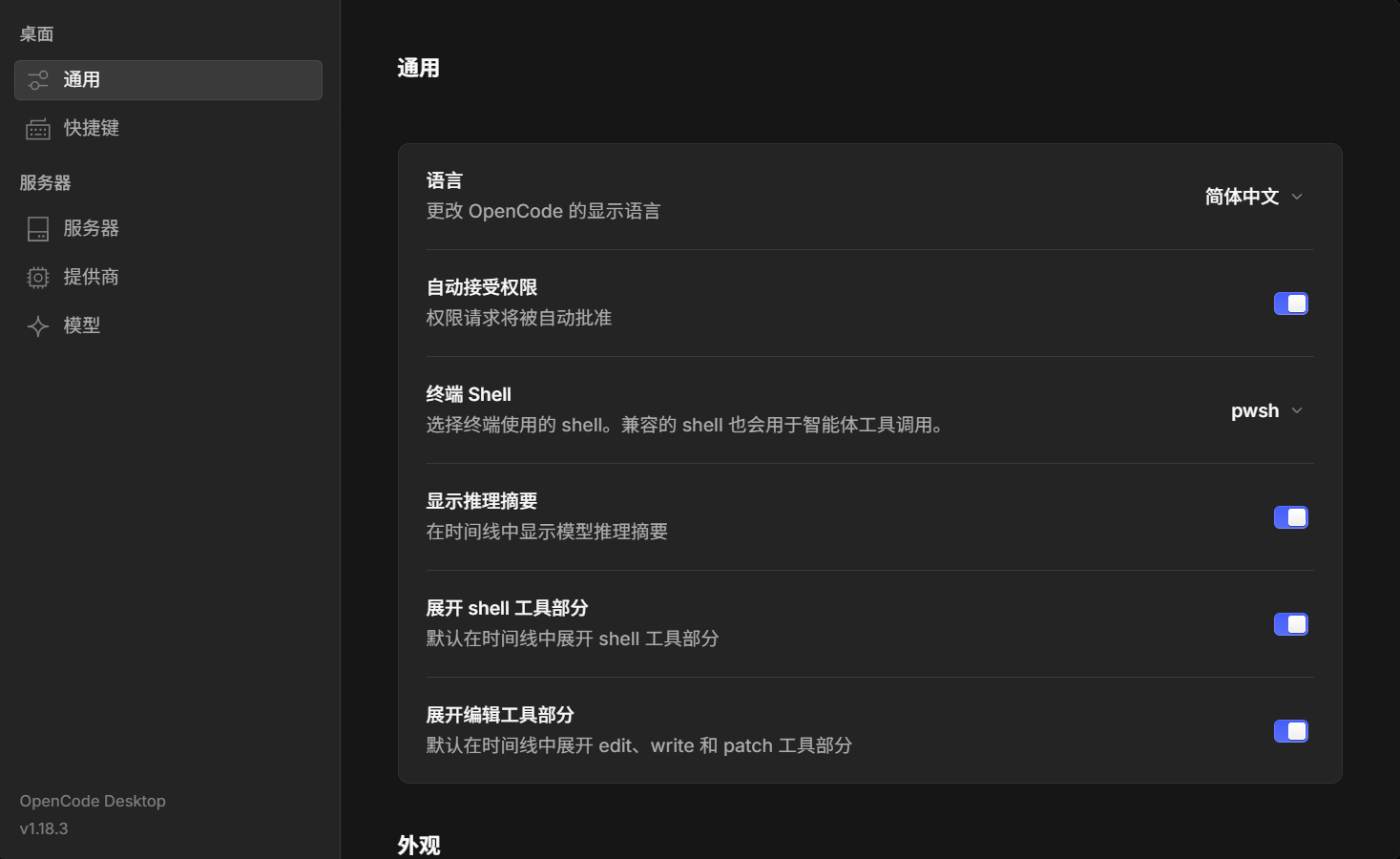
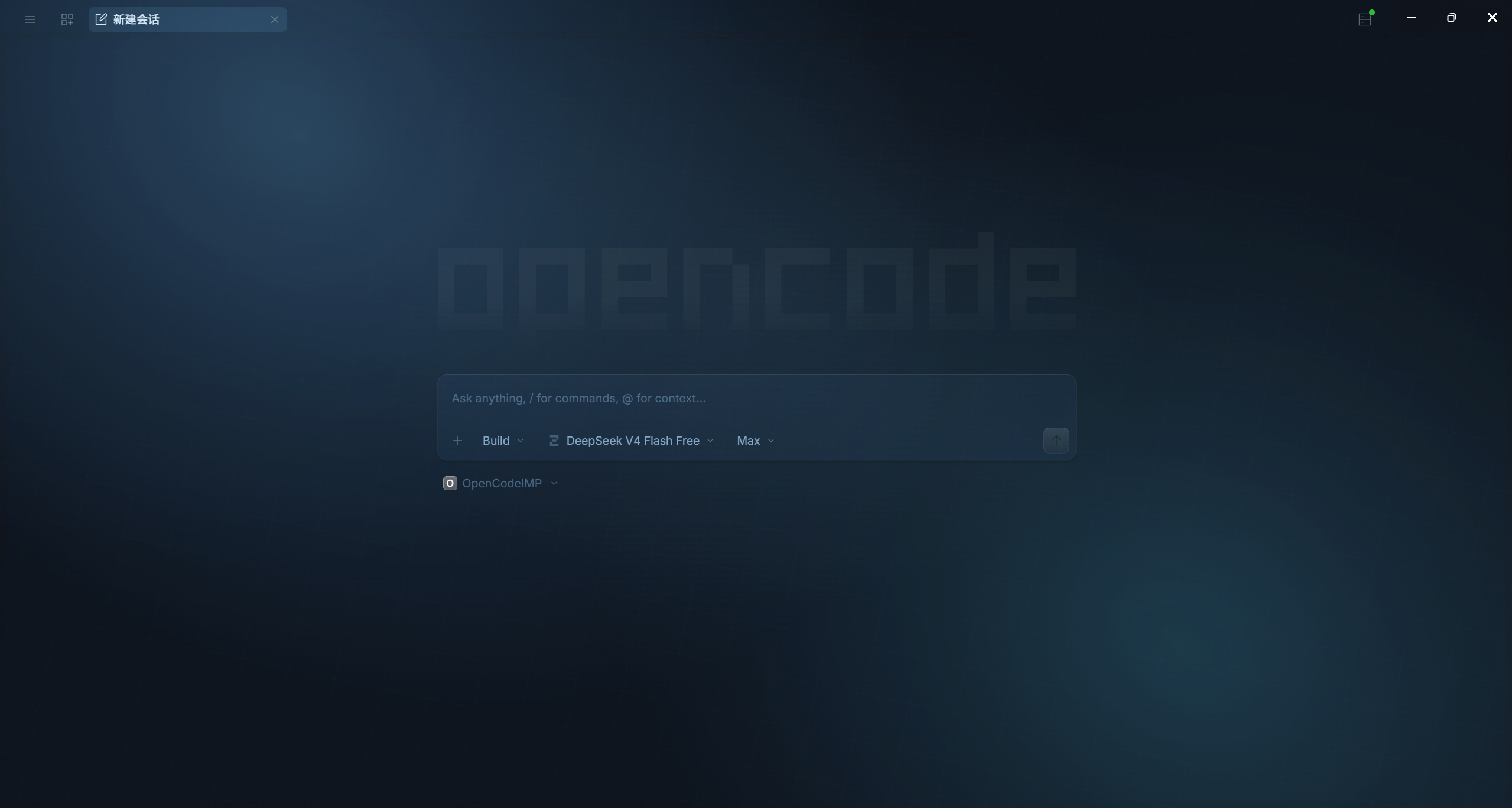
效果预览
菜单栏中文化
设置页中文化
自定义主题(背景图 + 玻璃层 + 光晕 + 网格纹理)
架构
opencode-zh-desktop
  │
  ├── 1. 查找 OpenCode.exe(Win/Mac/Linux 自动探测)
  ├── 2. 终止现有实例(WM_CLOSE 优雅关闭)
  ├── 3. 以 --remote-debugging-port=19222 重新启动
  ├── 4. 通过 CDP WebSocket 连接 Electron 渲染进程
  ├── 5. Page.addScriptToEvaluateOnNewDocument(持久注入)
  │     ├── setLocale() — 通过 window.api 调用 storeSet("language", zh)
  │     ├── TRANSLATIONS — 950 条英→中映射(自动生成)
  │     ├── processTree() — TreeWalker 扫描全树 TEXT_NODE + 属性
  │     ├── splitTextByShortcut() — 处理粘连快捷键文本
  │     └── startObserver() — MutationObserver 捕获动态 DOM 变化
  └── 6. 守护进程模式:自动重启、指数退避重连、脚本热重载
安装
npm install -g opencode-zh-desktop
# 或者
npx opencode-zh-desktop [选项]
使用
单次注入
连接到已运行的 OpenCode Desktop 实例并注入翻译:
opencode-zh-desktop --no-relaunch完整模式(终止 + 重启 + 注入)
自动查找并重启 OpenCode Desktop,启用 CDP 调试端口:
opencode-zh-desktop守护进程模式(推荐)
Desktop 退出后自动重启并重新注入:
opencode-zh-desktop --daemon守护进程会区分正常关闭和异常退出:通过窗口关闭按钮正常退出时,daemon 进入待机状态,不会重新启动 Desktop;如果 Desktop 崩溃或以非零退出码退出,则继续自动重启并重新注入。之后再次通过配置好的 OpenCode 快捷方式启动 Desktop,daemon 会自动恢复注入。
随 OpenCode Desktop 自动启动
OpenCode Desktop 必须在启动时带上 --remote-debugging-port,工具才能通过 CDP 注入翻译。因此,不能先用普通方式启动 Desktop,再可靠地附加注入。
最简单的方式是修改 OpenCode Desktop 快捷方式:
右键 OpenCode Desktop 快捷方式,选择“属性”。
将“目标”改为全局 npm 命令的路径,例如:
C:\Users\<用户名>\AppData\Roaming\npm\opencode-zh-desktop.cmd在目标后追加参数:
--daemon --no-proxy
最终效果应等价于:
opencode-zh-desktop --daemon --no-proxy之后通过该快捷方式启动时,守护进程会先以 CDP 模式启动 OpenCode Desktop,然后自动注入中文翻译;Desktop 崩溃或断线后也会自动重连。请关闭 OpenCode Desktop 原有的普通开机启动,避免普通启动路径与该快捷方式重复启动。
如果直接修改快捷方式不方便,也可以在 Windows 终端中运行:
opencode-zh-desktop --daemon --no-proxy保持该进程运行即可获得相同效果。
命令行选项
| 选项 | 说明 | 默认值 |
|---|---|---|
| --port <n> | CDP 调试端口 | 19222 |
| --exe <path> | OpenCode.exe 路径 | 自动探测 |
| --no-relaunch | 连接已运行实例,不重启 | false |
| --force-relaunch | 即使 CDP 已可用也强制重启 | false |
| --no-proxy | 启动 Desktop 时移除代理环境变量 | false |
| --daemon | 守护进程,自动重启 Desktop | false |
| --theme <file> | 加载并注入自定义主题 JSON | — |
| --version, -v | 显示版本号 | — |
第一阶段:主题管理
第一阶段提供纯主题管理能力,不修改 OpenCode 安装目录,也不要求启动 CDP:
opencode-zh-desktop theme list
opencode-zh-desktop theme detect
opencode-zh-desktop theme export sea-breeze --out sea-breeze.json
opencode-zh-desktop theme import sea-breeze.json
opencode-zh-desktop theme set-color sea-breeze.json dark text-base '#d7e8f5'
opencode-zh-desktop theme contrast sea-breeze.json
opencode-zh-desktop theme assets sea-breeze.json
opencode-zh-desktop --daemon --theme sea-breeze.json
opencode-zh-desktop theme reset
主题 JSON 使用 OpenCode Desktop theme 的 name、id、light、dark 结构,并保留 palette、seeds、overrides 和 v2Overrides 扩展字段。theme detect 会报告以下候选目录的实际存在状态,不会假设当前 OpenCode 版本一定支持某个目录:
- 用户目录:
$XDG_CONFIG_HOME/opencode/desktop-themes - 兼容探测目录:
$XDG_CONFIG_HOME/opencode/themes - 项目目录:
.opencode/themes
theme reset 只处理工具约定的 desktop-themes/theme.json,会保存为 theme.json.disabled 后删除活动文件;其他 JSON 主题不会被修改。
视觉主题
主题文件可以在 light、dark 中增加 visuals,并通过顶层 pages 为首页、会话页、设置页和项目页配置不同的视觉效果:
{
  "light": {
    "visuals": {
      "backgroundImage": "assets/home-light.jpg",
      "backgroundPosition": "center",
      "backgroundSize": "cover",
      "backgroundOpacity": 0.9,
      "overlayColor": "rgb(240 248 255 / 42%)",
      "glassOpacity": 0.42,
      "glassBlur": 18,
      "glassSaturation": 120,
      "atmosphere": true,
      "atmosphereOpacity": 0.65,
      "animation": false
    }
  },
  "dark": {
    "visuals": {
      "backgroundImage": "assets/home-dark.jpg",
      "glassOpacity": 0.48,
      "glassBlur": 20,
      "atmosphere": true
    }
  },
  "pages": {
    "settings": {
      "atmosphere": false,
      "glassOpacity": 0.62
    }
  }
}
背景图相对路径以主题 JSON 所在目录为基准。视觉层使用独立 DOM,设置 pointer-events: none,不会替换输入框、编辑器、终端、文件树或其他原生控件。theme assets <file> 可以检查背景资源,theme reset 会同时清理当前运行中的背景层、玻璃层、氛围光和 CSS 注入。
翻译覆盖
| 层级 | 覆盖率 | 机制 | |---|---|---| | 菜单栏 | ~100% | DOM 文本节点替换 | | 子菜单项 | ~100% | DOM 替换 | | 设置标签 | ~100% | DOM 替换 | | 对话框按钮 | ~100% | DOM 替换 | | 工具提示 / 占位符 | ~95% | 属性替换 | | Electron 原生菜单(Go / Window) | 0% | OS 级渲染,不在 DOM 中 | | 系统对话框 | 0% | updater/cli 硬编码(上游 #10840) |
翻译数据
950 条翻译对应关系自动从 OpenCode 官方 i18n 文件生成:
packages/app/src/i18n/en.ts(965 个 key)packages/app/src/i18n/zh.ts(980 个 key)packages/desktop/src/renderer/i18n/(21 个 key)
运行 npm run build-map 从上游最新翻译重新生成。
组合覆盖(配合 opencode-zh-plugin)
| 表面 | opencode-zh-plugin | opencode-zh-desktop | |---|---|---| | AI 回复 + 推理过程 | ✅ system.transform hook | — | | TUI 插槽 + 斜杠命令 | ✅ slot 替换 + commands | — | | Desktop 菜单栏 | — | ✅ CDP DOM 替换 | | Desktop 子菜单 | — | ✅ CDP DOM 替换 | | Desktop 设置/对话框 | — | ✅ CDP DOM 替换 | | TUI/CLI 硬编码字符串 | ❌ 需上游 PR | ❌ 不在此范围 | | 系统对话框 | ❌ 上游 #10840 | ❌ 上游 #10840 |
技术原理
实现方式
使用 Chrome DevTools Protocol 连接到 OpenCode Desktop 的 Electron 渲染进程。与 CodexPlusPlus 为 OpenAI Codex Desktop 使用的技术相同。
Page.addScriptToEvaluateOnNewDocument在页面 JS 执行前注入脚本Runtime.evaluate在已加载的页面上执行init()MutationObserver捕获动态渲染组件的 DOM 变化- 递归扫描 Shadow DOM 以覆盖 web component 内容
- 三次延迟重扫描(500ms / 1500ms / 3000ms)捕获延迟加载的 UI
局限性
- 闪烁:英文文本可能在替换前短暂闪现(DOM 变更时序问题)
- 一次性:不加
--daemon时,页面重载后注入丢失 - Electron 菜单:Go / Window 菜单为本地 OS 渲染,不在 DOM 中
- 版本依赖:上游 UI 变更可能破坏文本匹配
- 终端安全:检测到现有 CDP 实例时默认复用,不会重复重启 Desktop,避免影响正在运行的 TUI;仅在明确需要时使用
--force-relaunch
开发
git clone https://github.com/mike652638/opencode-zh-desktop.git
cd opencode-zh-desktop
npm install
npm run typecheck    # 仅类型检查
npm run build        # 编译到 dist/
npm run start        # 运行 CLI
相关链接
- opencode-zh-plugin — 服务端插件,负责 AI 回复中文化
- OpenCode — AI 编程 CLI
- OpenCode Desktop — 桌面应用
许可证
MIT © 2026 mike652638