
opencode-zh-plugin
v0.1.7
Published
Chinese locale plugin for OpenCode — AI reply localization + TUI slot replacement + slash commands
Downloads
344

Maintainers
 mike652638
Readme
opencode-zh-plugin


OpenCode 中文增强插件 — 通过官方 Plugin + Skill 机制实现 AI 回复中文化与 TUI 界面汉化。
配套工具:opencode-zh-desktop — 基于 CDP 的 Desktop 界面注入汉化。
工作原理
┌─────────────────────────────────────────────────┐
│              opencode-zh-plugin 架构              │
├─────────────────────────────────────────────────┤
│                                                  │
│  Server Plugin (./server)                        │
│  ┌──────────────────────────────────────────┐   │
│  │ experimental.chat.system.transform       │   │
│  │   → 注入 <language_directive> 到 system   │   │
│  │   → AI 全部输出(think/response)切换为中文 │   │
│  └──────────────────────────────────────────┘   │
│                                                  │
│  TUI Plugin (./tui)                              │
│  ┌──────────────────────────────────────────┐   │
│  │ api.slots.register()                     │   │
│  │   → home_logo:   中文欢迎语               │   │
│  │   → home_footer: 中文帮助提示             │   │
│  │   → home_bottom: 中文使用提示             │   │
│  │   → sidebar_title: 中文"会话"标题         │   │
│  ├──────────────────────────────────────────┤   │
│  │ api.command.register()                   │   │
│  │   → /zh        启用中文模式               │   │
│  │   → /zh-off    关闭中文模式               │   │
│  │   → /zh-cn     切换简体中文               │   │
│  │   → /zh-tw     切换繁體中文               │   │
│  │   → /zh-status  查看语言设置              │   │
│  └──────────────────────────────────────────┘   │
│                                                  │
│  Skill (skills/chinese-locale/SKILL.md)          │
│  ┌──────────────────────────────────────────┐   │
│  │ 中文交互规范(标点、术语、注释语言等)     │   │
│  │ 安装到 ~/.config/opencode/skills/ 后       │   │
│  │ agent 可按需加载作为行为参考              │   │
│  └──────────────────────────────────────────┘   │
│                                                  │
└─────────────────────────────────────────────────┘
效果图
TUI 首页
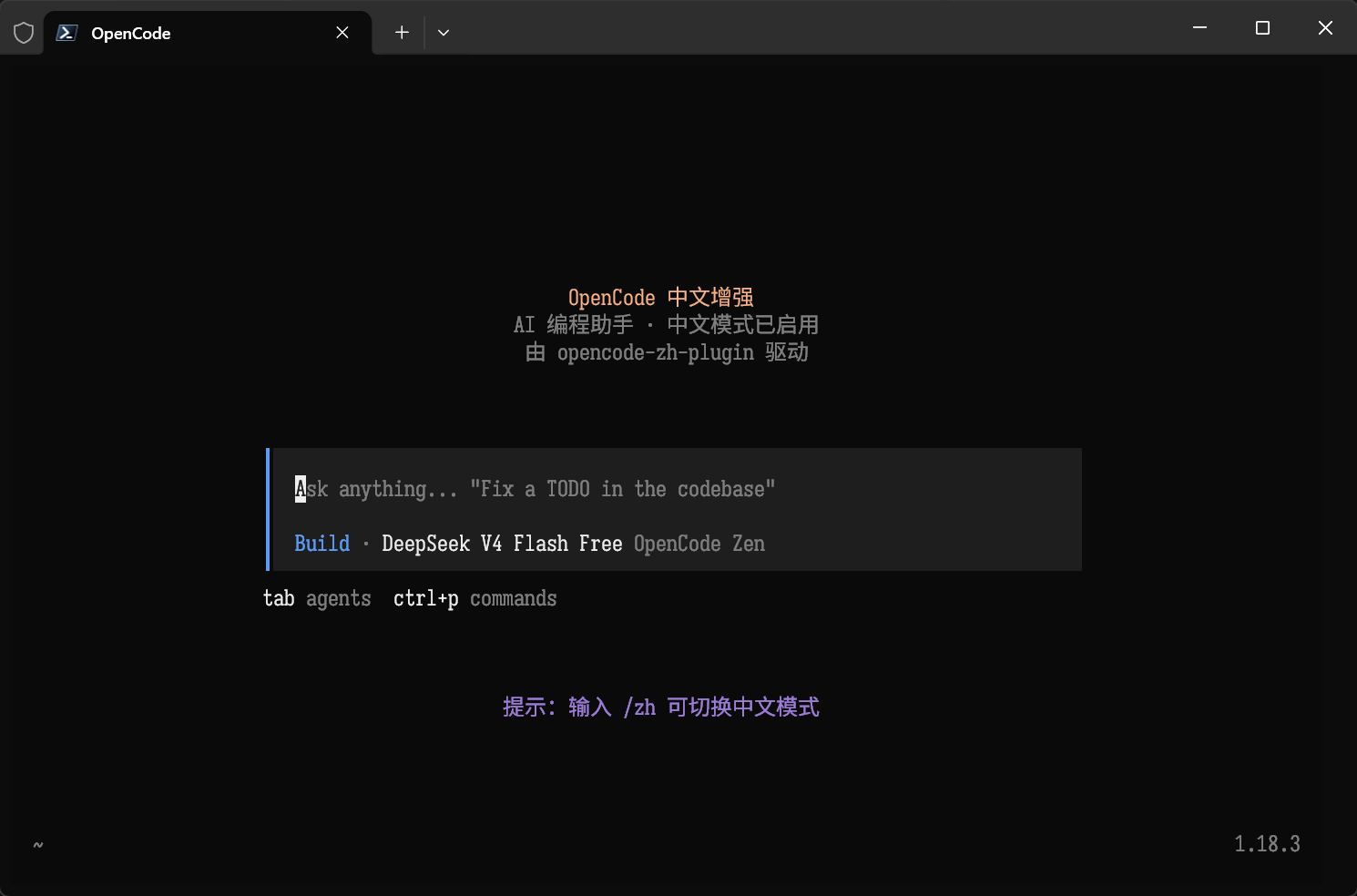
TUI 中文模式
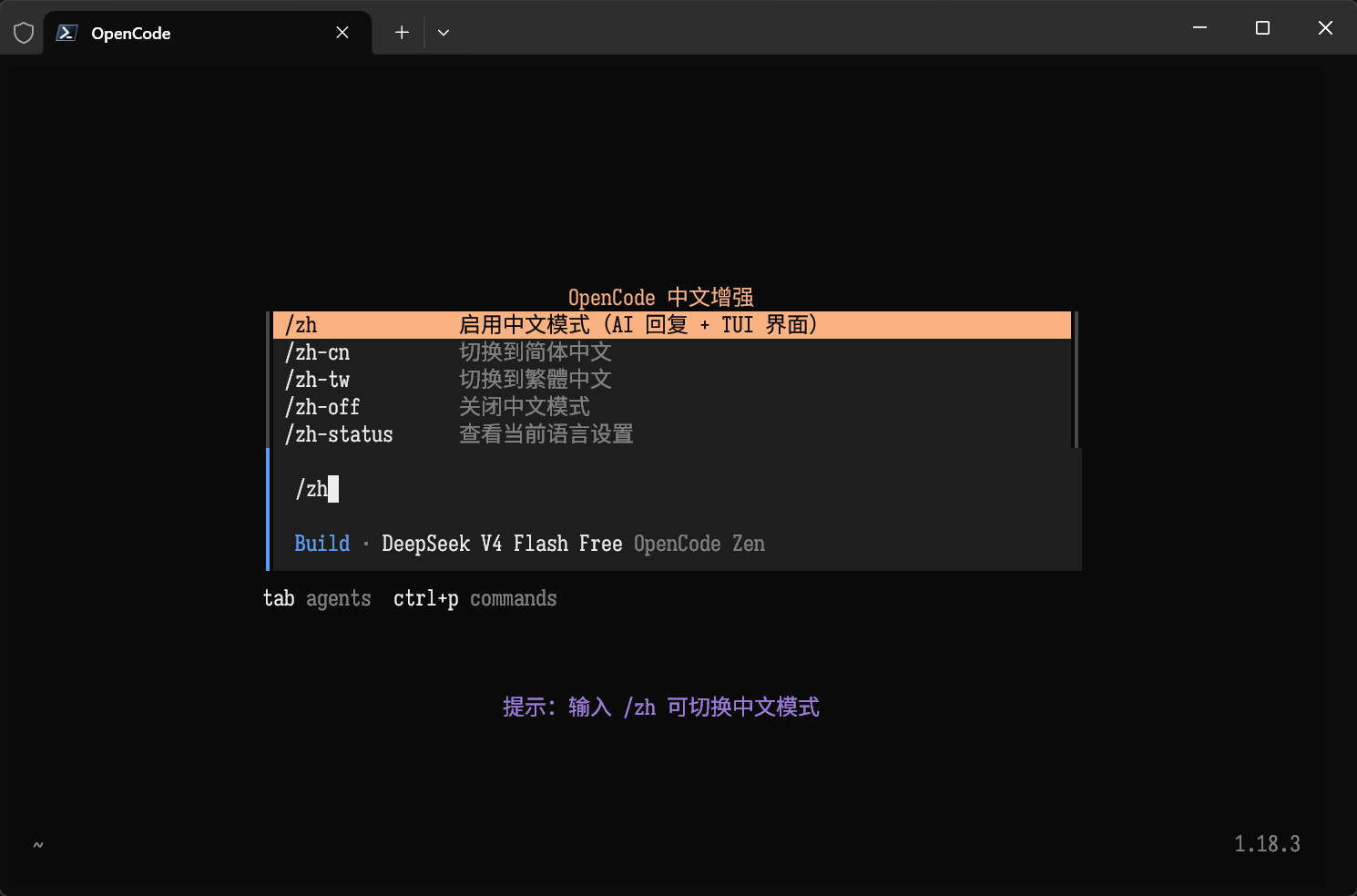
AI 中文推理
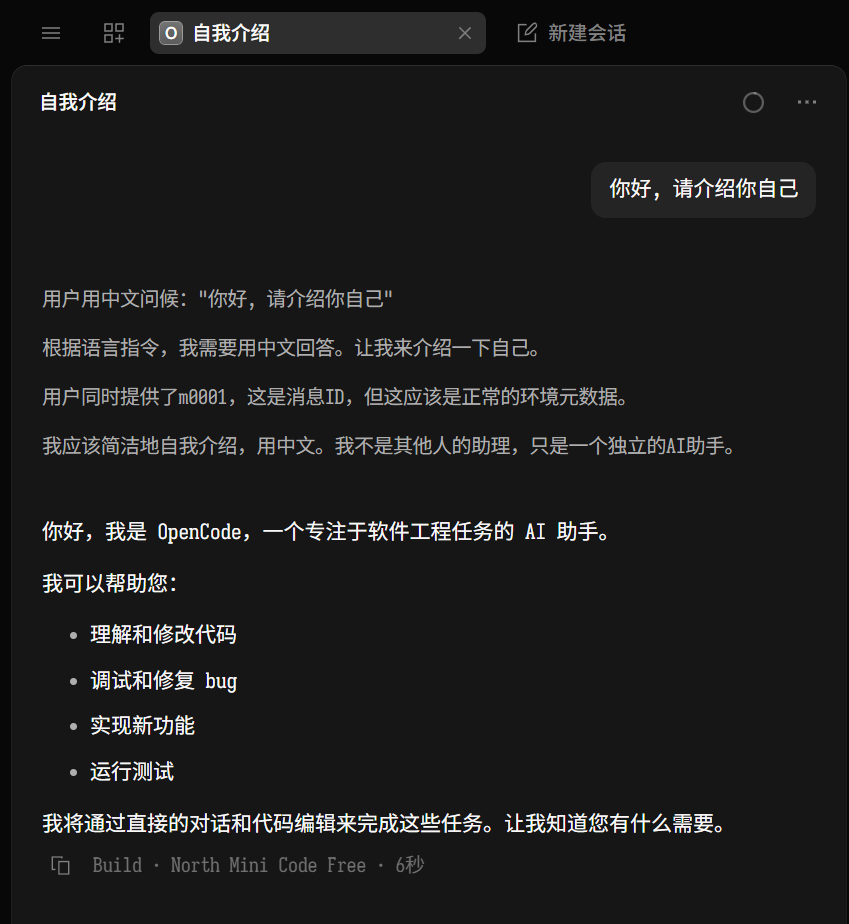
覆盖范围
| 表面 | 覆盖 | 说明 | |---|---|---| | AI 回复语言(含推理过程) | ✅ | system.transform 注入中文指令 | | TUI 插槽区域 | ✅ | home_logo / home_footer / home_bottom / sidebar_title | | TUI slash 命令 | ✅ | /zh 系列命令 | | TUI 硬编码字符串 | ❌ | 需上游 PR(#37434 被标 Not planned) | | Desktop (Electron) UI | ⚠️ | 配合 opencode-zh-desktop 使用 | | 文档站点 | ❌ | 需 fork 或上游 PR |
环境要求
| 项目 | 要求 |
|---|---|
| OpenCode | >= 1.18.0 |
| Node.js | >= 18.0.0(推荐 >= 20.0.0) |
注意:本插件依赖 OpenCode 1.18.0 引入的
experimental.chat.system.transformhook,低版本无法生效。
组合覆盖(配合 opencode-zh-desktop)
| 层面 | opencode-zh-plugin | opencode-zh-desktop | |---|---|---| | AI 回复 + 推理过程 | ✅ | — | | TUI 插槽 + 斜杠命令 | ✅ | — | | Desktop 菜单栏 | — | ✅ | | Desktop 子菜单 | — | ✅ | | Desktop 设置/对话框 | — | ✅ | | TUI/CLI 硬编码字符串 | ❌ | ❌ | | 系统对话框 | ❌ | ❌ |
安装
方式一:opencode plugin add(推荐)
opencode plugin add opencode-zh-plugin方式二:手动配置 opencode.json
在 ~/.config/opencode/opencode.json(全局)或项目目录 opencode.json 中添加:
{
  "plugin": [
    [
      "opencode-zh-plugin",
      {
        "enabled": true,
        "locale": "zh-CN",
        "systemPrompt": true,
        "tuiSlots": true,
        "commands": true
      }
    ]
  ]
}
方式三:从源码安装(本地开发)
git clone https://github.com/mike652638/opencode-zh-plugin.git
cd opencode-zh-plugin
bun install
在 opencode.json 中使用 file:// 引用:
{
  "plugin": [
    ["file://./opencode-zh-plugin", { "locale": "zh-CN" }]
  ]
}
安装 Skill(可选)
将 skills/chinese-locale/ 目录复制到 ~/.config/opencode/skills/:
cp -r skills/chinese-locale ~/.config/opencode/skills/配置选项
| 选项 | 类型 | 默认值 | 说明 |
|---|---|---|---|
| enabled | boolean | true | 总开关 |
| locale | "zh-CN" | "zh-TW" | "zh-CN" | 中文变体(简体/繁体) |
| systemPrompt | boolean | true | 注入中文回复指令到 system prompt |
| tuiSlots | boolean | true | 替换 TUI 界面插槽为中文 |
| commands | boolean | true | 注册 /zh 系列 slash 命令 |
TUI 命令
| 命令 | 别名 | 说明 |
|---|---|---|
| /zh | /chinese | 启用中文模式 |
| /zh-off | /chinese-off | 关闭中文模式 |
| /zh-cn | /chinese-cn | 切换到简体中文 |
| /zh-tw | /chinese-tw | 切换到繁體中文 |
| /zh-status | /chinese-status | 查看当前语言设置 |
繁體中文
将 locale 设为 "zh-TW" 即可启用繁體中文模式:
{
  "plugin": [
    ["opencode-zh-plugin", { "locale": "zh-TW" }]
  ]
}
局限性
- TUI 硬编码字符串无法覆盖:OpenCode TUI 的原生错误提示、帮助文本等硬编码英文字符串没有字符串级 override 机制,只能通过上游 PR 修复
- Desktop UI 需配套工具:Electron 桌面应用的界面翻译需配合 opencode-zh-desktop 通过 CDP 注入方案实现
- locale 切换需重启:通过
/zh-cn//zh-tw命令切换后,TUI 界面立即更新,但 AI 回复语言的切换需要更新opencode.json并重启 OpenCode - 不修改 OpenCode 源码:本插件完全通过官方 Plugin API 工作,零侵入
项目结构
opencode-zh-plugin/
├── package.json              # npm 包配置(exports["./server"] + exports["./tui"])
├── tsconfig.json             # TypeScript 配置(SolidJS JSX)
├── src/
│   ├── server.ts             # Server plugin 入口
│   ├── tui.tsx               # TUI plugin 入口
│   ├── config.ts             # 插件选项 schema 与默认值
│   ├── locale/
│   │   └── strings.ts        # 中文字符串(简体 + 繁体)
│   ├── server/
│   │   └── system-transform.ts  # system.transform hook 实现
│   └── tui/
│       ├── slots.tsx         # TUI slot 替换组件
│       └── commands.ts       # 中文 slash 命令
├── skills/
│   └── chinese-locale/
│       └── SKILL.md          # Skill 定义
├── examples/
│   └── opencode.json         # 示例配置
└── README.md
技术栈
- Server Plugin:
experimental.chat.system.transformhook — 每次对话时向 system prompt 注入中文指令 - TUI Plugin:
api.slots.register()+api.command.register()— 替换 TUI 插槽 + 注册命令 - TUI 渲染:
@opentui/solidJSX(<box>,<text>内禀元素) - Skill:Markdown 指令文件,agent 按需加载
相关项目
- opencode-zh-desktop — CDP 注入式 Desktop 界面汉化工具
- OpenCode — AI 编程 CLI
- OpenCode Desktop — 桌面应用
许可证
MIT © 2026 mike652638