npm package discovery and stats viewer.

Discover Tips

  • General search

    [free text search, go nuts!]

  • Package details

    pkg:[package-name]

  • User packages

    @[username]

Sponsor

Optimize Toolset

I’ve always been into building performant and accessible sites, but lately I’ve been taking it extremely seriously. So much so that I’ve been building a tool to help me optimize and monitor the sites that I build to make sure that I’m making an attempt to offer the best experience to those who visit them. If you’re into performant, accessible and SEO friendly sites, you might like it too! You can check it out at Optimize Toolset.

About

Hi, 👋, I’m Ryan Hefner  and I built this site for me, and you! The goal of this site was to provide an easy way for me to check the stats on my npm packages, both for prioritizing issues and updates, and to give me a little kick in the pants to keep up on stuff.

As I was building it, I realized that I was actually using the tool to build the tool, and figured I might as well put this out there and hopefully others will find it to be a fast and useful way to search and browse npm packages as I have.

If you’re interested in other things I’m working on, follow me on Twitter or check out the open source projects I’ve been publishing on GitHub.

I am also working on a Twitter bot for this site to tweet the most popular, newest, random packages from npm. Please follow that account now and it will start sending out packages soon–ish.

Open Software & Tools

This site wouldn’t be possible without the immense generosity and tireless efforts from the people who make contributions to the world and share their work via open source initiatives. Thank you 🙏

© 2025 – Pkg Stats / Ryan Hefner

opendal

v0.49.2

Published

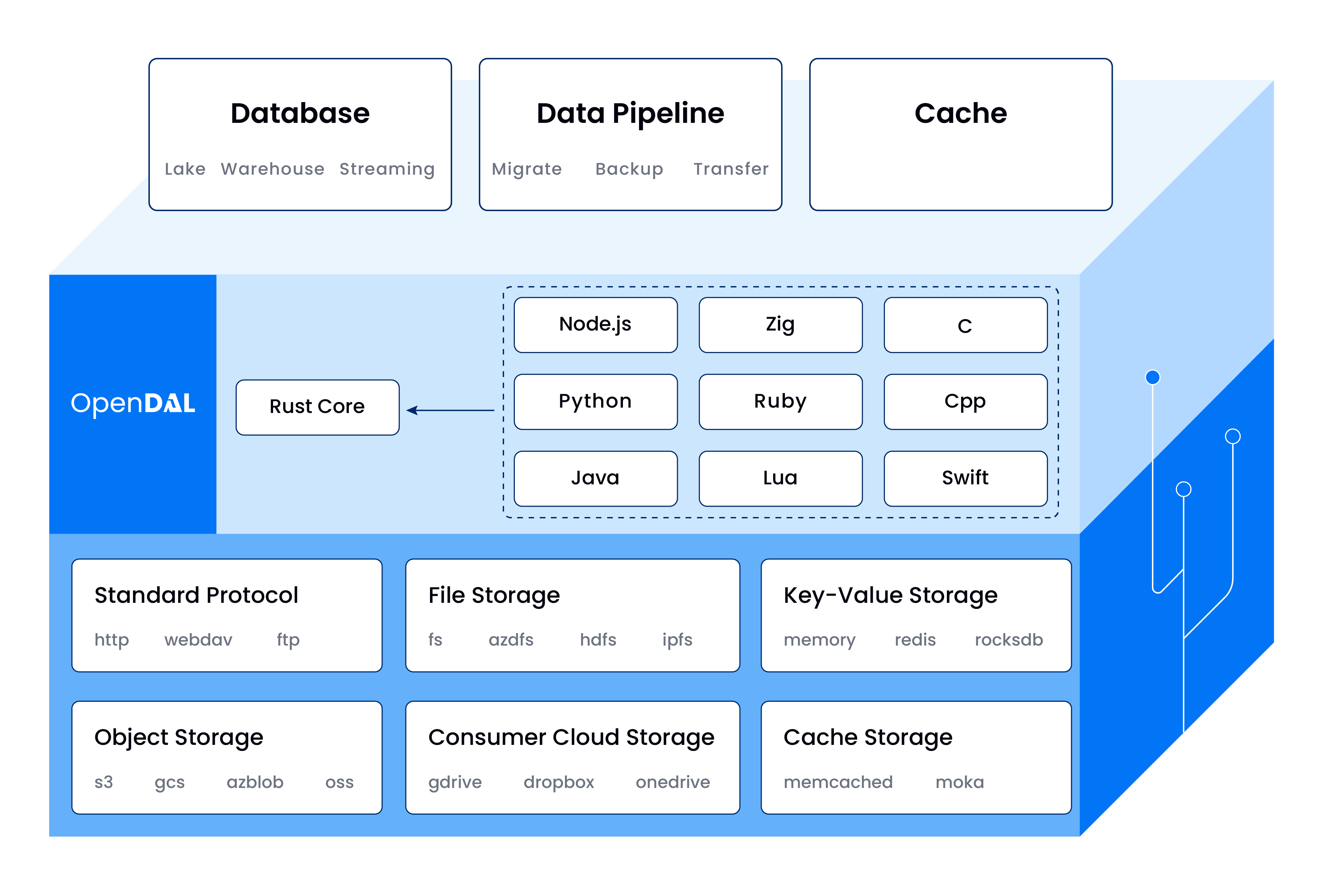
Apache OpenDAL: One Layer, All Storage.

Readme

Apache OpenDAL™ Node.js Binding

npm Website

Note: This binding has its own independent version number, which may differ from the Rust core version. When checking for updates or compatibility, always refer to this binding's version rather than the core version.

Useful Links

Installation

npm install opendal

Docs

To build the docs locally, please run the following commands:

# Only need to run once unless you want to update the docs theme
pnpm run build:theme

# Build the docs
pnpm run docs

Tests

Services behavior tests read necessary configs from env vars or the .env file.

You can copy .env.example to $(pwd)/.env and change the values on need, or directly set env vars with export KEY=VALUE.

Take fs for example, we need to enable bench on fs on /tmp:

OPENDAL_TEST=fs
OPENDAL_FS_ROOT=/tmp

You can run service behavior tests of enabled with the following command:

pnpm build && pnpm test

Usage

import { Operator } from "opendal";

async function main() {
  const op = new Operator("fs", { root: "/tmp" });
  await op.write("test", "Hello, World!");
  const bs = await op.read("test");
  console.log(new TextDecoder().decode(bs));
  const meta = await op.stat("test");
  console.log(`contentLength: ${meta.contentLength}`);
}

main();

Layers

OpenDAL provides layers to add additional functionality to operators. You can chain multiple layers together to build powerful data access pipelines.

Available Layers

  • RetryLayer - Retry failed operations automatically
  • ConcurrentLimitLayer - Limit concurrent requests
  • TimeoutLayer - Add timeout for operations
  • LoggingLayer - Log all operations
  • ThrottleLayer - Limit bandwidth usage

TimeoutLayer

Prevents operations from hanging indefinitely:

import { Operator, TimeoutLayer } from "opendal";

const op = new Operator("fs", { root: "/tmp" });

const timeout = new TimeoutLayer();
timeout.timeout = 10000; // 10 seconds for non-IO operations (ms)
timeout.ioTimeout = 3000; // 3 seconds for IO operations (ms)
op.layer(timeout.build());

Default values: timeout: 60s, ioTimeout: 10s

LoggingLayer

Add structured logging for debugging and monitoring:

import { Operator, LoggingLayer } from "opendal";

const op = new Operator("fs", { root: "/tmp" });

const logging = new LoggingLayer();
op.layer(logging.build());

// All operations will be logged
await op.write("test.txt", "Hello World");

Enable logging output:

# Show debug logs
RUST_LOG=debug node app.js

# Show only OpenDAL logs
RUST_LOG=opendal::services=debug node app.js

ThrottleLayer

Control bandwidth usage with rate limiting:

import { Operator, ThrottleLayer } from "opendal";

const op = new Operator("s3", {
  bucket: "my-bucket",
  region: "us-east-1",
});

// Limit to 10 KiB/s with 10 MiB burst
const throttle = new ThrottleLayer(10 * 1024, 10 * 1024 * 1024);
op.layer(throttle.build());

Parameters:

  • bandwidth: Maximum bytes per second
  • burst: Maximum burst size (must be larger than any operation size)

RetryLayer

Automatically retry temporary failed operations:

import { Operator, RetryLayer } from "opendal";

const op = new Operator("s3", {
  bucket: "my-bucket",
  region: "us-east-1",
});

const retry = new RetryLayer();
retry.maxTimes = 3;
retry.jitter = true;
op.layer(retry.build());

ConcurrentLimitLayer

Limit concurrent requests to storage services:

import { Operator, ConcurrentLimitLayer } from "opendal";

const op = new Operator("s3", {
  bucket: "my-bucket",
  region: "us-east-1",
});

// Allow max 1024 concurrent operations
const limit = new ConcurrentLimitLayer(1024);
limit.httpPermits = 512; // Limit HTTP requests separately
op.layer(limit.build());

Combining Multiple Layers

Stack multiple layers for comprehensive control:

import {
  Operator,
  LoggingLayer,
  TimeoutLayer,
  RetryLayer,
  ThrottleLayer,
} from "opendal";

const op = new Operator("s3", {
  bucket: "my-bucket",
  region: "us-east-1",
});

// Layer 1: Logging for observability
const logging = new LoggingLayer();
op.layer(logging.build());

// Layer 2: Timeout protection
const timeout = new TimeoutLayer();
timeout.timeout = 30000;
timeout.ioTimeout = 10000;
op.layer(timeout.build());

// Layer 3: Retry on failures
const retry = new RetryLayer();
retry.maxTimes = 3;
retry.jitter = true;
op.layer(retry.build());

// Layer 4: Bandwidth throttling
const throttle = new ThrottleLayer(100 * 1024, 10 * 1024 * 1024);
op.layer(throttle.build());

// Now the operator has full production-ready protection
await op.write("data.json", JSON.stringify(data));

Usage with Next.js

Config automatically be bundled by Next.js.

/** @type {import('next').NextConfig} */
const nextConfig = {
  serverExternalPackages: ["opendal"],
};

module.exports = nextConfig;

Contributing

License and Trademarks

Licensed under the Apache License, Version 2.0: http://www.apache.org/licenses/LICENSE-2.0

Apache OpenDAL, OpenDAL, and Apache are either registered trademarks or trademarks of the Apache Software Foundation.