
openqodex
v0.15.0
Published
Code review before you push, in Claude Code, Codex, Cursor and Cline. Scanners check your change and keep the findings on the lines you changed. Then a separate Claude Code or Codex reviewer answers every scanner finding. You or your agent can add a compa

Maintainers
 iammsiddhant
Readme
OpenQodex




Open source AI code review for coding agents. A separate reviewer checks every change your agent writes before you push. A code graph gives your agent a map of your codebase. Works in Claude Code, Codex, Cursor and Cline.
For people, in your terminal:
npx openqodex initAfter the install, say to your agent: "review my change with openqodex".
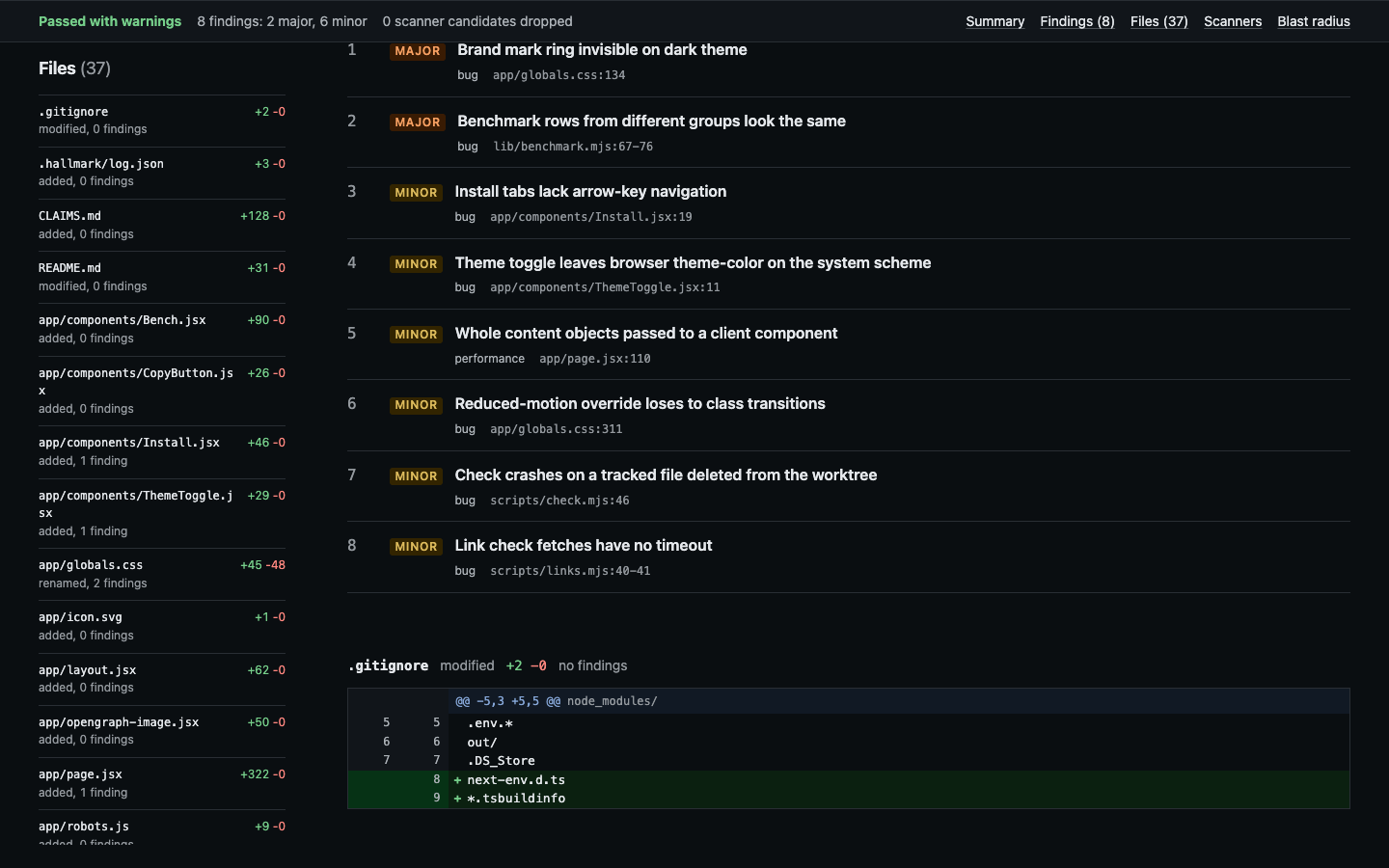
The report page of an OpenQodex review at its findings, captured 2026-10-25 with openqodex 0.14.0 and reviewer claude 2.1.310, on the openqodex/openqodex-lp repository.
The landing page: https://openqodex.com
AI agents: read the agent guide. After the install, ~/.openqodex/bin/openqodex guide for-agents prints the guide for the installed version.
OpenQodex reviews your code change before you push it. Your change is the commits you have not pushed plus everything uncommitted. OpenQodex runs on your machine, from your coding agent or your terminal.
First, OpenQodex runs the scanners that fit the files you changed. A scanner is a program that checks code without a model, such as gitleaks or semgrep. A finding is one problem at one place in the code, with a severity. OpenQodex keeps the scanner findings on the lines you changed. It drops findings in test fixtures and in rules you switched off. Every supported lockfile in the repository is checked against osv.dev at every review and scan of a change. Advisories outside the changed lines are shown, never counted, and kept out of the reviewer's brief. Each advisory names its fixed versions, or says no fixed version is published.
Then OpenQodex starts reviewers: separate Claude Code or Codex processes on your own login. By default, the agent that wrote the code does not review it. Finder sessions read each part of the change, with the code that calls it, and propose candidates with a quoted line as evidence. A script checks every quote against the code. Verifier sessions then judge each candidate and each scanner finding against the code, and must confirm or refute every one with a reason. Scripts check that every scanner finding was answered and that every changed line was given to a reviewer. Style and naming notes are shown as observations and do not block. Then you choose which findings your agent fixes.
Where it runs
| Coding agent | Starts a review | Can be the reviewer | Push gate | |---|---|---|---| | Claude Code | yes | yes | yes | | Codex CLI | yes | yes | yes, after you trust the hook in Codex | | Cursor | yes | no | no, a rule asks Cursor to review | | Cline | yes | no | no, a rule asks Cline to review |
In Cursor and Cline, the review needs Claude Code or Codex installed as the reviewer. A push gate is a hook that looks for a review before your agent runs git push.
Requirements
- Node 22 or newer, and git.
- macOS or Linux. CI runs the gate on Node 22, on macOS and on Ubuntu Linux. No test runs on Windows or WSL.
- For a full review: Claude Code or Codex, installed and logged in. OpenQodex needs no account or API key of its own.
- Some scanners need a language runtime that OpenQodex does not install. brakeman and rubocop need Ruby. golangci-lint needs Go. cargo-deny needs Cargo.
Install
In a terminal, init finds Claude Code, Cursor, Codex CLI and Cline on your machine. It lists the files it will write. It asks you once. It starts the scanner downloads that your repository needs. Then it reviews your current change when a reviewer can start.
In your own terminal, run ~/.openqodex/bin/openqodex review. That path is the launcher, a small script that init writes. An npx install puts no openqodex on your PATH.
For agents, the same install with no question:
npx -y [email protected] init --yes --agent <host><host> is claude-code, codex, cursor or cline. In its default sandbox mode, Codex gives commands no network. From Codex, run this line in your own terminal. The quickstart has a prompt to paste into your agent.
To install only the skill, run npx skills add openqodex/openqodex -g. That installs no push gate and downloads no scanner. A later init replaces that skill with the skill that init installs.
OpenQodex itself collects no usage data. The built-in scanners, as OpenQodex runs them, send no code. The reviewer sends your change to the model service of your Claude Code or Codex login. The privacy page lists each network use of this version.
What it does today
openqodex reviewreviews your change in one command.- It writes
report.html,report.md,report.jsonandreport.sarif. SARIF is a standard JSON format for scanner results. - At the end, it prints a receipt. The receipt holds the verdict, one line per finding and the path of
report.html. Here is an example report. - The skill tells your agent to show you the receipt. It tells the agent to ask "Fix all, or tell me which?". It tells the agent to fix only the findings you name.
review --allreviews every file of the repository, less the paths thatreview.paths.excludeleaves out.review <branch>reviews a branch.review '#42'reviews a pull request.- A review is complete only when every stage ran. Otherwise,
reviewprints "Review incomplete" with what is missing. Then it exits 2. - The push gate inside your agent looks for a review of your current work. It does not know what a push sends. For a plain
git push, it asks whether your current work has a passing review. For any other push command, it says it cannot tell. The git pre-push hook thatinitadds checks the exact commits a push sends, for eachgit pushthat runs git hooks.git push --no-verifyskips that hook. - Both warn by default. They block only when
.openqodex/config.yamlsetsreview.block_on_severity. Severities run fromcriticalthroughmajor,minorandnitpicktoinfo. A finding at or above the set severity blocks the push. - The GitHub Action runs the full review on a pull request when the workflow gives it an Anthropic API key. Without a key, it runs the scanners only. The pre-commit hook also runs the scanners only.
openqodex graphanswers questions about the code, such as who calls a function. An MCP server is a local tool server that your agent starts.initgives your agent the graph questions through an MCP server. For the Cline VS Code extension,initprints the entry for you to add.--offlineskips semgrep, osv-scanner, kubeconform and cargo-deny, the built-in scanners that use the network. It also stops scanner downloads. The reviewer still sends your change to its model service. An approved custom scanner still runs its own command.npx openqodex demobuilds a small repository with planted bugs. Then it scans that repository.
What it does not do yet
- No reviewer other than Claude Code or Codex. Cursor cannot be the reviewer.
cursor-agent2025.09.18 offered no way to limit it to reading. - Without a reviewer,
reviewprints "Full review unavailable" and exits 2. It saves the scanner findings, unchecked, tounchecked-candidates.json. It also names a fallback command,review --agent. In that fallback, your coding agent reviews its own change. - Inside the Codex sandbox, a second Codex process does not start. So Codex cannot be the reviewer there. OpenQodex tested this with codex-cli 0.160.0 on macOS.
- No review on your own API key, except in the GitHub Action.
- No Homebrew formula, no install script and no Docker image in this version. Install through npm.
- No offline copy of the vulnerability databases. osv-scanner checks every lockfile at every review and scan of a change, through osv.dev. cargo-deny downloads the RustSec advisory database.
- No review finds every problem. The report names each stage that did not run.
Benchmark
| Reviewer | Model | Cases | Issue recall | Precision | Clean rate | Cost per review | | --- | --- | --- | --- | --- | --- | --- | | Claude Code (claude-graph-on) | claude-opus-5-5 | Planted bugs, dev split | 129/153 (84.3%) | 142/146 (97.3%) to 146/146 (100.0%) | 6/6 (100.0%) | $0.0870 | | Codex (codex-graph-on) | gpt-6.1-sol | Planted bugs, dev split | 115/153 (75.2%) | 125/146 (85.6%) to 146/146 (100.0%) | 6/6 (100.0%) | not measured | | Scanner only (scan) | no model | Planted bugs, dev split | 32/51 (62.7%) | 35/45 (77.8%) to 40/45 (88.9%) | 1/2 (50.0%) | not measured | | Scanner only (scan) | no model | Planted bugs, dev split | 32/51 (62.7%) | 35/40 (87.5%) to 40/40 (100.0%) | 2/2 (100.0%) | not measured |
AACR-Bench is a set of real pull requests. Its own evaluator gives the board numbers below.
| Reviewer | Model | Cases | Issue recall | Semantic precision | Semantic recall | Semantic F1 | Noise rate | Line precision | Line recall | Cost per review | | --- | --- | --- | --- | --- | --- | --- | --- | --- | --- | --- | | Library (model-gpt-6.1-sol-graph-on) | gpt-6.1-sol | AACR-Bench, dev split, dev-laptop subset | not yet ruled | 22.8% | 5.2% | 8.5% | 77.2% | 49.4% | 11.3% | $0.0839 |
Full results and how to read them
Built-in scanners
OpenQodex has 22 built-in scanners. Most scanners run when your change holds a file they read. osv-scanner checks every supported lockfile in the repository at every review and scan of a change. Some scanners also read the project or folder around a changed file. Each scanner that needs a download gets it on first use. OpenQodex pins each download to one version.
| What it checks | Built-in scanners | |---|---| | Secrets in code | 1 | | Security problems in code | 3 | | Dependencies with known vulnerabilities | 2 | | Lint | 5 | | GitHub Actions workflows | 2 | | Dockerfiles, Terraform, Kubernetes and CloudFormation | 6 | | SQL and database migrations | 3 |
The scanner list gives each scanner, its version, the files it reads and what it does not check.
Add a scanner from GitHub
You or your agent can configure a compatible scanner from GitHub. Then you approve it before it runs.
Add the scanner to
.openqodex/config.yamlin your repository:scanners: custom: - source: https://github.com/Bearer/bearer run: bearer scan {target} --format sarif --output {report} --quiet --disable-version-check target: repoRun
npx openqodex trust. It downloads the release asset into a quarantine folder. Then it shows what will run and asks yes or no.Run
npx openqodex scan --only custom:bearerto see it work. The next review includes it.
To use your agent, say: "add https://github.com/Bearer/bearer to OpenQodex as a custom scanner". The agent writes the entry. The skill tells it never to run openqodex trust without asking you first.
A compatible scanner meets these limits:
- It writes SARIF, or one JSON document that a
mapblock in the configuration turns into findings. - It installs from a release asset for your system, an exact npm or PyPI version, or your
PATH. - OpenQodex runs it only when
~/.openqodex/trust.jsonon that machine holds your approval of that exact entry. A fresh GitHub-hosted runner holds none, so the GitHub Action skips it there.
Bearer CLI is under the Elastic License 2.0, which is not an open source licence. The custom scanner guide explains every key.
Packages
| Package | What it is |
|---|---|
| openqodex | The CLI as one bundled file, with the skill, the agent templates, the docs and the demo beside it. |
The CLI has no runtime dependencies. You can also import openqodex as a Node library. The build bundles the workspace packages under packages/ into it. This repository does not publish them to npm.
Documentation
The docs ship inside the package. npx openqodex guide <topic> prints one page in your terminal.
- Quickstart
- Agent guide
- Commands
- Configuration
- What init writes for each agent
- GitHub Action
- Security
- All pages
Made by Qodex

Qodex makes OpenQodex. Qodex also runs a hosted review service for pull requests.
Telemetry
OpenQodex sends no telemetry. OpenQodex starts semgrep with its metrics switched off. The telemetry page says more.
Security
Report a vulnerability through GitHub's private vulnerability reporting, as the security policy says. Never open a public issue for one.
Status
OpenQodex is on the way to 1.0. Commands, flags and the configuration file can change between minor releases. The changelog lists the changes in each release.
Licensed under Apache 2.0. The NOTICE file gives the scanners' licences.