
openssh
v1.1.0
Published
Simple Remote terminal connection
Downloads
2,065

Maintainers
 kubilaytr
Readme
🔐 Openssh
📥 Installation
npm i -g openssh📦 (Global installation)npm i openssh📦 (Local installation)yarn add openssh🧶
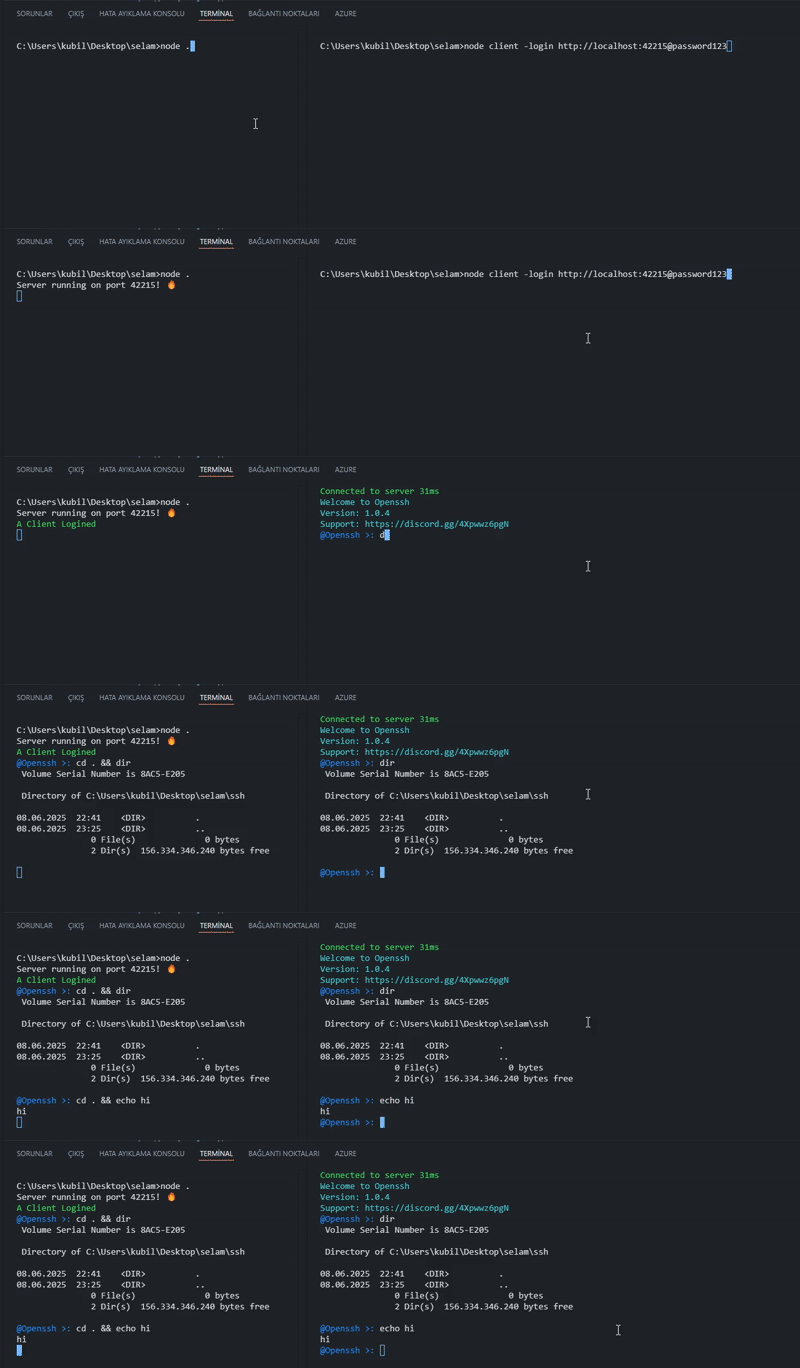
⚡ Features
- Simple remote terminal connection
- Password protection
- Easy to implement
- Works with Express
- Global CLI commands
🚀 Global CLI Usage (Recommended)
Installation:
npm i -g opensshStart server:
# Interactive mode
openssh serve

# Direct mode
openssh serve 90@mypassword
Client connection:
# CD protected (default)
openssh localhost:42215@password123

# CD unprotected
openssh localhost:42215@password123 -dusecd
🚀 Programmatic Usage
Step 1: Install the required packages
npm i express opensshStep 2: Create and configure your server
const express = require('express')
const app = express()
const server = app.listen(42215)

require('openssh')(server, {
  "password": "password123", // Change this to something secure
  "console": false // Set to true to disable console.log messages
})

console.log("Server running on port 42215! 🔥")👨💻 Manual Client Setup (Legacy method)
Client Setup:
First, install these packages
npm i [email protected] [email protected] [email protected] [email protected]Then run this file to connect to your server
var settings = {}
var cdp = "."

if(process.argv[2] == "-login" && process.argv[3].split("@").length == 2){
  settings.password = process.argv[3].split("@")[1]
  settings.url = process.argv[3].split("@")[0]
  settings.usecd = true
  if(process.argv[4] == "-dusecd") settings.usecd = false
start()
} else {
var readline = require('readline')
const c = require('ansi-colors')
const rl = readline.createInterface({input: process.stdin,output: process.stdout})
rl.question(c.blue('URL: '), (username) => {
    rl.question(c.blue('Password: '), (password) => {
        settings = {
            url: username,
            password: password,
            usecd: true
        }
        console.log("\n")
        rl.close()
        start()
    })
})
}


function start(){
    const c = require('ansi-colors')
  latinize = require('latinize')
  readline = require('readline')
  var io = require('socket.io-client')(settings.url)
  console.log(c.yellow('Connecting to server...'))
  io.emit("openssh",{password:settings.password,type:2,date:Date.now()});
  const rl = readline.createInterface({input: process.stdin,output: process.stdout})
  prefix = c.blue('@Openssh >: ');
  rl.setPrompt(prefix, prefix.length);

  rl.on('line', function(line) {
    if(settings.usecd && line.split("cd ").length >= 2) {
      cdp = (line.split("cd ")[line.split("cd ").length-1]).split(" ")[0]
    }
    if(line.trim() === "exit" || line.trim() === "exit 0") {process.exit(0);}
    else if(line.trim() === "reload" || line.trim() === "reset") {
      console.clear()
      return io.emit("openssh",{password:settings.password,type:2,date:Date.now()});
    } else if(line.trim() === "clear" || line.trim() === "cls") {
      console.clear()
     return rl.prompt();
    }else {
    io.emit("openssh",{console:(settings.usecd ? "cd "+cdp+" && ": "")+latinize(line.trim()),password:settings.password,type:0});}
  })

  rl.on('SIGINT', () => io.emit("openssh",{password:settings.password,type:4}));
  process.stdin.on("keypress", function (event,k) {
  io.emit("openssh",{console:latinize(k).sequence,password:settings.password,type:1});
  })
  io.on('opensshclient', function(msg){
   if(msg.console && typeof msg.console === "string" && msg.console.split("Welcome to Openssh").length == 2) console.clear()
   if(msg.type === 0) {
    console.log(msg.console)
    rl.prompt();
   }
   if(msg.type === 4){
    if(msg.console == 1) console.log("\n"+c.yellow("If you want to close the program, type exit!"))
    rl.prompt();
   }
   if(msg.type === 1) console.log(latinize(msg.console))
   if(msg.type === 2) console.log(c.red(latinize(msg.console)))
   if(msg.type === 3) {
   if(msg.console != 0) console.log(c.red("Process exited ("+msg.console+")"))
   rl.prompt();
   }
  })
}

  /*////Manuel \\\\
  io.on('opensshclient', function(msg){
   if(msg.type === 1) console.log(latinize(msg.console))
   if(msg.type === 2) console.log(c.red(latinize(msg.console)))
   if(msg.type === 3 && msg.console != 0) console.log(c.red("Process exited ("+msg.console+")"))
  })
  io.emit("openssh",{password:settings.password,type:2,date:Date.now()});
  io.emit("openssh",{console:latinize("echo Hello World"),password:settings.password,type:0});
  */
Openssh
npm i openssh