
openteams
v0.3.1
Published
OpenTeams - Team structure definition and template toolkit for multi-agent systems

Maintainers
 alexngai
Readme
openteams


A definition layer for multi-agent team structures. Define roles, topology, communication channels, and prompts in YAML — agent systems (Claude Code, Gemini, Codex, etc.) consume the structure and map it to their own runtime primitives.
Table of Contents
- What It Does
- Quick Start
- Architecture
- Template System
- Loadouts
- Communication Topology
- Distribution
- CLI Command Reference
- Library Usage
- Examples
- Visual Editor
- Contributing
- License
What It Does
OpenTeams is not a runtime coordination system. It does not manage state, spawn agents, or track tasks. Instead, it provides:
- YAML team templates. Declare roles, topology, spawn rules, communication channels, and enforcement in a
team.yamldirectory. One format, any agent system. - Role inheritance. Roles extend other roles with capability composition (
add/remove). Multi-level chains resolved at load time with cycle detection. - Loadouts. Reusable bundles of skills, capabilities, MCP servers, permissions, and prompt material that bind to roles (by slug or inline). Support single inheritance with canonical merge rules.
- Communication topology. Typed signal channels with role subscriptions, emission permissions, peer routing, and enforcement modes — all as structural metadata.
- Prompt loading. Single-file or multi-file prompts per role, loaded and resolved alongside the template.
- Generators. Produce SKILL.md files, role catalogs, agent prompts, and deployable packages from a template directory.
- Template installation. Clone and install templates from git repositories. Teams can live as a dedicated repo, multiple templates in one repo, or embedded in an existing project under
.openteams/. - Content-addressed bundles. Bundle a template or loadout into a deterministic JSON envelope keyed by content hash, ready to publish to a Multi-Agent Protocol (MAP) hub for runtime distribution. Same input always produces the same hash, so consumers can cache and verify integrity without trusting the publisher.
- Visual editor. Interactive browser-based UI for editing team configurations.
Agent systems read the resolved template and implement runtime behavior (task management, messaging, agent spawning, enforcement) using their own primitives.
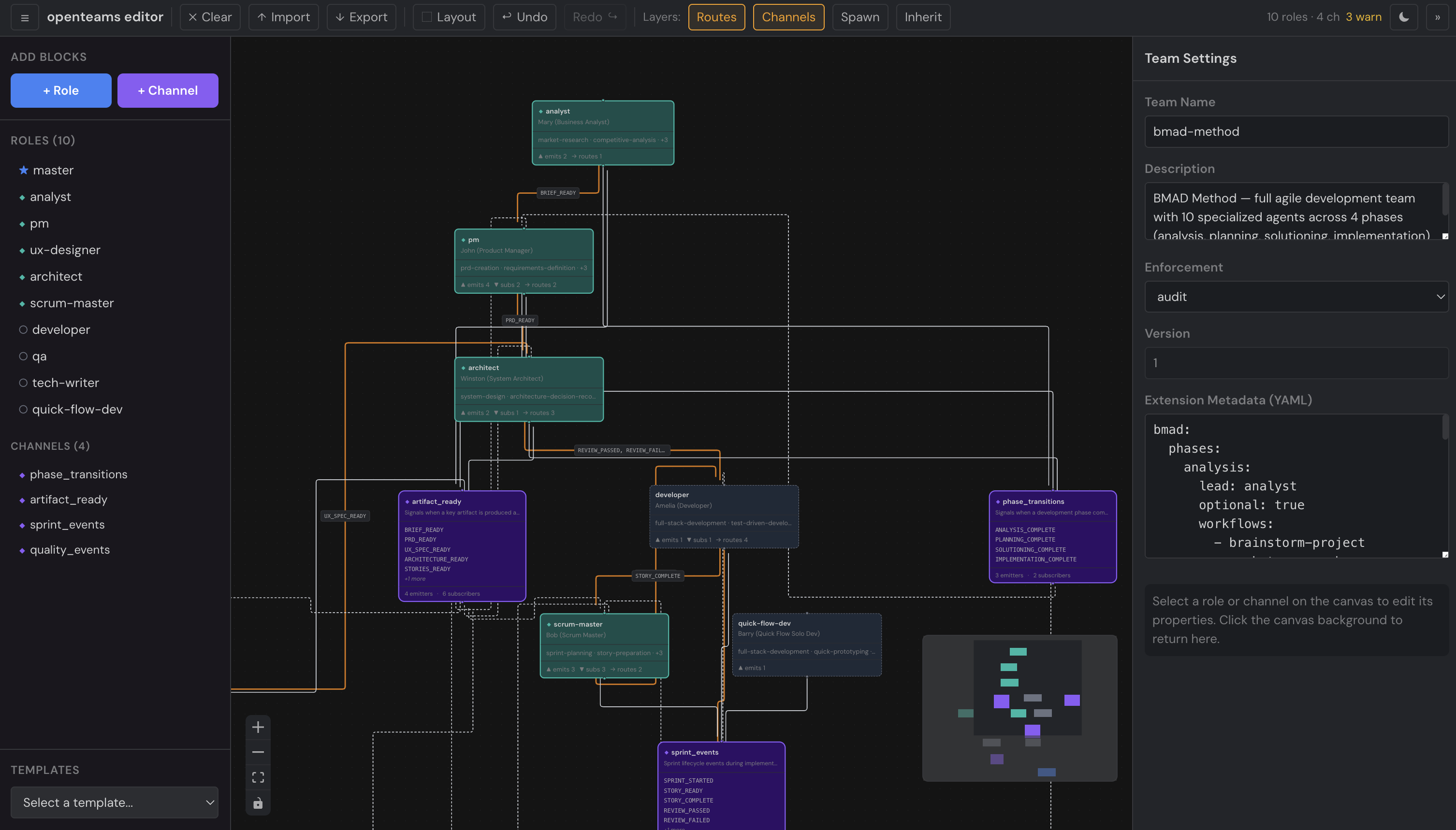
NEW! openteams frontend-only config editor
Quick Start
Prerequisites: Node.js >= 18
npm install -g openteamsValidate a template
openteams template validate ./examples/gsdTemplate "gsd" is valid.
Version: 1
Roles: orchestrator, roadmapper, planner, plan-checker, executor, verifier ...
Root: orchestrator
Channels: project_lifecycle, planning_events, execution_events, verification_eventsGenerate artifacts
# Generate SKILL.md + agent prompt files
openteams generate all ./examples/gsd -o ./output/gsd
Generated ./output/gsd/SKILL.md
orchestrator -> ./output/gsd/agents/orchestrator.md
planner -> ./output/gsd/agents/planner.md
...
Generated SKILL.md + 12 agent prompt(s) for team "gsd"Install a template from git
openteams template install owner/repoBundle a template for distribution
# Bundle the team as a content-addressed MAP resource
openteams bundle team ./examples/gsd -o gsd.bundle.json

# Bundle a single loadout
openteams bundle loadout ./examples/gsd executor -o executor.bundle.json

# Recompute the hash and verify the bundle is intact
openteams bundle verify ./gsd.bundle.json
OK x-openteams/team sha256:c1de81e800d2a63d…The bundle JSON is the same on any machine for the same template (NFC Unicode normalization + canonical JSON), so it's safe to cache by hash and ship across machines or CI pipelines.
Architecture
src/
  cli.ts                 # Entry point: template, generate, loadout, bundle, editor commands
  index.ts               # Public API exports
  cli/                   # CLI command definitions
  template/
    loader.ts            # TemplateLoader — YAML parsing, role inheritance, prompt loading
    types.ts             # All type definitions
    install-service.ts   # Git-based template installation
  generators/
    skill-generator.ts          # generateSkillMd(), generateCatalog()
    agent-prompt-generator.ts   # generateAgentPrompts(), generateRoleSkillMd()
    package-generator.ts        # generatePackage()
    loadout-generator.ts        # generateLoadoutArtifacts(), findMissingMcpReferences()
  runtime/                      # Coordinator-side state observation
    team-state.ts               # TeamState — applies MAP-aligned events, snapshots
  sync/                         # MAP Resource Protocol bundling and integration
    bundle.ts                   # bundleLoadout / bundleTeam / hydrateLoadout / hydrateBundle
    handlers.ts                 # Kind handler factories + composeResourceHandlers
    store.ts                    # InMemoryBundleStore (reference impl of BundleStore)
    client.ts                   # createOpenTeamsClient — typed wrapper over a MAP client
    spawn.ts                    # Spawn dispatch encode/decode for MAP task meta
    validate.ts                 # validateLoadoutBundle / validateTeamBundle
    uri.ts                      # parseRef / formatRef / loadoutRef / teamRef
schema/
  team.schema.json              # JSON Schema for team.yaml
  role.schema.json              # JSON Schema for role YAML
  loadout.schema.json           # JSON Schema for loadouts/<name>.yaml
examples/
  gsd/                          # 12-role team with wave-based execution
  bmad-method/                  # 10-role agile development team
  loadout-demo/                 # Three-role team exercising loadout binding styles
  sync-walkthrough/             # Runnable end-to-end sync demo (bundle → JSON → hydrate)
  ...                           # Additional templates: bug-fix-pipeline, security-audit, etc.
docs/
  team-map-sync-design.md       # Sync layer design
  map-integration.md            # Hub wiring + optional SDK improvements
  federated-teams-design.md     # Federation exploration (separate track)
No database. No runtime state in the template/generator layer. Templates are the source of truth; the sync layer adds content-addressed distribution on top, and the runtime layer is a thin observer over MAP-aligned events.
Template System
A template is a directory that declares a team structure in YAML.
Directory Structure
templates/my-team/
├── team.yaml              # Manifest: topology, communication, role list
├── roles/
│   ├── planner.yaml       # Role definition with capabilities
│   └── executor.yaml      # Role with optional loadout binding
├── loadouts/              # Reusable skill/capability/MCP/permission bundles
│   ├── code-reviewer.yaml
│   └── security-auditor.yaml  # Can extend other loadouts
├── prompts/
│   ├── planner.md         # Single-file prompt (simple roles)
│   └── executor/          # Multi-file prompt directory (complex roles)
│       ├── SOUL.md        # Personality, values, communication style
│       ├── ROLE.md        # Operational instructions (primary)
│       └── RULES.md       # Constraints (optional)
└── tools/
    └── mcp-servers.json   # MCP server config per role (legacy; prefer loadouts)
Minimal team.yaml
name: my-team
version: 1
roles: [coordinator, worker]

topology:
  root:
    role: coordinator
  spawn_rules:
    coordinator: [worker]
    worker: []
Full team.yaml with communication
name: self-driving
description: "Autonomous codebase development"
version: 1
roles: [planner, grinder, judge]

topology:
  root:
    role: planner
    prompt: prompts/planner.md
    config: { model: sonnet }
  companions:
    - role: judge
      prompt: prompts/judge.md
  spawn_rules:
    planner: [grinder, planner]
    judge: []
    grinder: []

communication:
  enforcement: audit
  channels:
    task_updates:
      description: "Task lifecycle events"
      signals: [TASK_CREATED, TASK_COMPLETED, TASK_FAILED]
    work_coordination:
      signals: [WORK_ASSIGNED, WORKER_DONE]
  subscriptions:
    planner:
      - channel: task_updates
      - channel: work_coordination
        signals: [WORKER_DONE]
    judge:
      - channel: task_updates
        signals: [TASK_FAILED]
    grinder:
      - channel: work_coordination
        signals: [WORK_ASSIGNED]
  emissions:
    planner: [TASK_CREATED, WORK_ASSIGNED]
    grinder: [WORKER_DONE]
  routing:
    peers:
      - from: judge
        to: planner
        via: direct
        signals: [FIXUP_CREATED]

# Extension fields: stored but not interpreted by openteams
macro_agent:
  task_assignment: { mode: pull }
Role Definitions
Roles live in roles/<name>.yaml and support single inheritance via extends:
# roles/senior-dev.yaml
name: senior-dev
capabilities: [code, review, deploy]

# roles/junior-dev.yaml
name: junior-dev
extends: senior-dev
capabilities:
  add: [debug]
  remove: [deploy]
# Resolved capabilities: [code, review, debug]
Multi-level chains (A extends B extends C) are resolved in topological order. Circular inheritance is detected and rejected at load time.
Loadouts
A loadout is a reusable bundle of everything an agent needs to do its job beyond its identity: skills, capabilities, MCP servers, permissions, and prompt material. Loadouts are decoupled from roles — one loadout can equip multiple roles, across multiple teams — and they support single inheritance, so you can compose a security-auditor on top of a generic code-reviewer without repeating yourself.
Loadouts are a definition-layer concept. OpenTeams stores, resolves, and attaches them; the consuming agent system (Claude Code, Gemini, Codex, etc.) materializes each loadout into its own runtime artifacts (.mcp.json, settings, skill bundles).
Anatomy of a loadout
# loadouts/security-auditor.yaml
name: security-auditor
extends: code-reviewer           # optional — inherit from another loadout

skills:
  profile: security-engineer     # named profile for a skill system
  include: [owasp-top-10]        # explicit skill slugs
  exclude: []
  max_tokens: 50000              # optional budget hint

capabilities: [file.read, git.diff, exec.test]   # flat list
# or: capabilities_add / capabilities_remove relative to the parent

# MCP scope declarations — which servers (and tools) this role may call.
# Four accepted shapes in the list; mix freely.
mcp_servers:
  - opentasks                                  # (1) shorthand: full access
  - chrome-devtools: [navigate, screenshot]    # (2) tool allowlist
  - ast-grep:                                  # (3) scope options
      exclude: [dangerous_replace]
  - name: bespoke                              # (4) inline install + full scope
    command: node
    args: [./mcp/bespoke.js]
  - ref: "@openhive/secrets-scanner"           # (5) symbolic ref — consumer resolves

permissions:
  allow: ["Read(**)", "Bash(npm audit:*)"]
  deny:  ["Bash(git push:*)"]                  # deny always wins across inheritance
  ask:   ["Write(.env)"]

prompt_addendum: |
  ## Security Focus
  Prioritize authn gaps, injection vectors, exposed secrets.
Omitting mcp_servers entirely is valid and means permissive — the role has access to the full base set (whatever the consumer has installed). Declaring mcp_servers explicitly is the way to restrict.
Team-level MCP providers (optional)
Loadout scope entries reference server names, but the actual install specs live at the team level in team.yaml:mcp_providers. This decouples installation (operational) from scope (role-definition).
# team.yaml
mcp_providers:
  opentasks:
    command: node
    args: [./mcp/opentasks.js]
    env: { LEVEL: info }

  chrome-devtools:
    command: npx
    args: [chrome-devtools-mcp]

  remote-api:
    type: http                   # streamable-http transport
    url: https://mcp.example.com/mcp
    headers: { Authorization: "Bearer ${TOKEN}" }

  secrets-scanner:
    ref: "@openhive/secrets-scanner"     # consumer resolves against its registry
    description: "Secret-detection MCP server"
The entry shape matches the Claude Code / Cursor / Windsurf / Cline mcpServers format (the de-facto MCP ecosystem standard), with three openteams-specific additions:
| Field | Purpose |
|---|---|
| ref | Symbolic reference — consumer resolves against its own registry (hive DB, plugin bundled list, etc.). Strip before emitting a standard .mcp.json. |
| disabled | Declared but inactive — consumer should not install. |
| description | Human-readable text for UIs. |
mcp_providers is fully optional. Omitting the section means the team relies on whatever the consumer already has installed (plugin MCP servers, project .mcp.json, user settings, hive DB registrations). Declared providers are advisory — consumers decide whether to install.
Loadout scope entries that reference a server absent from both mcp_providers and the consumer's base set will trigger a warning via findMissingMcpReferences(template, installedSet?).
Binding loadouts to roles
A role picks up a loadout in one of three ways:
# 1. No loadout — role runs bare (existing behavior, still valid)
name: planner
capabilities: [task.create, task.assign]

# 2. Slug reference — points at loadouts/<name>.yaml
name: implementer
loadout: implementer

# 3. Inline definition — declare a one-off loadout at the binding site
name: reviewer
loadout:
  extends: security-auditor
  capabilities_add: [task.update]
  prompt_addendum: |
    Be direct but kind. Cite specific lines.
The inline form is a convenience for one-off tweaks — you don't have to create a separate YAML file just to add a capability or permission for a single role.
Inheritance — merge rules
When a child loadout extends a parent, each field has a canonical merge strategy:
| Field | Strategy |
|---|---|
| skills.profile | Child replaces parent if set |
| skills.include / exclude | Union (deduplicated) |
| skills.max_tokens | Child replaces parent if set |
| capabilities | Same as role inheritance — composition (add/remove) or replacement |
| mcp_servers install specs | Union by name (or ref); child wins on conflict |
| MCP scope tools | Union across inheritance — child adds tools but cannot unrestrict a parent's allowlist |
| MCP scope exclude | Union across inheritance — deny always wins, child cannot drop a parent exclude |
| permissions.allow / ask | Union |
| permissions.deny | Union — deny always wins, child cannot drop a parent deny |
| prompt_addendum | Concatenated parent → child, separated by a blank line |
Multi-level chains and circular inheritance detection work the same way as roles.
Consuming systems
OpenTeams itself never writes .mcp.json, settings files, or skill bundles. It resolves loadouts and hands ResolvedTemplate.loadouts / ResolvedRole.loadout to the consuming system, which decides how to materialize each piece:
- MCP servers — consumer writes
loadout.mcpServersto whatever config its runtime expects. Symbolicref:entries are resolved against the consumer's own registry (OpenTeams does not ship one). - Permissions — shape is agent-system-agnostic and inspired by Claude Code's allow/deny/ask syntax; consumers can adopt it directly or map it to their own permission model.
- Skills — consumer with a skill system (e.g. skill-tree) compiles
loadout.skillsinto a prompt bundle. OpenTeams itself doesn't ship a skill compiler. - Prompt addendum — appended after the role's primary prompt when rendering agent markdown.
Customization hooks
For consumers that need to override or supply loadouts from outside the template directory (databases, user settings, remote registries), the loader exposes two hooks:
TemplateLoader.loadAsync(dir, {
  // Supply or override a loadout by name
  resolveExternalLoadout: async (name) => getDbLoadout(hiveId, name),
  // Post-process every resolved loadout (e.g. apply per-tenant tweaks)
  postProcessLoadout:    (lo) => applyOverrides(hiveId, lo),
});
This is how systems like OpenHive layer per-deployment loadout overrides on top of shared YAML templates without forking the template repo.
Complete example
See examples/loadout-demo/ for a working three-role team that exercises all three binding styles (no loadout, slug reference, inline-with-extends) and demonstrates multi-level loadout inheritance.
Communication Topology
Communication config is structural metadata that agent systems read and implement. OpenTeams defines the contract; enforcement is up to the consuming system.
Channels and Signals
A channel groups related signals. Roles subscribe to channels with optional signal-level filtering.
subscriptions:
  analyst:
    - channel: phase_transitions        # receives all signals
  pm:
    - channel: phase_transitions
      signals: [ANALYSIS_COMPLETE]     # receives only this signal
Peer Routes
Direct role-to-role routing for specific signals. Three modes:
| Via | Meaning |
|-----|---------|
| direct | Signal is routed directly from one role to another |
| topic | Signal is routed via a named topic |
| scope | Signal is scoped to a context boundary |
Enforcement Modes
Set via communication.enforcement in the manifest. Interpretation is left to the consuming agent system.
| Mode | Intent |
|------|--------|
| permissive (default) | All signal emissions allowed regardless of declared permissions |
| audit | Unauthorized emissions are flagged but not blocked |
| strict | Unauthorized emissions should be rejected |
Distribution
OpenTeams projects can be distributed as git repositories, as content-addressed bundles published to a MAP hub, or as a combination — git as the authoring source of truth, MAP as the runtime distribution mechanism. Pick the mode that matches your deployment.
Git-backed projects
Three layouts are supported, no configuration needed.
1. Dedicated team repo
The repo is the template. team.yaml lives at the root.
my-team-repo/
├── team.yaml
├── roles/
│   └── executor.yaml
├── loadouts/
│   └── code-reviewer.yaml
└── prompts/
    └── executor/
        └── ROLE.md
Consume:
openteams template install owner/my-team-repoThe template lands in .openteams/templates/my-team-repo/ and is reachable by name from every subsequent CLI command.
2. Multi-template repo
Many templates in one repo, each in its own subdirectory with its own team.yaml.
team-library/
├── teams/
│   ├── bmad-method/team.yaml
│   ├── gsd/team.yaml
│   └── custom-flow/team.yaml
└── README.md
openteams template install runs auto-discovery and prompts you to pick which template to install (or pass [name] directly):
openteams template install owner/team-library bmad-method3. Embedded in an existing repo
A team lives at any path inside a larger codebase — alongside source code, infrastructure, or docs.
my-app/
├── src/
├── package.json
└── .openteams/
    └── templates/
        └── ops-team/
            ├── team.yaml
            └── roles/
Path-based loading works without an install step. The CLI accepts a directory anywhere <dir> is expected:
openteams template validate ./.openteams/templates/ops-team
openteams generate all      ./.openteams/templates/ops-team -o ./build/team
openteams bundle team       ./.openteams/templates/ops-team -o ./build/team.bundle.json
The library API does the same:
const template = TemplateLoader.load("./.openteams/templates/ops-team");Content-addressed bundles (MAP sync)
For runtime distribution to agents that don't have git access, OpenTeams bundles templates into the MAP Resource Protocol format. Two resource kinds are defined: x-openteams/loadout (the leaf-agent unit) and x-openteams/team (the coordinator unit).
openteams bundle loadout ./my-team code-reviewer -o code-reviewer.bundle.json
openteams bundle team    ./my-team                -o my-team.bundle.json
Each bundle's id is sha256:<hex> derived from the canonical content. Two byte-identical templates on different machines, or under different version labels, produce identical hashes — so bundles are safely deduplicatable, verifiable, and cache-friendly. Tampering is detectable by recomputing.
Hub-side, OpenTeams ships kind handler factories that plug into MAPServer.additionalHandlers:
import { MAPServer } from "@multi-agent-protocol/sdk/server";
import {
  composeResourceHandlers,
  createLoadoutKindHandler,
  createTeamKindHandler,
  InMemoryBundleStore,
} from "openteams";

const store = new InMemoryBundleStore();
const composed = composeResourceHandlers([
  createLoadoutKindHandler({ store }),
  createTeamKindHandler({ store }),
]);

const server = new MAPServer({
  capabilities: { resources: { enabled: true, kinds: composed.kinds } },
  additionalHandlers: composed.handlers,
});
Agent-side, a typed client wrapper exposes get / publish / remove methods plus subscriptions and spawn dispatch:
import { createOpenTeamsClient, hydrateLoadout } from "openteams";

const client = createOpenTeamsClient(mapClient, { events: mapClient });
const resource = await client.getLoadout("sha256:abc…");
const resolved = hydrateLoadout(resource);  // verifies hash, returns ResolvedLoadout
See docs/team-map-sync-design.md for the full design and docs/map-integration.md for the integration walk-through. The complete dispatch flow — orchestrator on one runtime spawning a child on another via MAP tasks — is exercised end-to-end in examples/sync-walkthrough/walkthrough.ts.
Combining git and MAP
The two modes complement each other. Common pattern:
- Authors commit
team.yaml+ roles + loadouts to a git repo (any layout above). - CI runs
openteams bundle team .on push andclient.publishTeam(bundle)against a MAP endpoint. - Runtime agents fetch the team by id from MAP — no git access needed.
Git is the source of truth and review surface; MAP is the runtime cache. The bundle hash gives you content-based cache invalidation; the resource's version field (set from a git tag) gives you a human-meaningful alias on top of the hash.
CLI Command Reference
Template
| Command | Description |
|---------|-------------|
| openteams template validate <dir> | Validate a template without side effects |
| openteams template install <repo-url> [name] | Install a template from a git repository |
Options for template install:
| Flag | Description |
|------|-------------|
| -o, --output <path> | Install to a specific directory |
| -y, --yes | Skip confirmation prompts |
Generate
Generate artifacts from a template directory.
| Command | Description |
|---------|-------------|
| openteams generate skill <dir> | Generate SKILL.md from a template |
| openteams generate catalog <dir> | Generate a lightweight role catalog |
| openteams generate agents <dir> | Generate one prompt file per role |
| openteams generate all <dir> | Generate SKILL.md + all agent prompts |
| openteams generate package <dir> | Generate a deployable skill package directory |
| openteams generate role-package <dir> -r <role> | Generate a standalone SKILL.md for one role |
All generate commands accept -n, --name <name> to override the team name and -o, --output <path> to control output location.
Loadout
Inspect and validate the loadouts in a template.
| Command | Description |
|---------|-------------|
| openteams loadout validate <dir> | Parse all loadouts; report count, extends chains, capability/MCP totals |
| openteams loadout list <dir> | Show each named loadout with its role consumers; flag unused loadouts and inline bindings |
| openteams loadout show <dir> <name> | Print the fully resolved loadout (after extends chain) as YAML |
| openteams loadout preview <dir> <role> | Print the effective loadout bound to a role |
show and preview accept --json to emit a structured artifact object (split inline MCP entries / refs, permissions, skills, prompt addendum) suitable for piping into consumer tooling.
Editor
| Command | Description |
|---------|-------------|
| openteams editor | Launch visual team configuration editor |
Options:
| Flag | Default | Description |
|------|---------|-------------|
| -d, --dir <path> | cwd | Template directory to load |
| -p, --port <port> | 5173 | Port for the editor server |
Bundle
Bundle templates and loadouts as content-addressed MAP resources, and verify bundles.
| Command | Description |
|---------|-------------|
| openteams bundle team <dir> | Bundle a template as an x-openteams/team resource |
| openteams bundle loadout <dir> <name> | Bundle a single loadout as an x-openteams/loadout resource |
| openteams bundle verify <file\|-> | Recompute the hash and report OK or MISMATCH (accepts stdin via -) |
Options for bundle team / bundle loadout:
| Flag | Description |
|------|-------------|
| --bundle-version <semver> | Author-controlled version label, default 0.0.0. Excluded from the hash — labels are pointers, content is the identity. |
| -o, --output <file> | Write bundle JSON to file (default: stdout) |
| --name <name> | Override the bundle's display name (team only) |
| --description <text> | Descriptive metadata (excluded from hash) |
| --tag <tag> | Tag, repeatable (excluded from hash) |
| --owner <id> | Owner id (excluded from hash) |
Network publish is left to consumers — call OpenTeamsClient.publishLoadout / publishTeam against your MAP setup. See Distribution for the integration patterns.
Library Usage
npm install openteamsLoading Templates
import { TemplateLoader } from "openteams";

// Load from a directory
const template = TemplateLoader.load("./examples/gsd");

console.log(template.manifest.name);        // "gsd"
console.log(template.manifest.roles);        // ["orchestrator", "roadmapper", ...]
console.log(template.manifest.topology);     // { root, companions, spawn_rules }
console.log(template.manifest.communication); // { channels, subscriptions, emissions, routing }

// Access resolved roles (after inheritance)
const planner = template.roles.get("planner");
console.log(planner.capabilities);           // ["plan", "coordinate", ...]

// Access loaded prompts
const prompts = template.prompts.get("planner");
console.log(prompts.primary);               // Content of prompt.md or ROLE.md
console.log(prompts.additional);            // Additional prompt sections

// Access loadouts (if the template defines any)
for (const [name, lo] of template.loadouts) {
  console.log(name, lo.capabilities, lo.mcpScope, lo.permissions);
}
// Each role with a loadout binding has it attached post-resolution:
const reviewer = template.roles.get("reviewer");
if (reviewer?.loadout) {
  console.log(reviewer.loadout.capabilities);
  console.log(reviewer.loadout.mcpServers);   // install specs authored by the loadout
  console.log(reviewer.loadout.mcpScope);     // normalized { server, tools?, exclude? }
  console.log(reviewer.loadout.permissions);
  console.log(reviewer.loadout.skills);
  console.log(reviewer.loadout.promptAddendum);
}

// Team-level MCP provider install specs (advisory — consumer decides)
for (const [name, provider] of template.mcpProviders) {
  console.log(name, provider.command, provider.args, provider.url);
}

// Warn about scope references to servers not in providers or installed-set
import { findMissingMcpReferences } from "openteams";
const missing = findMissingMcpReferences(template, consumerInstalledServerNames);
for (const m of missing) {
  console.warn(`Loadout "${m.loadout}" references missing MCP server "${m.server}"`);
}
Async Loading with Hooks
import { TemplateLoader } from "openteams";

const template = await TemplateLoader.loadAsync("./my-team", {
  resolveExternalRole: async (name) => {
    // Resolve roles not found in the local roles/ directory
    return fetchRoleFromRegistry(name);
  },
  postProcessRole: (role, manifest) => {
    // Enrich roles after inheritance resolution
    return { ...role, description: `${role.description} (enriched)` };
  },
  postProcess: (template) => {
    // Transform the entire template after loading
    return template;
  },
});
Generating Artifacts
import { TemplateLoader, generateSkillMd, generateAgentPrompts, generatePackage } from "openteams";

const template = TemplateLoader.load("./my-team");

// Generate SKILL.md content
const skillMd = generateSkillMd(template, { teamName: "my-team" });

// Generate per-role prompt files
const prompts = generateAgentPrompts(template, { teamName: "my-team" });
for (const p of prompts) {
  console.log(`${p.role}: ${p.prompt.length} chars`);
}

// Generate a deployable package (writes files to disk)
const pkg = generatePackage(template, { teamName: "my-team", outputDir: "./out" });
Installing Templates
import { TemplateInstallService } from "openteams";

const installer = new TemplateInstallService();
const result = await installer.install(
  { repoUrl: "owner/repo" },
  {
    selectTemplate: async (templates) => templates[0].name,
    confirmGlobalInstall: async () => true,
    onProgress: (msg) => console.log(msg),
  }
);
console.log(`Installed to: ${result.installedPath}`);
Bundling and Hydrating
import {
  TemplateLoader,
  bundleLoadout,
  bundleTeam,
  hydrateLoadout,
  hydrateBundle,
  validateTeamBundle,
} from "openteams";

const template = TemplateLoader.load("./my-team");

// Bundle the team and any of its loadouts
const teamBundle = bundleTeam(template, { version: "1.4.0" });
const loadoutBundle = bundleLoadout(
  template.loadouts.get("code-reviewer")!,
  { version: "2.0.0", name: "code-reviewer" }
);

// Wire format: plain JSON. Same input → same hash on any machine.
const json = JSON.stringify(teamBundle);

// On the receiver — validate (returns warnings + errors) before hydrating
const validation = validateTeamBundle(JSON.parse(json));
if (!validation.valid) throw new Error(validation.violations[0]?.message);

// Hydrate verifies the hash and reconstructs a ResolvedTemplate
const reconstructed = hydrateBundle(JSON.parse(json));
console.log(reconstructed.manifest.name);  // same as the original template
The embedded loadout id inside a team bundle equals what bundleLoadout produces standalone — the same content addressed two ways resolves to the same hash.
MAP integration
import {
  createOpenTeamsClient,
  composeResourceHandlers,
  createLoadoutKindHandler,
  createTeamKindHandler,
  InMemoryBundleStore,
} from "openteams";

// Hub side: drop our handlers into MAPServer.additionalHandlers
const store = new InMemoryBundleStore();
const composed = composeResourceHandlers([
  createLoadoutKindHandler({ store }),
  createTeamKindHandler({ store }),
]);
// pass composed.handlers to MAPServer({ additionalHandlers, capabilities: { resources: { kinds: composed.kinds } } })

// Agent side: typed wrapper over any MAP client
const client = createOpenTeamsClient(mapClient, { events: mapClient });
await client.publishLoadout!(loadoutBundle);
const fetched = await client.getLoadout("sha256:abc…");
const removed = await client.removeLoadout!("sha256:abc…");
Spawn dispatch (orchestrator → MAP task → worker) and lifecycle events (resource.added / updated / removed) are also wired through this client. See docs/team-map-sync-design.md.
Examples
Two complete team templates are included in the examples/ directory.
BMAD Method (examples/bmad-method/)
A 10-role agile development team structured around four phases: analysis, planning, solutioning, and implementation.
Roles: master, analyst, pm, ux-designer, architect, scrum-master, developer, qa, tech-writer, quick-flow-dev
Channels: phase_transitions, artifact_ready, sprint_events, quality_events
Enforcement: audit
GSD (examples/gsd/)
A 12-role autonomous development system with wave-based parallel execution.
flowchart TD
    O["orchestrator\n(root)"] -->|spawns| R["roadmapper"]
    O -->|spawns| PR["project-researcher"]
    O -->|spawns| CM["codebase-mapper"]
    O -->|spawns| P["planner"]
    O -->|spawns| PC["plan-checker"]
    O -->|spawns| E1["executor ×N"]
    O -->|spawns| V["verifier"]
    O -->|spawns| IC["integration-checker"]
The orchestrator runs a research phase, produces a roadmap, validates a plan, then spawns executor waves. Verifiers check each completed phase.
Channels: project_lifecycle, planning_events, execution_events, verification_events
Enforcement: permissive
openteams template validate ./examples/gsd
openteams generate all ./examples/gsd -o ./output/gsd
Visual Editor
OpenTeams includes a browser-based visual editor for designing and editing team configurations. Load any bundled example template or start from a blank canvas, then visually arrange roles, channels, communication topology, and spawn rules.
Features:
- Canvas-based editing. Drag and connect role and channel nodes. Auto-layout for quick organization.
- Template library. Load any example template from a dropdown, or clear the canvas to start fresh.
- Inspector panel. Edit role identity, communication subscriptions, emissions, peer routes, spawn rules, capabilities, and prompts.
- Layer toggles. Show or hide peer routes, signal flow edges, spawn rules, and inheritance edges independently.
- Import/Export. Paste raw YAML to import, or export the current configuration as a downloadable template directory (zip).
- Validation. Real-time error and warning indicators for missing references, orphaned signals, and schema issues.
- Light/dark theme. Toggle between dark, light, and system themes.
Running the editor
# Via CLI (serves the built editor)
openteams editor

# For development
cd editor
npm run dev
Contributing
git clone <repo>
cd openteams
npm install
npm run build
npm test
Run a single test file:
npx vitest run src/template/loader.test.tsNo database or external services required. Tests use filesystem fixtures and inline manifests.
License
MIT