
opentmux
v1.5.7
Published
OpenCode tmux integration: automatically opens subagent panes and renders real-time agent execution with smart layouts

Maintainers
 angan
anganReadme
OpenTmux



An OpenCode plugin that provides smart tmux integration for viewing agent execution in real-time. Automatically spawns panes, streams output, and manages your terminal workspace.
- Agent-Agnostic: Works with oh-my-opencode, omoc-slim, or vanilla OpenCode.
- Cross-Platform: Full support for macOS, Linux, and Windows (via PowerShell or WSL).
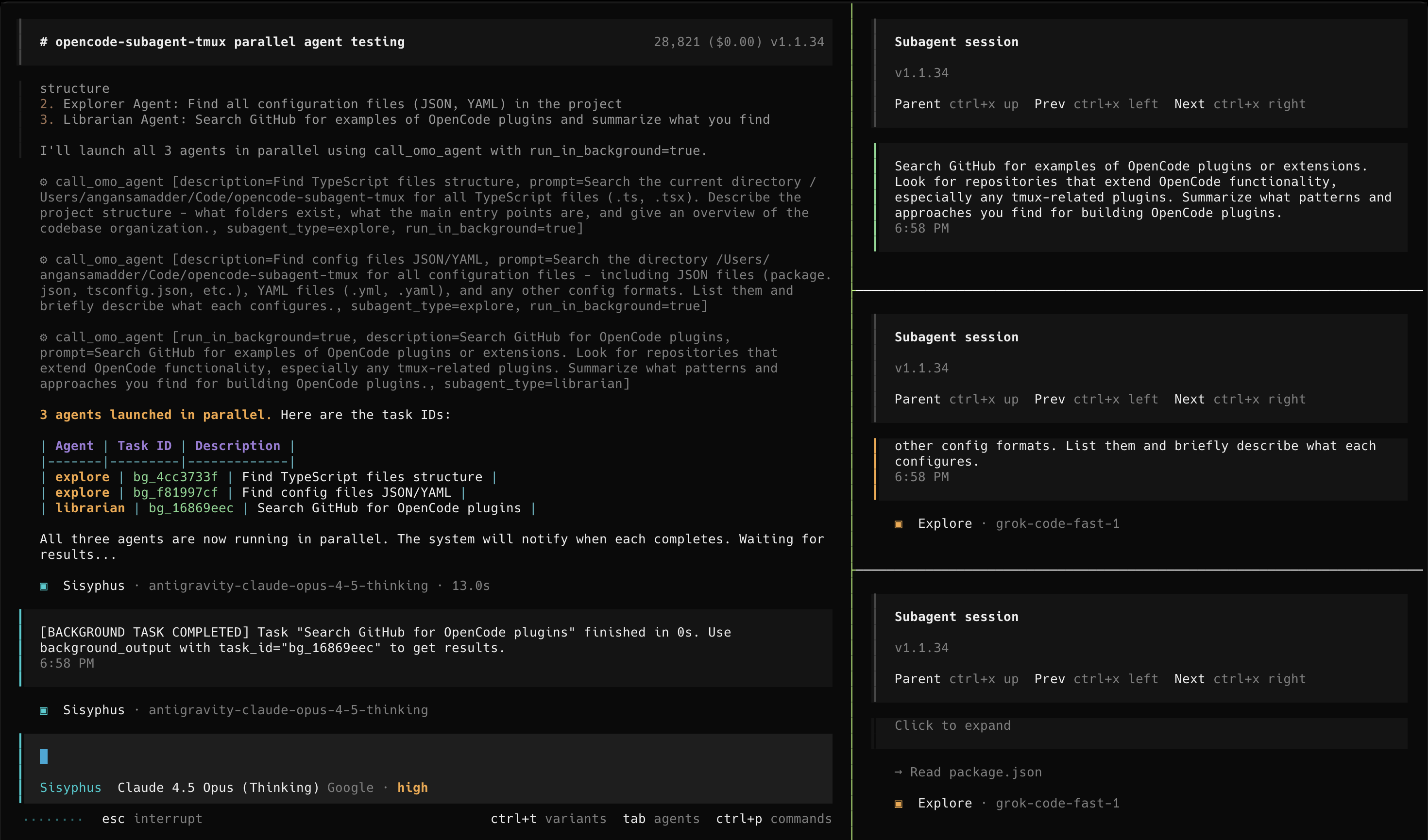 Note: The demo shows the "sisyphus" agent from oh-my-opencode, but this plugin supports ALL OpenCode subagents.
Installation
🤖 Let an LLM do it (Recommended)
Paste this into any LLM agent (OpenCode, Claude Code, Cursor, etc.):
Install the opentmux plugin by following: https://raw.githubusercontent.com/AnganSamadder/opentmux/main/README.mdTo install this plugin, please perform the following steps for the user:
Install the NPM package globally:
npm install -g opentmuxNote: This installer automatically configures the user's shell (Bash/Zsh/Fish/PowerShell) to use the smart wrapper.
Configure OpenCode: Add
"opentmux"to thepluginarray in the user's config file (usually~/.config/opencode/opencode.json).{ "plugin": [ "opentmux" ] }Verify & Finalize:
- Check if
tmuxis installed on the system. If not, advise the user to install it (e.g.,brew install tmux,sudo apt install tmux, orwinget install tmux). - Tell the user: "Installation complete! Please restart your terminal and run
opencodeto see the tmux integration in action."
- Check if
👤 For Humans (Manual)
Install via NPM:
npm install -g opentmuxThe installer automatically configures your shell to use the smart wrapper.
Enable the Plugin: Add
"opentmux"to your~/.config/opencode/opencode.json:{ "plugin": [ "opentmux" ] }Run OpenCode: Restart your terminal and type
opencode. The plugin handles the rest!
🛠️ Development
For contributors working on this plugin locally, see LOCAL_DEVELOPMENT.md for setup instructions.
✨ Features
- Automatic Tmux Pane Spawning: When any agent starts, automatically spawns a tmux pane
- Live Streaming: Each pane runs
opencode attachto show real-time agent output - Auto-Cleanup: Panes automatically close when agents complete
- Configurable Layout: Support multiple tmux layouts (
main-vertical,tiled, etc.) - Multi-Port Support: Automatically finds available ports (4096-4106) when running multiple instances
- Smart Wrapper: Automatically detects if you are in tmux; if not, launches a session for you.
⚙️ Configuration
You can customize behavior by creating ~/.config/opencode/opentmux.json:
{
  "enabled": true,
  "port": 4096,
  "layout": "main-vertical",
  "main_pane_size": 60,
  "auto_close": true
}
| Option | Type | Default | Description |
|--------|------|---------|-------------|
| enabled | boolean | true | Enable/disable the plugin |
| port | number | 4096 | OpenCode server port |
| layout | string | "main-vertical" | Tmux layout: main-horizontal, main-vertical, tiled, etc. |
| main_pane_size | number | 60 | Size of main pane (20-80%) |
| auto_close | boolean | true | Auto-close panes when sessions complete |
❓ Troubleshooting
Panes Not Spawning
- Verify you're inside tmux:
echo $TMUX - Check tmux is installed:
which tmux(orwhere tmuxon Windows) - Check logs:
cat /tmp/opentmux.log
Server Not Found
Make sure OpenCode is started with the --port flag matching your config (the wrapper does this automatically).
🗺️ Roadmap
The following features are planned for future releases:
- Glow Integration: Support for Glow to render markdown beautifully in spawned panes.
- Neovim Quick-Launch: Direct integration to launch Neovim at the agent's current working directory.
- Enhanced Customization: More options for pane positioning, colors, and persistent layouts.
📄 License
MIT
🙏 Acknowledgements
This project extracts and improves upon the tmux session management from oh-my-opencode-slim by alvinunreal.