
opentui-glyphfit
v0.5.0
Published
Direction-aware, charset-flexible intensity-to-character rendering for OpenTUI

Maintainers
 syphrpunk
Readme
opentui-glyphfit


Direction-aware, charset-flexible intensity-to-character rendering for OpenTUI.
A pure-TypeScript library that replaces OpenTUI's built-in
drawGrayscaleBufferSupersampled with a 6-point spatial sample → nearest-
neighbour charset match pipeline. Operates entirely over the public
OptimizedBuffer.drawChar() API — no native code, no FFI.
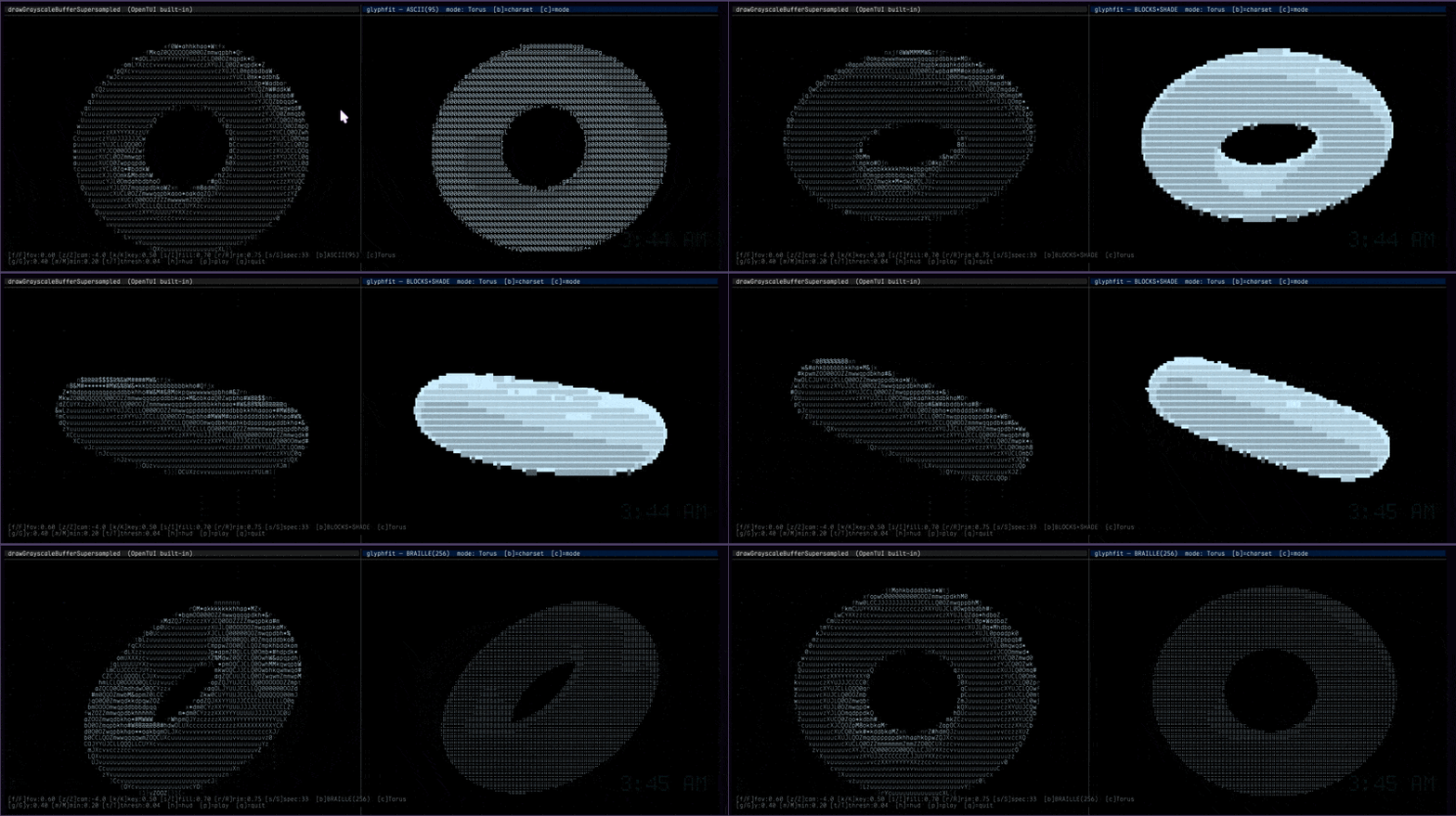
Left: OpenTUI's
drawGrayscaleBufferSupersampled. Right:opentui-glyphfitwith the ASCII charset — same intensity field, different rendering pipeline.
Why
OpenTUI's grayscale pipeline maps intensity to a character by density rank:
intensity 0.47 → GRAYSCALE_CHARS[33] → 'i'The spatial information within each cell is discarded. A diagonal edge, a horizontal bar, and a solid dot at the same average density all produce the same character.
opentui-glyphfit instead samples each terminal cell at 6 spatial sub-points
(2 columns × 3 rows). Each source pixel contributes to all 6 sub-regions in
proportion to its area overlap, producing a ShapeVector that encodes where
within the cell the ink falls:
[0.0, 0.8]   ← top:  ink on right only
[0.2, 0.6]   ← mid:  diagonal crossing
[0.7, 0.1]   ← bot:  ink on left only
→ findBestChar(v, BRAILLE) → '⠳'   (directional braille pattern)
Result: directional character selection at face/edge boundaries — visibly sharper geometry than pure density mapping.
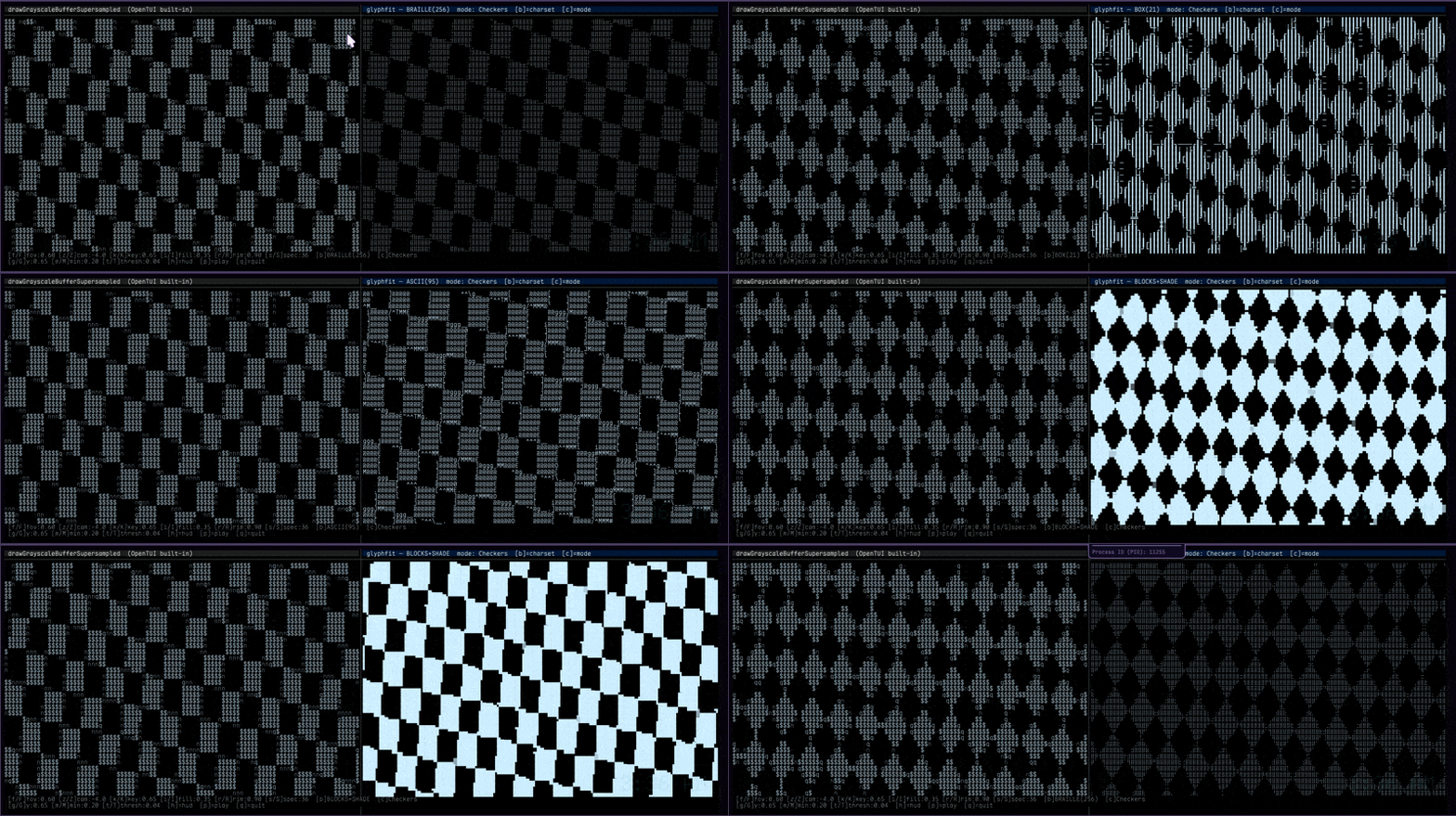
Procedural checkers field at 256-state braille. Cells straddling pattern edges pick directional braille codepoints; cells in the interior pick the appropriate density. The built-in renderer on the left has only a 1D density mapping to work with.
Install
bun add opentui-glyphfitPeer dependency: @opentui/core >= 0.2.0.
Quick start
import { drawGlyphFit, BLOCKS_SHADE } from "opentui-glyphfit"
import { RGBA } from "@opentui/core"

drawGlyphFit(buffer, {
  intensities,                       // Float32Array, row-major, [0..1]
  srcWidth: 200, srcHeight: 80,
  x: 0, y: 0,
  destWidth: 100, destHeight: 40,    // optional; defaults to fill
  fg: RGBA.fromValues(0.8, 0.9, 1.0, 1),
  bg: RGBA.fromValues(0,   0,   0,   1),
  charset: BLOCKS_SHADE,
})
For the colour-aware variant that eliminates banding on smooth-shaded surfaces:
import { drawGlyphFitColor, BLOCKS } from "opentui-glyphfit"

drawGlyphFitColor(buffer, {
  rgba,                              // Float32Array, length = W*H*4
  srcWidth: W, srcHeight: H,
  x: 0, y: 0,
  charset: BLOCKS,
})
Render any image as terminal art
Captured from the live demo with
[s]. The PNG is the same physical resolution as the source image, suitable for use as a desktop wallpaper.
# Reproduce the right-hand image above
GLYPHFIT_PNG_CELLS_WIDE=320 \
  bun demos/image.ts docs/media/synthwave-city_original.jpg ascii synthwave
# press [s] — a wallpaper-resolution PNG drops into screenshots/
Programmatic use:
import { drawGlyphFit, intensityFromPixels, resampleIntensity, BLOCKS_SHADE } from "opentui-glyphfit"

// Bring your own decoder. Sharp:
import sharp from "sharp"
const { data, info } = await sharp("photo.jpg").raw().ensureAlpha()
  .toBuffer({ resolveWithObject: true })

const intensity = intensityFromPixels(data, info.width, info.height)
const field     = resampleIntensity(intensity, info.width, info.height, 200, 80)

drawGlyphFit(buffer, {
  intensities: field, srcWidth: 200, srcHeight: 80,
  x: 0, y: 0, destWidth: 100, destHeight: 40,
  fg: WHITE, bg: BLACK, charset: BLOCKS_SHADE,
})
demos/image.ts is a runnable end-to-end example. It uses pngjs and
jpeg-js (devDependencies, pure JS, no native bindings) so it works on
any machine without external tools.
Colour palettes
Every cell's mean intensity can be mapped through a palette to give terminal art a thematic feel — fire, ocean, synthwave, phosphor CRT, viridis, etc.
import { drawGlyphFit, paletteFg, FIRE, BLOCKS_SHADE } from "opentui-glyphfit"

drawGlyphFit(buffer, {
  intensities, srcWidth, srcHeight, x: 0, y: 0,
  fg: WHITE, bg: BLACK, charset: BLOCKS_SHADE,
  intensityToFg: paletteFg(FIRE),     // black → red → orange → yellow → white
})
Built-in palettes: FIRE, OCEAN, SYNTHWAVE, PHOSPHOR, INFERNO,
VIRIDIS, GRAYSCALE. Or define your own:
import { paletteFg, paletteFromHex } from "opentui-glyphfit"

const sunset = paletteFg(paletteFromHex(["#0a0014", "#660066", "#ff3366", "#ffcc66", "#ffffff"]))
Frame-to-frame stability (StickyMatcher)
For animated content, cells whose ShapeVector hovers near a Voronoi boundary
in charset space may flip between two near-equivalent codepoints frame-to-
frame, producing visible shimmer. StickyMatcher adds bounded hysteresis:
if the previously chosen character is still close enough to the new best,
keep it.
import { drawGlyphFit, StickyMatcher, BLOCKS_SHADE } from "opentui-glyphfit"

const sticky = new StickyMatcher({ tolerance: 0.04 })
sticky.resize(W, H)                     // dest cell grid

renderer.setFrameCallback(async () => {
  drawGlyphFit(buffer, {
    intensities, srcWidth, srcHeight,
    x: 0, y: 0, destWidth: W, destHeight: H,
    fg, bg, charset: BLOCKS_SHADE,
    sticky,                              // ← suppress shimmer
  })
})

// Reset on hard cuts (mode/charset switch)
button.on("change", () => sticky.reset())
Cost: ~5% on the hot path; visual gain: substantial on smooth gradients.
API
drawGlyphFit(buffer, options)
Drop-in replacement for OptimizedBuffer.drawGrayscaleBufferSupersampled.
| Option | Type | Default | Description |
|---|---|---|---|
| intensities | Float32Array | required | Source field, row-major, [0, 1]. |
| srcWidth / srcHeight | number | required | Source pixel dimensions (> 0). |
| x / y | number | required | Destination cell anchor. |
| destWidth / destHeight | number | fill | Cell region dimensions. |
| fg / bg | RGBA | required | Foreground / background colour. |
| charset | Charset | BRAILLE | Charset for matching. |
| gamma | number | 1 | Gamma applied to samples before matching. |
| threshold | number | 0.02 | Cells below this mean intensity are skipped. |
| intensityToFg | (avg, fg) => RGBA | — | Per-cell foreground modulation (e.g. paletteFg). |
| sticky | StickyMatcher | — | Frame-to-frame char hysteresis. |
| unsafe | boolean | false | Skip input validation. |
Throws InvalidFieldError / InvalidOptionsError / InvalidCharsetError on
bad input unless unsafe: true.
drawGlyphFitColor(buffer, options)
Colour-aware variant. Takes RGBA pixel data and assigns one cluster centroid as foreground, the other as background. The directional character then encodes the spatial partition of bright vs dark pixels — eliminating banding on smooth surfaces because adjacent cells differ in colour even when their intensity is identical.
Built-in charsets
| Export | Chars | Best for |
|---|---|---|
| BRAILLE | 256 | Fine detail, 8-dot sub-cell grid |
| BLOCKS_SHADE | 25 | Smooth gradients + directional edges (general purpose) |
| BLOCKS | 22 | Hard geometric edges |
| SHADE | 4 | Pure density gradients |
| BOX | 22 | Wireframe / grid content |
| ASCII | 95 | Classic ASCII art |
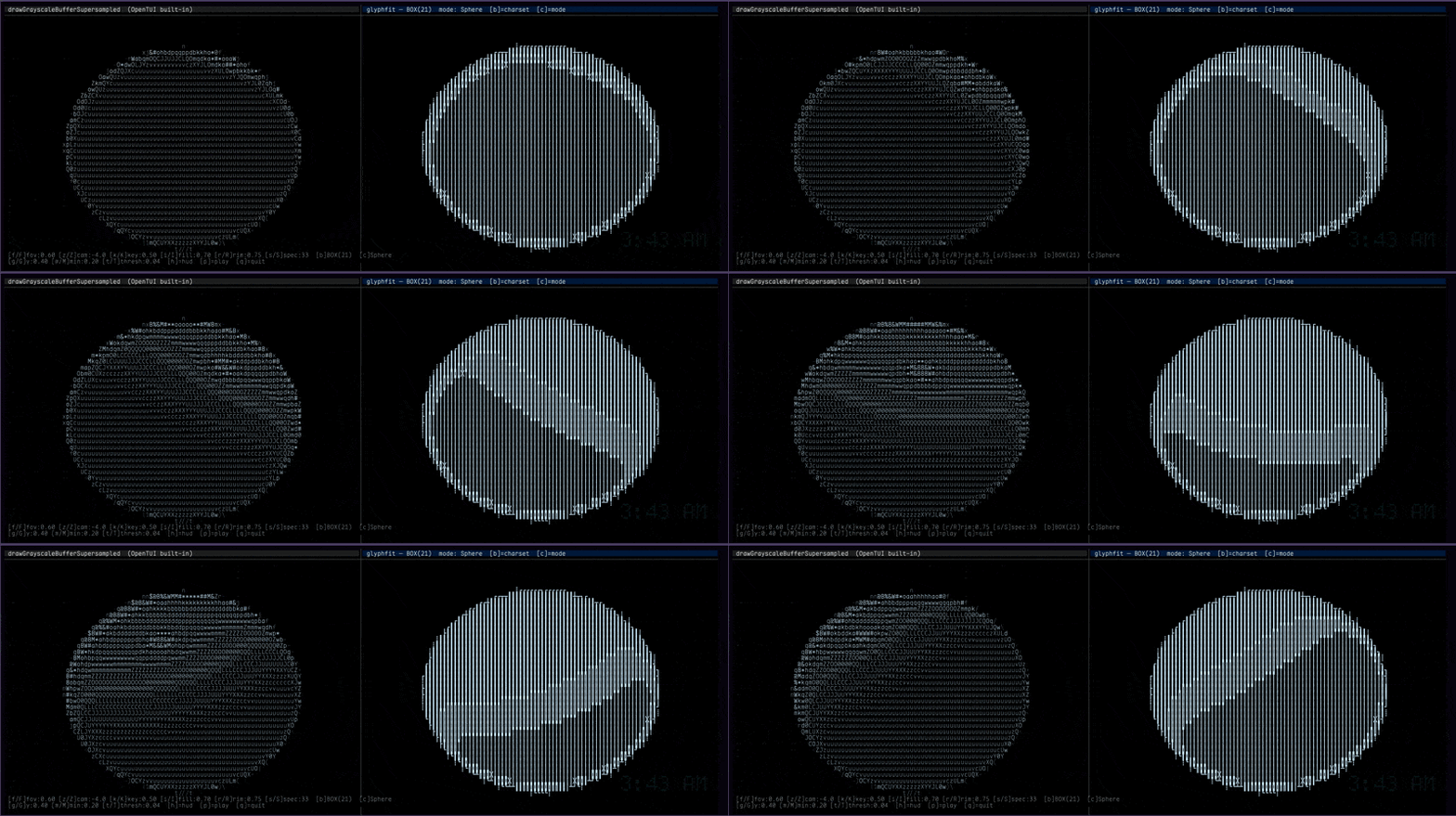
The same sphere through the BOX charset (22 chars). Box-drawing primitives have asymmetric ShapeVectors that line up with the sphere's tonal contours, producing a wireframe-like aesthetic that pure density mapping can't.
Low-level access
import {
  sampleShapeVector, sampleShapeVectorInto,
  findBestChar, shapeOf, buildCharset,
  compileCharset, findBestCharIn,
} from "opentui-glyphfit"

// Allocating sample (convenient for tests / one-off use)
const sv = sampleShapeVector(intensities, srcW, srcH, cellX, cellY, destW, destH, gamma)

// Allocation-free sample for hot loops
const out = [0, 0, 0, 0, 0, 0] as ShapeVector
sampleShapeVectorInto(out, intensities, srcW, srcH, cellX, cellY, destW, destH)

// Charset lookups
const { codepoint } = findBestChar(sv, BLOCKS_SHADE)
const sv2 = shapeOf(0x2580)   // ▀ → [1, 1, 0.5, 0.5, 0, 0]

// Custom charsets — built-ins, custom shapes, or both
const myset = buildCharset([
  0x2588, 0x2580, 0x2584, 0x20,          // built-in lookups
  [0x2022, [0, 0, 0.6, 0.6, 0, 0]],      // custom (•) bullet
])

// For inner loops, compile once and call findBestCharIn directly
const compiled = compileCharset(myset)
for (const sv of allCells) {
  const idx = findBestCharIn(sv, compiled)
  // ...
}
Image utilities
import { intensityFromPixels, resampleIntensity } from "opentui-glyphfit"

// Convert decoded pixels to intensity. Bring your own decoder.
const f = intensityFromPixels(rgbaBytes, width, height, {
  luminance: "rec709",   // | "rec601" | "average" | "max" | "alpha"
  invert: false,
  gamma: 1,
  channels: 4,           // 1 (grey) | 3 (rgb) | 4 (rgba)
})

// Bilinear resample to a new dimensions.
const resized = resampleIntensity(f, srcW, srcH, dstW, dstH)
Palette helpers
import {
  paletteFg, paletteFromHex, paletteFromValues, samplePaletteInto,
  FIRE, OCEAN, SYNTHWAVE, PHOSPHOR, INFERNO, VIRIDIS, GRAYSCALE,
} from "opentui-glyphfit"
Errors
All thrown errors extend GlyphFitError:
import {
  GlyphFitError, InvalidFieldError, InvalidOptionsError, InvalidCharsetError,
} from "opentui-glyphfit"

try {
  drawGlyphFit(buffer, opts)
} catch (e) {
  if (e instanceof InvalidFieldError) { /* bad intensities/srcWidth/srcHeight */ }
  if (e instanceof InvalidOptionsError) { /* bad gamma/threshold/dest dims */ }
  if (e instanceof InvalidCharsetError) { /* malformed charset */ }
}
How it works
ShapeVector (2 cols × 3 rows)
col:  left  right
     ┌────┬────┐
top  │ v0 │ v1 │  y ≈ 1/6
     ├────┼────┤
mid  │ v2 │ v3 │  y ≈ 3/6
     ├────┼────┤
bot  │ v4 │ v5 │  y ≈ 5/6
     └────┴────┘
     x≈1/4  x≈3/4
Each source pixel contributes to all 6 sub-regions in proportion to its area overlap. This gives correct sampling at any supersampling factor — including the common 2× case where naive integer-band assignment leaves the bottom row empty.
Charset shapes
All shape vectors are analytically derived from each character's mathematical structure — no font rasterisation, no measurement. Block, eighth, and quadrant characters follow Unicode definitions exactly. Braille shapes follow the dot-bit layout. ASCII shapes are structural approximations from stroke geometry.
Performance
At 200×50 cells with 3× supersampling on an M2 MacBook Air:
| Charset | Mean / frame | Notes | |---|---|---| | BRAILLE (256) | 5.1 ms | full pipeline | | BLOCKS_SHADE (25) | 1.3 ms | | | BLOCKS (22) | 1.2 ms | | | BOX (22) | 1.2 ms | | | ASCII (95) | 2.5 ms | | | SHADE (4) | 0.9 ms | | | empty field | 0.16 ms | threshold-first cheap pass skips most of the work |
Run bun bench for the full suite.
Why stripes appear with single-channel input on smooth surfaces
When rendering a smooth sphere into a single-channel intensity field, adjacent cells at the same height on the sphere have nearly identical intensity distributions → identical ShapeVectors → the same character is selected for the whole row → visible banding.
The fix is drawGlyphFitColor: by partitioning each cell's source pixels
into bright and dark clusters and using their average colours as fg/bg,
adjacent cells differ even when their brightness is identical. The
character then encodes the partition geometry, not the intensity rank.
Demos
# Side-by-side comparison: built-in vs glyphfit, 7 modes × 4 charsets, full HUD
bun run demo

# Render any image as terminal art
bun demos/image.ts photo.jpg            blocks_shade
bun demos/image.ts photo.jpg            braille       fire
bun demos/image.ts photo.jpg            box           viridis
Both demos respond to [s] to save the current frame as four files:
screenshots/<name>_<charset>[-<palette>]_<timestamp>.txt        — plain UTF-8
screenshots/<name>_<charset>[-<palette>]_<timestamp>.ansi.txt   — 24-bit ANSI escapes (cat-able)
screenshots/<name>_<charset>[-<palette>]_<timestamp>.html       — colour-faithful standalone page
screenshots/<name>_<charset>[-<palette>]_<timestamp>.png        — wallpaper-resolution PNG
The PNG is 2560×1440-class by default — directly usable as a desktop wallpaper on macOS, Linux, and Windows. Block / shade / braille / box characters rasterise crisply from their analytic geometry; ASCII falls back to a directional 2×3 fill so the output is always font-free.
Environment variables for the PNG output (image demo only):
| Var | Default | Effect |
|---|---|---|
| GLYPHFIT_SCREENSHOT_DIR | screenshots | Output directory. |
| GLYPHFIT_PNG_LONG_EDGE | 2560 | Long-edge pixel target. Bump to 3840 for 4K. |
| GLYPHFIT_PNG_CELLS_WIDE | (on-screen) | Re-render at higher cell density for more detail. Try 320 or 480. |
# 4K wallpaper, high cell density, viridis palette
GLYPHFIT_PNG_LONG_EDGE=3840 GLYPHFIT_PNG_CELLS_WIDE=480 \
  bun demos/image.ts photo.jpg blocks_shade viridis
# press `s`, then look in screenshots/
Saving frames programmatically
The same screenshot machinery is exposed as a public API. Drop any of these into your own render loop:
import {
  renderToText, renderToAnsi, renderToHtml, renderAllFormats,
  renderToImagePixels,
} from "opentui-glyphfit"
import { writeFileSync } from "node:fs"
import { PNG } from "pngjs"

const opts = { intensities, srcWidth, srcHeight, destWidth, destHeight, fg, bg, charset }

// String formats
writeFileSync("art.txt",  renderToText(opts))
writeFileSync("art.ansi", renderToAnsi(opts))         // cat art.ansi to view
writeFileSync("art.html", renderToHtml(opts, { title: "my art" }))

// PNG (wallpaper-grade)
const img = renderToImagePixels({ ...opts, cellWidth: 12, cellHeight: 24 })
const png = new PNG({ width: img.width, height: img.height })
png.data = Buffer.from(img.rgba)
writeFileSync("art.png", PNG.sync.write(png))

// Or all three string formats at once
const { txt, ansi, html } = renderAllFormats(opts)
renderToImagePixels returns a flat Uint8Array of RGBA bytes plus the
image dimensions. Pipe it into pngjs (above), sharp, the browser's
ImageData, or any other RGBA-capable encoder.
All renderers accept the same option shape as drawGlyphFit (minus
buffer-only fields like x, y, sticky, unsafe).
Development
bun install
bun test               # 199 unit + integration + snapshot + perf tests
bun run typecheck
bun run build          # → dist/
bun run bench          # microbenchmarks
bun run demo           # interactive comparison
Test layout
tests/shape-vector.test.ts   — svDistance, sampling, findBestChar
tests/charsets.test.ts        — every charset's structural invariants
tests/renderer.test.ts        — drawGlyphFit + drawGlyphFitColor against mock buffer
tests/integration.test.ts     — real OptimizedBuffer via @opentui/core/testing
tests/demo.test.ts            — setFrameCallback + FrameBufferRenderable code path
tests/snapshots.test.ts       — visual output pinned per (charset, field)
tests/perf.test.ts            — regression bounds (catches order-of-magnitude regressions)
tests/palette.test.ts         — palette construction, sampling, drawGlyphFit integration
tests/stickiness.test.ts      — StickyMatcher hysteresis
tests/image.test.ts           — intensityFromPixels + resampleIntensity
tests/screenshot.test.ts      — renderToText / renderToAnsi / renderToHtml
tests/raster.test.ts          — renderToImagePixels (PNG-ready RGBA bytes)
bench/index.ts                — manual microbenchmark suite
License
MIT — see LICENSE.