
opentui-tape
v0.2.0-alpha.0
Published
Realtime financial visualisations for OpenTUI: candles, sparklines, depth ladders, info bars, axes, volume panes, pattern classifier, and a composite Chart with sub-cell precision

Maintainers
 syphrpunk
Readme
opentui-tape
Realtime financial visualisations for OpenTUI: candles, sparklines, depth ladders, option chains, and ticker tables — with sub-cell precision via opentui-glyphfit.
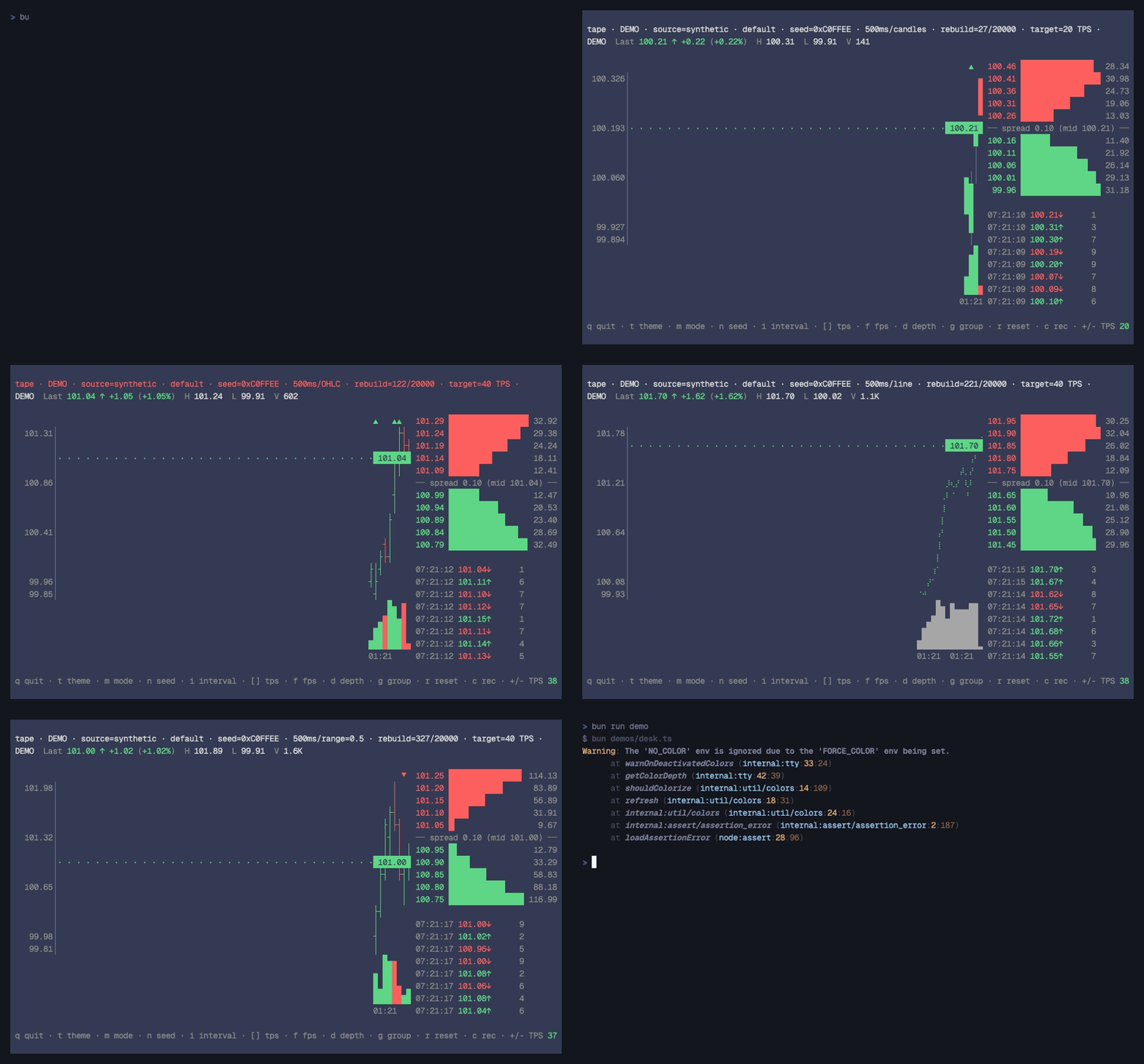
Status: 0.2.0-alpha — Phase 2.5 chrome pass shipped. Candle, Sparkline, DepthLadder, YAxis, XAxis, InfoBar, VolumePane, PatternAnnotated, plus a composite
ChartRenderable and a 26-pattern classifier. Options, tables, and animations land across phases 3–4. See DESIGN.md.
Why
Existing terminal charting tools (asciichart, chartscii, tickrs) round bar geometry to whole cells. A candle whose high reaches 0.6 of a cell renders as a full block — same as one reaching 0.99.
opentui-tape uses glyphfit's analytically-derived ShapeVector data to map
fractional row coverage to the right eighth-block, quadrant, or half-block:
high = 99.96, low = 99.91 (cells span $0.05 each)

            ┃                  ←  no ink (above high)
            ▆                  ←  high reaches 0.6 into this cell
            █                  ←  body fills entirely
            ▃                  ←  low extends 0.3 below
            ┃                  ←  no ink
The same precision applies to sparklines, depth bars, and (in upcoming phases) option-chain heatmaps.
Install
bun add opentui-tapePeer deps: @opentui/core >= 0.2.0, opentui-glyphfit >= 0.5.0.
Quick start
The composite Chart Renderable wires the candle, axes, info bar,
volume pane, and pattern annotation together with one constructor:
import { createCliRenderer } from "@opentui/core"
import { Chart } from "opentui-tape"

const renderer = await createCliRenderer({ exitOnCtrlC: true })
const chart = new Chart(renderer.root.ctx, {
  width: "100%", height: "100%",
  symbol: "DEMO",
  barInterval: 60_000,
})
renderer.root.add(chart)

stream.on("tick", t => chart.onTick(t))
For ad-hoc layouts (e.g. a candle paired with a depth ladder, or a
multi-pane dashboard), instantiate the constituent Renderables
directly — Chart is just opinionated wiring on top.
See demos/chart.ts (composite, minimal) and demos/desk.ts
(manual composition + DepthLadder + theme cycle) for runnable
examples (bun run demo:chart / bun run demo).
API
Renderables
new Chart(ctx, options)              // composite: candle + axes + info bar + volume + annotation
new Candle(ctx, options)             // streaming OHLC chart
new Sparkline(ctx, options)          // single-row mini chart
new DepthLadder(ctx, options)        // horizontal bid/ask bars per price level
new YAxis(ctx, options)              // right-aligned price labels + connector
new XAxis(ctx, options)              // single-row time/date labels
new InfoBar(ctx, options)            // symbol · last · change · H / L · volume
new VolumePane(ctx, options)         // column-aligned volume bars
new PatternAnnotated(ctx, options)   // single-row bias glyph overlay
Each accepts standard RenderableOptions (width/height/flex/etc.) plus a
domain-specific options object. See src/renderables/*.ts for the full
shape.
Pattern classifier
import { classify, classifyAll } from "opentui-tape/patterns"

// single-shot — match the trailing window
const matches = classify(bars)
//   ⇒ [{ name: "bullish-engulfing", confidence: 0.78, bullish: true }, ...]

// historical walk — every position with at least one hit
const hits = classifyAll(bars)
//   ⇒ [{ index: 17, matches: [...] }, ...]
26 named single-, two-, and three-bar patterns with multi-match output
sorted by descending confidence. Tunable thresholds via ClassifyOptions.
Cell-math (pure)
For custom rendering, the underlying generators are exported:
import {
  candleCells, sparkCells,
  horizontalBarCells, depthLadderCells, volumePaneCells,
  yAxisTicks, xAxisTicks, renderXAxisRow,
  drawShapeCells, CANDLE, SPARK, DEPTH,
} from "opentui-tape"

const ops = candleCells(bars, scale, rect, theme)
drawShapeCells(buffer, ops, CANDLE)
Generators reuse a single CellOp per yield — zero per-cell allocation.
Charsets
import { CANDLE, SPARK, DEPTH } from "opentui-tape/charsets"CANDLE and SPARK are subsets of glyphfit's BLOCKS shape data.
DEPTH adds the left-eighth blocks (▏▎▍▌▋▊▉█) which glyphfit does
not ship today — the shape data is declared inline.
Development
bun install
bun test               # 260+ tests (unit + visual snapshot + screenshot)
bun run typecheck
bun run build          # → dist/ (ESM + .d.ts), used by `prepublishOnly`
bun run demo           # synthetic candles + depth ladder + chrome
                       # hotkeys: q quit · t theme · i interval · r reset
                       #          +/- maxSize · p pause · s save PNG
bun run demo:chart     # minimal: composite Chart only
Visual snapshot tests
tests/visual/*.visual.test.ts render Candle / Sparkline into a real
OpenTUI test buffer (via @opentui/core/testing's createTestRenderer)
and snapshot the resulting character grid. Snapshots live in
tests/visual/__snapshots__/ and serve as a regression net for geometry
(cell placement, body/wick alignment, sub-cell precision) before any
demo run. Update with bun test --update-snapshots after intentional
visual changes.
Phase status
| Phase | Status | Includes |
|---|---|---|
| 1 | shipped | Candle, Sparkline, cell-math primitives, CANDLE / SPARK charsets |
| 2 | shipped | DepthLadder + DEPTH charset, screenshot capture |
| 2.5 | shipped | Pattern classifier (26 names), PatternAnnotated, YAxis, XAxis, InfoBar, VolumePane, composite Chart Renderable |
| 2.6 | next | tape-store v0 (durable ring buffer), OrderBook composite, CANDLE_BOX charset variant |
| 3 | planned | OptionChain, Heatmap, Greeks display |
| 4 | planned | TickerTable, Shimmer, Drawer, AXIS charset, React bindings |
| 5 | planned | Themes, devtools overlay, starter template |
See DESIGN.md for the full design and rationale.
License
MIT — see LICENSE.