
openwriter
v0.47.0
Published
The open-source writing surface for AI agents. Markdown-native editor with pending change review — your agent writes, you accept or reject.

Maintainers
 travsteward
Readme
OpenWriter
The open-source writing surface for the agentic era.
A markdown-native rich text editor built for human-agent collaboration. Your AI agent writes, you review. Plain .md files on disk — no database, no lock-in. Works with any MCP-compatible agent.
Why OpenWriter?
Claude Code, OpenCode, Codex — these agents are transforming how people build software. But that power hasn't crossed over to writing. Ask an agent to edit your essay and you're staring at raw markdown in a terminal. There's no collaborative surface, no way to review changes, no real workflow.
Every writing tool is racing to bolt on its own weak agent. They have it backwards. The most powerful agents already exist — and they're designed to work with tools, not be trapped inside one. OpenWriter doesn't ship an agent. It's the first writing surface built for the agents you already use, with a review system that keeps you in control.
Markdown is the native language of AI. Every LLM reads it, writes it, and thinks in it. OpenWriter treats .md files as first-class citizens — your documents are plain markdown on disk, and the editor adds rich formatting, workspaces, version history, and agent collaboration on top. No proprietary format. No database. Just files.
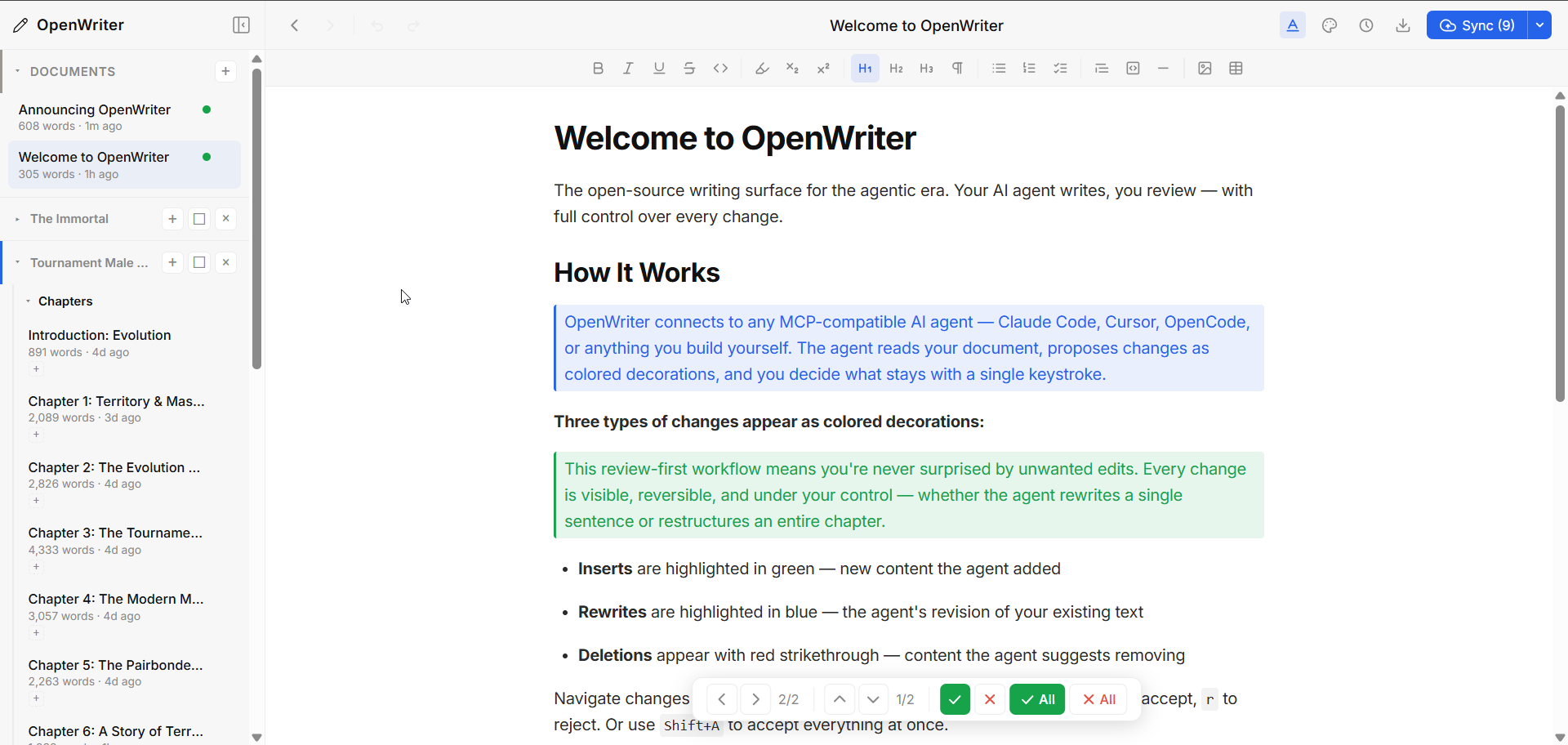
The agent writes. You accept or reject. That's it.
- Documents are plain
.mdfiles — open existing ones or create new ones - Agent makes changes → they appear as colored decorations (green for inserts, blue for rewrites, red for deletions)
- You review with vim-style hotkeys (
j/knavigate,aaccept,rreject) - Cross-document navigation when an agent edits multiple files at once
- Works with any MCP agent — no vendor lock-in
Quick Start
npx openwriterThat's it. Opens your browser to localhost:5050 with a ready-to-use editor. Documents save as markdown files in ~/.openwriter/.
Already have markdown files? Open them directly — the agent can use open_file to load any .md from disk, or you can drag files into the sidebar.
Connect Your Agent
Install the skill (Claude Code, Cursor, Codex, and 20+ agents):
npx skills add https://github.com/travsteward/openwriter --skill openwriterThen add the MCP server for the 24 editing tools:
claude mcp add -s user openwriter -- npx openwriter --no-openThe skill teaches your agent how to use OpenWriter's tools effectively — writing strategy, review etiquette, and troubleshooting. The MCP server provides the actual document editing capabilities.
Other MCP agents (Cursor, OpenCode, etc.) — add to your MCP config:
{
  "mcpServers": {
    "openwriter": {
      "command": "npx",
      "args": ["openwriter", "--no-open"]
    }
  }
}
Now your agent has 24 tools to read, write, and organize documents — and every change goes through your review.
Features
Agent Collaboration via MCP
24 tools across four categories:
| Category | Tools | What They Do |
|----------|-------|-------------|
| Document | read_pad, write_to_pad, edit_text, get_pad_status, + 5 more | Read/write document content, fine-grained text edits, metadata |
| Multi-doc | list_documents, switch_document, create_document | Navigate and manage multiple documents |
| Workspace | create_workspace, get_workspace_structure, add_doc, + 6 more | Organize docs into projects with containers and tags |
| Import | import_gdoc | Import structured Google Docs, auto-split into chapters |
Agents write in markdown or TipTap JSON. The server converts, assigns node IDs, and broadcasts changes to your browser in real-time via WebSocket.
Pending Change Review
The core interaction model. When an agent (or the context menu) makes changes:
- Inserts appear highlighted in green
- Rewrites appear highlighted in blue (original content preserved for reject)
- Deletions appear with red strikethrough
Review Panel (floating bottom bar):
| Key | Action |
|-----|--------|
| j / k | Next / previous change |
| h / l | Previous / next document with changes |
| a | Accept current change |
| r | Reject current change |
| Shift+A | Accept all in document |
| Shift+R | Reject all in document |
Multi-Document Workspaces
Documents are markdown files on disk. Organize them into workspaces with nested containers, cross-cutting tags, and shared context (characters, settings, rules) that agents can read for consistency.
Four sidebar views:
- Tree — Hierarchical folders with drag-and-drop
- Timeline — Sorted by last modified
- Board — Card-based drill-down navigation
- Shelf — Visual bookshelf metaphor with spine browsing
Context Menu (Right-Click)
Select text and right-click for AI-powered transformations:
| Action | Key | Description |
|--------|-----|-------------|
| Rewrite | R | Rewrite selection at similar length |
| Shrink | S | Condense by 40-60% |
| Expand | E | Expand by 50-100% |
| Custom | — | Free-text instruction |
| Fill | F | Generate content between paragraphs |
| Insert after | I | Generate new content after selection |
| Delete | D | Mark for deletion |
| Link to doc | L | Create internal document links |
The writing actions (Enhance, Shrink, Expand, Modify, Insert, Fill) run on your own Claude API key, added in Settings under Claude. They write in your voice, learned from the documents you right-click and choose "Learn my voice from this". Plugins can add more actions.
Themes
5 themes, each with light and dark modes:
- Ink — Clean, minimal, professional
- Novel — Warm, serif-based, literary
- Mono — Monospace, code-focused
- Editorial — Bold magazine-style headings
- Studio — Contemporary sans-serif
Three typography presets (default, compact, expanded) work with any theme.
Git Sync
Push your documents to GitHub directly from the editor. Three setup methods:
- GitHub CLI — Auto-detected if
ghis authenticated - Personal Access Token — Manual GitHub auth
- Existing repo — Connect to a repo you already have
Export
Export any document to:
- Markdown (
.md) - HTML (styled web page)
- Word (
.docx) - Plain text (
.txt) - PDF (via print preview)
Version History
Automatic snapshots with full rollback. Browse previous versions and restore any point.
Markdown Native
Every document is a .md file on disk. What you see in the editor is markdown with rich rendering — headings, lists, tables, code blocks, images, links — all stored as plain text.
~/.openwriter/
├── Getting Started.md
├── Chapter 1 - Origins.md
├── Research Notes.md
└── _workspaces/
└── My Novel.json- No database. The filesystem is the index. Move, copy, or
grepyour files however you want. - Open any
.mdfile. Point OpenWriter at existing markdown from any project — it loads instantly. - Git Sync built in. Push your documents to GitHub directly from the editor. Your markdown files are version-controlled and portable — access them from any machine or future web client.
- Frontmatter metadata. YAML frontmatter for tags, status, or any key-value pairs your workflow needs.
- Full markdown fidelity. Bold, italic, strikethrough, code blocks with syntax highlighting, tables, task lists, images, links, subscript, superscript — all round-trip cleanly to
.md. - AI-native format. Every LLM reads and writes markdown natively. No conversion layer, no token waste. The agent edits the same format the file is stored in.
Token-Efficient Wire Format
Agents don't parse JSON. OpenWriter uses a compact tagged-line format that's ~10x more token-efficient:
title: My Document
words: 1,205
pending: 2
---
[h1:a1b2c3d4] Chapter One
[p:e5f6g7h8] The quick brown fox jumped over the **lazy** dog.
[ul:i9j0k1l2]
  [li:m3n4o5p6] First bullet
  [li:q7r8s9t0] Second bullet
Each line: [type:8-char-id] content with inline markdown preserved. Agents read and write naturally.
Plugin System
OpenWriter is extensible via plugins. A plugin can:
- Register MCP tools — Extend the agent's capabilities
- Add HTTP routes — Custom API endpoints on the server
- Contribute context menu items — UI actions for text transformation
import type { OpenWriterPlugin } from 'openwriter';

const plugin: OpenWriterPlugin = {
  name: 'my-plugin',
  version: '1.0.0',

  mcpTools(config) {
    return [{
      name: 'my-tool',
      description: 'Does something useful',
      inputSchema: { type: 'object', properties: {} },
      handler: async (params) => ({ result: 'done' })
    }];
  },

  contextMenuItems() {
    return [{
      label: 'My Action',
      action: 'myplugin:do-thing',
      condition: 'has-selection'
    }];
  }
};

export default plugin;
Load plugins at startup:
npx openwriter --plugins my-plugin,another-pluginCLI Options
npx openwriter [options]

Options:
  --port <number>       Port number (default: 5050)
  --no-open             Don't auto-open browser
  --plugins <names>     Comma-separated plugin names
  --profile <name>      Run on this profile only, without changing the one OpenWriter normally opens

Subcommands:
  install-skill         Install Claude Code companion skill to ~/.claude/skills/openwriter/
Architecture
Browser (localhost:5050)
  ├── TipTap 3.0 Editor (React)
  ├── Decoration Plugin (pending insert/rewrite/delete)
  ├── Review Panel (accept/reject with keyboard nav)
  ├── Sidebar (4 views: tree, timeline, board, shelf)
  └── Context Menu (plugin-provided AI actions)
         │
         │ WebSocket + HTTP
         ▼
Pad Server (Express + WebSocket + MCP stdio)
  ├── Document state (in-memory + markdown on disk)
  ├── 24 MCP tools + plugin tools
  ├── Workspace management
  ├── Git sync, versions, export
  └── Plugin loader
         │
         │ MCP stdio
         ▼
AI Agent (Claude Code, Cursor, etc.)
Three interfaces:
- HTTP — Browser UI operations, document CRUD, plugin proxying
- WebSocket — Real-time push of agent changes to browser
- MCP stdio — Agent reads/writes documents
The server supports multi-session mode: if port 5050 is already taken, additional instances proxy MCP calls via HTTP to the running server. Multiple agents can safely share the same document state.
Development
# Clone and install
git clone https://github.com/travsteward/openwriter.git
cd openwriter
npm install

# Dev mode (hot reload)
cd packages/openwriter
npm run dev

# Build
npx turbo run build --force

# Type check
npx tsc --noEmit -p packages/openwriter/tsconfig.json        # frontend
npx tsc --noEmit -p packages/openwriter/tsconfig.server.json  # server

# Run production build
node packages/openwriter/dist/bin/pad.js
Monorepo structure: packages/openwriter (editor + server), plugins/ (optional extensions).
Contributing
Contributions welcome. Please open an issue first to discuss what you'd like to change.
License
MIT — Travis Steward