
openzerocode
v0.8.4
Published
AI coding assistant in the terminal

Maintainers
 masato25
Readme
OpenZeroCode
Terminal-first AI coding agent — inspired by OpenCode.
OpenZeroCode is a local-first, TUI-driven AI coding assistant adapted from the OpenCode direction. It strips away the zero cloud dependency and focuses on a self-contained terminal experience with built-in tooling, multi-provider support, and working memory.
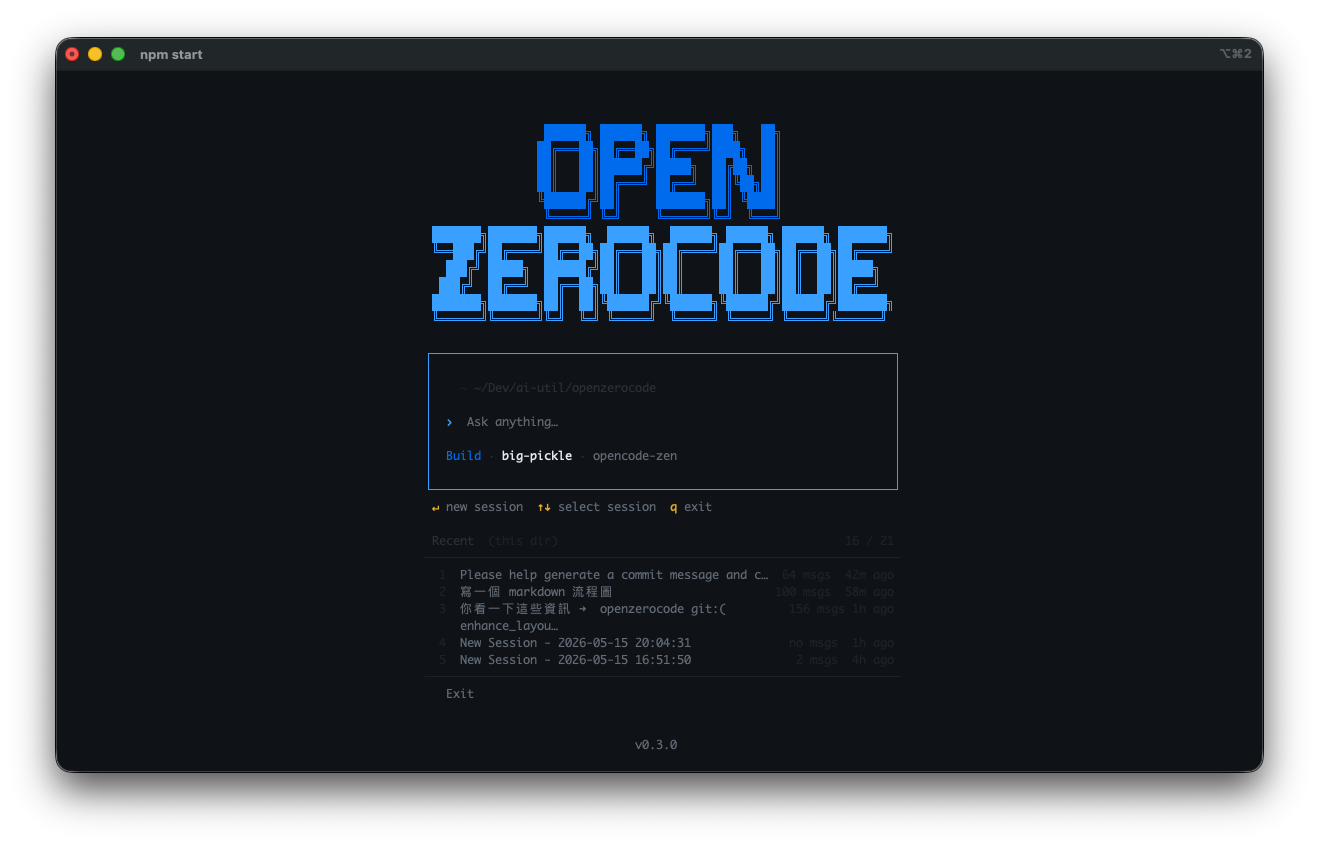
Inspiration
This project is heavily inspired by OpenCode, a terminal-native AI coding agent. OpenZeroCode started as a fork of OpenCode's architecture and has since evolved its own identity:
- Same foundation: SolidJS terminal UI (
@opentui), provider abstraction, tool system, session persistence - Different focus: Local-first, independent of the
zeroecosystem, extensible for custom workflows - Shared lineage: Provider registry, tool registration, and build pipeline patterns derive from OpenCode
We're grateful for the OpenCode project's design — this project wouldn't exist without it.
Current State
This repo is actively implemented. Current capabilities include:
- Solid-based terminal UI in
src/client/tui.tsx— streaming responses, reasoning display, command palette - Build / Plan / Learn modes — implementation, planning, and confirmed experience refinement into global memory or project
DEVELOPMENT.mdguidance - Provider switching — OpenCode Zen, OpenAI, OpenAI Codex, OpenRouter, Zero-API, DeepSeek, plus configurable OpenAI-compatible endpoints
- Model switching — switch models on the fly
- Multi-session persistence under
~/.openzerocode/sessions - Session management — rename, delete, compact, timeline actions (revert/copy/fork)
- Headless and server modes —
--runfor one-shot CLI runs andservefor the streaming HTTP API - Sidebar context — token usage, cost tracking, git diff summary
- Prompt memory — user-global
~/.openzerocode/AGENTS.md/CONTEXT.mdinjected into the system prompt; Learn mode creates missing empty global memory files on first entry, can propose/apply confirmed global updates, and can extract project-specific guidance intoDEVELOPMENT.md - Session handoff —
SESSION_SUMMARY.mdfor concise local continuation notes - GEASS browser tools — optional browser navigation, reading, interaction, screenshots, and visual observation
- 18 built-in tools:
| Tool | Description |
|------|-------------|
|
read| Read file contents | |write| Write / overwrite files | |grep| Search file contents by pattern | |glob| Find files by glob pattern | |bash| Execute shell commands | |edit| Targeted string replacement edits | |web-fetch| Fetch content from URLs | |todo-write| Maintain structured task lists during multi-step work | |learn-memory-apply| Apply confirmed Learn-mode updates to global~/.openzerocodememory | |learn-project-memory-apply| Apply confirmed Learn-mode updates to projectDEVELOPMENT.mdguidance | |browser-navigate| Navigate the connected GEASS browser to a URL | |browser-read| Read structured content from the current GEASS browser page | |browser-click| Click page elements in the GEASS browser | |browser-type| Type into inputs in the GEASS browser | |browser-select| Select dropdown options in the GEASS browser | |browser-scroll| Scroll the current GEASS browser page | |browser-screenshot| Capture a browser screenshot | |browser-observe-visual| Inspect the current browser view visually |
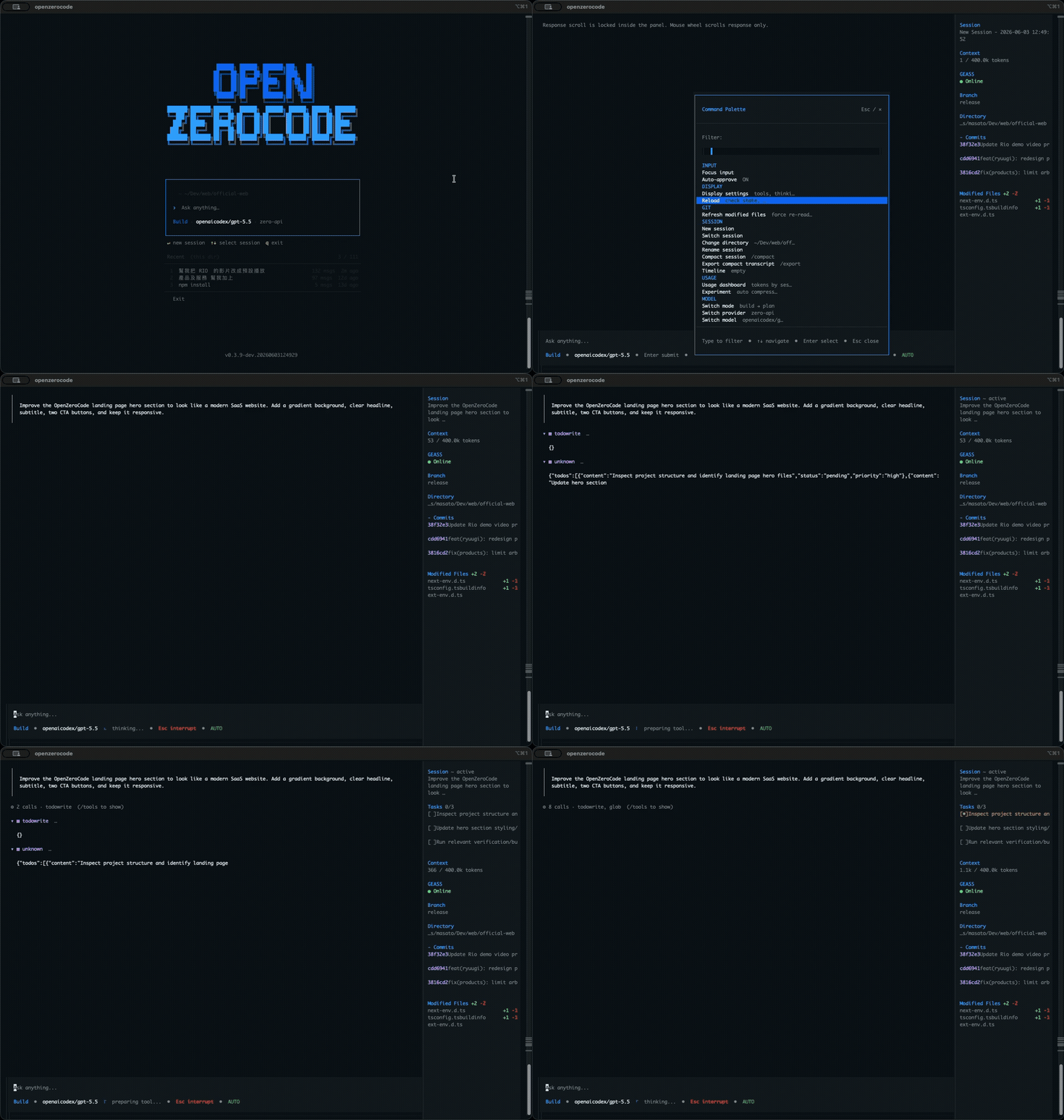
Quick Start
Prerequisites
For source development, use bun ≥ 1.2 and npm on your PATH.
Install script
The release installer follows opencode's user-level install style: it installs the binary to ~/.openzerocode/bin and updates your shell config to add that directory to PATH when needed.
curl -fsSL https://github.com/arborlogic/openzerocode/releases/latest/download/install | bashUse --no-modify-path if you want to update PATH manually, or set OPENZEROCODE_INSTALL_DIR to choose a different writable install directory.
Install from npm
Supported prebuilt npm targets:
darwin-arm64linux-x64linux-arm64win32-x64
Install with:
npm install -g openzerocodeThe root package installs a small Node launcher and resolves the matching optional platform package at runtime.
Install from source
git clone https://github.com/arborlogic/openzerocode.git
cd openzerocode
python3 scripts/dev-install.py
This remains the supported local development install path. It installs dependencies, rebuilds dist/openzerocode with a timestamped -dev.YYYYMMDDHHMMSS version suffix, and runs npm install -g . so the global openzerocode command points at that locally built binary. Built-in skills are included in the installed package and deployed beside that binary.
Run
openzerocodeDevelopment mode
npm run devUpdating
git pull
python3 scripts/dev-install.py
That refreshes dependencies, rebuilds the binary, and reinstalls the global openzerocode command from your local checkout.
npm packaging workflow
The published npm artifacts use a "root launcher + platform packages" structure:
- Root package
openzerocodeships only the Node launcherbin/openzerocode.js - Platform binaries live in
@openzerocode/<target>optional dependencies - Currently supported targets:
darwin-arm64,linux-x64,linux-arm64,win32-x64
Typical workflow:
Build the local binary
npm run buildThis runs
scripts/build.shand outputsdist/openzerocodeby default.Generate the
npm/publishing staging layoutnode scripts/create-platform-packages.mjsThis creates:
npm/package.json: root npm package manifestnpm/bin/openzerocode.js: launcher that dispatches to the matching platform binarynpm/packages/<target>/package.json: manifest for each platform packagenpm/README.md,npm/LICENSE,npm/bin/package.json: supporting publish files
Build each platform binary on its native platform
scripts/build-platform-package.sh darwin-arm64 scripts/build-platform-package.sh linux-x64 scripts/build-platform-package.sh linux-arm64 scripts/build-platform-package.sh win32-x64scripts/build-platform-package.shmust run on the matching host platform. For example,linux-arm64must be built on alinux-arm64machine. Successful builds output binaries to:npm/packages/<target>/bin/openzerocode- Windows target:
npm/packages/win32-x64/bin/openzerocode.exe
Pack / publish the npm packages
After staging and building the platform binaries, run
npm packornpm publishinsidenpm/and eachnpm/packages/<target>/directory.Recommended order:
- Publish platform packages
@openzerocode/<target>first - Publish the root package
openzerocodesecond
- Publish platform packages
Release checklist
First add a real
CHANGELOG.mdentry for the target version. Then use the release script to prepare the version bump, release commit, and matching git tag:npm run release -- patch # or: minor, major, explicit version such as 0.4.3 npm run release -- patch --dry-run npm run release -- patch --pushThe script requires no unrelated working-tree changes, validates that
CHANGELOG.mdalready contains the target version entry, updatespackage.jsonandpackage-lock.jsonif present, stages the changelog entry, runsnpm run typecheckby default, commitschore: release v<version>, and creates thev<version>tag. Use--no-verifyonly when you intentionally want to skip typecheck.Before and after a release, verify:
- Confirm the target version changelog entry is complete before running the release script
- If you did not pass
--push, push both the release commit and tag:git push origin HEAD && git push origin v<version> .github/workflows/build.ymlalways builds and uploads root/platform npm tarballs plus direct binary release archives (.tar.gzfor Linux/macOS,.zipfor Windows)- Tag pushes create a matching GitHub Release with those artifacts and automatically publish npm packages
- npm publishing publishes platform packages first and then the root
openzerocodepackage, skipping versions that already exist - If a workflow failed and only needs a rerun, use
workflow_dispatchfrom the Actions page; no version bump or rerun of the release script is needed in that case. Enablepublish_to_npmto rerun npm publishing, or provide the existing tag and enable the release option to recreate/update the GitHub Release - After publishing, verify
openzerocode --versionfrom the GitHub Release artifacts and verifynpm install -g openzerocode
This structure keeps npm install -g openzerocode lightweight while npm resolves the real executable from the platform-specific optional package.
Command-line usage
openzerocode                         # Launch the TUI
openzerocode --version               # Print version
openzerocode --help                  # Print CLI help
openzerocode --run "fix the tests"    # Run one prompt headlessly with auto-approved tools
openzerocode serve --port 4096       # Start the streaming HTTP API server
Environment overrides:
| Variable | Effect |
|----------|--------|
| OPENZERO_MODEL | Override the default model used by headless --run mode |
| OPENZEROCODE_PROVIDER_CONFIG | Override the provider config path (default ~/.openzerocode/providers.json) |
Alternative entrypoint
npm run start:tuiProvider Configuration
Provider credentials can be set through environment variables or a local config file:
~/.openzerocode/providers.jsonShape:
{
  "providers": {
    "openrouter": {
      "activeKey": "default",
      "keys": {
        "default": "sk-or-...",
        "backup": "sk-or-..."
      },
      "baseURL": "https://openrouter.ai/api/v1"
    }
  }
}
Supported providers:
| Provider id | Name | Environment keys |
|-------------|------|------------------|
| opencode-zen | OpenCode Zen | OPENCODE_API, OPENCODE_API_KEY (optional; anonymous free models are available) |
| openai | OpenAI | OPENAI_API_KEY |
| openai-codex | OpenAI Codex | ChatGPT OAuth via /codex-login |
| xai-oauth | xAI Grok OAuth | SuperGrok / X Premium+ OAuth via /xai-login |
| openrouter | OpenRouter | OPENROUTER_API_KEY |
| zero-api | Zero-API-compatible local endpoint | ZERO_API_KEY |
| deepseek | DeepSeek | DEEPSEEK_API_KEY |
Notes:
- Each provider can have multiple named keys.
activeKeyselects which key the runtime uses for that provider.baseURLcan override a provider's default endpoint for compatible APIs.- Config file values take precedence over environment variables.
- You can inspect and switch providers, models, and keys inside the TUI with slash commands and the command palette.
Development
# Type check
npm run typecheck

# Run all unit tests (excludes provider-integration tests)
npm run test:unit

# Run a single test file
npx tsx --test src/client/workspace-memory.test.ts
See DEVELOPMENT.md for detailed guidance on:
- Building standalone binaries
- Cross-platform distribution
- The build system &
Bun.build()compilation
Architecture
┌─ TUI client ──────────────────────────────────┐
│  src/client/tui.tsx                            │
│  - transcript / response rendering             │
│  - command palette & autocomplete              │
│  - session management (create, rename, delete) │
│  - build / plan mode toggle                    │
│  - sidebar: token usage, cost, git summary     │
│  - workspace memory + skill injection          │
└────────┬───────────────────────────────────────┘
         │
         ├── provider layer ─────────────────────┐
         │  src/provider/registry.ts             │
         │  - OpenCode Zen (opencode-zen)         │
         │  - OpenAI / OpenAI Codex              │
         │  - OpenRouter / Zero-API / DeepSeek   │
         │  - Extensible via registry            │
         └───────────────────────────────────────┘
         │
         └── tool layer ─────────────────────────┐
            src/tool/registry.ts                 │
            - file/search/shell/edit/web tools    │
            - todo + GEASS browser tools         │
            - Permission / auto-approve system   │
            └────────────────────────────────────┘
Prompt Memory Model
OpenZeroCode keeps durable prompt memory user-global and intentionally small:
~/.openzerocode/AGENTS.md: user personal cross-project preferences, language/response style, and general safety rules. Always loaded when non-empty.~/.openzerocode/CONTEXT.md: user background, common tools, and long-term preferences. Always loaded when non-empty.DEVELOPMENT.md: project-local development guidance extracted on demand in Learn mode. This is regular repository documentation and is not auto-injected into every prompt.SESSION_SUMMARY.md: concise handoff notes for humans/continuation; not auto-injected into the system prompt.
Project AGENTS.md / CONTEXT.md files are treated as regular repository documentation, not automatic prompt memory. Conditional memory.d auto-injection is intentionally not used; project-specific experience is made explicit by extracting it into project docs.
/mode learn switches the agent into a two-stage experience-refinement workflow:
- Accumulate experience globally — the user can ask the AI to distill lessons from the current project state and discussion context. After the AI presents the exact target and text, and only after explicit confirmation, it may call
learn_memory_applyto update global~/.openzerocode/AGENTS.mdor~/.openzerocode/CONTEXT.md. - Extract experience into a project — later, the user can ask Learn mode to read/search the project plus global memory, select relevant reusable guidance, and write confirmed project-local guidance to
<workspace>/DEVELOPMENT.mdvialearn_project_memory_apply.
Learn mode does not expose general edit/write/bash tools.
Key source files
| File | Purpose |
|------|---------|
| src/client/tui.tsx | Main TUI entrypoint & UI orchestration |
| src/client/sessions.ts | Session persistence helpers |
| src/client/workspace-memory.ts | Loads user-global AGENTS.md / CONTEXT.md into the system prompt and reports memory status |
| SESSION_SUMMARY.md | Manual session handoff / continuation notes |
| src/provider/registry.ts | Provider registration & resolution |
| src/tool/registry.ts | Built-in tool registration |
| src/server/index.ts | Streaming HTTP API server for openzerocode serve |
Relationship to OpenCode
| Aspect | OpenCode | OpenZeroCode |
|--------|----------|--------------|
| Runtime | Requires zero cloud service | Self-contained, local-first |
| TUI framework | @opentui (SolidJS) | @opentui (SolidJS) — same |
| Provider layer | OpenRouter, others | OpenCode Zen, OpenAI, OpenAI Codex, OpenRouter, Zero-API, DeepSeek, extensible |
| Tool system | Built-in tools | File/search/shell/edit/web tools + todo + GEASS browser tools + permission system |
| Session storage | Local files | Local files under ~/.openzerocode/ |
| Prompt memory | Varies | User-global AGENTS.md + CONTEXT.md are injected into the local system prompt |
| Cloud dependency | Requires zero for operation | None — works entirely offline |
| Binary distribution | Platform-specific npm packages | Platform-specific npm packages (darwin-arm64, linux-x64, linux-arm64, win32-x64) plus source-first local install via python3 scripts/dev-install.py |
License
MIT — see LICENSE.