
or-awp
v1.0.8
Published
awp 命令行自动发布工具


Readme
or-awp
- V1.0.4 升级,服务端接口升级,抛弃字符串上传的方式,基于文件流,可以避免一些特殊字符引发token校验的问题。
- 1.0.5 cise 接入。
- 1.0.6 app配置文件更新不了的bug修复 @空石





更新 test Case,由于发布接口只在Ali内网工作,所以 travis 的ci没有办法通过,只要 CISE 的构建status 是成功即可。
One-Request 组件之一,智能一键发布页面到AWP工具。
感谢航旅的awpp。在此基础上做了大量的优化和改进,修复bug,增加稳定性和易用性。
Install
$ npm install -g or-awp
$ awp
Features
- 支持日常,预发,线上不同环境发布
- 支持glob文件查询,批量发布
- 支持任意应用下的任意路径发布
Usage
 Usage: awp [options] <file ...>

  Options:

    -h, --help                                   output usage information
    -V, --version                                output the version number
    -p, --project [value]                        项目名
    -g, --group [value]                          应用名,默认为 mfe
    -e, --env [value]                            发布环境(waptest|日常,wapa|预发,wapp|线上预览,m|线上)
    -o, --operator [value]                       发布者花名
    --dtoken, --dailytoken [value]               发布者日常环境 token
    --otoken, --onlinetoken [value]              项目预发/线上环境 token
    --did, --dailyid [value]                     项目日常环境 WebAppId
    --oid, --onlineid [value]                    项目预发/线上环境 WebAppId
    --pub, --ispub [boolean]                     是否性能测试通过后自动发布
    --autopub, --isautopub [boolean]             是否 tms 区块更新时自动发布
    --autoparse, --isautoparse [boolean]         是否需要 AWP 平台自动解析资源
    --needperformtest, --needperform [boolean]   是否需要 AWP 性能测试
    --delversion, --delversionifexist [boolean]  是否需要删除已存在的版本
    config                                       配置 AWP 发布默认参数
不要被上面的参数吓到,工具可以零成本使用。即使你不看以下的文档,安装好之后,只要敲下 awp 命令,工具会一步步指引你完成发布。
快速使用
如果你第一次使用:
敲下awp命令之后,工具会自动引导你完成当前目录下的html/htm 文档的寻找和发布。不过默认是发布到mfe应用(也就是 mfe/ 目录下)
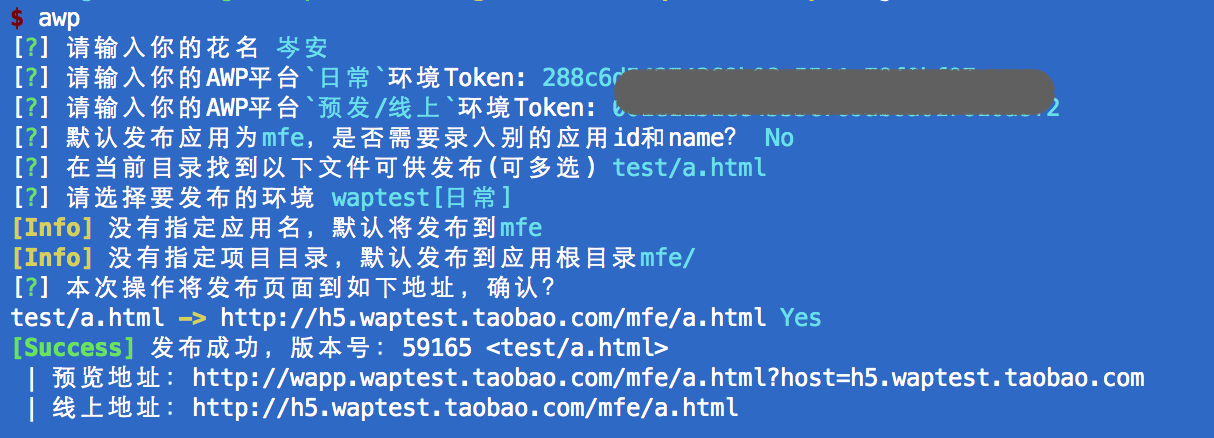
以后使用的时候,就不用再输入个人信息配置了,如下:



发布页面到别的应用
默认是发到mfe应用下的,无线事业部全体前端默认有这个应用的发布权限,如果你想发到别的应用,比如无线活动,发到alone目录下,怎么办呢?
你可以尝试-g --group参数。
比如, 把 a.html 发布到 alone 目录下。
$ awp -g alone a.html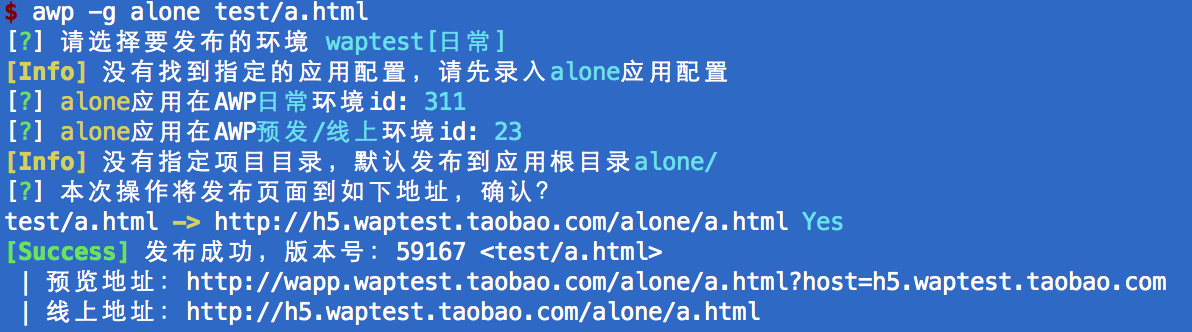 工具也会指引你先录入 alone 应用的相关id,然后自动发布。
当然,一旦录入之后,以后再发布到这个应用都可以直接发出去了。
工具也会指引你先录入 alone 应用的相关id,然后自动发布。
当然,一旦录入之后,以后再发布到这个应用都可以直接发出去了。
修改个人信息和批量录入app信息
$ awp config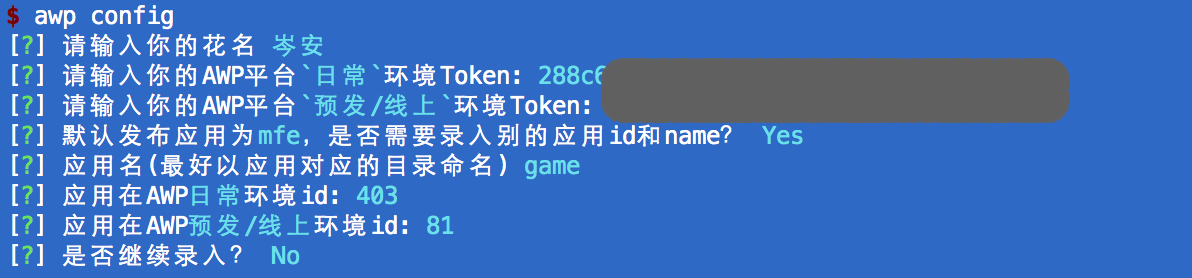 不用修改的信息直接回车就好,应用信息的录入包括 应用名字(最好和发布目录对应), 应用日常环境id,预发和线上环境id。而且可以重复录入。
二级目录和发布环境的指定
使用 -p --project 参数指定二级目录, -e --env 指定发布环境。
env可选
- waptest 日常
- wapa 预发
- m 线上
比如
$ awp -p test a.html # 把 a.html发布到 mfe/test/ 目录下,发布环境工具指引后续选择$ awp -g alone -p test src/b.html # 把src/b.html 发布到 alone/test/ 目录下,发布环境工具指引后续选择$ awp -g alone -p test -e wapa src/b.html # 把 src/b.html 发布到预发环境的 alone/test/ 目录。文件批量发布
支持 glob 文件查询。
你可以
$ awp a.html b.html # 发布 a.html 和 b.html你也可以
$ awp src/* # 发布src目录下 所有 html和 htm或者
$ awp src/* src2/**/* #发布 src和 src2 目录下所有html|htm ,src2/ 下包括子目录的文件一起发布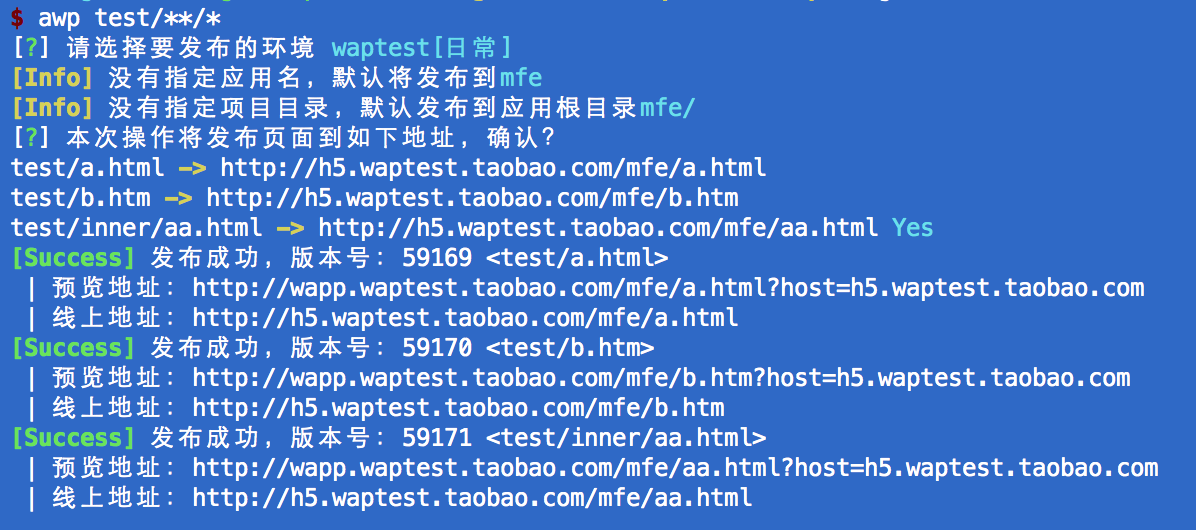
其他参数和规则见
$ awp -h注意
- 发布到线上的时候只能自动提交发布单,摩天轮的性能校验还是逃不过,awp不开放直接绕过性能校验的功能。