
orca-viz
v0.6.0
Published
Unofficial, third-party, read-only web visualizer for Orca's orchestration database

Maintainers
 nvergez
Readme
orca-viz
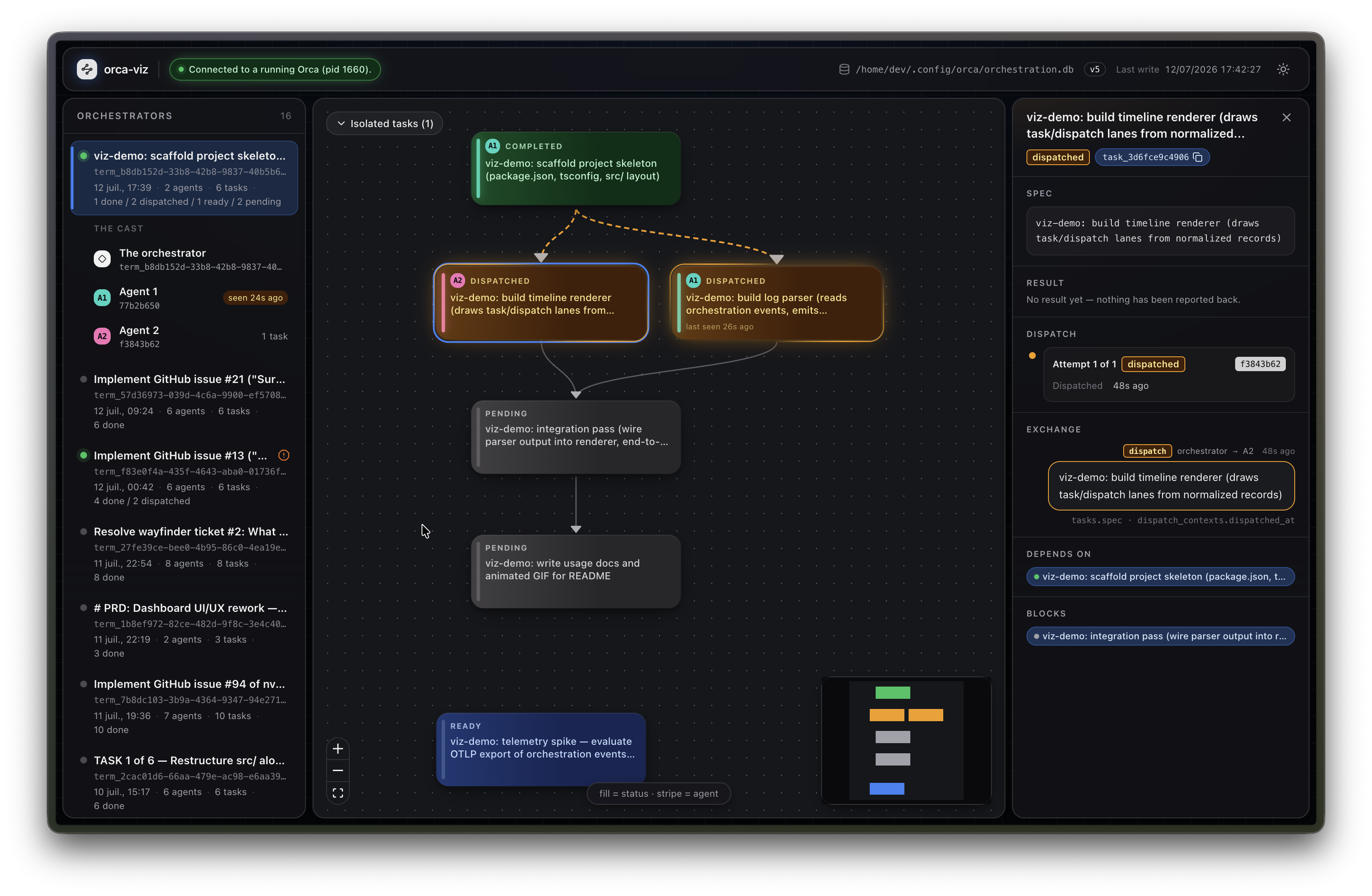
See what your Orca agents are doing — the task DAG, who is working what, the decision gates blocking the run, and the messages the agents are sending each other.
npx orca-viz@latestIt finds Orca's orchestration database, starts on 127.0.0.1:4269, and opens a browser.
Read this before you point it at your machine
orca-viz is unofficial and third-party. It is not affiliated with, endorsed by, or supported by Stably or Orca. It is an outside observer of a database that happens to be readable.
It is strictly read-only. It never writes to your database — not a gate resolution, not a
retry, not marking a message read. Every connection is opened readOnly: true, and there is
no code path in the tool that issues a write. That is what makes it safe to run against a
live orchestration: Orca's coordinator assumes it is the single writer, and orca-viz does
nothing to challenge that assumption.
It reads Orca's internal, undocumented schema. That schema is Orca's private business, it carries no compatibility promise to anyone outside the app, and it changes between Orca releases. So a minor bump of orca-viz may be required after an Orca update. This is an expectation, not an apology — see Surviving an Orca update for what the tool does when it meets a schema it was not built for, which is never to crash and never to lie about it.
It binds to loopback only. Your task specs, agent prompts and message bodies are in that database, and they are not served to the network.
Requirements
Node >= 22.5. That is where node:sqlite landed, and node:sqlite is why orca-viz has
zero native dependencies and no install script: nothing compiles on first run, so npx
starts the tool in seconds instead of failing on a native build. orca-viz checks the version
itself at startup and tells you what to do, because npm's own engines warning is easy to
miss and the alternative failure is a cryptic Cannot find module 'node:sqlite'.
You also need Orca, with orchestration enabled (it is experimental, behind the localStorage
flag orca.orchestration.enabled), and at least one orchestration run in its history.
Usage
npx orca-viz@latest                   # find the database, serve it, open a browser
npx orca-viz@latest --list-dbs        # every database it can find, and which it would choose
npx orca-viz@latest --db ./copy.db    # read a specific database — a copy, a backup, a colleague's
npx orca-viz@latest --port 8080 --no-open
| Flag | |
|---|---|
| --db <path> | The orchestration.db to read. A path that does not work is a hard error — orca-viz will never quietly fall back to a different database than the one you named. Also settable as ORCA_VIZ_DB. |
| --archive <path> | Replay a saved run archive instead of reading a database — see Exporting one run, and replaying it offline. Opens no database and polls nothing, so it cannot be combined with --db, --list-dbs or --poll-interval. |
| --list-dbs | Print every candidate database, in the order orca-viz would choose them, with its liveness, schema version and mtime. Then exit. |
| --port <n> | Port to listen on (default 4269). A port that is already taken is an error, not a hop to another one — a hunted port would break the URL orca-viz just opened and any bookmark of it. |
| --host <host> | Address to bind (default 127.0.0.1). Loopback by design; see the warning above before changing it. |
| --poll-interval <ms> | How often to re-read the database (default 5000). |
| --watch | Also watch the database directory, and run that poll early when a file changes — a change usually surfaces in under a second instead of within the poll interval. A hint, never a source: the poll stays authoritative, no delivery latency is promised on any platform, and if watching fails orca-viz warns once and carries on polling. |
| --orca-enrichment | Also show what a live worker is doing right now — its worktree, branch and current tool call — by asking the orca CLI (worktree ps, terminal list: two read-only commands, on their own timer, only while Orca is running). Off by default. Context attaches only on an exact terminal-handle match — never guessed from names or timing — and if the CLI is slow, gone or unreadable the database view is untouched and the tool says the context is unavailable. |
| --no-open | Do not open a browser. Also suppressed automatically when stdout is not a terminal, or over SSH, or with no display — so it does the right thing on a headless box without being told. |
| --version | Print the version and exit. |
| --help | Print the flags and exit. |
Where it looks for the database
First hit wins, and every candidate is validated before it is accepted — the file exists,
SQLite can actually open it read-only, and its PRAGMA user_version reads:
--dbORCA_VIZ_DB$ORCA_USER_DATA_PATH/orchestration.dbThe platform defaults, mirroring Orca's own
userDatadirectory:| | | |---|---| | Linux |
${XDG_CONFIG_HOME:-~/.config}/orca| | macOS |~/Library/Application Support/orca| | Windows |%APPDATA%\orca|each with an
orca-devsibling for dev builds. When more than one exists, orca-viz prefers the one with a freshorca-runtime.json— the Orca you are actually using — and tiebreaks on the most recent write.
The chosen path is always printed at startup. You should never have to wonder which database you are looking at.
Local disks only. The database is in WAL mode, and WAL does not work over a network
filesystem. Pointing --db at NFS, SMB, sshfs, or /mnt/c from WSL is refused with an
explanation rather than silently misread.
What it shows
An orchestrator, the agents it spawned, and what they said to each other.
┌──────────────────┬──────────────────────────────────────────┬─────────────────────┐
│  ORCHESTRATORS   │  ⚠ GATE STRIP (only when gates are open) │   RIGHT DOCK        │
│                  ├──────────────────────────────────────────┤   • CONVERSATION    │
│  ● label         │              DAG CANVAS                  │       ⇕             │
│    term_2ffffb19 │      (exactly one orchestrator)          │   • NODE INSPECTOR  │
│    N agents · …  │  ┌ Wave 1 ┐   ┌ Wave 2 · after 14h idle┐ │     (on selection)  │
│    ↳ THE CAST    │  │        │   │                        │ │                     │
│      A1 · A2     │  └────────┘   └────────────────────────┘ │                     │
└──────────────────┴──────────────────────────────────────────┴─────────────────────┘- The rail — one row per orchestrator: a Claude Code session that was told to coordinate
(
tasks.created_by_terminal_handle). The cast nests under the open one — the orchestrator, and every agent it dispatched work to, namedA1,A2,A3. - Clicking an agent is the whole tool. The canvas dims to that agent's tasks, and the conversation fills with that agent's half of the dialogue. One click, two panels.
- The canvas — one node per task, filled by status and striped by agent (two colour systems cannot both win the same pixel), with a "last seen 12s ago" badge while it is dispatched, a failure count, and a retry marker. Dependency edges animate into whatever is currently dispatched. Where the terminal went quiet for more than six hours, the work is drawn in waves — bordered regions captioned with the gap that opened them.
- The conversation — what the orchestrator and its agents actually said, live over SSE. The orchestrator on one side, its agents on the other; a question and its answer threaded together; heartbeats collapsed to one line (they are ~65% of the traffic). Every turn says which columns it was reconstructed from — see below, because this is the interesting part.
- The gate strip — the questions actually blocking your orchestration, above the canvas rather than in a tab you forget to open. It disappears when nothing is blocked.
- The inspector — the spec that was dispatched, the result that came back, every dispatch attempt (the only place the retry-and-circuit-breaker story is visible), and that task's exchange end to end.
- Export archive — under the open orchestrator, and only there: one click saves that run's evidence as a file you can replay offline, later, or somewhere else. See below.
It follows your system's light or dark theme, and the toggle in the top right overrides that and is remembered.
Exporting one run, and replaying it offline
Open an orchestrator in the rail and click Export archive. You get one JSON file: that run's retained evidence — every task with its spec and result in full, every dispatch attempt, its gates, its whole reconstructed conversation, and the raw messages attributed to it. Open it later, or on another machine, with no Orca anywhere in sight:
npx orca-viz --archive ~/Downloads/orca-viz-run_term_2ffffb19-2026-07-12T09-30-00-000Z.jsonThe replay is the same screen — the same rail, canvas, conversation and inspector, reading the same evidence — and it says archived where the live tool says connected. It opens no database, makes no request after the first one, and never claims anything is running.
What is deliberately not in the file:
- Your machine's database. An archive is one run. Not the other orchestrators, not the global
or unattributed messages, not the
orchestration.db, and not its path — a path is where the evidence came from on somebody's laptop, and it is not what the file is. - A recorder. Nothing is watched, scheduled, or captured after the click. The export is a
photograph of what the database already held at the instant you asked, which is the whole of what
this tool is allowed to do (
docs/adr/0005-one-shot-retained-run-archives.md). - A liveness claim. A run that was still running when you exported it is archived as ended, because "live" means now, and now is not when the file gets opened.
The file records its own format version, so a newer orca-viz's archive still opens in an older one — under a visible warning, with anything it does not understand preserved in the file and shown as it was written. An archive whose core it genuinely cannot read fails in the terminal, with the reason, rather than as an empty screen.
Note that an archive is a copy of your task specs, agent prompts and message bodies. It is evidence, not a redaction format — read what you are sending before you send it.
What it infers, and where that can be wrong
orca-viz reads a database that was designed for a coordinator, not for a viewer, and it is honest about the difference.
- The conversation is reconstructed, and every line of it says so. This is the big one.
When the orchestrator dispatches an agent it writes no message — Orca injects the prompt
straight into the worker's PTY, and there is not one
dispatchrow in a real database. So a conversation built from themessagestable alone shows agents talking into the void, to an orchestrator that never answers. orca-viz merges four sources instead:tasks.spectimestamped bydispatch_contexts.dispatched_at(what the orchestrator said), the messages (what the agent said back), adecision_gatemessage and the reply threaded onto it (the question and its answer), andtasks.resultattasks.completed_at(the final report). Each turn carries a small grey caption naming the columns it came from, because a bubble that looked like a message the orchestrator sent, when no such message exists, would be the most convincing lie this tool could tell. - An orchestrator is a column, not a guess. A row is one
created_by_terminal_handle. Tasks with no handle collect into one Unattributed row rather than vanishing. Two orchestrators are never merged just because they overlapped in time. - The six-hour rule is shown, not imposed. A terminal that goes quiet for six hours and then dispatches again did two separate bursts of work. That used to silently end one "run" and start another, so one terminal became several unrelated rows for no reason the screen ever gave. It is now a wave: same rule, drawn on the canvas, with the length of the silence written on it.
- Gates come from
decision_gatemessages, not thedecision_gatestable — which is empty in practice. A gate is open until a reply threads onto it. - Status transitions are not recorded anywhere. Only creation, each dispatch attempt, and completion carry a timestamp, so orca-viz shows you those and does not draw a status timeline that would be a fabrication.
- A re-completed task overwrites its first completion time (the schema does this, not orca-viz), so "completed at" is the latest completion, never the first.
- The database is never pruned, and
orca orchestration resetdeletes rows without renumbering. orca-viz detects a reset and says so, and a message that points at a task the reset deleted still appears in the conversation — just unlinked.
When Orca is closed
It keeps working. Liveness is re-derived every tick from Orca's orca-runtime.json and the
process table, so the moment Orca goes away the badge flips to stale and the page says
"Orca isn't running; showing last-known state from <time>". The canvas, rail, conversation and
inspector all keep rendering — reading yesterday's run is the whole point, and being told
plainly that it is yesterday's run is what makes it trustworthy.
Surviving an Orca update
orca-viz never refuses to start over a schema it does not recognise, and it never crashes on
one. At startup it reads PRAGMA user_version and then introspects the columns that actually
exist, and builds its queries from those:
| What it finds | What you get | |---|---| | The schema it was built for | Everything. | | A newer Orca | Everything renders, under a banner: some data may be missing or mislabeled. | | An older Orca | Per-feature degradation. A missing column disables exactly the feature that needed it — you lose that feature, not the tool — and the banner names it. | | The right version number, but a column it expected is gone | The same per-feature degradation, under its own banner: this Orca is missing columns this build expects. The columns are the fact; the version number is only a claim. | | A status or message type it has never seen | Rendered in a neutral style with its raw name. Never dropped. | | No readable task table at all | This, and only this, is a hard error. |
So an Orca ahead of this build will most likely still work — the schema's history so far is
purely additive — and the banner will say you are past what was verified rather than leaving
you to guess. If a feature is genuinely missing, first make sure you are not a cached npx away
from the fix (npx orca-viz@latest); after that, it is a bug worth filing.
Development
npm ci
npm test          # vitest: the HTTP API against real fixture databases, and the UI in jsdom
npm run typecheck
npm run lint
npm run build     # dist/client (Vite) + dist/server (tsc) — what the package ships
npm start         # run the built server
Tests never mock the database driver: they build a real orchestration.db with the fixture
builder and drive the real server over real HTTP. The fixtures reproduce the shape of a live
database — gate messages with no gate rows, split timestamp formats, null handles, orphaned
task ids — because a fixture that is tidier than reality certifies exactly the bugs this tool
was written to avoid.
Releasing
A release is a pull request labelled release. package.json is the source of truth for the
version, so the bump is a reviewable line in the diff and not something CI decides on its own:
- Bump
versioninpackage.jsonin the PR. - Label the PR
release. CI now also checks that the version is one npm does not already have, so a forgotten bump fails on the PR rather than after the merge. - Merge. The release workflow re-runs the full check suite on
the merge commit, publishes to npm, pushes the
v<version>tag, and cuts a GitHub Release with generated notes.
There is no npm token anywhere in this repo. The workflow authenticates to npm with
trusted publishing: npm is configured to trust this
repo's release.yml, GitHub mints a short-lived OIDC token for the job, and npm exchanges it for
publish rights. Every published version therefore carries a signed provenance attestation linking
it back to the commit it was built from.
Merging without the label publishes nothing. A release label on a PR that did not bump the
version publishes nothing either, and says so on the run.
License
MIT. Copyright (c) 2026 Nicolas Vergez.
Orca is a product of Stably. This project is not affiliated with them, and the name is used only to say what the tool reads.