
ost-builder
v1.2.2
Published
Opportunity Solution Tree Builder - Build and visualize Opportunity Solution Trees for product discovery.

Maintainers
 trinix
Readme
Opportunity Solution Tree Builder
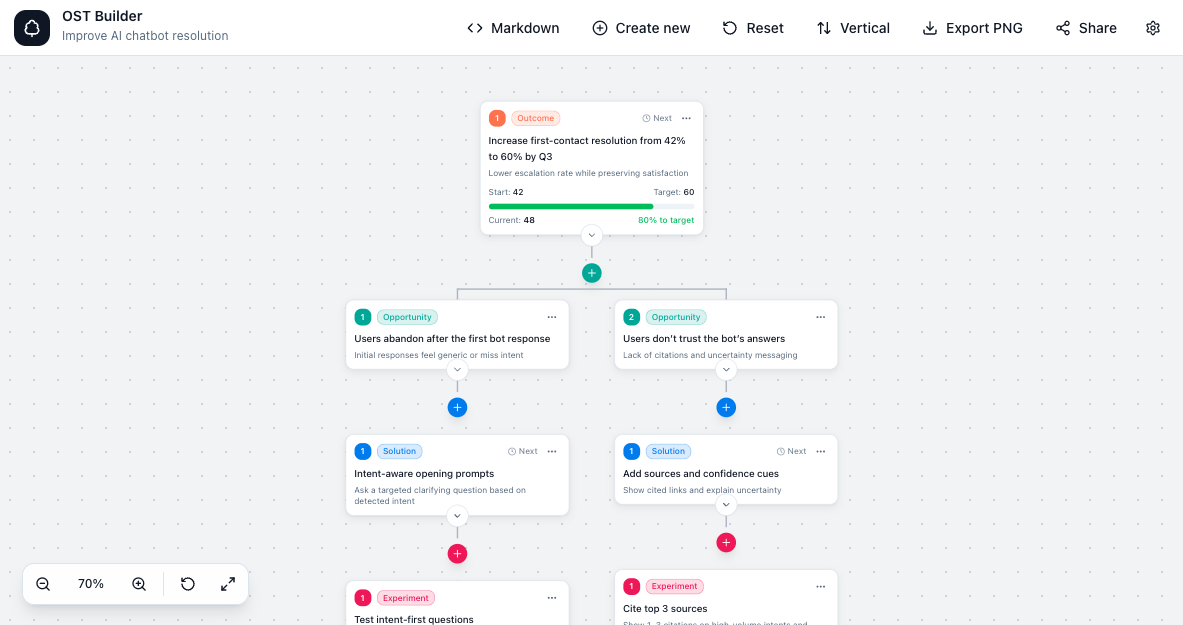
A fast, markdown-first Opportunity Solution Tree (OST) builder for product teams. Write plain Markdown, see a beautiful tree instantly, and share it with a single link.
Demo
Live demo: https://ost-builder.trinixlabs.dev
Features
- Markdown‑first editing with instant tree visualization
- Shareable links (no account required)
- Export to PNG
- Works well with AI assistants & LLMs like Claude and ChatGPT
- Built‑in templates and examples
- Horizontal or vertical layouts
- Compact or full card density
- Privacy - All data is stored only in your browser
CLI
If you are working with your markdown file on your laptop, you can use the CLI to quickly visualise it in your browser or to generate a shareable link. Or convert it to JSON format or print the structured tree locally.
Examples:
- View the Opportunity tree in your browser:
npx ost-builder ./my-tree.md - Generate a shareable link:
npx ost-builder ./my-tree.md --share - Output Opportunity tree as JSON:
npx ost-builder ./my-tree.md --format json --pretty - Output Opportunity tree as Markdown:
npx ost-builder ./my-tree.md --format markdown
Cloud Library examples:
- Login with GitHub:
npx ost-builder auth login github - Check auth session:
npx ost-builder auth status - Browse cloud library (interactive):
npx ost-builder library browse - Upload markdown to library:
npx ost-builder library upload ./my-tree.md - Download by share id/url:
npx ost-builder library download <id-or-url> --out ./downloaded.md - Reuse/create cloud link for an item:
npx ost-builder library share ./my-tree.md --copy - Set access mode:
npx ost-builder library access <id-or-file> --anyone-with-link
Notes:
library uploaddefaults toonly-meaccess unless explicitly overridden.- File-to-cloud mapping is stored in
.ost-library.jsonin your current working directory.
AI Skill for Claude and ChatGPT
If you are using Claude or ChatGPT, you can use the opportunity-solution-tree-builder skill to generate an Opportunity Solution Tree from scratch.
After installing, you can ask things like “Create an Opportunity Solution Tree in Markdown for X,” or “Update my OST headings and status tags.”
Install the skill:
npx skills add https://github.com/thim81/ost-builder/skills --skill opportunity-solution-tree-builderWhy ost-builder for product teams?
Many product managers are familiar with Opportunity Solution Trees through Teresa Torres’ Continuous Discovery Habits, but applying them in practice can still be challenging. While the concept is powerful, working with templates and slides (like Miro or decks) often feels time‑consuming tweaking to make it look good when all you want is a clear, readable OST.
The goal was to have a visual tool, something lightweight and fast, allowing PMs to focus on thinking about the Opportunities & Solutions instead of the formatting.
With OST-builder, you can type Markdown or add Opportunities/Solutions directly, share it with teammates, and call it a day. And because it’s Markdown, it works great with AI assistants & LLMs like Claude or ChatGPT.
This project is open‑source and free — my small way to give back to the PM community. Feedback is very welcome.
Who it’s for
- Product Managers practicing continuous discovery
- Product teams using Opportunity Solution Trees
- Anyone who prefers lightweight, text-first tools over whiteboards
Credits & inspiration
- Teresa Torres — Continuous Discovery Habits
- Hustle Badger — How to build an Opportunity Solution Tree