
outport
v1.3.0
Published
Outport is a versatile library for API testing and documentation, offering a user-friendly interface to define, test, and visualize API endpoints for seamless debugging and collaboration.

Maintainers
 gms.shahzaib
Readme
Outport



A lightweight API documentation and testing library for Express.js. Define, test, and visualize your API endpoints with an interactive UI.
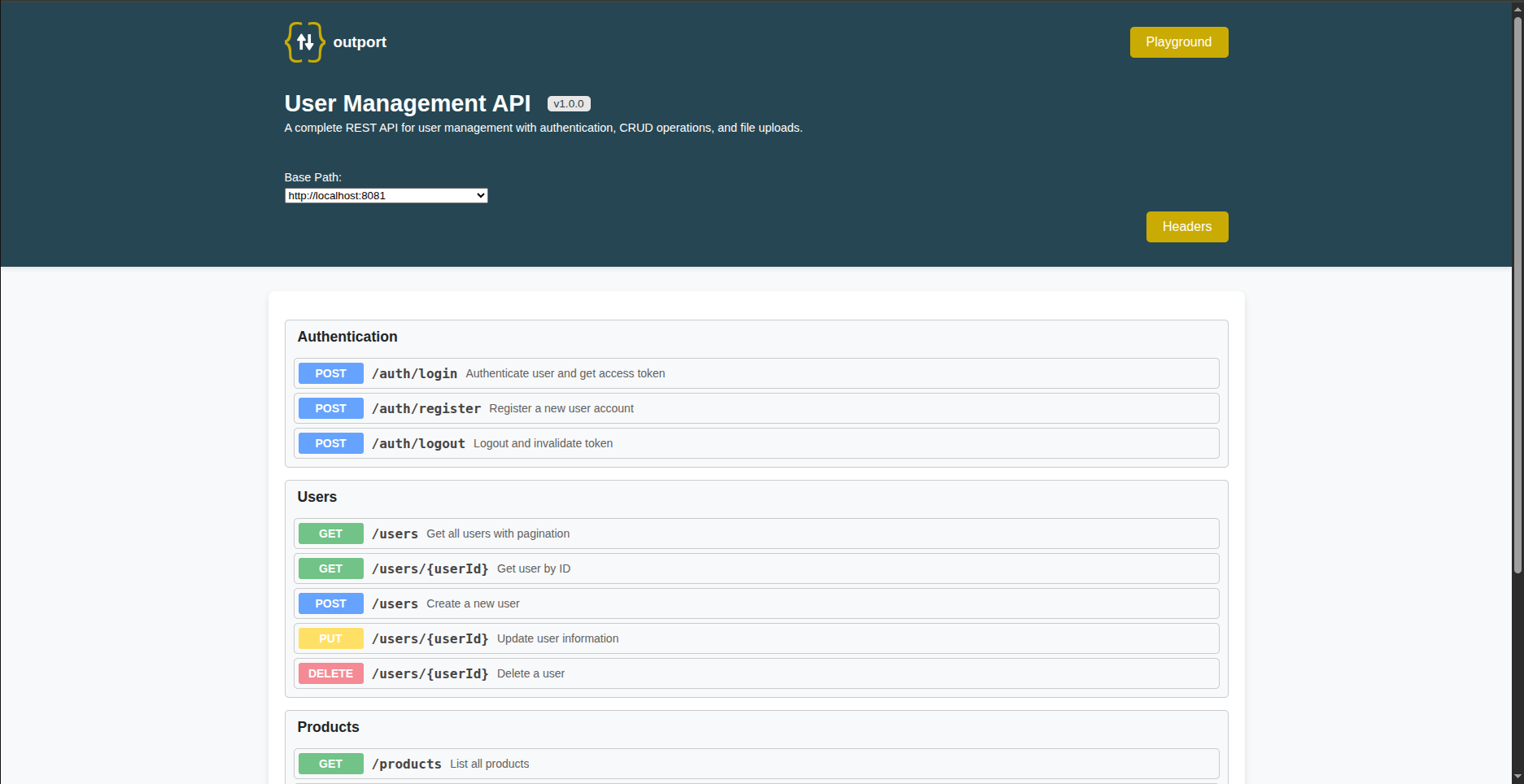
Features
- Interactive API documentation UI
- Built-in API testing (like Postman)
- Playground for custom requests
- Light and dark theme with one-click toggle (follows OS preference by default)
- Path parameters, query params, headers, and body support
- JSON and Form/Multipart body types
- Multiple server environments
- File upload support
- TypeScript support
- Zero configuration required
Installation
npm install outportQuick Start
import express from 'express';
import Outport from 'outport';

const app = express();

const outport = new Outport({
  title: 'My API',
  version: '1.0.0',
  description: 'API documentation powered by Outport',
  servers: ['http://localhost:3000']
});

outport.use('Users', [
  {
    path: '/users',
    method: 'GET',
    summary: 'Get all users'
  }
]);

app.use('/docs', outport.serve());
app.listen(3000);
Open http://localhost:3000/docs to view your documentation.
Configuration Options
Outport Constructor
| Option | Type | Required | Default | Description |
|--------|------|----------|---------|-------------|
| title | string | Yes | - | API documentation title |
| version | string | Yes | - | API version |
| description | string | Yes | - | API description |
| servers | string[] | No | - | List of server URLs |
| headers | Header[] | No | - | Global headers for all endpoints |
| playground | boolean | No | true | Enable/disable playground page |
| timeout | number | No | 60000 | Request timeout in milliseconds (max: 600000) |
Endpoint Options
| Option | Type | Required | Description |
|--------|------|----------|-------------|
| path | string | Yes | Endpoint path (supports {param} syntax) |
| method | string | Yes | GET, POST, PUT, DELETE, PATCH |
| summary | string | Yes | Short description |
| description | string | No | Detailed description |
| headers | Header[] | No | Endpoint-specific headers |
| parameters | Parameter[] | No | Query parameters |
| body | Body | No | Request body configuration |
| responses | Response[] | No | Example responses |
Type Definitions
interface Header {
  key: string;
  value: string;
  description?: string;
}

interface Parameter {
  key: string;
  value: string;
  description?: string;
}

interface Body {
  type: 'json' | 'form';
  data: BodyData[];
}

interface BodyData {
  key: string;
  value?: any;
  description?: string;
  type?: 'text' | 'file';  // For form body only
}

interface Response {
  status: number;
  description: string;
  value?: object | string;
  headers?: Header[];
}
Examples
Path Parameters
outport.use('Users', [
  {
    path: '/users/{userId}',
    method: 'GET',
    summary: 'Get user by ID',
    responses: [
      {
        status: 200,
        description: 'User found',
        value: { id: 1, name: 'John Doe' }
      },
      {
        status: 404,
        description: 'User not found',
        value: { error: 'User not found' }
      }
    ]
  }
]);
Query Parameters
outport.use('Users', [
  {
    path: '/users',
    method: 'GET',
    summary: 'List users with pagination',
    parameters: [
      { key: 'page', value: '1', description: 'Page number' },
      { key: 'limit', value: '10', description: 'Items per page' },
      { key: 'sort', value: 'name', description: 'Sort field' }
    ]
  }
]);
JSON Body
outport.use('Authentication', [
  {
    path: '/login',
    method: 'POST',
    summary: 'User login',
    body: {
      type: 'json',
      data: [
        { key: 'email', value: '[email protected]' },
        { key: 'password', value: 'secret123' }
      ]
    },
    responses: [
      {
        status: 200,
        description: 'Login successful',
        value: {
          token: 'eyJhbGciOiJIUzI1NiIs...',
          user: { id: 1, email: '[email protected]' }
        }
      }
    ]
  }
]);
Form Body with File Upload
outport.use('Files', [
  {
    path: '/upload',
    method: 'POST',
    summary: 'Upload a file',
    body: {
      type: 'form',
      data: [
        { key: 'title', value: 'My Document', type: 'text' },
        { key: 'description', value: 'A sample file', type: 'text' },
        { key: 'file', type: 'file' }
      ]
    },
    responses: [
      {
        status: 200,
        description: 'File uploaded',
        value: { fileId: 'abc123', url: '/files/abc123' }
      }
    ]
  }
]);
Global Headers
const outport = new Outport({
  title: 'My API',
  version: '1.0.0',
  description: 'API with authentication',
  servers: ['http://localhost:3000'],
  headers: [
    {
      key: 'Authorization',
      value: 'Bearer your-token-here',
      description: 'JWT authentication token'
    },
    {
      key: 'X-API-Key',
      value: 'your-api-key',
      description: 'API key for rate limiting'
    }
  ]
});
Multiple Server Environments
const outport = new Outport({
  title: 'My API',
  version: '1.0.0',
  description: 'Multi-environment API',
  servers: [
    'http://localhost:3000',
    'https://staging.api.example.com',
    'https://api.example.com'
  ]
});
Response Headers
outport.use('Files', [
  {
    path: '/download/{fileId}',
    method: 'GET',
    summary: 'Download a file',
    responses: [
      {
        status: 200,
        description: 'File download',
        headers: [
          { key: 'Content-Type', value: 'application/octet-stream' },
          { key: 'Content-Disposition', value: 'attachment; filename="file.pdf"' }
        ]
      }
    ]
  }
]);
Playground
Outport includes a Playground page for testing any API endpoint. Access it at /docs/playground.
Features:
- Custom URL input
- All HTTP methods
- Headers management
- Query parameters
- JSON and Form body
- Response viewer with headers
To disable the playground:
const outport = new Outport({
  // ...
  playground: false
});
CommonJS Usage
const Outport = require('outport').default;

const outport = new Outport({
  title: 'My API',
  version: '1.0.0',
  description: 'CommonJS example'
});
TypeScript Support
Outport is written in TypeScript and includes type definitions. Import types directly:
import Outport, {
  Endpoint,
  Header,
  Parameter,
  BodyData,
  ExampleResponse,
  APIDocumentation
} from 'outport';

const endpoints: Endpoint[] = [
  {
    path: '/users',
    method: 'GET',
    summary: 'Get users'
  }
];

outport.use('Users', endpoints);
Express Integration
import express from 'express';
import Outport from 'outport';

const app = express();

// Your API routes
app.get('/users', (req, res) => {
  res.json([{ id: 1, name: 'John' }]);
});

app.post('/users', (req, res) => {
  res.json({ id: 2, name: req.body.name });
});

// Outport documentation
const outport = new Outport({
  title: 'User API',
  version: '1.0.0',
  description: 'User management endpoints',
  servers: ['http://localhost:3000']
});

outport.use('Users', [
  {
    path: '/users',
    method: 'GET',
    summary: 'Get all users'
  },
  {
    path: '/users',
    method: 'POST',
    summary: 'Create a user',
    body: {
      type: 'json',
      data: [{ key: 'name', value: 'John Doe' }]
    }
  }
]);

app.use('/docs', outport.serve());

app.listen(3000, () => {
  console.log('Server running on http://localhost:3000');
  console.log('Docs available at http://localhost:3000/docs');
});
Peer Dependencies
- Express >= 4.0.0
Contributing
Contributions are welcome! See CONTRIBUTING.md for guidelines.
License
ISC License - see LICENSE for details.