
p-entity
v1.0.0
Published
Simple, Fast & Composable Entity for building business entity

Maintainers
 playman
Readme
about
实体类库,可拓展出具体相关属性和方法的业务实体模型类库
Usage
定义业务的实体模型,在各页面场景就可以通过把存数据转初始化为一个实体实例,直接展示或是响应用户行为进行操作
定义一个实体类
    var AddressEntity = Entity.extend({
        model: {
            "type": "object",
            "properties": {
                "lines": {
                    "type": "array",
                    "items": {"type": "string"}
                },
                "zip": {"type": "string"},
                "city": {"type": "string"},
                "country": {"type": "string"}
            },
            "required": ["country"]
        },
        actions: {}
    });


    var PersonEntity = Entity.extend({
        model: {
            "type": "object",
            "properties": {
                "name": {"type": "string"},
                "address": {"$ref": AddressEntity.model},
                "votes": {"type": "integer", "minimum": 1}
            }
        },
        actions: {
            show: function () {
                console.log('my name :' + this.name)
            }
        },
        events:{
            'xxx':function(){},
            'yyy':function(){}
        }
    });
实例出一个实体对象
    var x = new PersonEntity({
        name:'xiaoming',
        address:{
            country:'china'
        }
    });
    x.name
    x.show()
    x.$emit('xxx')
    x.$once('xxx')
    x.$on('xxx',function(){});
    x.$broadcast('xxx')
    x.$listeners('xxx')   // => [function,function,function]
    x.$model()
API
全局api
Entity.extend拓展出一个业务实体类
class
model获取该实体类的数据模型
选项/数据模型(model)
定义业务实体的数据模型,通过json schema方式清晰表达实体数据的参数,格式,默认值...以及对其他实体数据模型的依赖
选项/行为(actions)
定义业务实体在前端领取常具备的操作行为
选项/生命周期钩子
提供一个实体实例的不同阶段的钩子函数调用
created: 某业务的实体实例已经创立,可以访问属性和调用方法beforeDestory: 在一个实例销毁前调用destoryed: 在实例销毁后调用
实例/属性:
您所定义的业务数据属性
实例/方法
- 您所定义的业务操作方法
$toPlain()实体实例转为存数据$destory()销毁实体实例对象$model()实体类的业务数据模型
实例/事件
$on: em.$on( event, callback )
- 参数:
{String} event{Function} callback
- 用法: 监听当前实例上的自定义事件,事件可以由 em.$emit, em.$broadcast触发。传入这些方法的附加参数都会传入这个方法的回调
- 示例:
       em.$on('test', function (msg) {
         console.log(msg)
       })
       em.$emit('test', 'hi')
       // -> "hi"
- 参数:
$once: em.$once(event,callback)
- 参数:
{String} event{Function} callback
- 用法: 监听一个自定义事件,但是只触发一次,在第一次触发之后删除监听器
- 参数:
$off: em.$off([event,callback])
- 参数:
{String} [event]{Function} [callback]
- 用法:
删除事件监听器
- 如果没有参数,则删除所有的事件监听器
- 如果只提供了事件,则删除这个事件所有的监听器
- 如果同时提供了事件与回调,则只删除这个回调
- 参数:
$emit: em.$emit(event,[...args])
- 参数:
{String} event[...args]
- 用法: 触发当前实例上的事件。附加参数都会传给监听器回调
- 参数:
$broadcast: em.$broadcast(event,[...args])
- 参数:
{String} event[...args]
- 用法: 广播事件,通知给其他实体实例对象
- 参数:
$listeners: em.$listeners(event)
- 参数:
{String} event
- 用法: 返回当前事件的监听器回调函数列表
- 参数:
结构图
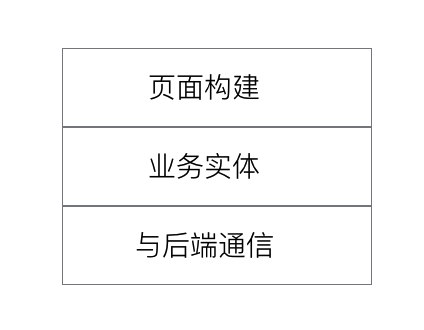
页面构建层(可以选择React,viewbinder,vue,....来构建你的页面,展示实体实例数据以及响应用户行为对实体实例进行操作)
工程
build
tnpm run build
dev
tnpm run dev
demo
tnpm run serve-test => http://localhost:8080/examples