
packston
v1.0.2
Published
The clever package inspector. Interactive dependency mapping and vulnerability scanning for Node, Python, Go, Dart (Flutter), and .NET.

Maintainers
 jens-thirmeyer
Readme
Packston
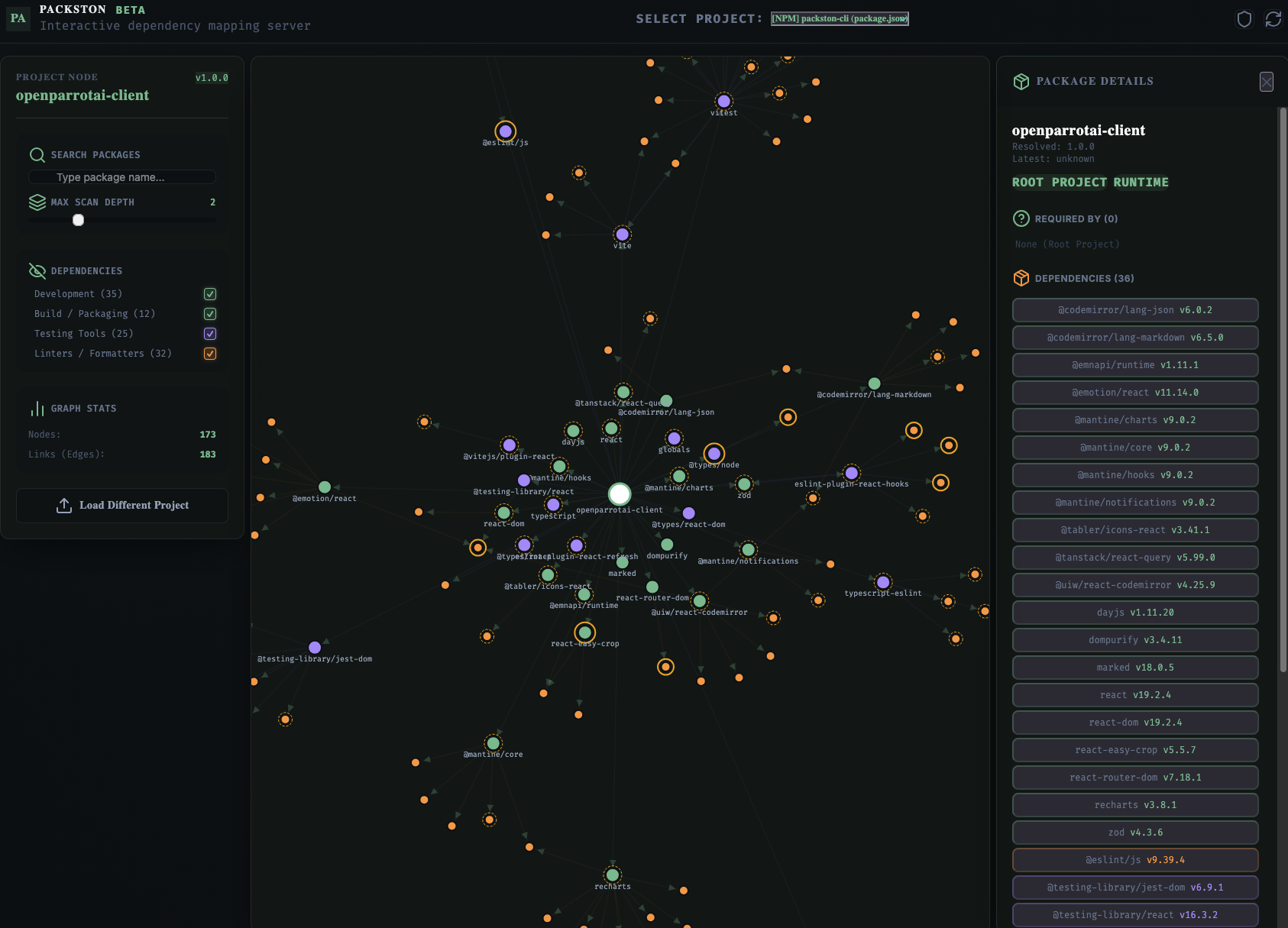
An interactive multi-language dependency network visualizer. It scans your workspaces, automatically detects projects, parses dependency graphs (including direct and transitive links), alerts you to security vulnerabilities, identifies outdated packages, and renders them in an interactive D3.js force-directed graph dashboard.
Preview
Key Features
- 🔍 Automated Workspace Scanning: Recursively scans directories to detect package manifest and lockfiles, ignoring common noise folders (like
node_modules,.git,.venv, anddist). - 📊 Interactive D3 Network Visualization: Explore your dependency tree visually. Trace parent-child paths, drag nodes, filter by search terms, and customize graph depth limits.
- 🛡️ Vulnerability Identification: Displays CVE/vulnerability notices from local tool audits (
npm audit) and enriches manually uploaded graphs dynamically in the browser via the OSV (Open Source Vulnerability) API. - 🔄 Outdated Package Flags: Visually flags outdated dependencies (major, minor, and patch updates).
- 💾 Manual Upload Support: Got a isolated file or working offline? Drag-and-drop package manifests and lockfiles directly into the browser dashboard to visualize them instantly.
Supported Ecosystems & Manifests
Packston identifies and parses package files across several programming languages and ecosystems:
| Ecosystem | Manifest File | Lock File | Local Command Integration |
| :--- | :--- | :--- | :--- |
| Node.js (NPM) | package.json | package-lock.json | npm audit, npm outdated |
| Node.js (Yarn) | package.json | yarn.lock | — |
| Node.js (PNPM) | package.json | pnpm-lock.yaml | — |
| Node.js (Bun) | package.json | bun.lock / bun.lockb | — |
| Go | go.mod | go.sum | go list -m -json all |
| Python (Poetry) | pyproject.toml | poetry.lock | poetry show --json |
| Python (Pip) | requirements.txt | — | pip list --format=json |
| .NET (C#) | *.csproj | packages.lock.json | — |
| Dart / Flutter (Pub) | pubspec.yaml | pubspec.lock | flutter/dart pub outdated, flutter/dart pub deps |
Analysis Data Sources
To construct a comprehensive visualization, the tool processes data from three levels:
- Static AST & File Parsing: The CLI directly parses JSON, TOML, YAML, and XML files (and parses
.dart_tool/package_config.jsonfor Pub packages) to build the core node-link network for direct and transitive dependencies. This does not require having the ecosystem runtime installed on your machine. - Local CLI Integrations (Optional): If you run the tool on a machine where the respective package manager commands are configured, the CLI executes local commands (e.g.
npm audit,go list) in the project directories to extract real-time security warnings and outdated version configurations. - Dynamic Browser-Side Enrichment: If local tooling is unavailable or you manually upload a file to the browser, the web UI queries public registries and the OSV API directly from your browser to pull vulnerabilities and latest package versions.
Architecture Overview
The project is structured as an npm workspaces monorepo:
- cli/: Command-Line Interface and API backend. Parses projects, executes audits, and spins up a local Express server.
- frontend/: Client application built with React, Vite, Tailwind-free custom CSS, and D3.js.
The components communicate as follows:
graph TD
    subgraph CLI [CLI Server Runtime]
        A[Commander CLI] --> B[Workspace Scanner]
        B --> C[Unified Parser]
        C --> D[Express API Server]
        E[Local Tools: npm audit, go list, pip, poetry] -.-> D
    end
    subgraph Browser [Browser / UI Dashboard]
        D -->|Serves Static Assets| F[React Frontend App]
        F -->|Fetches /api/projects & /api/graph| D
        F -->|Renders D3.js Network| G[Force-Directed Graph]
        F -->|Queries OSV & Registries| H[OSV API / Public Registries]
        I[Manual Upload Zone] -->|File Upload| F
    end
Getting Started
Prerequisites
- Node.js (v22.12.0 or higher)
- npm (v9.0.0 or higher)
Run via NPX (Quick Start)
You can run the packston on any target workspace directly using npx:
npx packston [path-to-target-directory]By default, this spins up the backend and visualizer dashboard on http://localhost:3000.
Local Installation
Alternatively, clone the repository and install the CLI globally:
# Clone the repository
git clone https://github.com/your-username/packston.git
cd packston

# Install dependencies and build project
npm install
npm run build

# Install CLI globally
npm install -g ./cli

# Run analyzer
packston [path-to-target-directory]
CLI Command Options
packston [directory] [options]

Arguments:
  directory              Target directory to analyze (default: ".")

Options:
  -p, --port <number>    Port to run the server on (default: 3000)
  -h, --help             display help for command
Developer / Contributor Guide
If you want to run the project in development mode:
Workspace Commands
Work from the root directory using the following workspace scripts:
| Command | Action |
| :--- | :--- |
| npm run build | Builds both the frontend assets (writes to cli/dist/public) and the CLI TypeScript code. Production CLI serving expects these frontend assets to exist. |
| npm run dev:frontend | Starts the Vite dev server for frontend on http://localhost:5173 with Hot Module Replacement (HMR). Proxies /api requests to backend on port 3000. |
| npm run dev:cli | Runs the CLI backend directly from TS files using ts-node. |
| npm run build:frontend | Builds only the React frontend code. |
| npm run build:cli| Builds only the CLI backend code. |
| npm start | Launches the production-compiled CLI Express server. |
Development Workflow
- Start the CLI backend:
npm run dev:cli -- [path-to-analyze-directory] - In a separate terminal, start the frontend developer server:
npm run dev:frontend - Open
http://localhost:3000in your browser. Any changes to the UI will live-reload instantly!