
pair-mode
v0.4.0
Published
Annotate a coding agent's proposed edits line by line, in your terminal.

Maintainers
 ofrusch
Readme
pair-mode is a tool that allows you to sit somewhere between being an approval monkey for your agent running in manual mode and just totally vibe coding in auto mode.
If you've ever found yourself wanting to pay attention to the code that your agent of choice is generating and (god forbid) suggest changes, I'm sure you've run into: "oh no, I clicked 'reject' and now the proposed diff is gone - what did I want to suggest again?"
pair-mode attempts to solve this.
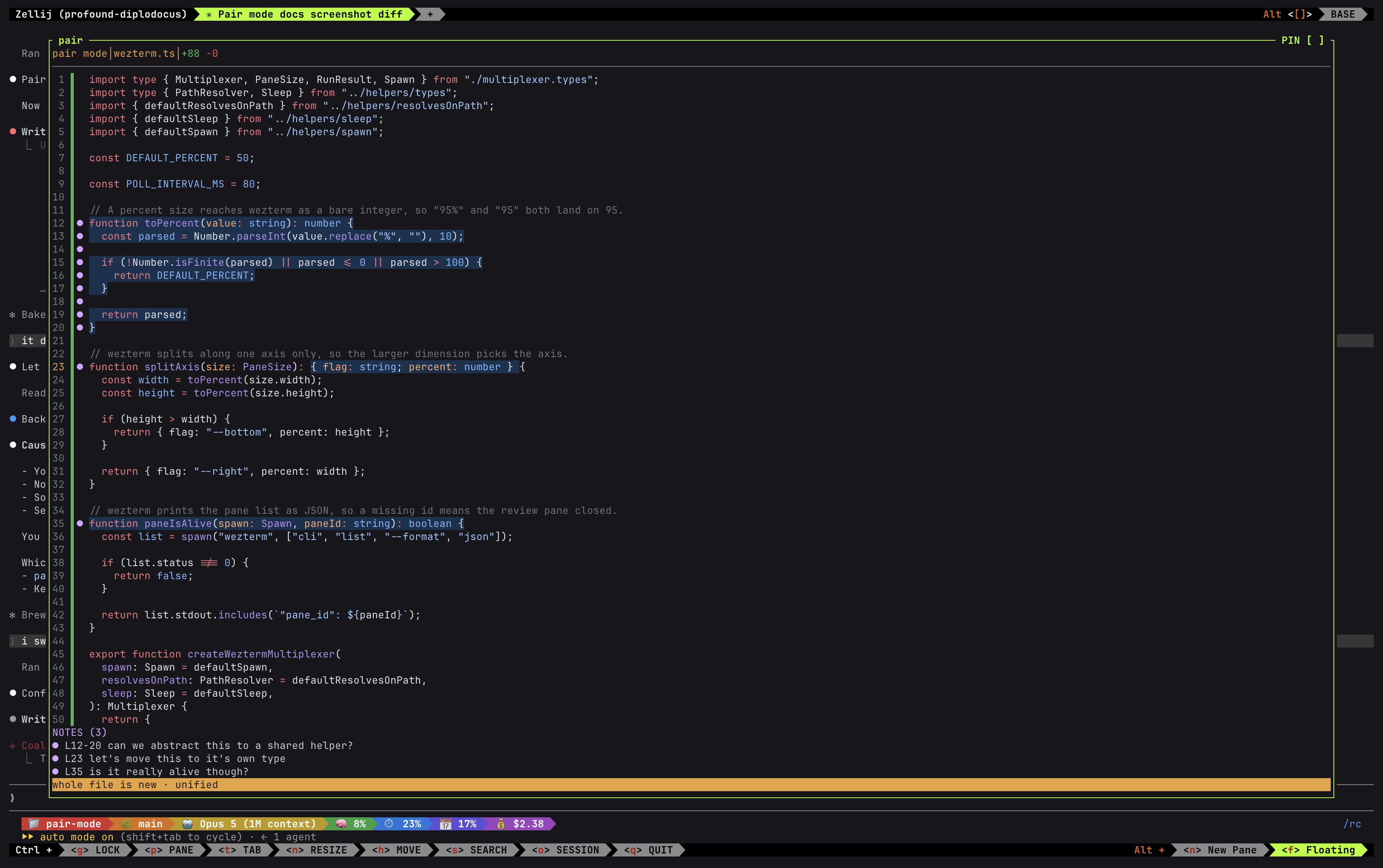
When enabled, your agent will push diffs to your editing interface of choice (your choices are currently: in a separate terminal tab/pane, multiplexer sub-pane or web - sorry if your interface of choice is not actually here (yet)). From there you can go line by line over the diff and add comments, suggestions, chidings, deranged ramblings, etc. Your agent will receive your thoughts and proceed accordingly.
Install
Pick one of two paths. A plugin covers one CLI and needs no setup step. The npm install
covers every CLI on your machine and gives you the pair-mode command.
As a plugin
A plugin resolves its own path at runtime, so it needs no global install and no setup step.
Claude Code:
/plugin marketplace add oFrusch/pair-mode
/plugin install pair-mode@pair-mode
Codex:
codex plugin marketplace add oFrusch/pair-mode
codex plugin add pair-mode@pair-mode
The plugin registers the hook and the pair command for that one CLI. Add the npm install
below if you also want pair-mode watch or pair-mode config, because both need the
pair-mode command on your PATH.
From npm
npm install -g pair-mode
pair-mode setup
Install pair-mode globally before you run setup. Setup writes the install path into each CLI's config as an absolute path. npx pair-mode setup runs from a package cache that npm later prunes, which would leave every hook pointing at a deleted file. Setup detects that case and stops.
The setup command detects the CLIs and multiplexers on your machine, registers the required hooks, and writes a config file.
Supported CLIs
| CLI | Hook | Status |
| ----------- | ------------------------------------------------ | ------------------------------------------- |
| Claude Code | PreToolUse, matcher Write\|Edit\|MultiEdit | Should work. |
| Codex | PreToolUse, matcher apply_patch\|Edit\|Write | Should work. |
| pi | tool_call extension hook | Will maybe work. Probably not. Coming soon. |
| opencode | tool.execute.before plugin hook | Will maybe work. Probably not. Coming soon. |
The /pair command
pair-mode setup installs a /pair ($pair for Codex) command for every CLI whose hook it registers. The command toggles pair mode for the current directory. It also tells the agent how a held edit comes back.
| CLI | Installed at | Invoked as |
| ----------- | ------------------------------- | ----------------------- |
| Claude Code | ~/.claude/commands/pair.md | /pair on, /pair off |
| Codex | ~/.codex/skills/pair/SKILL.md | $pair on, $pair off |
The command runs a bare pair-mode, unlike a hook, which each CLI invokes by absolute
path. So pair-mode must resolve on your PATH. A global install puts it there.
Editors
This is what will render your diff if you choose to use one of the CLI-based approaches. We ship the pair editor, which has good syntax highlight and mouse highlighting support. This makes the annotation process a bit easier. But we also support most popular terminal-based editors.
| Editor | Diff colour | Syntax colour on changed rows |
| -------------- | ----------- | -------------------------------------------------------------------------------------------------------------------------------------------------------------------------------------------------------------------------------- |
| pair (default) | Yes | Yes. pair is the built-in review pane, so it paints syntax colour and change colour on the same row. It also reads mouse clicks and drags for selection, and it anchors a note to the exact span you select, not the whole line. |
| micro | Yes | No. micro paints one highlight group per character, so a changed row trades syntax colour for the diff band. |
| vim | Yes | Yes. matchadd() overlays the diff highlight on top of syntax, so a changed row keeps both. |
| nvim | Yes | Yes. Same matchadd() overlay as vim. |
| nano | Yes | No. nano has no syntax engine here, so a changed row gets the diff band only. |
Pair mode names the language from the extension first, then the exact filename, then the
shebang on the first line. So Gemfile, Dockerfile, Makefile, and an extensionless
script all get colour. A brand new file has nothing on disk yet, so its first review reads
no shebang.
The pair pane and the web view colour every language Shiki bundles. micro colours the 54 languages that ship a syntax asset.
Keys:
- pair: see Keymap below.
- micro: Ctrl+W or F2 sends your annotations and closes the editor. F3 moves between panes.
- vim and nvim:
:wqasends your annotations and closes the editor.
Keymap
These keys work inside the pair review pane. Some have a mouse equivalent; the rest are keyboard only.
| Key | Mouse equivalent | Action |
| ------------------ | ---------------- | ------------------------------------------------------------------------------------------------------------------ |
| j k ↓ ↑ | — | Move the row cursor. A fold moves as one row. |
| Ctrl+d Ctrl+u | — | Page down and page up. |
| n N | — | Jump to the next and the previous changed run. |
| v, then a motion | click and drag | Select a span. |
| a | — | Open a note on the current selection, or on the current row if nothing is selected. |
| Enter | — | Save the note. |
| Esc | — | Discard the note draft, or clear the current selection. |
| Tab | — | Cycle the focused note. |
| d | — | Delete the focused note. |
| Space | click a fold | Expand or collapse a fold row. |
| u | — | Swap between the split layout and the unified layout. |
| Ctrl+s | — | Send the notes. The hook denies the edit. |
| Ctrl+q Ctrl+c | — | Quit. With no notes, the edit applies. With notes pending, asks: s sends, d discards and quits, Esc cancels. |
| ? | — | Toggle the keymap overlay. |
Multiplexers
If you want to do all your development in one terminal pane while using either Claude Code or Codex, you'll need to use a multiplexer (I use zellij but tmux works great as well). Both harnesses run their hooks with no controlling terminal. A multiplexer allows us to open up the agent's diff in a floating sub-pane.
Session modes
Session mode moves the review out of the agent's process. The hook posts to a Unix socket and waits. A client you start (another terminal tab or the web view) renders the review and allows you to provide your annotations.
One socket per agent session
pair-mode on inside an agent session reads that session's id, turns pair mode on for that
session alone, and prints the session id. It mints no socket. Run pair-mode watch <id>
with the id it printed, and that watcher mints the socket. Another session in the same
checkout gets its own socket and never sees the first session's diffs.
pair-mode on <dir> from a plain terminal keeps the old behaviour. It writes a directory
flag, and its socket catches every session that has no socket of its own.
A bare pair-mode off inside a session turns pair mode off for that session only. It never
clears a directory flag, so it never silences another session. pair-mode off <dir> names
its target and clears the directory flag.
Finding a session
pair-mode sessionsThat prints every live session with its id, its label, how many watchers are attached, and how many reviews are queued. It also removes any socket whose watcher has died.
pair-mode connectThat opens the same list, interactive. j, k, and the arrow keys move the cursor. Enter
watches the session under the cursor. q quits.
pair-mode watch <id> attaches directly when you already know the id. It mints the socket
when nothing owns it yet, which is how a session first gets a watcher. An id that is not
s- followed by eight hex characters is rejected as a typo.
A session flag outlives the agent that wrote it. pair-mode sessions removes a session flag
and a session opt-out once the session has had no socket for fourteen days, and it says how
many it removed.
Several watchers can watch one session at once, in a terminal or in a browser. The first one to watch a session owns its socket. Every later one attaches to that socket as a viewer. Each attached client receives every diff, and the first answer wins. The others see the review withdraw. A browser tab therefore joins a session a terminal pane already owns, and closing the tab leaves that pane serving.
Session mode config
Set transport to "session", then pick a client.
pair-mode config transport sessionpair-mode configwith no argument prints every setting and its value.pair-mode config <key>prints one.pair-mode config <key> <value>changes one and validates it before it writes.
Watch mode reviews in a terminal you own.
pair-mode watch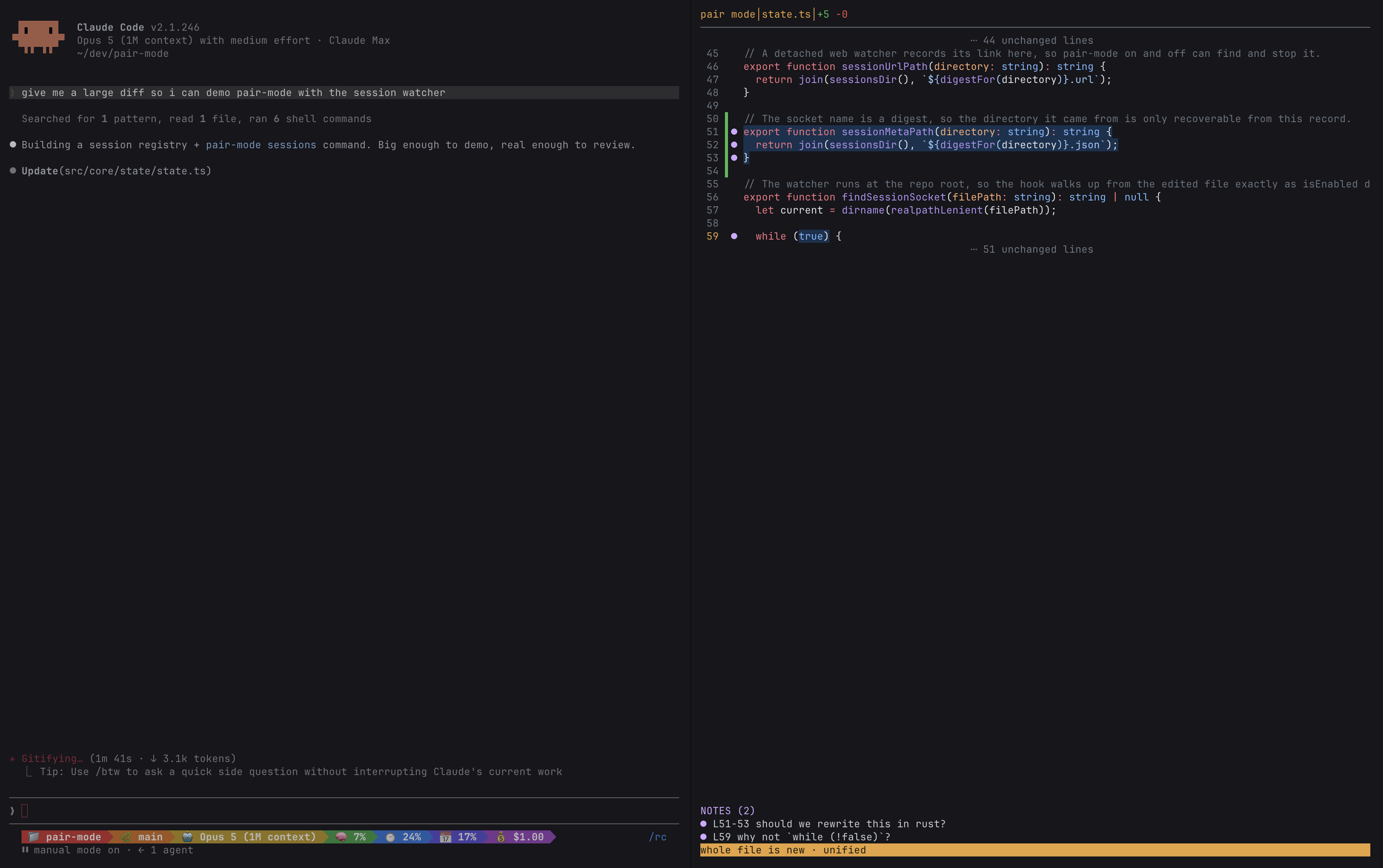
Run this command in the directory or any subdirectory of where you are working with your agent. The diffs your agent suggests will be pushed to the running Unix socket and rendered wherever this command was run. You can then mark up the diffs as you please and send them back to your agent.
q on the idle screen quits and releases the socket.
Web mode reviews in a browser and needs no terminal at all.
pair-mode on --web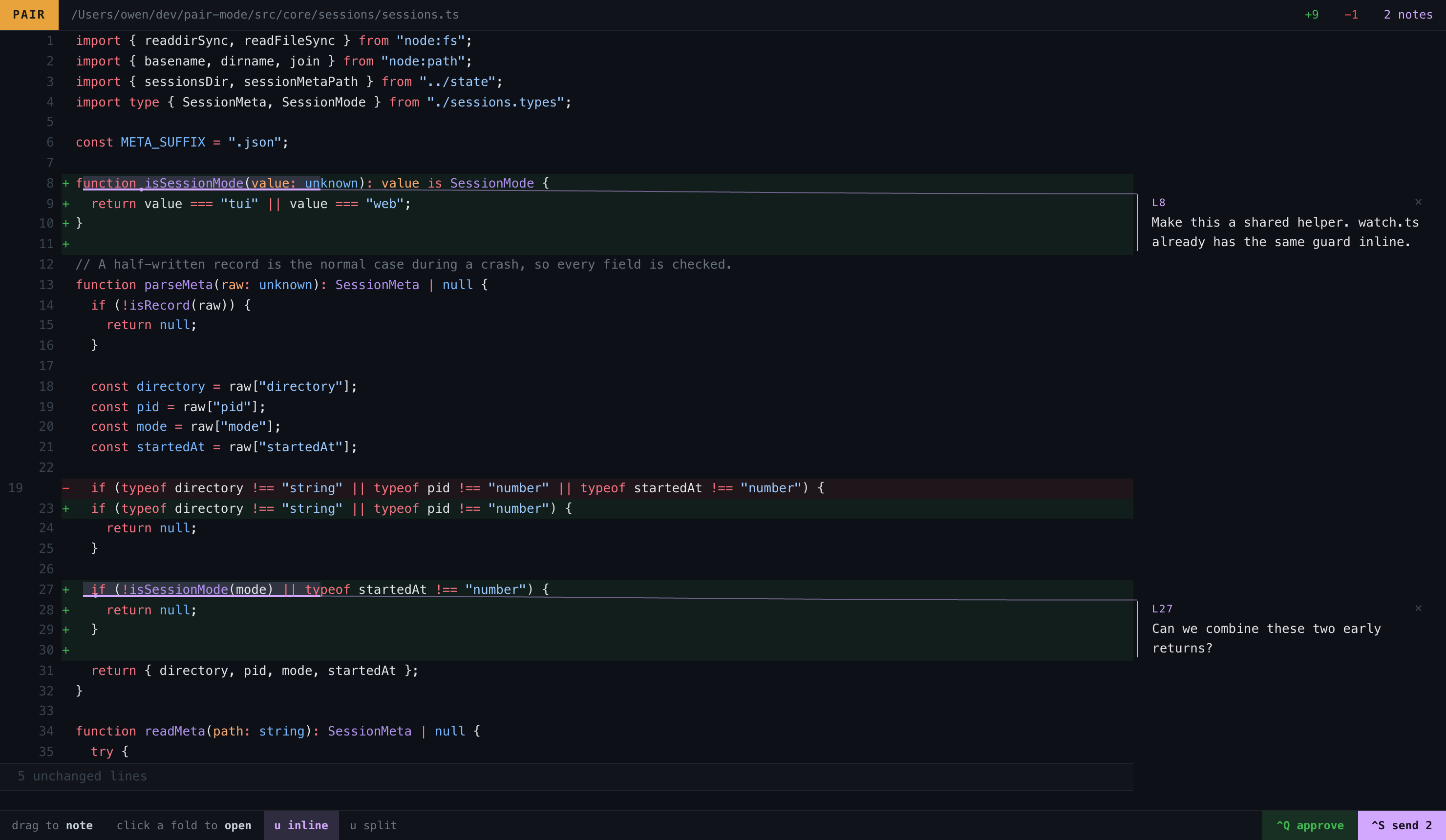
That spawns a detached watcher, binds an HTTP server on 127.0.0.1, and prints a link carrying a random token. Drag across any text in the diff. A popup opens under the selection. Type the note and press Enter.
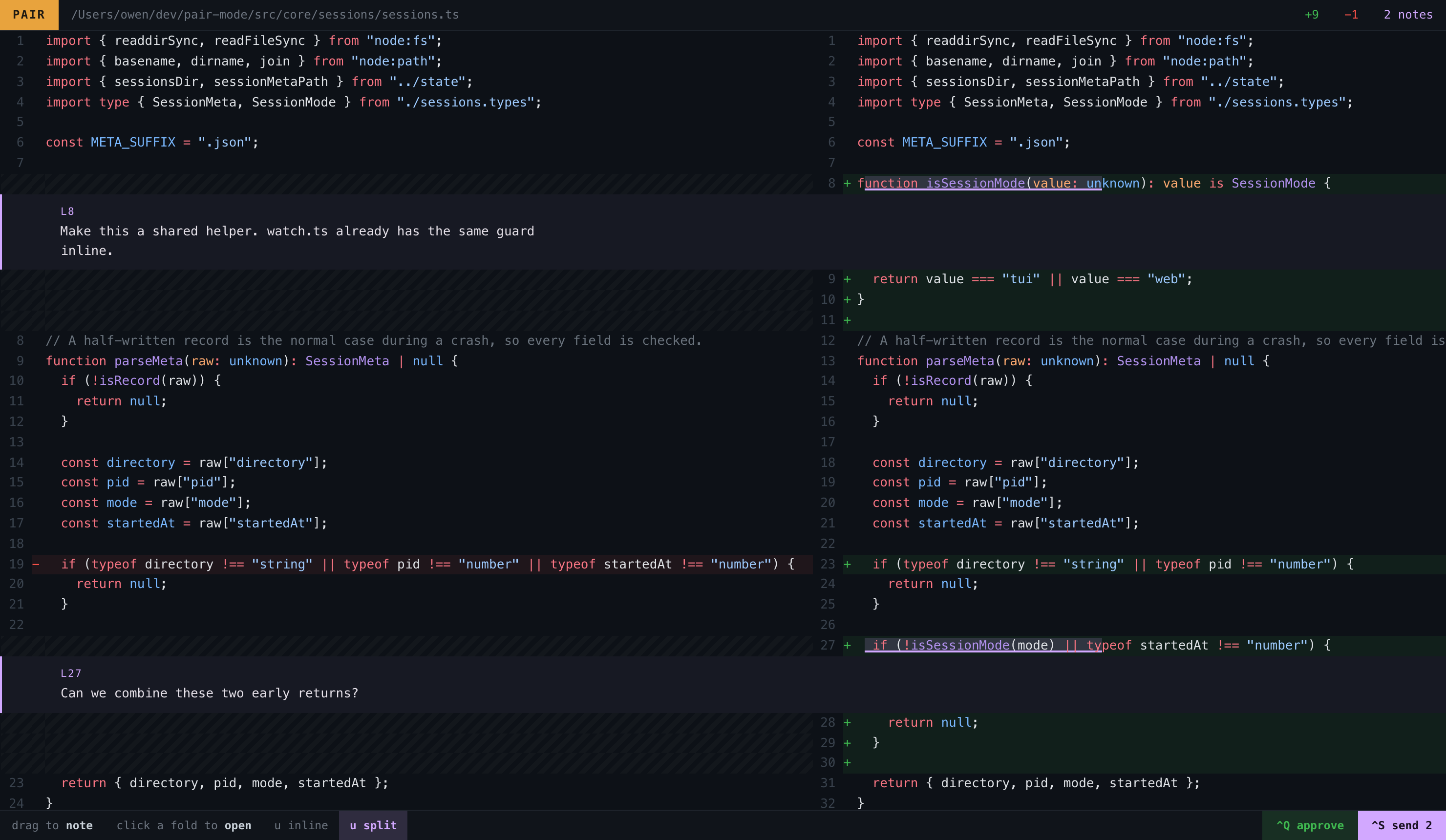
The page opens in the layout your layout setting names, and u swaps it while you read. The inline layout puts every note in the right margin and draws a leader from the marked run to the card. The split layout threads each note under the last line it covers, and it hatches the side of a row that has no line.
Configuration
Run pair-mode setup when first installing and that should get you most of the way there in terms of pair mode working for your setup. Regardless, all configuration options and their accepted values are listed below.
Pair mode reads $XDG_CONFIG_HOME/pair-mode/config.json, or ~/.config/pair-mode/config.json when XDG_CONFIG_HOME is not set.
| Key | Type | Default | Meaning |
| ----------------- | --------------------------------------------------------------------------------------- | ----------- | ---------------------------------------------------------------- |
| editor | "auto" \| "pair" \| "micro" \| "nvim" \| "vim" \| "nano", or an array of editor names | "auto" | Which editor opens the review pane. |
| multiplexer | "auto" \| "zellij" \| "tmux" \| "none" | "auto" | Which multiplexer hosts the pane. |
| transport | "pane" \| "session" | "pane" | Open a pane per edit, or post to a watcher you started. |
| session.timeout | integer, 1 or more | 300 | Seconds a hook waits for a verdict before it applies the edit. |
| web.enabled | boolean | false | Serve the review in a browser whenever a watcher starts. |
| web.port | integer, 0 to 65535 | 0 | 0 asks the operating system for a free port. |
| layout | "split" \| "inline" | "split" | Side-by-side columns, or one column. |
| notes | "panel" \| "anchored" | "panel" | A docked notes panel, or a note inline at its anchor. |
| context | integer, 1 or more | 5 | Unchanged lines kept around a change before folding. |
| minFold | integer, 1 or more | 4 | Minimum run of unchanged lines that folds. |
| pane.width | string | "95%" | |
| pane.height | string | "95%" | |
| theme.add | 6-digit hex colour | "#1e3a1e" | |
| theme.del | 6-digit hex colour | "#3a1e1e" | |
| theme.fold | 6-digit hex colour | "#2a2a2a" | |
| theme.rowBand | boolean | true | Paint the whole changed row, not just the changed span, in pair. |
| syntax | boolean | true | Load Shiki for syntax colour in pair. |
| trace | boolean | false | |
| autoApprove | boolean | true | |
An editor array lists editor names in order of preference. Pair mode tries each in
turn and uses the first one it finds on the machine. auto tries pair first, so an
existing config with no editor key now opens pair mode's own pane by default.
notes and layout both describe position, and they are easy to confuse. layout
controls the diff itself — split into two columns, or one inline column. notes
controls only where a note you write renders in the pair pane — in a docked panel, or
anchored next to the span it annotates. Setting one does not affect the other. The web
view anchors every note, so it reads layout and ignores notes.
License
MIT. See LICENSE.