
pan-wizard
v3.34.0
Published
Command a bot army for your codebase: a reasoning-tier Mission Control delegates whole-project goals to specialist squads and ships behind a human merge gate. Five AI CLIs, zero context rot.

Maintainers
 oharms
Readme
PanWizard
Command a bot army for your codebase — a Mission Control agent delegates whole-project goals to specialist squads and ships behind a human merge gate (the army is built for Claude Code; the planning pipeline runs on all five CLIs). Five AI CLIs, zero context rot.
Solves context rot — the quality degradation that happens as the model fills its context window.



npx pan-wizard@latestWorks on Mac, Windows, and Linux.
How It Works · Commands · Why It Works · User Guide · FAQ
What is PAN Wizard?
PAN (Project Automation Navigator) is a structured workflow system that helps you build software projects with AI coding assistants. The complexity is in the system, not in your workflow. Behind the scenes: context engineering, XML prompt formatting, subagent orchestration, state management. What you see: a few commands that just work.
The system gives Claude everything it needs to do the work and verify it. Describe your idea, let the system extract everything it needs to know, and let Claude Code get to work.
PAN is the context engineering layer that makes Claude Code reliable. It breaks work into phases that fit within context limits, provides specialized agents with exactly the context they need, and maintains state across sessions.
Architecture
┌─────────────────────────────────────────────────────────────┐
│  YOU                                                        │
│  /pan:new-project → /pan:plan-phase → /pan:exec-phase       │
└─────────────────────┬───────────────────────────────────────┘
                      │ invokes
┌─────────────────────▼───────────────────────────────────────┐
│  COMMANDS (.md files + CLI operations)                      │
│  Thin orchestrators that spawn agents and route results     │
└─────────────────────┬───────────────────────────────────────┘
                      │ spawns
┌─────────────────────▼───────────────────────────────────────┐
│  AGENTS (specialized)                                       │
│  planner · executor · verifier · researcher · debugger ...  │
│  Each in its own context (native on Claude Code)            │
└─────────────────────┬───────────────────────────────────────┘
                      │ uses
┌─────────────────────▼───────────────────────────────────────┐
│  CORE LIBRARY (pan-wizard-core/)                            │
│  config · state · init · verify · commit · phase · roadmap  │
│  Cross-platform CLI tools, zero runtime dependencies        │
└─────────────────────┬───────────────────────────────────────┘
                      │ reads/writes
┌─────────────────────▼───────────────────────────────────────┐
│  .planning/                                                 │
│  project.md · roadmap.md · state.md · PLAN files            │
│  Persistent state that survives context resets              │
└─────────────────────────────────────────────────────────────┘
Bot Army
Don't run one phase — run the whole project.
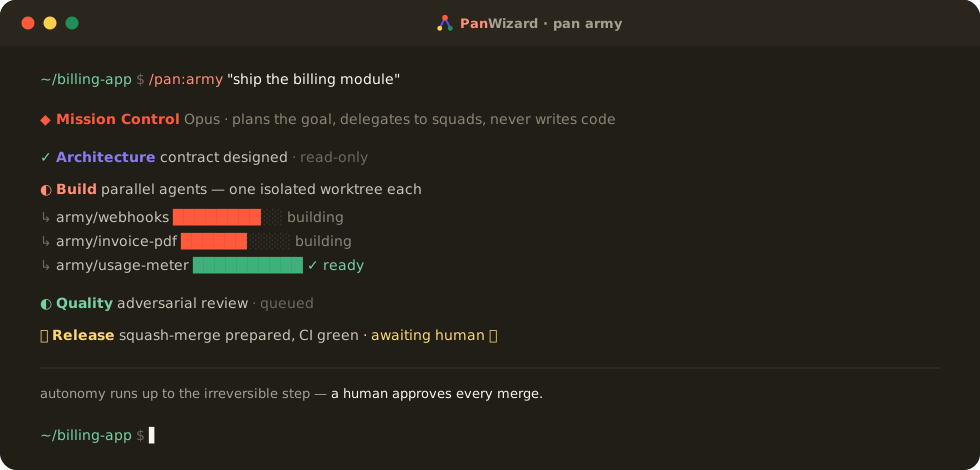
/pan:army(built and tested on Claude Code, which has native sub-agent spawning; the command installs on every runtime, but nothing gates it elsewhere and it is untested there — use the flat pipeline on the other runtimes) turns PAN's agents into a coordinated army that delivers a goal end-to-end: a Mission Control agent plans the mission and delegates to specialist squads, parallel builders each work an isolated git worktree, and the Release squad stops at your explicit approval instead of merging. On the MCP path that gate is enforced in code; on/pan:armyit is the squads' instructions, so pair it with branch protection to make green checks a rule your repository enforces.
| Tier | Squad | Does | Access |
|------|-------|------|--------|
| 0 · Mission Control | pan-conductor | Plans + delegates; instructed to hand implementation to a squad | delegation-first |
| 1 · Architecture | roadmapper · planner · researchers · … | Designs the contract before code | read-only |
| 1 · Build | pan-executor | Turns the contract into committed code | read-write-bash · one army/<task> worktree per agent |
| 1 · Quality | reviewer · hardener · verifier · … | Adversarially tries to break it | read-only |
| 1 · Release | pan-release | Ships behind a human gate | always-ask |
| 2 · Workers | the utility agents pan-tools squad list reports under workers | Narrow, high-volume jobs | scoped |
Mission Control runs on your session's model — pan-conductor declares no model: and no spawn passes one, so it inherits whatever you launched with under every profile (resolve-model reports the budget profile's mid tier for it, but nothing applies that).
Reading the Access column. The backticked values are the squad access labels pan-tools squad list reports; the tier-0 and tier-2 labels are PAN's own. Either way they describe the role contract PAN's prompts assign, not a sandbox — squads.cjs "modifies no agent and changes no execution path", so a label can differ from what an agent may actually do. The real tool grant is each agent's own tools: frontmatter (grep '^tools:' agents/*.md), and Mission Control's includes Write and Bash. The rail those grants do enforce is delegation depth: grep -l '^tools:.*Task' agents/*.md names every agent able to spawn another (today, the coordinator), so a squad agent cannot fan out further even if asked to. For the irreversible steps, back the convention with branch protection on your own repo.
The loop: Muster → Plan → Delegate → Execute → Review → Integrate → Learn ↺ — repeating until the goal ships or a stop condition fires.
Bounded by a hard safety harness:
- A human merges. The Release squad prepares a squash-merge and surfaces an
always-askapproval instead of merging; pair it with branch protection on your repo, which is what makes that unbypassable rather than merely instructed. Recovery isgit revertor the previous tag, never a force-push. - Isolated builders. Each Build agent forks its own
army/<task>branch + git worktree, so parallel agents never share a file. - Caps. Delegation-depth cap, per-cycle spawn + budget ceilings, and a
.planning/orchestration/abortkill-switch, re-checked before every spawn by Mission Control's protocol (prompt-enforced; the MCPpan_next_actionpath enforces the cycle cap, the budget cap whencaps.enforceBudgetis set, anabortedflag the caller sets (it does not read the abort file) and the human gate in code — delegation depth is bounded by which agents hold theTasktool) — the same harness as hierarchical exec, at campaign scale.
Run it over days. --schedule arms a resumable campaign with a per-day budget that burns the backlog down across sessions (the per-day budget is advisory unless the schedule is armed with --enforce-budget, which pauses the day's run once spent — campaign status shows the day's spend — and an external scheduler triggers each --continue) — and still waits for you at every merge. Autonomy runs up to the irreversible step; a human is at the step.
See it. /pan:hud renders a single self-contained HTML snapshot — Mission Control over the squads, in-flight worktrees, campaign budget, telemetry, and the safety harness — in one page. The page does not refresh itself; re-run the command for a fresh one.
/pan:army "ship the v1 reporting module"     # plan → delegate → build → review → human-gated ship
/pan:army "harden auth across the app" --schedule daily --daily-budget 200
/pan:army --status        # where the campaign stands
/pan:hud --open           # snapshot of the army's current state
Resolve the live squad roster any time with pan-tools squad list (pan-tools is shorthand; see Operations for how to run it).
Who This Is For
People who want to describe what they want and have it built correctly — without managing complex project management overhead.
Getting Started
npx pan-wizard@latestThe installer prompts you to choose the runtime — Claude Code, OpenCode, Gemini, Codex, Copilot CLI, or all. Location is not prompted: it defaults to the current project (--local). To install into your home config directory instead, pass --global with a runtime flag, such as --claude --global. --global alone skips the runtime prompt and installs Claude Code.
Verify with:
- Claude Code / Gemini:
/pan:help - OpenCode / Copilot CLI:
/pan-help - Codex:
$pan-help
[!NOTE] Codex and Copilot CLI installations use skills rather than custom prompts. Codex uses the shared
.agents/skills/pan-*/SKILL.mdtree; Copilot CLI usesskills/pan-*/SKILL.mdunder.github(local) or~/.copilot(global).
Staying Updated
PAN evolves fast. Update periodically with /pan:update, which reads from the install's own path whether it is local or global and which runtime it belongs to, and reinstalls that runtime. For an install made with --config-dir or --unified-skills, which it cannot tell from the path, re-run the installer yourself with the flags you installed with (add --global for a global install, since the installer defaults to the current project):
npx pan-wizard@latest# Claude Code
npx pan-wizard --claude --global # Install to ~/.claude/
npx pan-wizard --claude --local # Install to ./.claude/
# OpenCode (open source, free models)
npx pan-wizard --opencode --global # Install to ~/.config/opencode/
# Gemini CLI (enterprise — see note below)
npx pan-wizard --gemini --global # Install to ~/.gemini/
# Codex (skills-first)
npx pan-wizard --codex --global # Skills to ~/.agents/skills/, core, agents and hooks to ~/.codex/
npx pan-wizard --codex --local # Skills to ./.agents/skills/, core, agents and hooks to ./.codex/
# GitHub Copilot CLI (skills-first)
npx pan-wizard --copilot --global # Install to ~/.copilot/
npx pan-wizard --copilot --local # Install to ./.github/
# All runtimes
npx pan-wizard --all --global # Install to all directoriesUse --global (-g) to install into your home config directory; --local (-l) is the default and may be omitted.
Use --claude, --opencode, --gemini, --codex, --copilot, or --all to skip the runtime prompt. A local install also writes outside the runtime directory: a marker-fenced PAN section in the project's AGENTS.md; for Claude Code, a marker-fenced block in CLAUDE.md (the @AGENTS.md import, and compact instructions that keep PAN's position through compaction) and a pan MCP server in .mcp.json; and for Codex or --unified-skills, the shared .agents/ tree (skills, plus a shared core under --unified-skills). --uninstall removes them (the AGENTS.md and CLAUDE.md blocks and the .agents/ tree stay while another PAN runtime in the project still uses them).
Add --unified-skills to install commands as one shared .agents/skills/ tree instead of per-runtime formats. Codex, Gemini CLI, OpenCode, Copilot CLI and Antigravity CLI read that tree; Claude Code does not, so for Claude the installer also copies each skill into .claude/skills/ and the commands become /pan-<name>. Gemini CLI gives skills no slash command, so on a unified Gemini install you ask for the task and /skills list shows what loaded. See the User Guide for details.
Gemini CLI note: from June 18, 2026, Google's Gemini CLI serves Gemini Code Assist (Standard/Enterprise) customers; individual free / AI Pro / Ultra accounts are directed to Antigravity CLI instead. PAN's
--geminitarget installs for Gemini CLI. Antigravity CLI is not yet a PAN install target, but it reads the shared.agents/skills/tree natively — install with--unified-skillsand PAN's commands are usable from Antigravity in the same project.
Clone the repository, then run the installer from a separate project
directory. The installer hard-refuses to install into its own source repo (a
PAN_SOURCE_ROOT guard exits with an error), so point it at a different target:
# 1. Get the source and build the hooks (hooks/dist/ is build output a clone lacks;
#    the installer copies the hooks from there)
git clone https://github.com/oharms/PanWizard.git
cd PanWizard && npm run build:hooks

# 2. Install into a DIFFERENT project directory (never the PanWizard source dir)
cd /path/to/some-test-project
node /path/to/PanWizard/bin/install.js --claude --local
Installs to the test project's ./.claude/ so you can try local modifications
before contributing.
Run the test suite from inside the cloned source repo:
cd /path/to/PanWizard
npm test                # Unit tests
npm run test:scenarios  # Scenario tests
npm run test:all        # All tests (unit + scenario)
PAN-Z is an experimental, separate subsystem that brings the PAN workflow to ZCode, z.ai's GLM coding-agent harness. ZCode has no slash-commands or hooks to host PAN directly, so PAN-Z instead exposes PAN's engine to ZCode over MCP: PAN's agents become ZCode subagents, and the deterministic engine — including a model-proof human merge gate — is reached as MCP tools.
ZCode is beta, and its on-disk formats change frequently. PAN-Z is a preview: two facts (whether a subagent can call MCP tools, and whether local MCP calls are metered) can only be confirmed on a live ZCode install. See
pan-zcode/README.mdandpan-zcode/KNOWN-BETA-RISKS.md.
# From an installed pan-wizard package, build the ZCode bundle into a target dir
node "$(npm root -g)/pan-wizard/pan-zcode/bin/install-zcode.js" --target ./zcode-bundle
# then finish setup inside ZCode per the generated INSTALL-ZCODE.md
Recommended: Skip Permissions Mode
PAN is designed for frictionless automation. Run Claude Code with:
claude --dangerously-skip-permissions[!TIP] This is how PAN is intended to be used — stopping to approve
dateandgit commit50 times defeats the purpose.
If you prefer not to use that flag, add this to your project's .claude/settings.json:
{
  "permissions": {
    "allow": [
      "Bash(date:*)",
      "Bash(echo:*)",
      "Bash(cat:*)",
      "Bash(ls:*)",
      "Bash(mkdir:*)",
      "Bash(wc:*)",
      "Bash(head:*)",
      "Bash(tail:*)",
      "Bash(sort:*)",
      "Bash(grep:*)",
      "Bash(tr:*)",
      "Bash(git add:*)",
      "Bash(git commit:*)",
      "Bash(git status:*)",
      "Bash(git log:*)",
      "Bash(git diff:*)",
      "Bash(git tag:*)"
    ]
  }
}
How It Works
Already have code? Run
/pan:map-codebasefirst. It analyzes your stack, architecture, conventions, and concerns — single-shot with one agent for repositories under the sharding threshold, sharded across parallel mapper agents above it. Then/pan:new-projectknows your codebase — questions focus on what you're adding, and planning automatically loads your patterns.
1. Initialize Project
/pan:new-projectOne command, one flow. The system:
- Questions — Asks until it understands your idea completely (goals, constraints, tech preferences, edge cases)
- Research — Spawns parallel agents to investigate the domain (optional but recommended)
- Requirements — Extracts what's v1, v2, and out of scope
- Roadmap — Creates phases mapped to requirements
You approve the roadmap. Now you're ready to build.
Creates: project.md, requirements.md, roadmap.md, state.md, .planning/research/
2. Discuss Phase
/pan:discuss-phase 1This is where you shape the implementation.
Your roadmap has a sentence or two per phase. That's not enough context to build something the way you imagine it. This step captures your preferences before anything gets researched or planned.
The system analyzes the phase and identifies gray areas based on what's being built:
- Visual features → Layout, density, interactions, empty states
- APIs/CLIs → Response format, flags, error handling, verbosity
- Content systems → Structure, tone, depth, flow
- Organization tasks → Grouping criteria, naming, duplicates, exceptions
For each area you select, it asks until you're satisfied. The output — context.md — feeds directly into the next two steps:
- Researcher reads it — Knows what patterns to investigate ("user wants card layout" → research card component libraries)
- Planner reads it — Knows what decisions are locked ("infinite scroll decided" → plan includes scroll handling)
The deeper you go here, the more the system builds what you actually want. Skip it and you get reasonable defaults. Use it and you get your vision.
Creates: {phase_num}-context.md
3. Plan Phase
/pan:plan-phase 1The system:
- Researches — Investigates how to implement this phase, guided by your context.md decisions
- Plans — Creates atomic plans of 2-3 tasks each, with XML structure
- Verifies — Checks plans against requirements; up to three checker passes (two revisions), then the remaining issues come to you
Each plan is small enough to execute in a fresh context window. No degradation, no "I'll be more concise now."
Creates: {phase_num}-research.md, {phase_num}-{N}-plan.md, {phase_num}-plan-check.md (the checker's report, when the checker runs)
4. Execute Phase
/pan:exec-phase 1The system:
- Runs plans in waves — Parallel where possible, sequential when dependent
- Fresh context per plan — a whole context window purely for implementation, zero accumulated garbage (native sub-agent spawning on Claude Code; the other runtimes delegate through their own agent mechanism)
- Commits per task — Every task gets its own atomic commit (consecutive trivial chore or docs tasks may be coalesced into one)
- Verifies against goals — Checks the codebase delivers what the phase promised (skipped, and said so, when
workflow.verifieris off)
Walk away, come back to completed work with clean git history.
How Wave Execution Works:
Plans are grouped into "waves" based on dependencies. Within each wave, plans run in parallel. Waves run sequentially.
┌─────────────────────────────────────────────────────────────────────┐
│  PHASE EXECUTION                                                     │
├─────────────────────────────────────────────────────────────────────┤
│                                                                      │
│  WAVE 1 (parallel)          WAVE 2 (parallel)          WAVE 3       │
│  ┌─────────┐ ┌─────────┐    ┌─────────┐ ┌─────────┐    ┌─────────┐ │
│  │ Plan 01 │ │ Plan 02 │ →  │ Plan 03 │ │ Plan 04 │ →  │ Plan 05 │ │
│  │         │ │         │    │         │ │         │    │         │ │
│  │ User    │ │ Product │    │ Orders  │ │ Cart    │    │ Checkout│ │
│  │ Model   │ │ Model   │    │ API     │ │ API     │    │ UI      │ │
│  └─────────┘ └─────────┘    └─────────┘ └─────────┘    └─────────┘ │
│       │           │              ↑           ↑              ↑       │
│       └───────────┴──────────────┴───────────┘              │       │
│              Dependencies: Plan 03 needs Plan 01            │       │
│                          Plan 04 needs Plan 02              │       │
│                          Plan 05 needs Plans 03 + 04        │       │
│                                                                      │
└─────────────────────────────────────────────────────────────────────┘
Why waves matter:
- Independent plans → Same wave → Run in parallel
- Dependent plans → Later wave → Wait for dependencies
- File conflicts → Sequential plans or same plan
This is why "vertical slices" (Plan 01: User feature end-to-end) parallelize better than "horizontal layers" (Plan 01: All models, Plan 02: All APIs).
Creates: {phase_num}-{N}-summary.md, {phase_num}-review.md (unless --skip-review or --fast), {phase_num}-verification.md (unless workflow.verifier is off)
5. Verify Work
/pan:verify-phase 1This is where you confirm it actually works.
Automated verification checks that code exists and tests pass. /pan:verify-phase re-runs that check on demand, goal-backward: does the codebase deliver what the phase promised?
The system:
- Gates on the test suite — a failing (or non-running) suite forces the verdict to
gaps_found; the must-have checks still run so the report is complete - Checks every must-have — each phase promise is verified against the code, not the task list
- Reports the gaps — a verification report with a per-truth status and the recommended fix plans
- Hands the gaps to the planner —
/pan:plan-phase N --gapswrites the fix plans (gap_closure: true);/pan:exec-phase N --gaps-onlyruns just those
On Claude Code, /pan-diagnose-issues <phase> spawns one debugger per failed UAT truth to find root causes. Manual acceptance testing stays yours: use the feature and record what you find in the phase's UAT file.
Creates: {phase_num}-verification.md; fix plans follow from /pan:plan-phase N --gaps
6. Repeat → Complete → Next Milestone
/pan:discuss-phase 2
/pan:plan-phase 2
/pan:exec-phase 2
/pan:verify-phase 2
...
/pan:milestone-done 1.0
/pan:milestone-new
Loop discuss → plan → execute → verify until milestone complete.
Each phase gets your input (discuss), proper research (plan), clean execution (execute), and goal-backward verification (verify). Context stays fresh. Quality stays high.
When all phases are done, /pan:milestone-done archives the milestone and tags the release.
Then /pan:milestone-new starts the next version — same flow as new-project but for your existing codebase. You describe what you want to build next, the system researches the domain, you scope requirements, and it creates a fresh roadmap. Each milestone is a clean cycle: define → build → ship.
Quick Mode
/pan:quickFor ad-hoc tasks that don't need full planning.
Quick mode gives you PAN guarantees (atomic commits, state tracking) with a faster path:
- Same agents — Planner + executor, same quality
- Skips optional steps — No research, no plan checker, no verifier
- Separate tracking — Lives in
.planning/quick/, not phases
Use for: bug fixes, small features, config changes, one-off tasks.
/pan:quick
> What do you want to do? "Add dark mode toggle to settings"
Creates: .planning/quick/1-add-dark-mode-toggle-to-settings/1-plan.md, 1-summary.md
Why It Works
Context Engineering
Claude Code is incredibly powerful if you give it the context it needs. Most people don't.
PAN handles it for you:
| File | What it does |
|------|--------------|
| project.md | Project vision, read when PAN plans, researches or resumes work |
| research/ | Ecosystem knowledge (stack, features, architecture, pitfalls) |
| requirements.md | Scoped v1/v2 requirements with phase traceability |
| roadmap.md | Where you're going, what's done |
| state.md | Decisions, blockers, position — memory across sessions |
| plan.md | Atomic task with XML structure, verification steps |
| summary.md | What happened, what changed, committed to history |
| standards.md | Selected industry standards (OWASP, WCAG, NIST, etc.) — advisory checklists for agents |
| todos/ | Captured ideas and tasks for later work |
Sizing guidance, not an enforced limit: the planner aims to finish each plan within about half a context window, before quality starts to degrade. Stay under it and results stay consistent.
XML Prompt Formatting
Every plan is structured XML optimized for Claude:
<task type="auto">
  <name>Create login endpoint</name>
  <files>src/app/api/auth/login/route.ts</files>
  <action>
    Use jose for JWT (not jsonwebtoken - CommonJS issues).
    Validate credentials against users table.
    Return httpOnly cookie on success.
  </action>
  <verify>curl -X POST localhost:3000/api/auth/login returns 200 + Set-Cookie</verify>
  <done>Valid credentials return cookie, invalid return 401</done>
</task>
Precise instructions. No guessing. Verification built in.
Multi-Agent Orchestration
Every stage uses the same pattern: a thin orchestrator spawns specialized agents, collects results, and routes to the next step.
| Stage | Orchestrator does | Agents do |
|-------|------------------|-----------|
| Research | Coordinates, presents findings | Parallel researchers investigate stack, features, architecture and pitfalls |
| Planning | Validates, manages iteration | Planner creates plans, checker verifies, up to three passes |
| Execution | Groups into waves, tracks progress | Executors implement in parallel, each in a fresh context (native sub-agents on Claude Code, each runtime's own delegation elsewhere) |
| Verification | Presents results, routes next | Verifier checks codebase against goals; on Claude Code, /pan-diagnose-issues sends one debugger per failed UAT truth |
The orchestrator never does heavy lifting. It spawns agents, waits, integrates results.
The result: You can run an entire phase — deep research, multiple plans created and verified, thousands of lines of code written across parallel executors, automated verification against goals — and your main context window stays at 30-40%. The work happens in fresh subagent contexts. Your session stays fast and responsive.
Reasoning-Trace Handoff
When agents hand work off via files, only OUTPUTS get passed by default — not the reasoning that produced them. Per Cognition's "Don't build multi-agents" research (June 2025), silent decisions force downstream agents to reconcile contradictions blindly. PAN passes the reasoning explicitly:
- Plans carry a
## Plan Decisionssection (Locked / Open / Considered+rejected buckets) — the executor reads it before coding so it doesn't re-argue settled choices. - Summaries carry an
## Implementation Decisionssection — the verifier reads it to understand WHY the executor deviated from the plan, not just THAT it did.
The plan-checker enforces this with dedicated dimensions for Spec Sufficiency for Handoff and Decision Trace Completeness. Schema lives in pan-wizard-core/references/handoff-decisions.md.
Self-Improving Learnings
PAN runs autonomous experiments in isolated folders, harvests the resulting telemetry, and promotes generalizable findings into a shipped patterns store at pan-wizard-core/learnings/:
learnings/universal/<topic>.md— patterns that ship to every install (atomic-state, concurrency, idempotency, secret-handling, test-patterns, …). Loaded by planner / executor / verifier agents during their work.learnings/internal/<topic>.md— PAN-development patterns; source-only (stripped at install).learnings/index.json— topic→agent-relevance map. Workflows callpan-tools learn topics-for --agent <role> --cue "<the task>" --token-budget Nto load only the topics that match the task (falling back to the role's tagged topics when none does) instead of skim-everything (avoids the distractor-density anti-pattern).pan-tools learn lint— integrity check (duplicate IDs, dangling refs, scope leaks, citations whose code is gone). Contributors run it through the source repo's/checkdev command.
Atomic Git Commits
The executor commits each task as soon as it completes — a rule of its protocol, not a git hook (consecutive trivial chore or docs tasks are coalesced):
abc123f docs(08-02): complete user registration plan
def456g feat(08-02): add email confirmation flow
hij789k feat(08-02): implement password hashing
lmn012o feat(08-02): create registration endpoint
[!NOTE] Benefits: Git bisect finds exact failing task. Each task independently revertable. Clear history for Claude in future sessions. Better observability in AI-automated workflow.
Every commit is surgical, traceable, and meaningful.
Modular by Design
- Add phases to current milestone
- Insert urgent work between phases
- Complete milestones and start fresh
- Adjust plans without rebuilding everything
You're never locked in. The system adapts.
How PAN Compares
| | PAN Wizard | Cursor / Devin Desktop (ex-Windsurf) | Aider / Cline | GitHub Copilot | |---|---|---|---|---| | Context rot prevention | Phase-scoped fresh context windows (native sub-agents on Claude Code) | No — context degrades over time | No (Cline: condensing) | No | | Multi-agent | Specialized agents, parallel waves | Parallel agents in worktrees (Cursor) | Single agent (Cline: subagents) | Custom agents as subagents | | Plan → Verify loop | Research → plan → verify with iteration | Agent generates plan | Plan mode (Cline) | Plan step | | Post-execution verification | Auto verifier + human UAT | Iterative error-fix | Manual test runs | Auto-fix loop | | Session persistence | state.md + pause/resume + handoff | Memory tool / transcripts | None / checkpoints (Cline) | Copilot Memory, CLI session recovery | | Runtime support | Claude Code, OpenCode, Gemini CLI, Codex, Copilot CLI | IDE-locked | Terminal / VS Code | VS Code + CLI | | Zero dependencies | Yes (Node builtins only) | No (Electron) | No (Python / Node) | No |
PAN is not a replacement for your IDE or AI agent — it's the orchestration layer that handles everything around them: breaking work into context-safe chunks, researching before planning, verifying after execution, and maintaining state across sessions.
For the full comparison across the major AI coding tools and many dimensions, see COMPARISON.md.
Commands
Core Workflow
| Command | What it does |
|---------|--------------|
| /pan:new-project [--auto] | Full initialization: questions → research → requirements → roadmap |
| /pan:discuss-phase <N> [--auto] | Capture implementation decisions before planning |
| /pan:design-phase <N> | Design a phase — architecture, ADR, threat-lite — before planning |
| /pan:plan-phase [N] [--auto] | Research + plan + verify for a phase |
| /pan:exec-phase <N> | Execute all plans in parallel waves, verify when complete |
| /pan:verify-phase [N] | Re-run goal-backward verification with a test-suite gate; lists gaps for /pan:plan-phase N --gaps ¹ |
| /pan:milestone-audit | Verify milestone achieved its definition of done |
| /pan:milestone-done <version> | Archive milestone, tag release |
| /pan:milestone-new [name] | Start next version: questions → research → requirements → roadmap |
Navigation
| Command | What it does |
|---------|--------------|
| /pan:progress | Where am I? What's next? |
| /pan:hud (alias /pan:dashboard) | Render a self-contained HTML dashboard of project + bot-army state to .planning/hud.html (--open, --out, --stdout) |
| /pan:report phase <N> \| index \| all | Self-contained HTML report for one phase, or a timeline index linking every phase report (--out, --open, --stdout on phase and index; --bundle on index inlines every phase report into one file; all regenerates every phase report plus the index and takes only --open) |
| /pan:help | Show all commands and usage guide |
| /pan:update | Update PAN with changelog preview |
| /pan:discord | Join the PAN Discord community |
Brownfield
| Command | What it does |
|---------|--------------|
| /pan:map-codebase | Analyze existing codebase before new-project |
Bot Army
| Command | What it does |
|---------|--------------|
| /pan:army "<goal>" | Campaign-scale delivery: Mission Control delegates a whole-project goal to architecture/build/quality/release squads with branch-per-agent worktrees, behind CI + a human merge gate; --schedule/--continue run it over time |
Phase Management
| Command | What it does |
|---------|--------------|
| /pan:add-phase <description> | Append phase to roadmap |
| /pan:insert-phase <after> <description> | Insert urgent work between phases |
| /pan:remove-phase <N> | Remove future phase, renumber |
| /pan:assumptions <N> | See Claude's intended approach before planning |
| /pan:milestone-gaps | Create phases to close gaps from audit |
Session
| Command | What it does |
|---------|--------------|
| /pan:pause | Create handoff when stopping mid-phase |
| /pan:resume | Restore from last session |
Utilities
| Command | What it does |
|---------|--------------|
| /pan:settings | Configure model profile and workflow agents |
| /pan:profile <profile> | Switch model profile (quality/balanced/budget) |
| /pan:todo-add [desc] | Capture idea for later |
| /pan:todo-check | List pending todos |
| /pan:debug [desc] | Systematic debugging with persistent state |
| /pan:quick [--full] | Execute ad-hoc task with PAN guarantees (--full adds plan-checking and verification) |
| /pan:health [--repair] | Validate .planning/ directory integrity; --repair fixes the issues it marks repairable |
| /pan:hygiene [--apply] [--trace-age-days N] [--all-tracks] | Scan for PAN version drift and stale project artifacts (legacy filenames, .tmp orphans, memory bloat and stale or expired memory entries, poisoned cost ledgers, trace and report debris, cached-context bloat, fragment planning dirs) and Claude Code's own memory index (reported, never edited); --apply executes the safe fixes — poisoned ledgers are quarantined by rename (only the newest quarantine copy is kept), and settled state.md history, shipped roadmap phases and stale memory entries are archived rather than dropped |
| /pan:links [--strict] [--doc-root <dir>] [--source-root <dir>] | Validate the doc-code link graph: inline [[<id>]] refs, // @pan: source anchors, require-code-mention contracts (ADR-0027). The default roots are PAN's own source layout, so pass your project's roots |
| /pan:phase-tests <N> [instructions] | Generate tests for a completed phase based on UAT criteria |
| /pan:milestone-cleanup | Archive accumulated phase directories from completed milestones |
| /pan:retro | Milestone retrospective — estimation accuracy, verification patterns, gap analysis |
| /pan:patches | Restore local modifications after a PAN update |
| /pan:research-phase <N> | Standalone deep research for a phase (usually part of plan-phase) |
| /pan:phase-budget | Estimate context window utilization for current phase |
| /pan:experiment <subcommand> | Manage external self-improvement experiments — scaffold, run, harvest, promote findings back to PAN (never inside the PAN source repo) |
Operations
pan-tools is shorthand for node .claude/pan-wizard-core/bin/pan-tools.cjs; the installer adds no pan-tools command to your PATH. Use your runtime's directory in place of .claude (.codex, .gemini, .opencode, .github), or its global config directory after a --global install.
| Command | What it does |
|---------|--------------|
| pan-tools preflight [target] | Pre-flight validation: state, blockers, git clean, config, error patterns |
| pan-tools dashboard | Aggregated project overview as JSON: phase, progress, blockers, next phase (for the visual HTML dashboard, see /pan:hud) |
| pan-tools learnings extract | Extract learnings from error patterns (patterns.md) and phase summaries |
| pan-tools learnings list | List all extracted learnings with type breakdown |
| pan-tools learnings prune | Remove old learnings by age (--days N) or ID (--id LEARN-NNN) |
| pan-tools deps validate | Cross-reference roadmap vs disk phases, detect orphaned requirements |
Focus (Strategic Project Management)
| Command | What it does |
|---------|--------------|
| /pan:focus-scan | Collect, classify, and prioritize all work items with Reality Score |
| /pan:focus-plan | Create capacity-budgeted execution batch (modes: bugfix, balanced, features, full) |
| /pan:focus-exec | Execute items from batch with tier-based test cadence |
| /pan:focus-auto | Continuous scan→plan→exec loop with purpose-driven categories and a layered safety harness |
| /pan:focus-sync | Detect stale documentation (counts, missing commands, outdated references); --all also fixes it |
| /pan:focus-design | Multi-phase strategic feature investigation pipeline |
| /pan:focus-drift-walking | Walk project tree, detect doc-code drift, score severity, auto-repair |
| /pan:focus-doc-audit | Multi-dimensional document audit with a quality score per dimension |
Cost, Foresight & Review
| Command | What it does |
|---------|--------------|
| /pan:cost | Token usage + estimated cost across PAN invocations (json/table/chart) |
| /pan:preview phase <N>\|phases\|milestone | Read-only foresight: blast radius, dependency graph, milestone ETA |
| /pan:review-deep <phase> | Security audit (OWASP + STRIDE) + cross-check by meta-reviewer |
| /pan:knowledge {ask\|discuss\|playbook} | Grounded Q&A, multi-turn discussion, or aggregate memory into playbook |
| /pan:what-if <phase> "scenario" | Counterfactual phase replay in isolated git worktree |
| /pan:mcp-bridge {list\|recommend\|cache} | List the MCP tools recorded in its cache (only cache --servers or an external script writes it) and recommend the ones relevant to a phase |
Optimization & Git
| Command | What it does |
|---------|--------------|
| /pan:learn | Analyze trace events and write an optimization report. /pan:optimize apply records its suggestions; nothing is applied automatically |
| /pan:optimize {apply\|revert\|list\|stats\|trace} | Record a report's suggestions for a person to act on (apply: notes in .planning/optimization/suggestions.md, config notes in config-suggestions.md), undo one apply (revert <apply_id> or revert --last), list reports, view stats, manage trace sessions |
| /pan:git <subcommand> | Phase-aware git workflow: commit/branch/push/status/log/stash/diff/rollback/tag/sync |
| /pan:audit-deployment <target-directory> [--enhancements] [--repair] | Audit a PAN installation for integrity, project health, and draft enhancement specs |
¹ Contributed by reddit user OracleGreyBeard
Configuration
PAN stores project settings in .planning/config.json. Configure during /pan:new-project or update later with /pan:settings. For the full config schema, workflow toggles, git branching options, and per-agent model breakdown, see the User Guide.
Core Settings
| Setting | Options | Default | What it controls |
|---------|---------|---------|------------------|
| mode | yolo, interactive | chosen at /pan:new-project (yolo is the recommended answer; --auto always sets it) | Auto-approve vs confirm at each step |
| depth | quick, standard, comprehensive | chosen at /pan:new-project (--auto uses quick unless the idea document's frontmatter sets planning_depth) | Planning thoroughness (phases × plans) |
Model Profiles
Control which Claude model each agent uses. Balance quality vs token spend.
| Profile | Planning | Execution | Verification |
|---------|----------|-----------|--------------|
| quality | reasoning | reasoning | reasoning |
| balanced (default) | reasoning | reasoning | reasoning |
| budget | Sonnet | Sonnet | Haiku |
reasoning= the session model (inherit) — every agent runs on the model you launched the session with, except the reviewer-class agents (reviewer, hardener, meta-reviewer), which pin a reasoning-tier model on Claude Code. The other runtimes' agent files drop the pin, so there those agents inherit the session model too. Bothqualityandbalancedresolve this way; onlybudgetsteps down — to a Sonnet/Haiku mix on Claude Code, and to the provider's own mid and fast models where PAN detects OpenAI (Codex) or Google (Gemini CLI) — under OpenCode, asprovider/modelids for the provider of OpenCode's configuredmodel, or, when that names none PAN routes for, the provider the runtime directories suggest (.opencode/alone counts as OpenAI);pan-tools resolve-model <agent>prints the id. Actual assignment varies by agent role — see User Guide for the full per-agent breakdown.
Switch profiles:
/pan:profile budgetOr configure via /pan:settings.
Workflow Agents
These spawn additional agents during planning/execution. They improve quality but add tokens and time.
| Setting | Default | What it does |
|---------|---------|--------------|
| workflow.research | true | Researches domain before planning each phase |
| workflow.plan_check | true | Verifies plans achieve phase goals before execution |
| workflow.verifier | true | Confirms must-haves were delivered after execution |
| workflow.auto_advance | false | Auto-chain discuss → plan → execute without stopping |
| workflow.nyquist_validation | false | Map test coverage during planning (Nyquist layer) |
Use /pan:settings to toggle these, or override per-invocation:
/pan:plan-phase --skip-research/pan:plan-phase --skip-verify
Execution
| Setting | Default | What it controls |
|---------|---------|------------------|
| parallelization | true | Run independent plans simultaneously |
| commit_docs | true | Track .planning/ in git |
Git Branching
Control how PAN handles branches during execution.
| Setting | Options | Default | What it does |
|---------|---------|---------|--------------|
| branching_strategy | none, phase, milestone | none | Branch creation strategy |
| phase_branch_template | string | pan/phase-{phase}-{slug} | Template for phase branches |
| milestone_branch_template | string | pan/{milestone}-{slug} | Template for milestone branches |
Strategies:
none— Commits to current branch (default PAN behavior)phase— Creates a branch per phase; you merge it yourself (the phase workflows never merge it)milestone— Creates one branch for the entire milestone; you merge it yourself
At milestone completion you merge the milestone branch yourself (git merge --squash or --no-ff); /pan:milestone-done <version> archives and tags but does not merge.
Security
Protecting Sensitive Files
PAN's codebase mapping and analysis commands read files to understand your project. Protect files containing secrets by adding them to Claude Code's deny list:
- Open Claude Code settings (
.claude/settings.jsonor global) - Add sensitive file patterns to the deny list:
{
  "permissions": {
    "deny": [
      "Read(.env)",
      "Read(.env.*)",
      "Read(**/secrets/*)",
      "Read(**/*credential*)",
      "Read(**/*.pem)",
      "Read(**/*.key)"
    ]
  }
}
This prevents Claude from reading these files entirely, regardless of what commands you run.
[!IMPORTANT] PAN includes built-in protections against committing secrets, but defense-in-depth is best practice. Deny read access to sensitive files as a first line of defense.
Troubleshooting
Commands not found after install?
- Restart your runtime to reload commands/skills
- For Claude Code, verify files exist in
~/.claude/commands/pan/(global) or./.claude/commands/pan/(local) — or, after a--unified-skillsinstall, in.claude/skills/pan-*/SKILL.md - For Codex, verify skills exist in
~/.agents/skills/pan-*/SKILL.md(global) or./.agents/skills/pan-*/SKILL.md(local) - For Copilot CLI, verify skills exist in
~/.copilot/skills/pan-*/SKILL.md(global) or./.github/skills/pan-*/SKILL.md(local) - For OpenCode, verify files exist in
~/.config/opencode/commands/pan-*.md(global) or./.opencode/commands/pan-*.md(local) - For Gemini CLI, verify files exist in
~/.gemini/commands/pan/*.toml(global) or./.gemini/commands/pan/*.toml(local) - After a
--unified-skillsinstall, the runtimes other than Claude Code read./.agents/skills/pan-*/SKILL.md(~/.agents/skills/after--global)
Commands not working as expected?
- Run
/pan:help(/pan-helpon OpenCode, Copilot CLI and unified Claude installs;$pan-helpon Codex) to verify installation - Re-run
npx pan-wizardwith the flags you installed with (the runtime,--global/--local, and any--config-diror--unified-skills) to reinstall
Updating to the latest version? Run /pan:update; it reinstalls the runtime it runs in. For an install made with --config-dir or --unified-skills, re-run the installer with the flags you installed with (--global for a global install):
npx pan-wizard@latestUsing Docker or containerized environments?
If Claude Code in the container reads its config from somewhere other than the installing user's ~/.claude, set CLAUDE_CONFIG_DIR to that directory before installing (--global --config-dir <path> does the same):
CLAUDE_CONFIG_DIR=/home/youruser/.claude npx pan-wizard --globalPAN then installs into that directory and writes its absolute path into the installed commands, agents and hook commands. A global install writes absolute paths whether or not the variable is set.
Uninstalling
To remove PAN completely:
# Global installs
npx pan-wizard --claude --global --uninstall
npx pan-wizard --opencode --global --uninstall
npx pan-wizard --gemini --global --uninstall
npx pan-wizard --codex --global --uninstall
npx pan-wizard --copilot --global --uninstall

# Local installs (current project)
npx pan-wizard --claude --local --uninstall
npx pan-wizard --opencode --local --uninstall
npx pan-wizard --gemini --local --uninstall
npx pan-wizard --codex --local --uninstall
npx pan-wizard --copilot --local --uninstall
This removes all PAN commands, agents, hooks, and settings while preserving your other configurations.
Documentation
| Document | Audience | What it covers | |----------|----------|---------------| | User Guide | Users | Workflow diagrams, command reference, config schema, troubleshooting | | FAQ | Users | Common questions about cost, runtimes, customization | | Examples | Users | Worked examples from new project to cost-conscious development | | Architecture | Contributors | Layered system design, data flow, module graph | | Development Guide | Contributors | Setup, how to add commands/agents/tests, cross-platform pitfalls | | CLI Reference | Contributors | Every pan-tools.cjs subcommand with args, flags, and JSON output | | Agent System | Contributors | Agent inventory, lifecycle, model profiles, collaboration patterns | | Hook System | Contributors | The built-in hooks, bridge file architecture, custom hook development | | Internals | Power Users | Checkpoint system, TDD, verification patterns, model profiles | | Troubleshooting | Users | Deep-dive diagnostics for execution, state, git, and verification issues | | Contributing | Contributors | Project structure, code style, PR process | | Contributors | Everyone | Who built this project | | Attribution | Everyone | Where every design idea came from | | Changelog | Everyone | Release history |
License
MIT License. See LICENSE for details.
Brand
| Token | Hex | Use |
| --- | --- | --- |
| Ember | #FF5A3C | Primary / CTAs |
| Conduit | #5B4BE6 | Links, agent connectors |
| Verify | #1E8E5A | Success / verified |
| Butter | #FFCE4A | Highlights |
| Ink | #211E18 | Dark surfaces, terminals |
| Paper | #F3ECDD | Light surfaces |
Type: Gabarito (display) + JetBrains Mono (code & labels). Logo: a node-graph mark (coral parent → indigo links → butter + green children) beside the PanWizard wordmark.
Banner, avatar, and illustration art are generated from the prompts in
docs/branding/image-prompts.md.
Claude Code is powerful. PAN makes it reliable.