
pandoc-glance
v0.1.0
Published
Render Markdown and LaTeX files in the browser with live reload

Maintainers
 omacl
omaclReadme
pandoc-glance
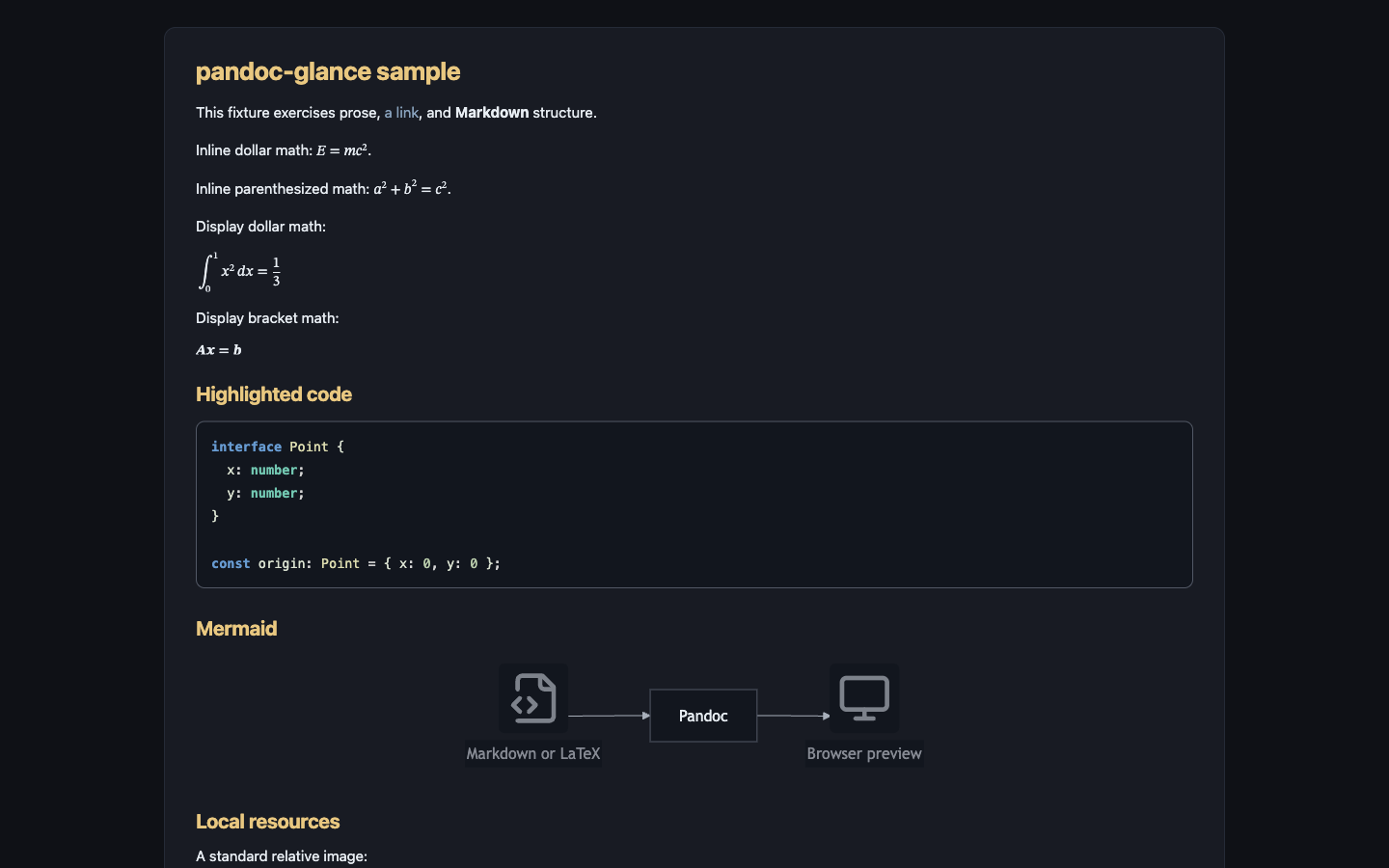
pandoc-glance renders Markdown and LaTeX files as good-looking pages in your browser. Add --watch to refresh the page whenever you save.
Prerequisites
Install Pandoc on macOS with:
brew install pandocOn Debian/Ubuntu, use sudo apt install pandoc. On Windows, use winget install --id JohnMacFarlane.Pandoc. If Pandoc is installed elsewhere, set PANDOC_PATH to the executable.
Install
npm install --global pandoc-glanceUsage
pandoc-glance [options] <file>
pandoc-glance --watch [options] <file>
pandoc-glance <file> --watch
| Option | Meaning |
|---|---|
| -w, --watch | Start a live preview server and re-render after saved changes |
| --no-open | Do not launch a browser; print the generated path or preview URL |
| --theme auto\|light\|dark | Browser theme; default auto follows prefers-color-scheme |
| --format auto\|markdown\|latex | Input format; default auto uses the file extension |
| --font-size <px> | Base document font size from 10 to 24; default 15 |
| --port <number> | Watch-server port; 0 or omission chooses an available port |
| -h, --help | Show help |
| -v, --version | Show the version |
Automatic format detection recognizes common Markdown extensions (.md, .markdown, .mdown, .mkd, .qmd, and .rmd) and standalone LaTeX (.tex and .latex). Use --format for another extension.
One-shot preview
pandoc-glance notes.md
pandoc-glance paper.tex --theme light --font-size 16
One-shot mode writes a cached HTML file and opens it in the default browser. The cache keeps at most 30 previews.
For headless or SSH use:
pandoc-glance --no-open notes.md
# HTML: /path/to/cache/<id>.html
Watch mode
pandoc-glance --watch notes.md
pandoc-glance notes.md --watch --theme auto
pandoc-glance --watch --no-open --port 0 notes.md
Watch mode:
- Opens one browser tab and updates it after each saved change.
- Handles ordinary writes and atomic saves.
- Preserves reading position across reloads.
- Keeps the last successful preview visible after a render error and recovers on the next valid save.
Watch mode sees files on disk, not unsaved editor buffers. Enable autosave for faster updates. If the initial render fails, the error page stays open and waits for a valid save. Stop the server with Ctrl-C.
Rendering examples
Math
All of these forms are supported in Markdown:
Inline dollar math: $E = mc^2$.

Inline parenthesized math: \(a^2 + b^2 = c^2\).

$$
\int_0^1 x^2\,dx = \frac{1}{3}
$$

\[
\mathbf{A}\mathbf{x} = \mathbf{b}
\]
Pandoc emits native MathML when possible. The browser loads MathJax only for equations that Pandoc leaves as TeX.
Mermaid
```mermaid
flowchart LR
  Source[Markdown or LaTeX] --> Pandoc
  Pandoc --> Browser
```
Mermaid runs in the preview page and loads only when a mermaid fence is present. No local Mermaid package or Mermaid CLI (mmdc) is required.
Flowchart icon nodes support lucide:* and logos:*. Keep each icon declaration on one source line:
```mermaid
flowchart LR
  source@{ icon: "lucide:file-code-2", label: "Source" }
  github@{ icon: "logos:github-icon", label: "GitHub" }
  source --> github
```
If Mermaid or an icon pack cannot load, the preview shows the error and the original diagram source.
Local resources and Obsidian images
Relative paths resolve from the source document's directory:


![[figures/result.png|Obsidian-style caption]]Absolute local image paths are also supported. Watch mode uses revisioned, non-cached resource URLs so saved image changes appear immediately.
Standalone LaTeX
A .tex or .latex file is read as a complete LaTeX document:
\documentclass{article}
\usepackage{amsmath}
\begin{document}
\section{Example}
Inline math $x^2$ and display math
\[
  \int_0^1 x^2\,dx = \frac{1}{3}.
\]
\end{document}
Previewing LaTeX does not run a TeX engine; Pandoc converts supported document structure and equations directly to HTML5/MathML.
Editor and shell integration
Launch watch mode from any editor or task runner that can invoke a shell command:
pandoc-glance --watch "/absolute/path/to/current-file.md"Zed
Add this task to .zed/tasks.json in a project or to Zed's global tasks file:
[
  {
    "label": "Preview current Markdown/LaTeX file",
    "command": "pandoc-glance",
    "args": ["--watch", "$ZED_FILE"],
    "cwd": "$ZED_WORKTREE_ROOT",
    "use_new_terminal": true,
    "allow_concurrent_runs": false,
    "reveal": "always",
    "save": "current"
  }
]
Run Preview current Markdown/LaTeX file from Zed's task picker. With autosave enabled, the browser updates shortly after edits.
Other examples
- VS Code tasks can pass
${file}. - Vim and Neovim commands can pass the current buffer's expanded filename after writing it.
- Over SSH, use
--watch --no-openand forward the printed port when remote browser access is needed. - Scripts and CI checks can use one-shot
--no-openwithout launching a GUI.
The server binds to 127.0.0.1, so remote access requires an explicit tunnel such as ssh -L.
Network use
Pandoc conversion, styling, native MathML, syntax highlighting, local resources, and live reload are local. The browser downloads these optional components as needed:
- Mermaid 11.16 from jsDelivr when the document contains a Mermaid block.
- Lucide or Logos icon data from unpkg when a diagram uses that pack.
- MathJax 3 from jsDelivr when Pandoc leaves an equation as TeX.
Without network access, the core preview still works. Mermaid remains visible as source with an error, and unsupported equations remain as TeX with a warning.
Security model
Watch mode:
- Binds only to
127.0.0.1. - Uses a random 192-bit token in every preview route.
- Sets
no-store,nosniff, no-referrer, same-origin, and content-security headers. - Rejects path traversal, including encoded
..and symlinks outside the source directory. - Serves an outside absolute file only when the current document explicitly references it, through an opaque ID.
A failed render keeps the previous HTML and resource allowlist.
Troubleshooting
Pandoc was not found
Confirm installation:
pandoc --versionOr select a binary explicitly:
PANDOC_PATH="/custom/path/pandoc" pandoc-glance notes.mdThe CLI validates Pandoc before starting and exits nonzero when it is unavailable.
The browser did not open
Use --no-open and open the printed HTML path or URL manually:
pandoc-glance --no-open notes.md
pandoc-glance --watch --no-open notes.md
The CLI uses the operating system default-browser command (open, xdg-open, or Windows start); it does not hard-code a browser.
A local image is missing
- Check the path relative to the source file, not the shell's current directory.
- Put paths containing spaces or parentheses in Markdown angle brackets.
- In watch mode, a relative symlink whose target is outside the document directory is deliberately blocked; use an explicit absolute path if that file should be allowlisted.
- Save the image and source file. Resource responses are not browser-cached.
The selected port is busy
Omit --port or use --port 0 to let the operating system choose an available loopback port.
Development
npm install
npm run typecheck
npm test
npm run build
The test suite uses real Pandoc but does not open a browser or access the public network.
A representative fixture is available at test/fixtures/sample.md, with a standalone LaTeX companion at test/fixtures/sample.tex.
For a manual headless smoke test:
node dist/cli.js --watch --no-open test/fixtures/sample.mdFetch the printed loopback URL, save an edit to the fixture or a temporary copy, and observe the revision change. Press Ctrl-C to stop it.
License
MIT. The rendering palettes and selected normalization/browser-preview patterns were adapted from the MIT-licensed pi-markdown-preview implementation; see LICENSE.