
paperclip-plugin-tickler
v0.20.0
Published
Every org, one page: a cross-org HUD for Paperclip that shows what needs you and lets you answer approvals and agent questions inline.

Maintainers
 nickallevato
Readme
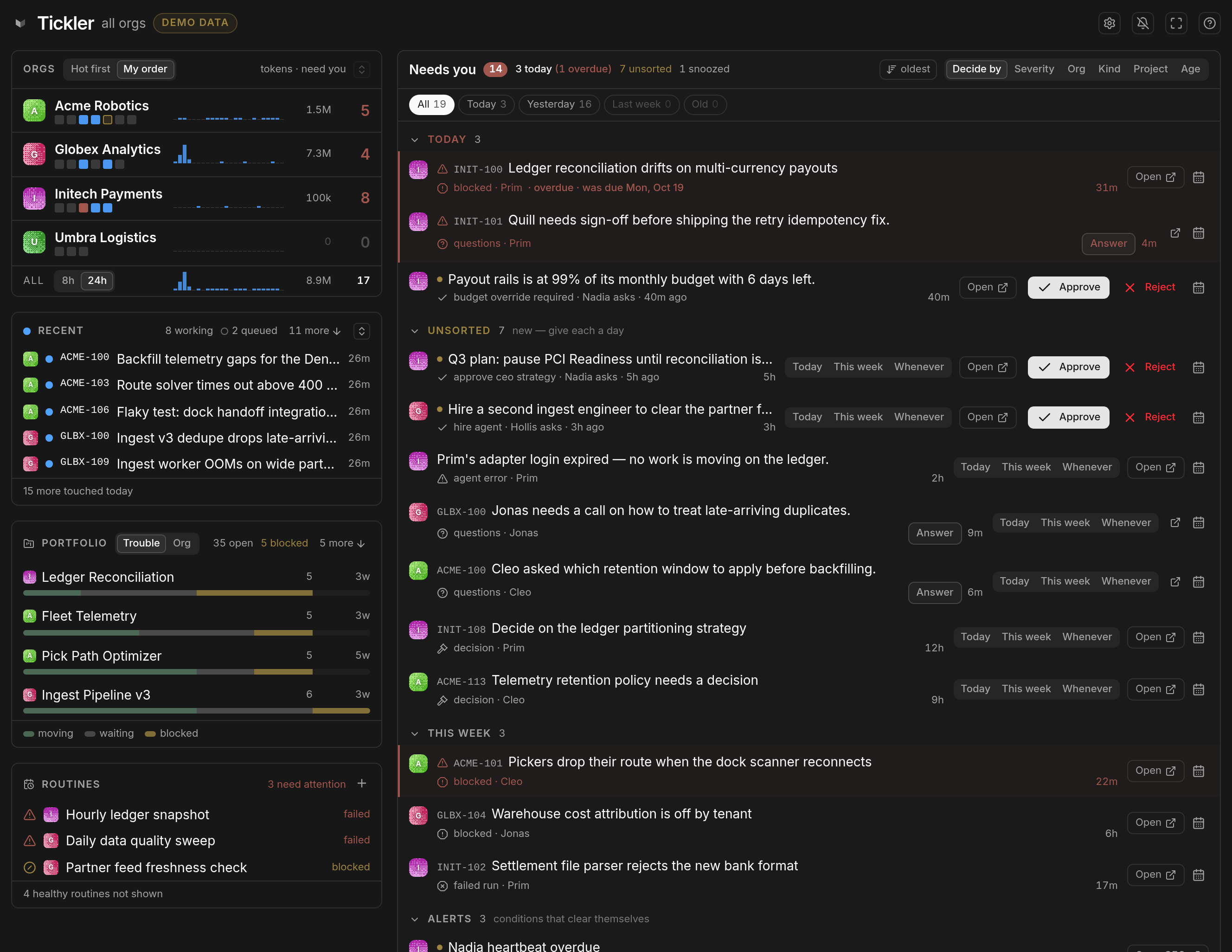
One page that answers "what needs me, across every org, right now" — and lets you say when you will deal with each thing — instead of visiting each org's dashboard in turn.
- ⚡ Answer in place. Approve, reject, reply, pick an option on an agent's question — right on the row.
- 🗓️ Decide by. Say when you'll deal with each item — Today, This week, Whenever — and the queue sorts itself. It's Paperclip's own decision triage, so the dates follow you there.
- 🏢 Every org at a glance. Who's working, token burn by the hour, what's waiting on you.
- 👀 What agents are actually doing. Hover any agent or task for its live narration — not just "3 running".
- 🚦 Trouble surfaces itself. Blocked projects, stalled runs, runs stuck past their agent's time limit, failed routines, overdue heartbeats.
- ⬆️ Updates itself from a button, and rolls back from one too if a new version misbehaves.
- 📱 Works on a phone, and 🧩 changes nothing in core — UI-only, prebuilt, and fits whichever Paperclip build it lands on.
📦 Install from inside Paperclip — no terminal needed. Settings → Plugins → Install Plugin, enter
paperclip-plugin-tickleras the npm Package Name, and click Install. That's it — Tickler's button appears in the bar at the top of the page.You need to be an instance admin, on a self-hosted Paperclip whose server can reach npm. Prefer the command line, or building from source? See Install.
Need a tweak or change? Join the Paperclip Discord and hop into the Tickler thread — that is where feature requests, bug reports and "is this supposed to do that?" land. Tickler is a community plugin, not an officially supported part of Paperclip, so please bring Tickler's rough edges here rather than to Paperclip's own issues. The same link lives behind the ? in the Tickler page header.
What it shows
Queue — the main column. Every item across every org that wants a human: approvals, questions and confirmations awaiting a response, blockers, failed runs, overdue heartbeats, routine exceptions. Actions are inline — Approve, Reject, Reply, answer a question, choose on a confirmation — so you rarely need to open the org at all. A row's title opens it, and Reject asks twice, because a rejected approval cannot be undone.
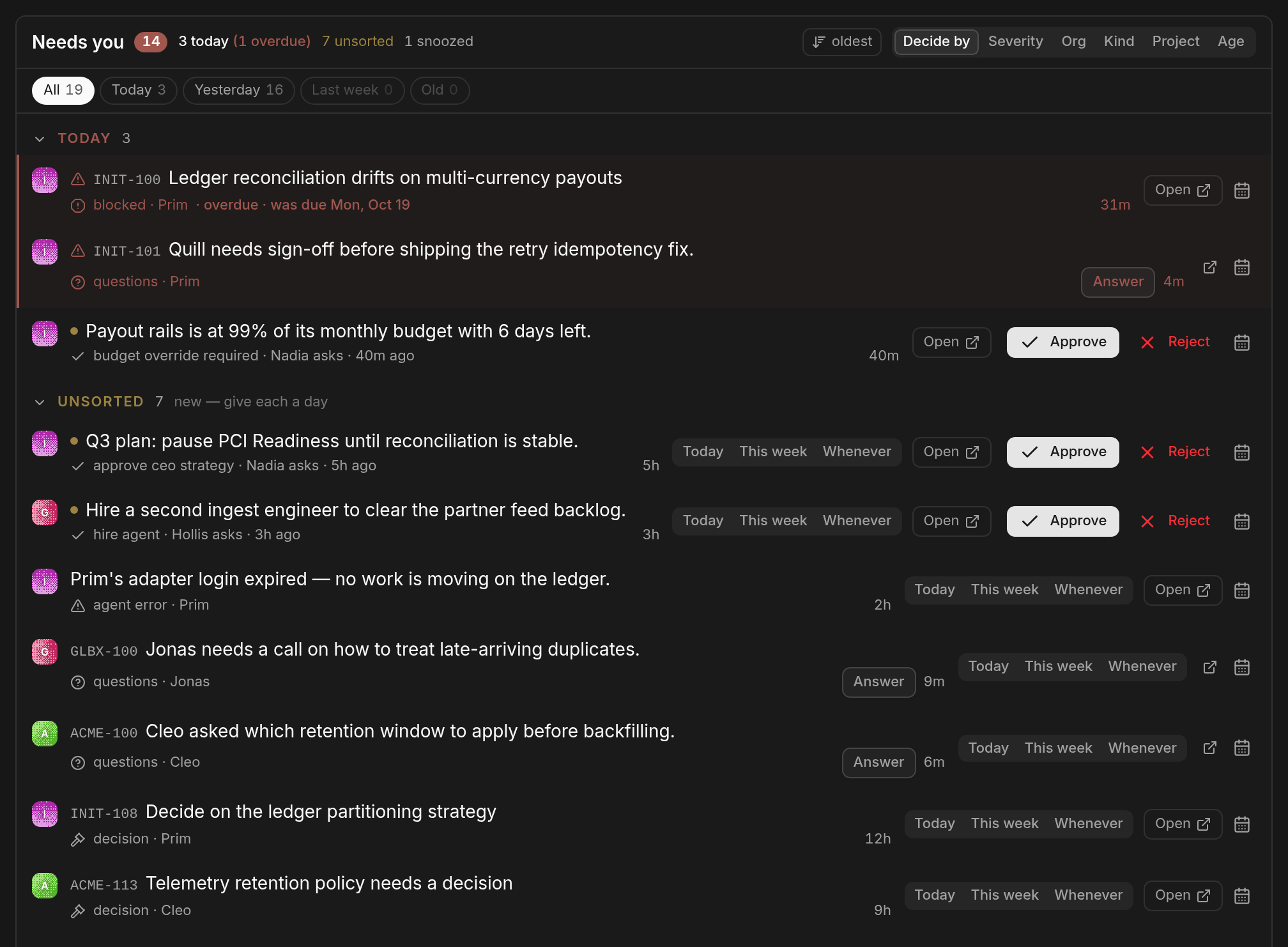
By default it groups by when you said you'd decide — Today (and anything overdue), Unsorted, This week, Alerts, Whenever, Snoozed. New items land in Unsorted with Today · This week · Whenever right on the row. Those are Paperclip's own decision-triage records, so a day set in Tickler is the day Paperclip's Decisions page shows. It can also group by severity, org, kind, project or age — by project is how you find the one project quietly generating half the noise.
Orgs — the left column: one line per org with who is working, its tokens by the hour over the last 8 or 24 hours, and how much is waiting on you. Hover a name for everything else; hover a capacity square for which agent it is and what they are doing right now. Beneath it the rail stacks Recent, Portfolio and Routines, so the whole column is one scan: who's working, what just moved, what's stuck. Orgs and Recent each have an Expand toggle for when the short list isn't enough. Archived and paused orgs are left out; to take an active one off the board too, Hide it from its hover card — Tickler stops asking for it, it keeps running in Paperclip, and N hidden in the header brings it back.
Recent — what's been touched lately, live rows first. Hover a row for the ticket, its status, and the agent's own last sentence about it.
Routines — only the broken ones, plus any you pin with the +: a pinned routine stays on top with a ▶ to run it now (press twice; it links the issue the run made).
In the header — the gear names the version you are on, offers the newer one in place when npm has it (or an earlier one, under Install an earlier version), and holds the token thresholds that colour the spend figures; the bell turns on browser alerts for the edges worth knowing about (an org going red, a critical item arriving); the expand control is kiosk mode, for a wall display. On a phone the panes stack into one column, and Pane order in the header lets you drag them into the order you want.
When something breaks — an error in one part of Tickler costs only that part: one org's line, one pane, or at worst the page shows a notice with the error, Try again, Copy details and Report on GitHub (a prefilled issue you review before submitting). If a new version is the cause, the notice offers Roll back to x.y.z — the newest version that worked in your browser — which reinstalls it in place and keeps your settings. See troubleshooting.
Full tours, with the rest of the screenshots: the board · the queue.
Note: The screenshots are Tickler's own demo mode — invented orgs, tickets and agents, not a real instance. Try it on your own install: add
?demo=1to the Tickler page's URL (e.g./ACME/tickler?demo=1). Nothing you click there reaches the server, and the header carries a DEMO DATA badge the whole time it is on.
Install
You need an instance admin account on a self-hosted Paperclip whose server can reach the npm registry. Nothing is built on your side: the package ships prebuilt and carries nothing tied to a particular Paperclip build, so upgrading Paperclip later needs nothing from Tickler.
In Paperclip: Settings → Plugins → Install Plugin, enter paperclip-plugin-tickler as the
npm Package Name — just the name, no @, no version — and click Install.
From the command line:
npx paperclipai plugin install paperclip-plugin-tickler    # install
npx paperclipai plugin upgrade nickallevato.plugin-tickler # upgrade in place
From source, for working on Tickler:
git clone https://github.com/nickallevato/paperclip-tickler.git
cd paperclip-tickler && pnpm install && pnpm build
npx paperclipai plugin install /absolute/path/to/paperclip-tickler --local
Then find it. Tickler adds a button carrying its mark to the breadcrumb bar above every page,
and a page at /<COMPANY-PREFIX>/tickler — /ACME/tickler, say, using any company's issue
prefix. The page shows every org whichever prefix you arrive through; the prefix is only there
because Paperclip mounts plugin pages under a company route.
docs/install.md covers every route in detail: upgrading, the directory layout a clone
needs for its link: dependencies, and how to check the plugin actually loaded. If the page comes
up blank, troubleshooting works through it in order.
Documentation
install · configuration · the board · the queue · architecture · troubleshooting · release notes
Contributing
Bugs and feature requests go through the three issue templates — feature request, bug report, or core limitation. docs/intake.md is the whole path from there to a merged change. You get an answer either way: a duplicate is closed pointing at the original, and something real but not now is parked, not closed, and reopens on a sentence. Not sure it is worth an issue yet? Say it in the Tickler thread on the Paperclip Discord first.
To send a change, read CONTRIBUTING.md — and before anything else, the one rule: Tickler never modifies Paperclip core. Everything lands here, through a plugin extension point. If the plugin surface cannot express a change, file it as a core limitation rather than working around it. CI enforces this, with no bypass.
Why "Tickler"? A tickler file is the office folder of dated reminders you work through by due
date — which is what the decide-by queue is. Formerly Plica (paperclip-plugin-plica, through
0.6.0). MIT licensed.