
parsistent
v0.0.3
Published
Typed localStorage, sessionStorage and cookies, shaped like the browser APIs: validated values, defaults, cross-tab sync and SSR-safe React hooks

Maintainers
 iamsomraj
Readme
parsistent




Typed localStorage, sessionStorage and cookies, shaped like the browser APIs.
📖 Documentation: iamsomraj.github.io/parsistent, with live demos
const local = createStorage('local', {
  theme: oneOf(['light', 'dark'], 'light'),
  count: number(0),
});

local.getItem('count'); // number, never a raw string
local.setItem('count', 3);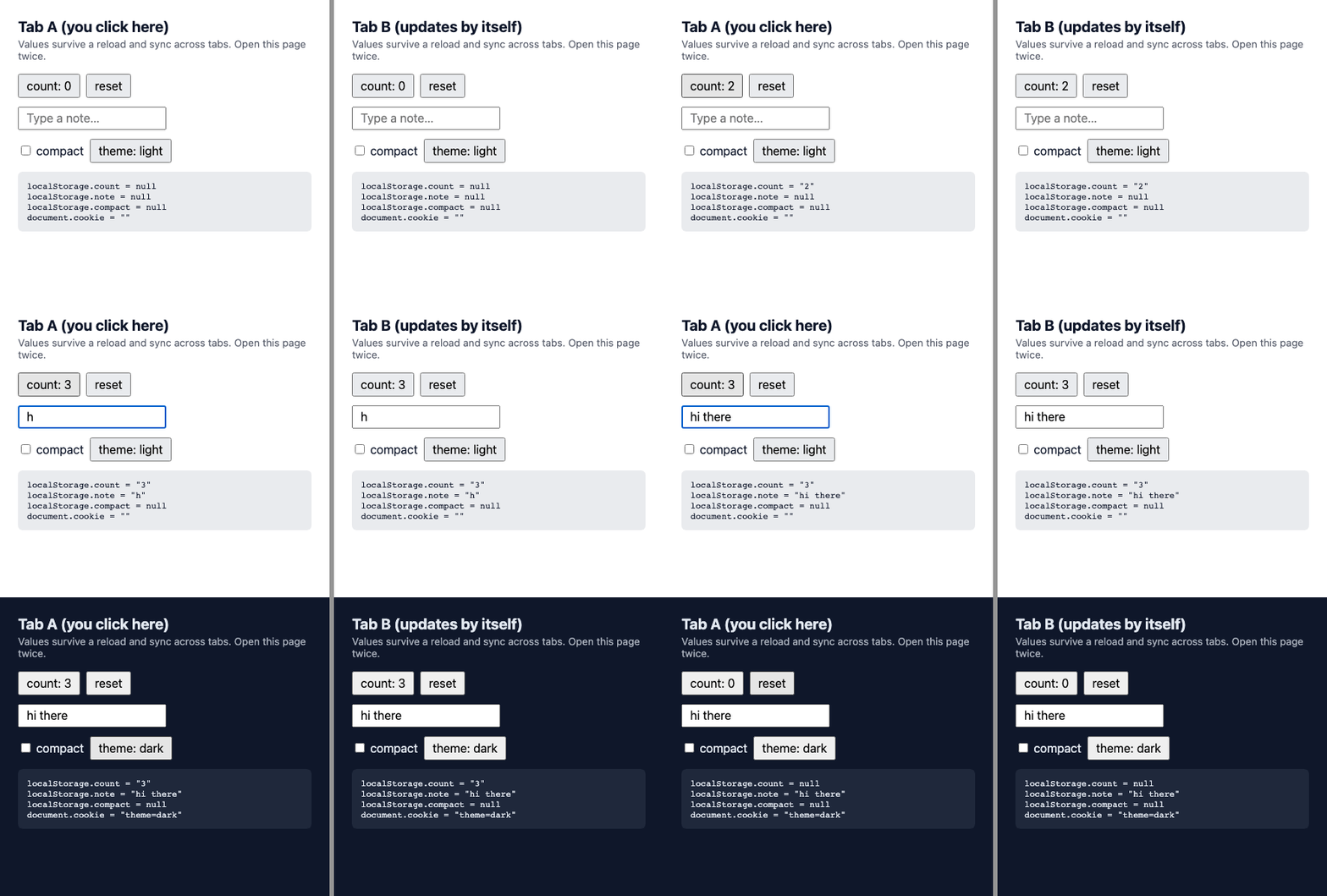
Why parsistent?
The Web Storage and Cookie Store APIs only store strings, and anything can be in them: values written by an older version of your app, edited in DevTools, or set by an extension. parsistent keeps the API you already know, and adds what it lacks:
| | localStorage | parsistent |
| ------------------------ | ----------------------------- | -------------------------------------------- |
| Values | strings | typed (number, Date, unions, JSON…) |
| Missing or invalid value | null, or garbage | your default |
| Validation | none | built in, or any Zod / Valibot / ArkType |
| Keys | any string | only the keys you declared, type-checked |
| Changes in the same tab | no event | change event |
| Changes in other tabs | storage event, raw strings | change event, parsed values |
| Server rendering | localStorage is not defined | defaults on the server, cookies from headers |
| React | — | useItem(), like useState |
No runtime dependencies. React is optional.
Installation
npm install parsistentStorage
Declare the keys once, with a type and a default:
import { createStorage, date, json, number, oneOf, string } from 'parsistent';
import { z } from 'zod';

export const local = createStorage('local', {
  theme: oneOf(['light', 'dark'], 'light'),
  count: number(0),
  name: string(), // no default: reads as string | null
  lastVisit: date(new Date(0)),
  filters: json(z.object({ q: z.string() }), { q: '' }),
});
Then use it like localStorage:
local.getItem('theme'); // 'light' | 'dark'
local.setItem('count', 3); // stored as '3'
local.removeItem('count'); // reads as 0 again
local.clear(); // removes only the declared keys
local.length; // number of declared keys that are set
local.key(0); // 'theme' | 'count' | … | null

local.setItem('count', '3'); // ❌ type error
local.setItem('nope', 1); // ❌ type error- Invalid values read as the default. If
localStorage.countis"abc",getItem('count')returns0. - Setting the default removes the key, to keep storage clean. Pass
{ clearOnDefault: false }to keep it. 'local'/'session'resolve lazily, so stores can be created at module level in server-rendered apps. You can also pass anyStorageobject, or a function returning one.- On the server, reads return defaults and writes are ignored, so values never leak between requests.
- Blocked storage (disabled site data, some private modes) falls back to memory with a warning, instead of throwing.
- Full storage: like
localStorage.setItem,setItemthrows when the quota is exceeded.
Change events
local.addEventListener('change', (event) => {
  event.key; // 'count'
  event.oldValue; // 0
  event.newValue; // 3
  event.external; // true when the change came from another tab
});
Unlike the native storage event, it also fires for changes made in the current tab, and only
when the parsed value actually changes.
Options
createStorage('local', schema, {
  prefix: 'my-app:', // stored as 'my-app:count'
  clearOnDefault: true,
});
Cookies
Cookie stores mirror the async Cookie Store API, and work in every browser:
import { createCookieStore, oneOf } from 'parsistent';

export const appCookies = createCookieStore(
  { theme: oneOf(['light', 'dark'], 'light') },
  { maxAge: 60 * 60 * 24 * 365, sameSite: 'lax' } // default attributes
);

await appCookies.get('theme'); // 'light' | 'dark'
await appCookies.set('theme', 'dark', { secure: true });
await appCookies.delete('theme');
appCookies.addEventListener('change', (event) => {});
Attributes: path (default /), domain, maxAge, expires, sameSite, secure,
partitioned. change events cover the current tab in every browser, and other tabs in
browsers with the native Cookie Store API.
On the server
// Route handlers, middleware…
const theme = appCookies.fromHeader(request).get('theme');

// Set a cookie in a response
response.headers.append('Set-Cookie', appCookies.serialize('theme', 'dark'));
fromHeader accepts a Cookie header string, a Request, Headers, a record, or anything with
getAll() such as Next.js cookies().
React
import { useItem } from 'parsistent/react';
import { local } from './stores';

function Counter() {
  const [count, setCount] = useItem(local, 'count');
  return <button onClick={() => setCount((c) => c + 1)}>{count}</button>;
}- Works like
useState: the setter takes a value, an updater, ornullto remove the key. - Re-renders when the key changes: in this tab or another one, through
useItemorsetItem. - Works with storage and cookie stores.
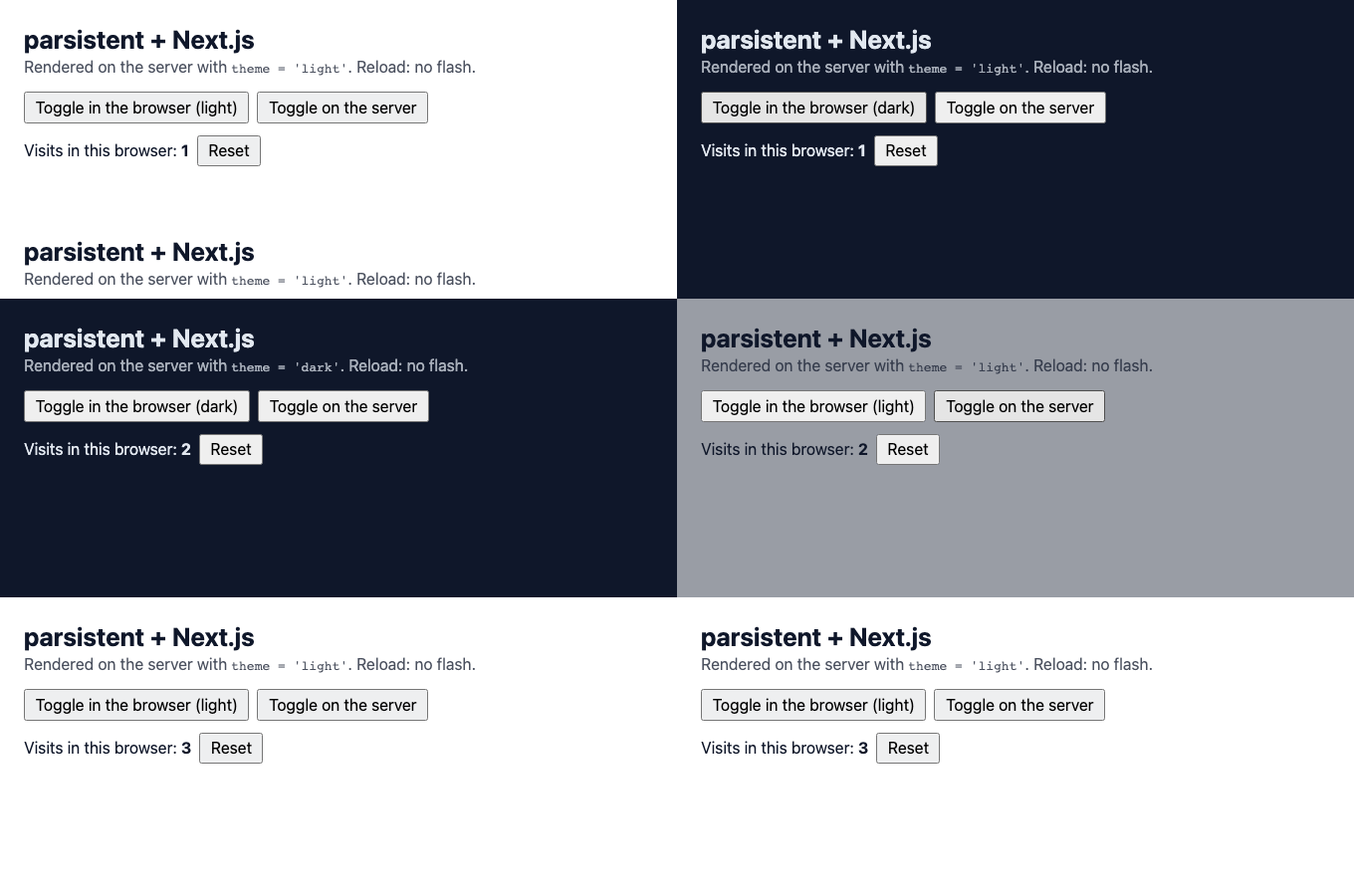
Server rendering
useItem renders the default on the server and during hydration, then the stored value, so
hydration never mismatches. For cookies, pass the request cookies to CookieProvider to render
the right value immediately:
// app/layout.tsx (Next.js App Router)
import { cookies } from 'next/headers';
import { CookieProvider } from 'parsistent/react';
import { appCookies } from './stores';

export default async function RootLayout({ children }: { children: React.ReactNode }) {
  const snapshot = appCookies.fromHeader(await cookies());
  return (
    <html>
      <body>
        <CookieProvider cookies={snapshot.cookies}>{children}</CookieProvider>
      </body>
    </html>
  );
}
snapshot.cookies only contains the store's own cookies, never other request cookies such as
session tokens, because it is sent to the client.
Values
| Helper | Type | Stored as |
| --------------------------- | ----------------------------- | -------------------- |
| string(default?) | string | as is |
| oneOf(options, default?) | union of the options | as is |
| number(default?) | number (finite) | '42' |
| boolean(default?) | boolean | 'true' / 'false' |
| date(default?) | Date (valid calendar dates) | ISO string |
| json(validator, default?) | validated JSON | JSON |
Without a default, a key reads as T | null.
json() requires a validator, because stored data is user-controlled: a function returning the
value (or null), or any Standard Schema (Zod, Valibot, ArkType…).
Custom values
Any object with parse and serialize works:
import type { Value } from 'parsistent';

const point: Value<{ x: number; y: number }> = {
  parse: (raw) => {
    const [x = NaN, y = NaN] = raw.split(',').map(Number);
    return Number.isFinite(x) && Number.isFinite(y) ? { x, y } : null;
  },
  serialize: ({ x, y }) => `${x},${y}`,
  eq: (a, b) => a.x === b.x && a.y === b.y,
  defaultValue: { x: 0, y: 0 },
};
nuqs parsers have the same shape, so you can reuse the ones from your URL state:
import { parseAsInteger } from 'nuqs';

createStorage('local', { page: parseAsInteger.withDefault(1) });
Examples
| Example | Shows |
| --------------------------------------- | ------------------------------------------------------------------------------------------------ |
| React (Vite) | Client-only app: storage, cookies and cross-tab sync (the demo above) |
| Next.js (App Router) | Server rendering: cookies on the first paint, server components, a route handler, localStorage |
Contributing
See CONTRIBUTING.md. Everyone taking part is expected to follow the Code of Conduct.
Related
- vue-qs: type-safe URL query state for Vue
- nuqs: type-safe URL query state for React, where the parser idea comes from
License
MIT © Somraj Mukherjee