
paws-http
v1.0.0
Published
Terminal-native runner for JetBrains Rider / IntelliJ .http flow files, with an interactive Ink TUI and a plain-text reporter for CI.
Downloads
24

Maintainers
 artmann
Readme
paws-http
A terminal-native HTTP flow runner. Run and explore Rider/IntelliJ
.httpfiles from the command line, with an interactive three-pane TUI or straight-line output for CI.
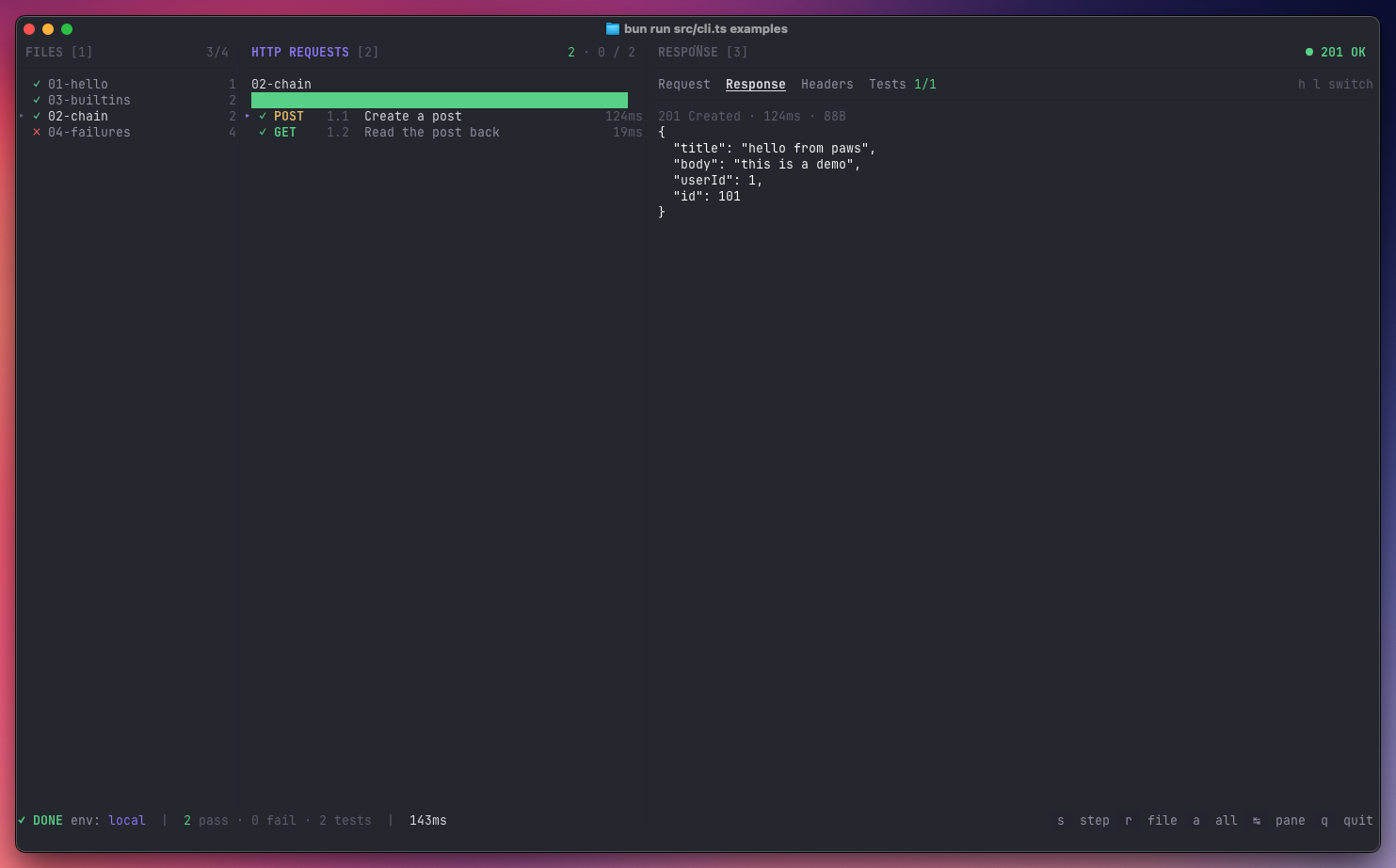
paws-http is to the terminal what the JetBrains HTTP Client is to Rider. Point
it at a .http file (or a directory full of them) and it'll run the requests,
execute the JavaScript pre- and post-scripts, evaluate
client.test/client.assert assertions, and chain values between steps via
client.global.set.
Why
- Runs where Rider can't — CI, remote SSH, containers, Linux boxes.
- Same files as Rider — no separate format to maintain.
- Fast feedback — an interactive TUI for day-to-day exploration, a pretty console reporter for scripts and pipelines.
Install
Run it without installing:
npx paws-httpOr install globally:
npm install -g paws-httpRequires Node.js 22+.
Hacking on
paws-httpitself? See CONTRIBUTING.md for the source-based setup with Bun.
Quick start
Try the bundled examples (they hit public APIs — no local server needed):
paws-http                         # launcher
paws-http run examples            # interactive three-pane view
paws-http run examples/01-hello.http
paws-http run examples/01-hello.http --only 1.1   # single step, non-interactive
Usage
paws-http                         browse files interactively (launcher)
paws-http run <file.http>         run a single .http flow
paws-http run <dir>               run every .http in a directory, recursively
paws-http run <file> --only 1.3   run one step from a file
paws-http env list                list environments in the nearest env.json

  -e, --env <name>          environment (default: local)
  -f, --fail-fast           stop on the first failed step
      --only <step>         run only the step with this num (e.g. 1.2)
  -n, --non-interactive     force the console reporter (skip the TUI)
paws-http auto-picks a mode: if your terminal is a TTY you get the Ink-based
three-pane TUI; otherwise you get a coloured console report and a non-zero exit
code on failure. Pass -n / --non-interactive (or set CI=1, or pipe stdout)
to force the console reporter explicitly — handy for scripts and pipelines.
Interactive keys
Navigation
| key | action |
| ----------- | ----------------------------------------- |
| ← / → | cycle panes (Files → Requests → Response) |
| Tab | next pane |
| 1 2 3 | jump to Files / Requests / Response |
| ↑ / ↓ | move within the active pane |
| , / . | cycle through files (works in any pane) |
| h / l | switch tab in the Response pane |
Running
| key | action |
| --- | --------------------------------- |
| s | run the selected step (only) |
| r | run every step in the active file |
| a | run every step in every file |
Other
| key | action |
| ----- | ------ |
| q | quit |
| esc | quit |
Environments
paws-http reads the same environment files as Rider, discovered by walking up
from the .http file:
http-client.env.json— checked into the repo, one object per environment.http-client.private.env.json— gitignored, merged on top for local secrets.
{
  "local": {
    "baseurl": "http://localhost:8080",
    "Security": {
      "Auth": {
        "admin_auth": { "Type": "Mock", "Token": "{{admin_token}}" }
      }
    }
  },
  "dev": {
    "baseurl": "https://api.example.dev",
    "Security": {
      "Auth": { "admin_auth": { "Type": "OAuth2" } }
    }
  }
}
OAuth2 entries in v1 look for a pre-fetched bearer token under
Security.Auth.<name>.Token in the private env file — paws-http won't run the
OAuth2 flow for you.
Supported HTTP file syntax
### 1.1 Titleseparators (numeric labels optional)- All methods:
GET / POST / PUT / PATCH / DELETE / HEAD / OPTIONS - Short-form GET: a bare URL on a line after
### - Optional trailing
HTTP/1.1on the request line - Indented URL continuation lines
- Headers:
Key: Value - Bodies: inline JSON / text, or
< ./path/to/filefor a file upload < {% … %}pre-request script> {% … %}response handler (client.test,client.assert, etc.)- Built-in vars:
{{$timestamp}}{{$uuid}}{{$random.integer(a, b)}}{{$auth.token("name")}} - Environment files (
http-client.env.json+ private overrides) #and//comments
Not yet supported: import … from "utilities", OAuth2 flows, JSONPath body
expansion ({{$.items..name}}).
Example .http file
### 1.1 Create a post
POST {{baseurl}}/posts
Content-Type: application/json

{
  "title": "hello",
  "userId": 1
}

> {%
    client.test("created", function() {
        client.assert(response.status === 201, "expected 201");
    });
    client.global.set("post_id", response.body.id);
%}

### 1.2 Read it back
GET {{baseurl}}/posts/{{post_id}}
License
MIT — see LICENSE.