
payload-ai-agent
v0.5.1
Published
AI Agent plugin for Payload CMS 3.x — a chat assistant in the admin panel that turns natural language into real panel actions via LLM tool calling and the Payload Local API.

Maintainers
 gurkanbektas
Readme
payload-ai-agent
An AI Agent plugin for Payload CMS 3.x. It adds a floating chat assistant to the admin panel that turns natural-language commands into real panel actions. The agent uses LLM tool calling on top of the Payload Local API, so every action runs with the exact permissions of the signed-in user.
"Change the first hero image on the home page to this picture", "list the unpublished blog posts", "set product X's price to 250", "rewrite this post's body in a friendlier tone" — the agent finds the right documents and applies the change, asking for confirmation on destructive operations.
The plugin is generic: no collection or global name is hardcoded. It reads the host project's Payload config at runtime and generates its tools and schema hints from it, so it works with whatever collections your project defines.
- Powered by the Vercel AI SDK — bring your own model; the plugin ships no default provider and is never bound to one vendor.
- RBAC-safe — all operations go through the Local API with
overrideAccess: false. - Writes rich text — send Markdown, it's converted to Lexical editor state.
- Bulk edits, undo, and conversation history built in.
- TypeScript, ESM + CJS, full types exported.
Installation
pnpm add payload-ai-agent
# peers (you already have these in a Payload 3 project):
pnpm add ai @ai-sdk/react zod
# plus the provider you want as the code-configured default:
pnpm add @ai-sdk/openai      # or @ai-sdk/anthropic, @ai-sdk/google, @ai-sdk/groq, …
You only install a provider package for the
modelyou pass in code. Switching the model later from the admin panel needs no install at all — every supported provider ships with the plugin. See Switching the model from the panel.
Rich-text writing uses @payloadcms/richtext-lexical, which almost every Payload 3
project already has (it's the default editor). It is an optional peer — if it isn't
present the agent still runs; only rich-text writes return a clear "install it" message.
Set the API key for your chosen provider in the environment:
# .env — the variable name depends on the provider
OPENAI_API_KEY=sk-...
Quick start
The model option is required — there is no default provider, so you always choose
which model the agent runs on:
// payload.config.ts
import { openai } from '@ai-sdk/openai'
import { buildConfig } from 'payload'
import { aiAgentPlugin } from 'payload-ai-agent'

export default buildConfig({
  // ...your collections, globals, db, editor...
  plugins: [
    aiAgentPlugin({ model: openai('gpt-4o') }),
  ],
})
Omitting model throws at config build time with an explicit message, so a
misconfiguration surfaces on boot rather than on the first chat message.
Then regenerate the admin import map so Payload can mount the chat widget:
payload generate:importmapStart the app, open /admin, and click the chat button in the bottom-right corner.
"Component not found in import map"? Run
payload generate:importmapagain and restart the dev server. This step is required by Payload 3 for any plugin that adds admin components — it is not specific to this plugin.
Choosing a provider
model accepts any Vercel AI SDK LanguageModel, so you can run the agent on OpenAI,
Anthropic, Google, Groq, Ollama, or anything else the AI SDK supports. Switching
providers is a one-line change:
// OpenAI — env: OPENAI_API_KEY
import { openai } from '@ai-sdk/openai'
aiAgentPlugin({ model: openai('gpt-4o') })

// Anthropic — env: ANTHROPIC_API_KEY
import { anthropic } from '@ai-sdk/anthropic'
aiAgentPlugin({ model: anthropic('claude-sonnet-5') })

// Google Gemini — free tier at https://aistudio.google.com/apikey
// env: GOOGLE_GENERATIVE_AI_API_KEY
import { google } from '@ai-sdk/google'
aiAgentPlugin({ model: google('gemini-2.0-flash') })

// Groq — free tier at https://console.groq.com/keys, env: GROQ_API_KEY
import { groq } from '@ai-sdk/groq'
aiAgentPlugin({ model: groq('llama-3.3-70b-versatile') })

// Ollama (local, via the community provider)
import { createOllama } from 'ollama-ai-provider-v2'
aiAgentPlugin({ model: createOllama()('llama3.1') })
Install the matching provider package (@ai-sdk/google, @ai-sdk/openai, …) and make
sure its version matches your AI SDK major version — this plugin targets AI SDK v5,
so use the provider's 2.x release line.
The API key is never bundled — it comes from your environment or the provider instance you pass in.
Switching the model from the panel
The model above is the default. Admins can override it at runtime from
System → AI Agent Settings — pick a provider, type a model id, paste a key — and the
change applies from the very next message, with no redeploy and no payload.config.ts edit.
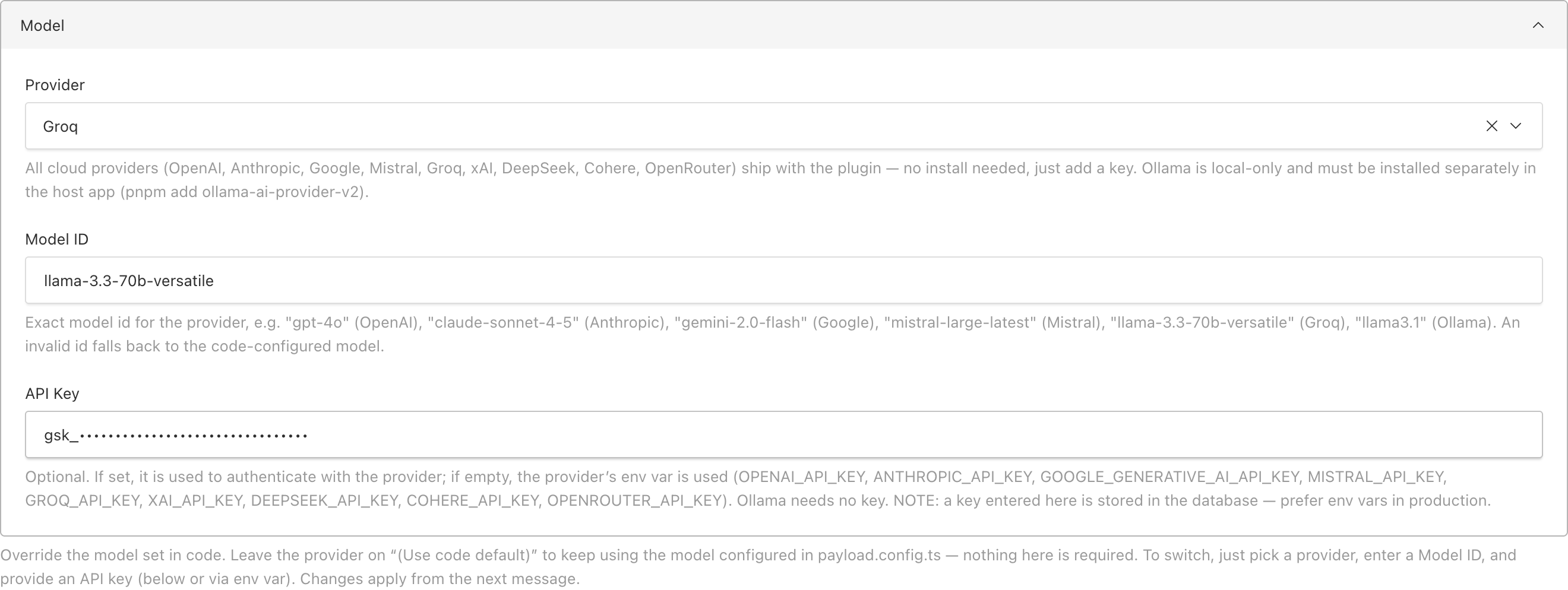
Every provider in the dropdown ships with the plugin, so switching needs no extra install — only credentials:
| Provider | Env var (used when the panel key is empty) | Example model id |
| --- | --- | --- |
| OpenAI | OPENAI_API_KEY | gpt-4o |
| Anthropic | ANTHROPIC_API_KEY | claude-sonnet-4-5 |
| Google | GOOGLE_GENERATIVE_AI_API_KEY | gemini-2.0-flash |
| Mistral | MISTRAL_API_KEY | mistral-large-latest |
| Groq | GROQ_API_KEY | llama-3.3-70b-versatile |
| xAI (Grok) | XAI_API_KEY | grok-3 |
| DeepSeek | DEEPSEEK_API_KEY | deepseek-chat |
| Cohere | COHERE_API_KEY | command-r-plus |
| OpenRouter | OPENROUTER_API_KEY | openai/gpt-4o |
The three fields belong together. Provider, Model ID and API Key must all be for the
same vendor — a Groq key with OpenAI selected is rejected. If the key obviously belongs to
another provider the plugin says so up front instead of letting the vendor return an opaque
401/429:
The API Key looks like a Groq key (it starts with
gsk_), but the selected Provider is OpenAI (GPT). In AI Agent Settings, make the Provider, Model ID and API Key all belong to the same provider.
Leave the provider on (Use code default) — or enter a model the provider doesn't
have — and the agent quietly falls back to the model from payload.config.ts, so a bad
panel value can never take chat down.
A key typed into the panel is stored in the database. Prefer the env var in production; use the field for quick switching and self-hosted setups.
Options
| Option | Type | Default | Description |
| ---------------------- | --------------------------------------------------- | --------------------------------- | ---------------------------------------------------------------------------------------- |
| model (required) | LanguageModel | — (no default) | The AI SDK model the agent runs on. You pick the provider; nothing is assumed. |
| systemPrompt | string | – | Extra instructions appended to the built-in system prompt. |
| settings | boolean | true | Adds the AI Agent Settings global: model, confirmations and prompt instructions editable from the panel. false hides it — the agent then always runs with the code-configured options. (adminInstructions is a deprecated alias.) |
| adminGroup | string \| false | 'System' | Admin sidebar group for the AI Agent Settings global and the ai-agent-logs collection. Set your own label (e.g. 'AI Agent') to group them separately, or false to leave them ungrouped. |
| collections | string[] \| 'all' | 'all' | Collections the agent may access. |
| globals | string[] \| 'all' | 'all' | Globals the agent may access. |
| disabledOperations | ('create'\|'update'\|'delete'\|'upload')[] | [] | Operations never exposed to the model as tools. |
| requireConfirmation | ('create'\|'update'\|'delete')[] | ['delete'] | Operations that require an explicit user confirmation in the UI. Overridable from the panel. |
| logging | boolean | true | Adds the ai-agent-logs audit collection: tool calls, status, error class, duration, steps, token usage. |
| conversations | boolean | true | Persists per-user chat history so users can revisit and continue past conversations. |
| access | (args: { req }) => boolean \| Promise<boolean> | any authenticated user | Who may call the chat/confirm/conversation endpoints. |
| providerOptions | Record<string, Record<string, JSONValue>> | – | Provider-specific settings forwarded to the AI SDK, keyed by provider id. |
| enabled | boolean | true | Disable the plugin entirely. |
The
modelyou pass here is the default/fallback. Admins can override the model at runtime from System → AI Agent Settings (see below) without a redeploy.
Example: restricted, read-mostly agent
aiAgentPlugin({
  model: openai('gpt-4o'),
  collections: ['posts', 'products'],
  globals: [],
  disabledOperations: ['delete', 'upload'],
  requireConfirmation: ['delete', 'update'],
  access: ({ req }) => req.user?.roles?.includes('admin'),
})
What the plugin registers out of the box
One line of config —
plugins: [aiAgentPlugin({ model })]— and the admin panel gains, with no further setup:
The floating chat widget on every admin page (authenticated users only).
System → AI Agent Logs — one audit row per turn: user, message, tool calls, affected docs, revert data, status (
success/partial/error), error class and redacted message, duration, steps, model and token usage. Admins only.System → AI Agent Settings — panel-editable runtime settings, read fresh on every turn so changes apply from the next message with no redeploy:
- Model — override the code-configured model; see Switching the model from the panel.
- Require confirmation for — which of create/update/delete must be approved in a confirmation card before running.
- Additional Instructions — a textarea appended to the agent's system prompt. Edit tone, terminology or project rules from the panel.
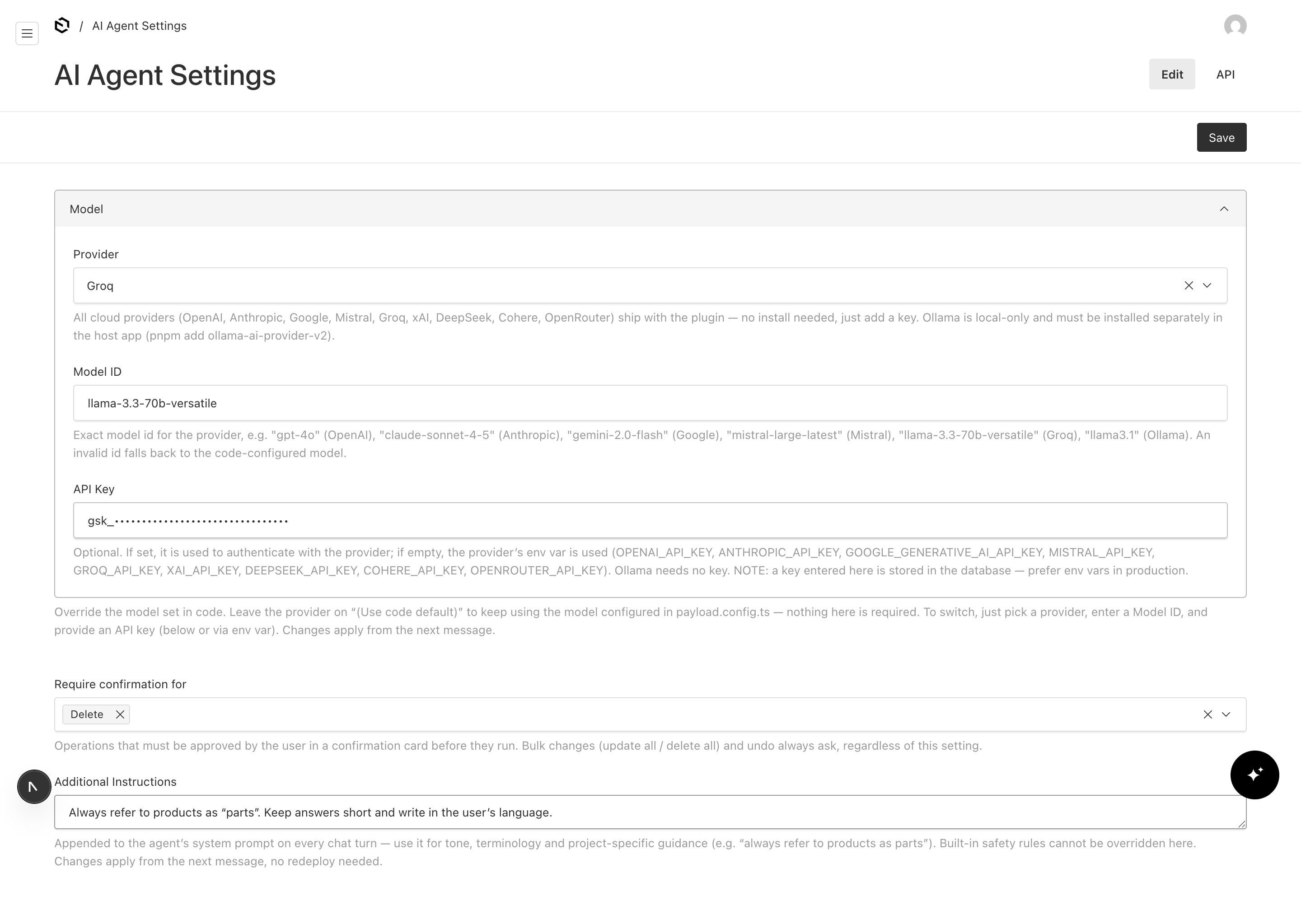
The built-in safety rules cannot be overridden here, only admins can edit it, and the global is invisible to the agent's own tools — so the model can never read the API key or rewrite its own settings.
Hidden plumbing:
ai-agent-pending(confirmation tokens) andai-agent-conversations(per-user chat history).
Writing rich text (Markdown → Lexical)
Rich-text (Lexical) fields are fully writable. When the agent sets a rich-text field
it sends Markdown — headings, bold/italic, lists, links, blockquotes, code — and the
plugin converts it to a valid Lexical editor state before saving (via
@payloadcms/richtext-lexical). The conversion walks the whole field schema, so rich-text
fields nested in groups, arrays, blocks and tabs are handled too.
- Passing a string → treated as Markdown and converted.
- Passing an object with a
rootkey → assumed to be valid Lexical JSON and stored as-is. - Rich text is replaced wholesale, never deep-merged — to edit existing content the agent reads the document first, then writes the full new Markdown for that field.
"Rewrite the intro of this post to be more concise and add a bullet list of the three key features" — the agent reads the current body, rewrites it as Markdown, and saves.
Uploading images
The agent can upload files into your upload-enabled collections (e.g. media) with
the uploadMedia tool, and reference them from other documents ("change the first hero
image on the home page").
⚠️ Don't make fields on your upload collection
required(especiallyalt). When the agent uploads a file it creates the media document from the file alone — it does not invent values for extra required fields. If a field likealtisrequiredon yourmediacollection, the create fails at the database level with a raw error such as:Failed query: insert into "media" (... "alt" ...) values (..., null, ...)The upload itself is fine — the row is rejected because a
NOT NULLfield came in empty. Fix: makealt(and any other extra fields) optional on collections the agent uploads to. If you want alt text, ask the agent to set it after upload, or add it manually in the panel. As an alternative, use a PayloadbeforeChangehook to auto-fill a defaultaltso it's never null.
Bulk operations
For "all X" requests the agent uses bulk tools with a where query instead of looping one
document at a time: updateManyDocs and deleteManyDocs. Bulk operations always
require confirmation regardless of requireConfirmation, and the confirmation summary
includes the exact number of documents that will be affected ("Update 12 documents in
"posts" …") so nothing runs by surprise.
Undo
With logging enabled, the agent can revert its most recent reversible change for the
current user via the undoLastChange tool ("undo that"). It reconstructs an inverse plan
from the audit log's stored pre-mutation state — restoring updated documents, re-creating
deleted ones, deleting created ones, restoring globals — and always asks for confirmation
first. File/upload operations are not reversible and are declined with a clear message.
Page context awareness
The widget sends the admin page you're on with each message. When you're viewing a document or global and say "this document/page", the agent resolves it to exactly what you're looking at and acts on it directly — no searching, no guessing which record you meant.
Conversation history
With conversations enabled (default), chat history is stored per user in the
admin-hidden ai-agent-conversations collection. The widget has a history panel to
revisit and continue past chats and a new chat button to start fresh. Each user only
ever sees their own conversations. Set conversations: false to keep chats ephemeral (no
collection or history endpoints are registered).
Tools the agent gets
Generated dynamically from your config. Read: listCollections, getCollectionSchema,
findDocs, getDoc, getGlobal, findReferences. Write: createDoc, updateDoc,
updateGlobal, updateManyDocs, deleteManyDocs, deleteDoc,
replaceMediaFile, uploadMedia, undoLastChange. Disabled operations and
non-whitelisted collections are never generated, so the model cannot call them.
Security model
- Least privilege. Every tool runs through the Payload Local API with
overrideAccess: falseand the signed-inuser. The agent can never do more than that user can do in the panel — your existing access-control functions are enforced verbatim. - Confirmation for destructive actions. Operations in
requireConfirmation(and all bulk/undo operations) don't run immediately: the tool returnsconfirmation_requiredand the UI shows an approve/cancel card. On approval the client sends back only a short-lived, server-stored, single-use, user-scoped token — never the action itself — so a forged "approved" payload cannot smuggle in a different operation. Pending tokens live in an internalai-agent-pendingcollection with a 5-minute TTL, so confirmations work correctly across multiple instances and serverless invocations. - Audit log. With
logging: true, anai-agent-logscollection records the user, message, tool calls, affected documents, status, model and token usage for each turn. It also stores the pre-mutation state that powersundoLastChange. Readable by admins only. - Find before change. The system prompt forbids inventing IDs; the agent must locate a document before updating or deleting it.
Screenshots
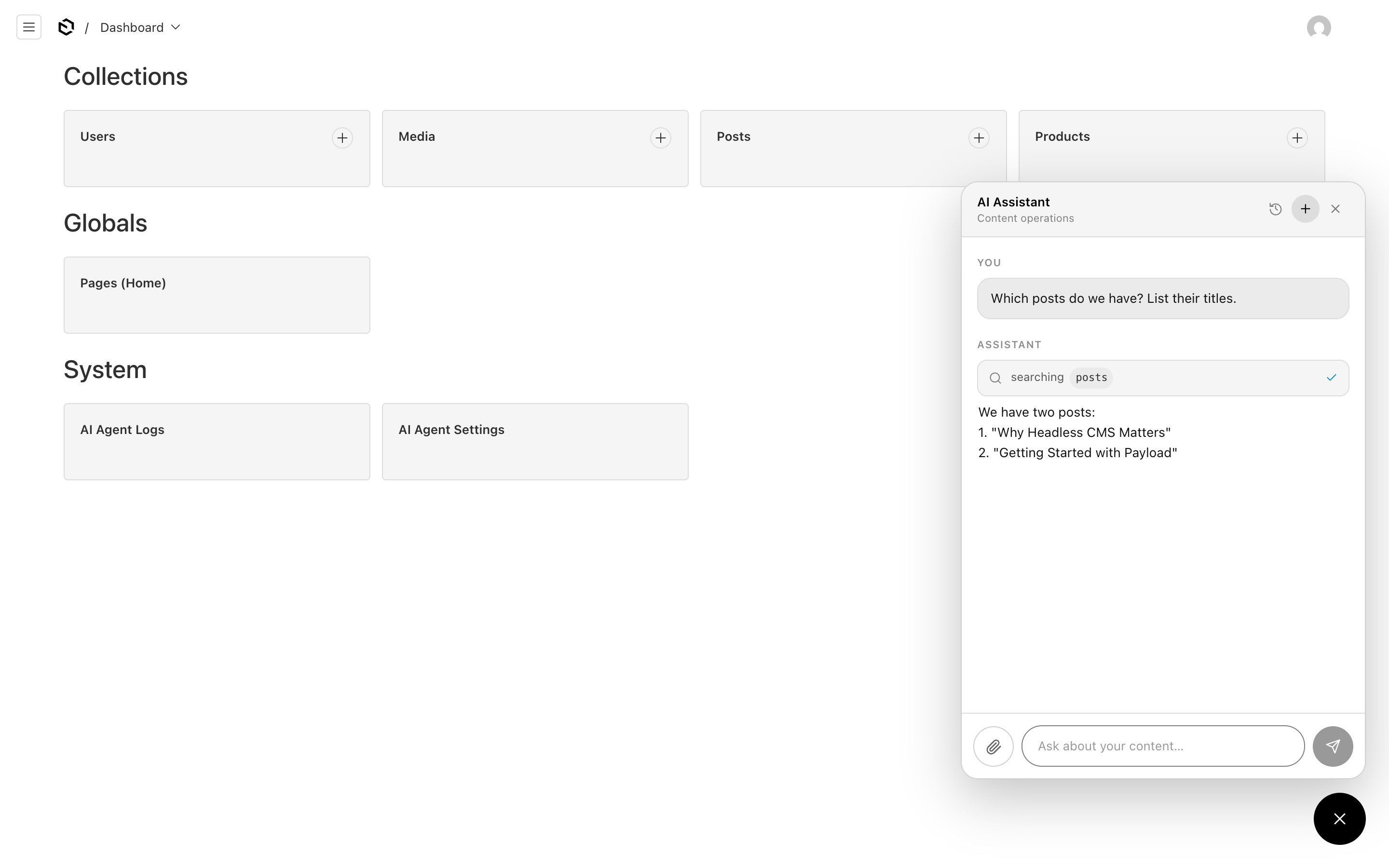
The chat widget — ask in plain language; the agent calls the tools it needs (here
findDocs on posts) and reports back. Tool activity is shown inline as it happens.
AI Agent Settings — model, confirmation rules and prompt instructions, all editable from the panel and applied on the next message.
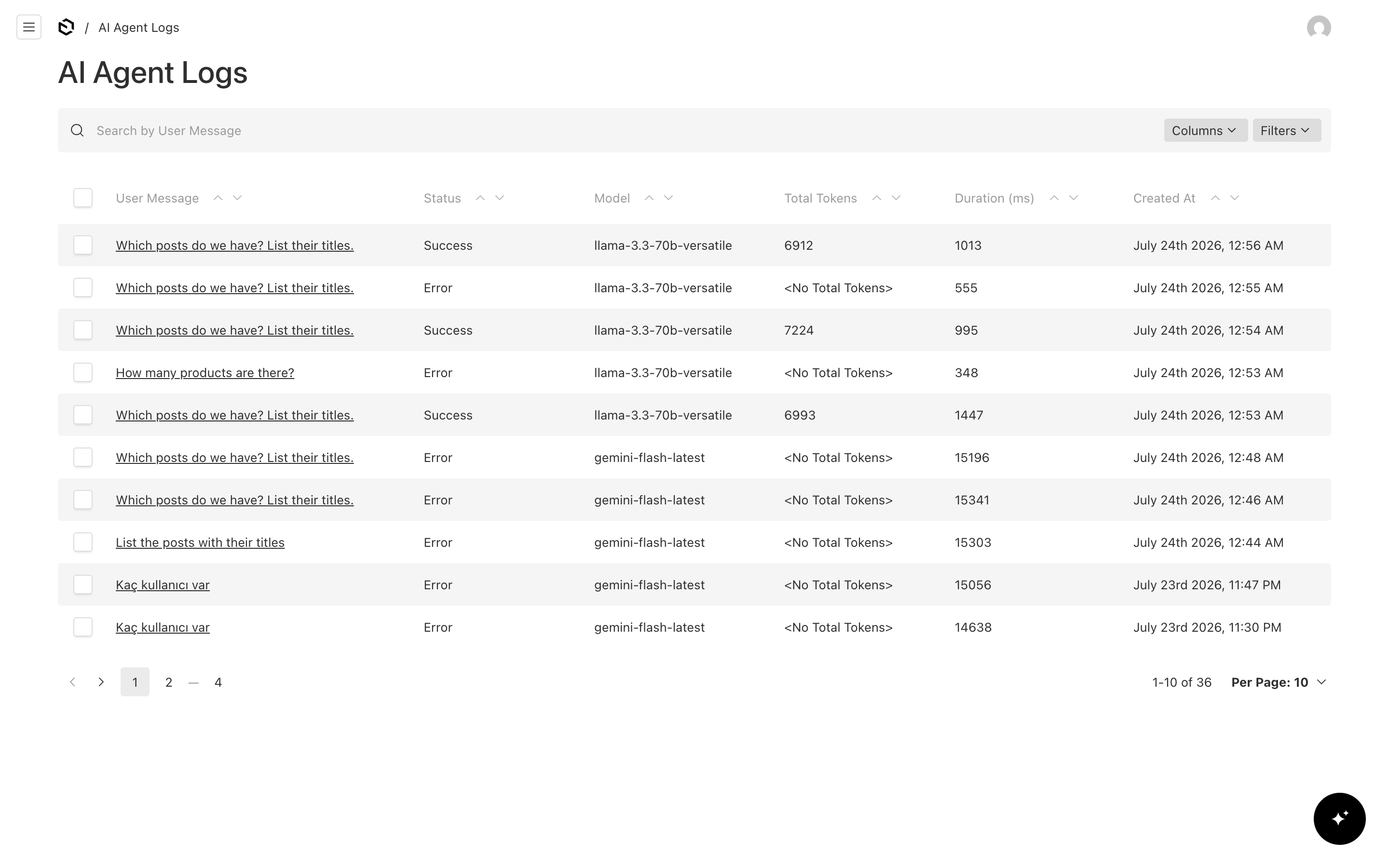
AI Agent Logs — one row per turn with status, the model that actually ran, token usage
and duration. The Model column reflects the panel override, so you can see exactly which
model served each request.
Limitations
- Undo doesn't cover file operations.
undoLastChangereverts document/global create/update/delete, but uploads and in-place file replacements can't be undone automatically. - Required fields on upload collections break agent uploads. The agent creates media
from the file alone, so a
requiredfield likealton your upload collection makes the insert fail. Keep those fields optional — see Uploading images. - One request at a time. The agent works per request; there is no background or scheduled execution.
- Model choice affects reliability. Small or free-tier models can be inconsistent on multi-step tool sequences (occasionally querying with the wrong operator or over-creating). For production-grade, reliable mutations, choose a stronger model (e.g. GPT-4o or Claude). The plugin's safety rails — RBAC, confirmation, and the "never create a duplicate" prompt — apply regardless of model.
- Free-tier provider limits. Free tiers have per-minute token limits; heavy use can surface as a transient "AI request failed" message. Retry after a moment or use a paid tier / another provider.
Development
This repo contains a full Payload app under dev/ that links the plugin from source.
pnpm install
pnpm dev          # builds the plugin in watch mode + runs the dev app on :3000
Seeded login: [email protected] / password (and an [email protected] for testing RBAC).
Tests
The plugin has a Vitest integration suite that boots a real (sqlite) Payload instance and exercises tool generation, RBAC, the confirmation flow, Markdown→Lexical conversion, bulk confirmation — all without any network or LLM calls.
cd packages/payload-ai-agent
pnpm test
Try these in the panel
- "list the draft posts" — read-only find.
- "rewrite the body of the About page to be friendlier" — Markdown → Lexical write.
- "change the first hero image on the home page" (attach an image with 📎) — upload + nested global update.
- "unpublish all posts tagged internal" — bulk update with confirmation + count.
- "undo that" — revert the last change.
- "delete the post titled 'Draft: Roadmap 2026'" — see the confirmation card.
- As the editor user, "set the Espresso Machine price to 500" — blocked by RBAC.
License
MIT