
payload-ga-4
v0.1.6
Published
Google Analytics 4 (GA4) plugin for Payload CMS. Add analytics widgets and dashboards to admin panel with service account authentication.

Maintainers
 ardhicorp
Readme
Google Analytics 4 (GA4) Plugin for Payload CMS
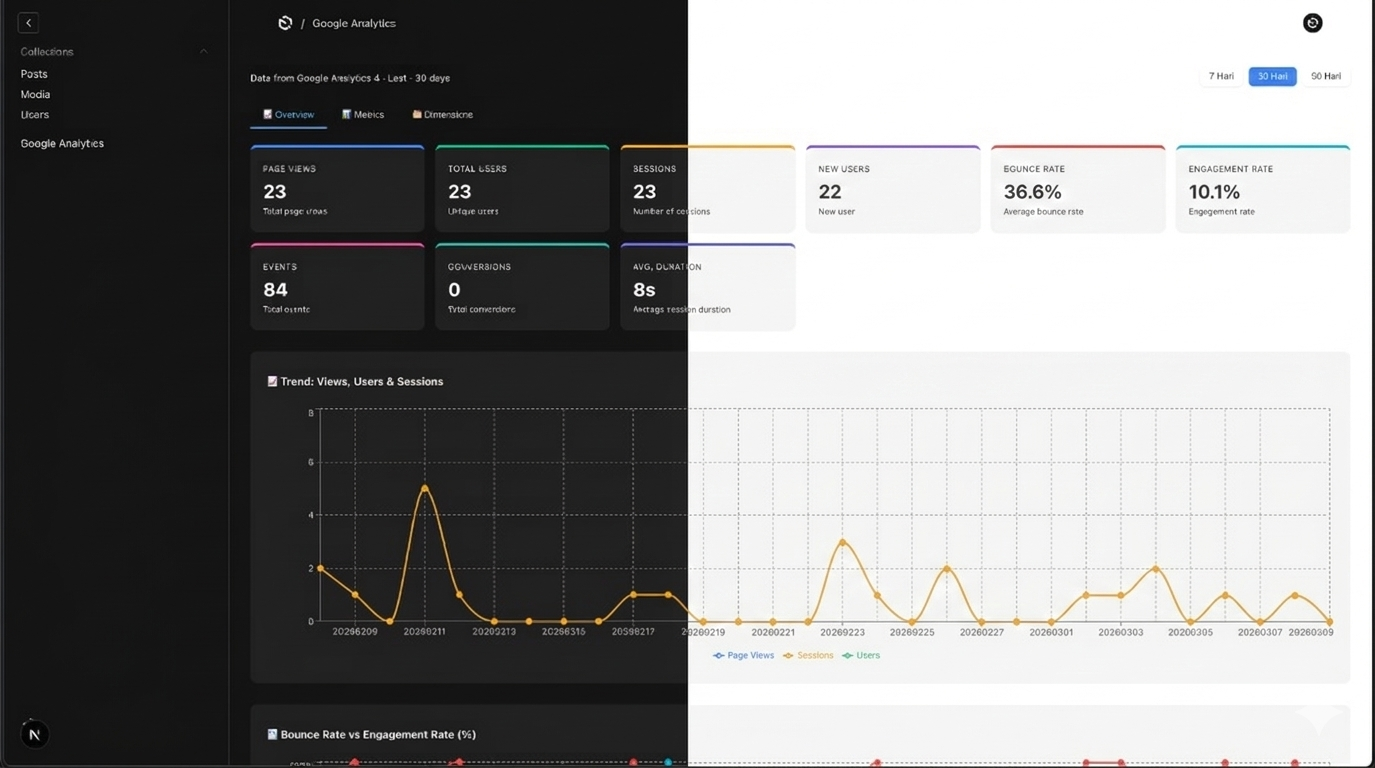
Add Google Analytics 4 (GA4) widgets and dashboards directly to your Payload CMS admin panel using your Google Developer Service Account credentials.
Features
- Custom Analytics Dashboard View (
/analytics) - Widgets that can be placed in Dashboard, Collections, or Globals
- Support for multiple timeframes (7d, 30d, 90d)
- Service Account based authentication (No OAuth screens required)
Installation
npm install payload-ga-4
# or
yarn add payload-ga-4
# or
pnpm add payload-ga-4
Setup Google Analytics
To use this plugin, you'll need a Google Cloud Service Account and a GA4 Property ID.
- Go to Google Cloud Console
- Create a new Service Account and download the JSON key.
- Keep note of the
client_emailandprivate_keyfrom the JSON. - Go to Google Analytics Admin
- Find your GA4 Property ID (Admin > Property Settings).
- Give your Service Account email "Viewer" access to your GA4 property under Property Access Management.
Configuration
Import the payloadGa4 plugin and add it to your payload.config.ts.
import { buildConfig } from 'payload'
import { payloadGa4 } from 'payload-ga-4'

export default buildConfig({
  // ... other payload config
  plugins: [
    payloadGa4({
      enabled: true,

      // Look for the Property ID in Google Analytics Admin > Property > Property Settings
      propertyId: process.env.GA_PROPERTY_ID!,

      // Google Service Account Credentials
      credentials: {
        type: 'service_account', // or process.env.GA_ANALYTIC_TYPE
        clientEmail: process.env.GA_ANALYTIC_CLIENT_EMAIL!,
        // Note: ensure \n is handled properly if parsed from .env string
        privateKey: process.env.GA_ANALYTIC_PRIVATE_KEY!,
      },

      defaultTimeframe: '30d',

      // Where to show the analytics dashboard widget
      placement: ['dashboard', 'root'],

      // Widget specific config
      widget: {
        title: 'Google Analytics',
      },

      // Access control for the analytics data
      access: async (user) => {
        return user ? true : false
      },
    }),
  ],
})
Options
| Option | Type | Description |
|--------|------|-------------|
| enabled | boolean | Whether to enable the plugin (default: false). |
| propertyId | string | Required. Your GA4 Property ID. |
| credentials.type | string | Typically 'serviceAccount' / 'service_account' |
| credentials.clientEmail | string | Required. Service account client email. |
| credentials.privateKey | string | Required. Service account private key. |
| defaultTimeframe | '7d' \| '30d' \| '90d' | Default timeframe for fetching data. |
| placement | PlacementSlot \| PlacementSlot[] | Where to render the widget. See Placements below. |
| widget.title | string | Title of the widget component. |
| widget.timeframe | '7d' \| '30d' \| '90d' | Widget component default time period. |
| widget.detailPath | string | Detailed analytics view path (matches your root view path if set). |
| path | string | Custom path for the root analytics view (default: /analytics). |
| access | (user: any) => boolean \| Promise<boolean> | Function to control access to analytics endpoints and view dashboard. |
Placements
Provide a plain string or an object to bind widgets to specific collections or globals:
// Into the main dashboard before elements:
placement: 'dashboard'

// As a separate view on the side nav root:
placement: 'root'

// Bound to specific collections:
placement: {
  collection: 'pages',
  position: 'afterList' // 'beforeList' | 'afterList' | 'beforeEdit' | 'afterEdit'
}

// Bound to globals:
placement: {
  global: 'site-settings',
  position: 'beforeEdit' // 'beforeEdit' | 'afterEdit'
}