
pcm-erd-viewer
v1.0.4
Published
Salesforce Revenue Cloud Advanced - Product Catalog ERD Dependency Viewer

Maintainers
 mohanchinnappan
Readme
🎯 Product ERD Dependency Viewer
A powerful Node.js CLI tool for visualizing and analyzing Salesforce Revenue Cloud Advanced - Product Catalog Entity Relationship Diagrams (ERD). Understand complex object dependencies and relationships with interactive visual representations.



✨ Features
- 🔍 Dependency Analysis - Instantly see which objects depend on a target object
- 📊 Interactive Visualization - Force-directed graphs with drag-and-drop
- 🔗 Relationship Mapping - Visualize lookup and composite lookup relationships
- 📋 Detailed Information - Composite keys, field mappings, and SOQL queries
- 🚀 Fast & Lightweight - Minimal dependencies, maximum performance
📸 Demo
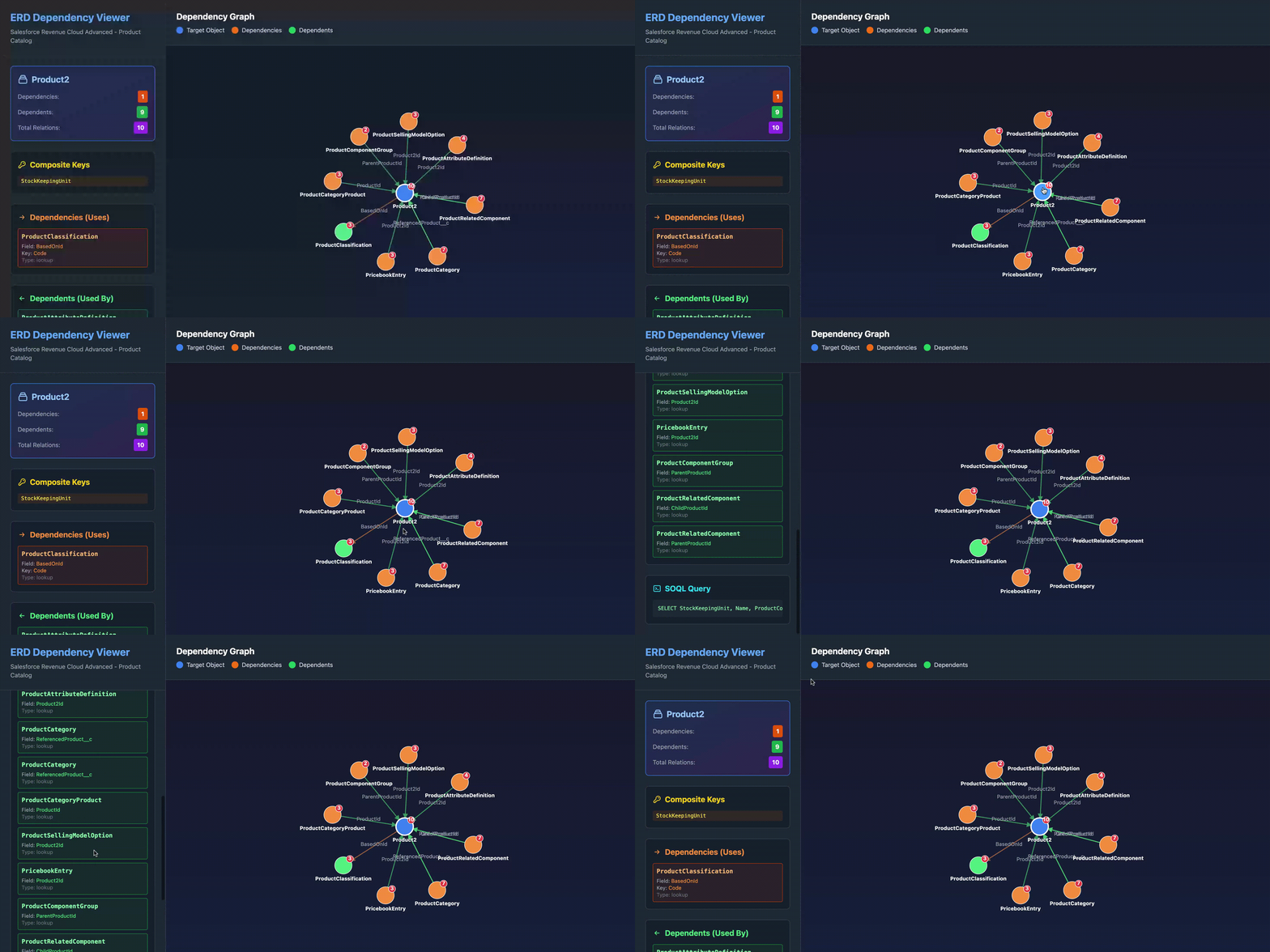
Sample Load Plan (download this as loadplan.json)
🚀 Quick Start
Installation
npm install -g pcm-erd-viewerBasic Usage
# Analyze a specific object
pcm-erd-viewer -m Product2

# Use a custom load plan file
pcm-erd-viewer -m ProductAttributeDefinition -f path/to/custom-loadplan.json
📖 Usage Guide
Command Line Options
| Option | Alias | Required | Description | Default |
|--------|-------|----------|-------------|---------|
| --metadata <object> | -m | ✅ Yes | Object name to analyze | - |
| --file <path> | -f | ❌ No | Path to load plan JSON | loadplan.json |
| --help | -h | ❌ No | Display help information | - |
| --version | -V | ❌ No | Display version number | - |
Examples
Analyze Product2 object:
pcm-erd-viewer -m Product2Analyze with custom load plan:
pcm-erd-viewer -m ProductCategoryProduct -f data/my-loadplan.json📁 Load Plan JSON Format
The load plan JSON should follow this structure:
[
  {
    "object": "Product2",
    "compositeKeys": ["StockKeepingUnit"],
    "query": "SELECT StockKeepingUnit, Name, ProductCode FROM Product2",
    "fieldMappings": {
      "Name": "Name",
      "BasedOnId": {
        "lookup": {
          "object": "ProductClassification",
          "key": "Code",
          "field": "BasedOn.Code"
        }
      }
    }
  }
]
Supported Relationship Types
- Simple Lookup
{
  "lookup": {
    "object": "ParentObject",
    "key": "UniqueKey",
    "field": "ParentObject.UniqueKey"
  }
}- Composite Lookup
{
  "compositeLookup": {
    "object": "ParentObject",
    "keyFields": ["Field1", "Field2"],
    "sourceFieldMap": {
      "Field1": "Parent.Field1",
      "Field2": "Parent.Field2"
    }
  }
}
🎨 Output
The tool generates an interactive HTML file with:
Left Panel
- Target Object Stats - Dependency and dependent counts
- Composite Keys - All composite key fields
- Dependencies List - Objects the target depends on with field details
- Dependents List - Objects that depend on the target
- SOQL Query - Complete query for the object
Right Panel
- Interactive Graph - D3.js force-directed visualization
- Color-Coded Nodes:
- 🔵 Blue - Target object
- 🟠 Orange - Has dependencies (uses other objects)
- 🟢 Green - Pure dependents (used by other objects)
- Directional Arrows - Show relationship flow
- Draggable Nodes - Rearrange the layout
- Zoom & Pan - Explore large graphs
🔍 Understanding the Visualization
Node Colors
- Blue Node - The object you're analyzing (target)
- Orange Nodes - Objects with outgoing dependencies
- Green Nodes - Objects that are only dependents
Arrow Colors
- Orange Arrows (→) - Dependencies (target uses these objects)
- Green Arrows (→) - Dependents (these objects use the target)
Relationship Badges
- Red Circle - Total number of relationships for each object
🛠️ Development
Requirements
- Node.js >= 14.0.0
- npm >= 6.0.0
🌟 Use Cases
1. Understanding Dependencies Before Migration
pcm-erd-viewer  -m Product2
# See what objects Product2 depends on before migrating
2. Impact Analysis for Schema Changes
pcm-erd-viewer  -m AttributeDefinition
# See which objects would be affected by changes to AttributeDefinition
3. Data Load Order Planning
# Check dependencies to determine correct load order
pcm-erd-viewer  -m ProductCategoryProduct
4. Documentation & Training
# Generate visual documentation for team training
pcm-erd-viewer -m ProductRelatedComponent
📊 Sample Objects to Analyze
Common Salesforce Product Catalog objects:
| Object | Description |
|--------|-------------|
| Product2 | Core product object |
| ProductAttributeDefinition | Product attribute definitions |
| ProductCategoryProduct | Product-category relationships |
| PricebookEntry | Pricing information |
| ProductRelatedComponent | Bundle and product relationships |
| AttributeCategory | Attribute categorization |
| ProductClassification | Product classification data |
| ProductSellingModel | Selling model configurations |
📝 License
This project is licensed under the MIT License - see the LICENSE file for details.
🐛 Known Issues
- Large graphs (100+ nodes) may have performance issues
- Circular dependencies are supported but may create complex visualizations
🔮 Roadmap
- [ ] Export graph as PNG/SVG
- [ ] Filter relationships by type
- [ ] Search/highlight specific objects in graph
- [ ] Multiple object comparison view
- [ ] Load plan validation and linting
- [ ] Reverse dependency tree view
- [ ] Interactive load order calculator
💡 Tips & Tricks
Tip 1: Navigate Large Graphs
Use zoom (scroll wheel) and pan (click + drag background) to explore large dependency graphs.
Tip 2: Focus on Specific Relationships
The left panel lists all relationships with details - use this for precise information.
Tip 3: Generate Multiple Reports
Run the tool multiple times to compare different objects:
pcm-erd-viewer -m Product2
pcm-erd-viewer -m ProductAttributeDefinition
pcm-erd-viewer-m PricebookEntry
Tip 4: Custom Load Plans
Create custom load plans for specific analysis needs:
pcm-erd-viewer -m MyCustomObject -f custom-analysis.json
References
Made with ❤️ for Salesforce Developers