
pencil-faces
v1.0.0
Published
Pencil-drawn passport-photo portraits as SVG strings, generated from a seed or a config.

Maintainers
 mbecher
Readme
pencil-faces



Little pencil-drawn portraits as SVG, generated from a number.
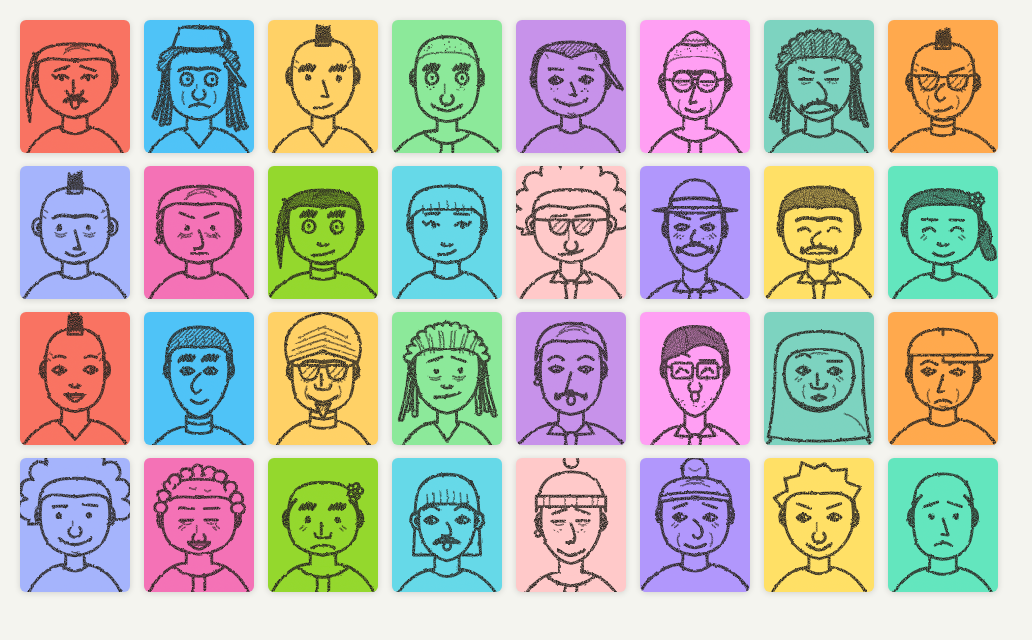
I drew these for a geography game where every player gets a passport photo. A seed rolls a face: head shape, hair, eyes, brows, nose, mouth, clothes, maybe a beard, glasses, a hat or headphones. An SVG filter roughens the lines so they look like graphite on paper. The same seed gives the same face on every machine, so a game only has to send a 32-bit number around.
There is no randomness hidden inside the renderer. A seed produces a plain
FaceConfig object, and the renderer turns a config into an SVG string. You
can edit the config, store it, or build one from scratch in a face editor.
No dependencies, works in the browser and in Node.
Install
npm install pencil-facesESM only, with type declarations.
Usage
import { faceFromSeed, renderFace, pencilDefs } from 'pencil-faces';

// Once per page: the pencil filter every face refers to.
document.body.insertAdjacentHTML('beforeend', pencilDefs());

const avatar = document.querySelector('.avatar');
avatar.innerHTML = renderFace(faceFromSeed(1234567));
The SVG has no fixed size and fills its container. Lines use the CSS color
of the container; shapes that cover something (the head in front of long
hair, a hat over the forehead) are filled with --c, so set that to the
colour of the box:
.avatar {
  --c: #f3d9a4;     /* paper */
  color: #2b2622;   /* pencil */
  width: 96px;
  aspect-ratio: 38 / 46;
  background: var(--c);
}
The seed can also be a string, so a user name gives everyone a face of their own without storing anything:
renderFace(faceFromSeed('marian'));To change a face, change its config. faceFromSeed takes overrides that
replace fields after the roll, so everything else stays the same:
faceFromSeed(42, { hair: 'afro', glasses: 'round', marks: { freckles: true } });defaultFace() returns a plain friendly face to start an editor from, and
FACE_OPTIONS lists the allowed values per field for building pickers.
The config has one numeric field, jitter. It seeds the proportions (head
width, eye spacing, nose length) and the small wobble that keeps a hand
drawing from being perfectly symmetric. Swapping the hairstyle never moves
the eyes.
Seeds stay as stable as they can across releases. New options are rolled after the old ones, so a seed only changes when one of those new rolls hits it, and a config renders the same unless a release fixes how something is drawn (0.2 stops hair sticking out over beanies, caps, brimmed hats and fezzes). A test pins the faces of earlier versions.
Options
| Field | Values |
| --- | --- |
| shape | oval square long round pear heart |
| clothes | crewneck vneck shirtTie turtleneck hoodie stripes |
| ears | small big |
| eyes | dot open lidded happy wide squint tired lash |
| wink | true closes the right eye |
| brows | straight arch angry worried bushy unibrow thin raised |
| nose | plain hook bulb snub wide pointed, plus noseSide |
| mouth | line smile grin surprised crooked pout frown dimples |
| marks | laughLines foreheadLines crowsFeet chinDimple freckles |
| beard | none moustache handlebar full goatee stubble |
| hair | bald short sidePart curly afro bun long bangs mohawk spiky braid slickedBack locs cornrows ponytail buzz receding; with bangs, longHairBehindBangs adds long hair behind the fringe |
| hairTone | light (outline only) mid dark (shaded with hatching) |
| hat | none beanie cap brimmed headband hijab turban kippah fez; a hijab covers hair, ears and neck, a turban the hair |
| glasses | none round square sunglasses monocle |
| extra | none headphones earring flower pencil |
renderFace(config, options) takes filterId (default pencil-face,
null for clean vector lines), className, background and stroke if
you would rather not use CSS variables. The filter must live in the same
document as the face. For a standalone SVG file, say one written from Node,
wrap the face in an <svg> of your own with pencilFilter() in its <defs>.
Styling
Paths carry four classes you can tune from a stylesheet: fill for solid
dots such as pupils and freckles, detail for small extras, soft for
shading and strands of hair, thick for bold strokes. They come with
sensible defaults, so a face looks right without any CSS. Stroke widths are
in viewBox units and scale with the picture; tiny faces read better with
thicker lines and .detail { display: none }.
Development
git clone https://github.com/MarianBecher/pencil-faces && cd pencil-faces
npm install
npm run demo   # a page with a seed field, a picker for every option and a gallery
make check     # typecheck, lint and tests
How this was made
The code, tests and docs were written by Claude (Anthropic) with Claude Code, directed and reviewed by me. CI runs the type check, lint, the test suite and the build on every push.