people-selector
v1.1.3
Published
选人组件


Readme
选人组件Demo
线上地址
pc: https://static.educloud.qq.com/components/selector/demo/index.html#/pc?token=xxx
h5: https://static.educloud.qq.com/components/selector/demo/index.html#/h5?token=xxx
依赖
框架:vue
UI:element-ui、view-design(h5无需引入)
第三方库: axios
更换主题色:#0CB181
安装
npm 安装
npm i people-selector -S
使用(npm)
<template>
  <selector
    :options="selectorOptions"
    ref="selector"
    style="width: 720px">
  </selector>
</template>
<script>
  import 'people-selector/dist/1.1.3/index.css'; // 引入组件样式
  import { PeopleSelectorPc, PeopleSelectorH5, PeopleSelectorByRole } from 'people-selector';
  export default {
    components: {
      Selector: PeopleSelectorPc,
      SelectorH5: PeopleSelectorH5,
      SelectorByRole: PeopleSelectorByRole
    },
    data() {
      return {
        selectorOptions: {
          staticParams: {
            DepartmentType: '1,2,4,5,6,7,8',
            CheckType: 0,
            ShowUserType: 1,
            IsIncludeBranch: true
          },
          getTree(params, callback) {
            axios.get('https://iapi.campus.qq.com/campus/department/GetSelectTreeForAdmin', {
              params: params,
              headers: {
                Authorization: localStorage.getItem('token')
              }
            }).then(res => {
              callback(res.data);
            }).catch(err => {
              let res = err.response.data;
              callback(res);
            });
          }
        }
      }
    }
  }
</script>
CDN
<!-- 引入样式 -->
<link rel="stylesheet" href="//static.educloud.qq.com/components/selector/element/style/index.css">
<link rel="stylesheet" type="text/css" href="//static.educloud.qq.com/components/selector/iview/style/iview.css">
<link rel="stylesheet" href="//static.educloud.qq.com/components/selector/dist/1.1.3/index.css">

<!-- 引入组件库 -->
<script src="//static.educloud.qq.com/vue/vue.js"></script>
<script src="//static.educloud.qq.com/components/selector/element/index.js"></script>
<script src="//static.educloud.qq.com/components/selector/iview/index.js"></script>
<script src="//static.educloud.qq.com/components/selector/dist/1.1.3/index.umd.min.js"></script>
使用(cdn)
<people-selector-pc
  ref="selector"
  style="width: 720px"
  :options="selectorOptions">
</people-selector-pc>
<script>
new window.Vue({
    el: '#app',
    data: {
      selectorOptions: {
        staticParams: {
          DepartmentType: '1,2,4,5,6,7,8',
          CheckType: 0,
          ShowUserType: 1,
          IsIncludeBranch: true
        },
        getTree(params, callback) {
          axios.get('https://iapi.campus.qq.com/campus/department/GetSelectTreeForAdmin', {
            params: params,
            headers: {
              Authorization: localStorage.getItem('token')
            }
          }).then(res => {
            callback(res.data);
          }).catch(err => {
            let res = err.response.data;
            callback(res);
          });
        }
      }
    }
  });
</script>
组件属性
options参数说明
| 参数 | 类型 | 示例 | 是否必填 | 默认值 | 说明 | | :---: | :---: | :--- | :--- | :----: | :---- | | getTree | Function | 见上图 | 是 | 否 | 应用侧获取组织架构接口 | | staticParams | | | | | | | staticParams.DepartmentType | String | 1,2,3 | 是 | 否 | 组织架构类型 0学校 1学生 2教职工 4校友 5退休教师 6临时组 7虚拟组 8课程班 | | staticParams.CheckType | Integer | 0 | 是 | 否 | 控制是否可勾选 0架构和用户均可勾选 1只用户可勾选 2只架构可勾选 3只班级可勾选| | staticParams.ShowUserType | String | 1 | 是 | 否 | 控制用户是否显示 0不显示用户 1显示架构用户 2班级节点用户显示老师 3班级节点用户显示家长 4班级节点用户都显示 | | staticParams.IsIncludeBranch | String | true | 否 | 否 | 是否展示分校 |
getTree回调函数说明
| 参数名字 | 参数描述 | 类型 | | :---: | :---: | :--- | | params | 接口参数,具体参看文档 | Object | | callback | 调用应用侧接口后回传方法,需要回传节点列表 | Function |
组件方法
| 方法名 | 说明 | 参数 | 返回值 | | :---: | :---: | :--- | :--- | | setOptions | 手动设置options,参数值与options属性一致 | (object) | 无 | | getData | 获取已选择的用户或组织架构列表 | 无 | Array |
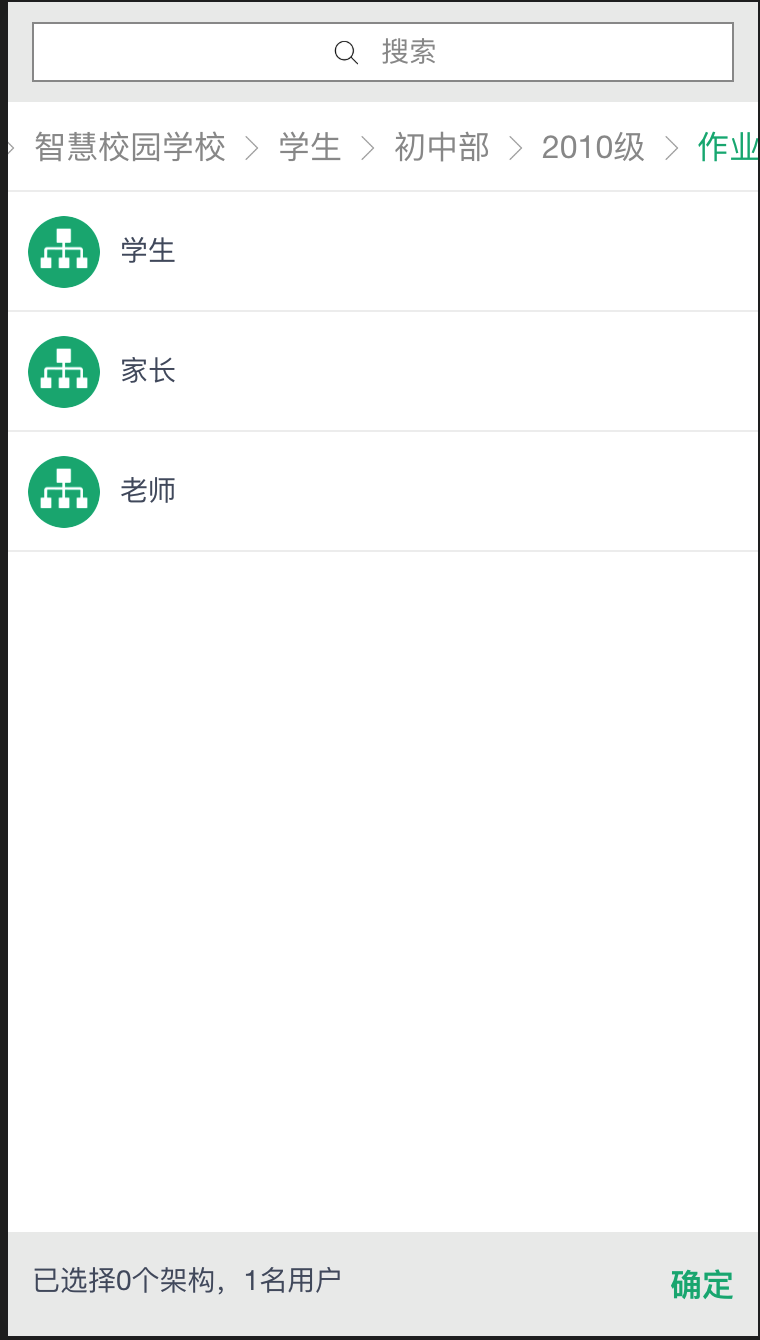
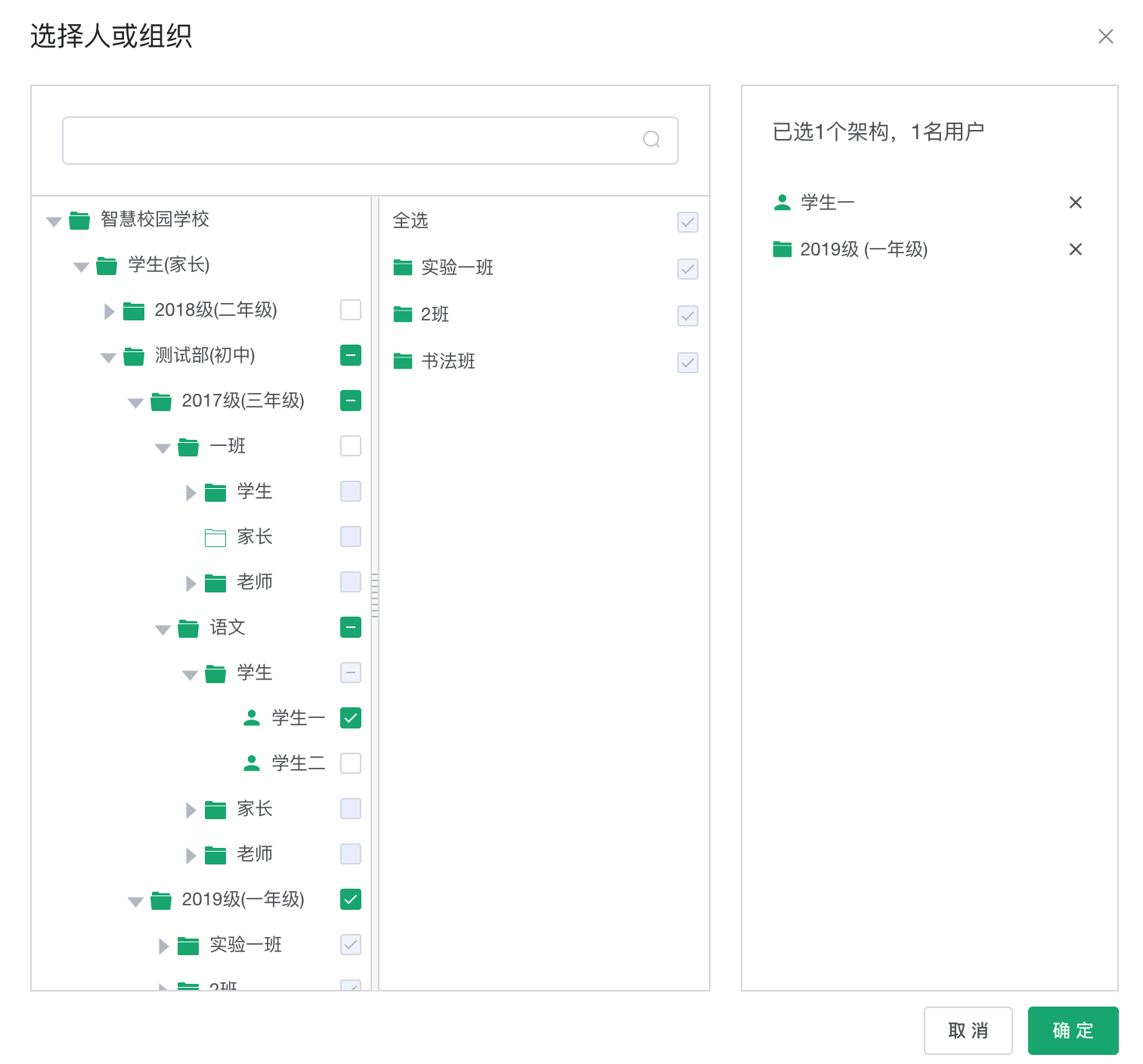
组件预览
pc端
h5端