
pg-boss-admin-dashboard
v1.1.1
Published
Admin dashboard and debugging console for monitoring, managing and analyzing pg-boss job queues

Maintainers
 lyubomirpetrov
Readme
pg-boss-admin-dashboard


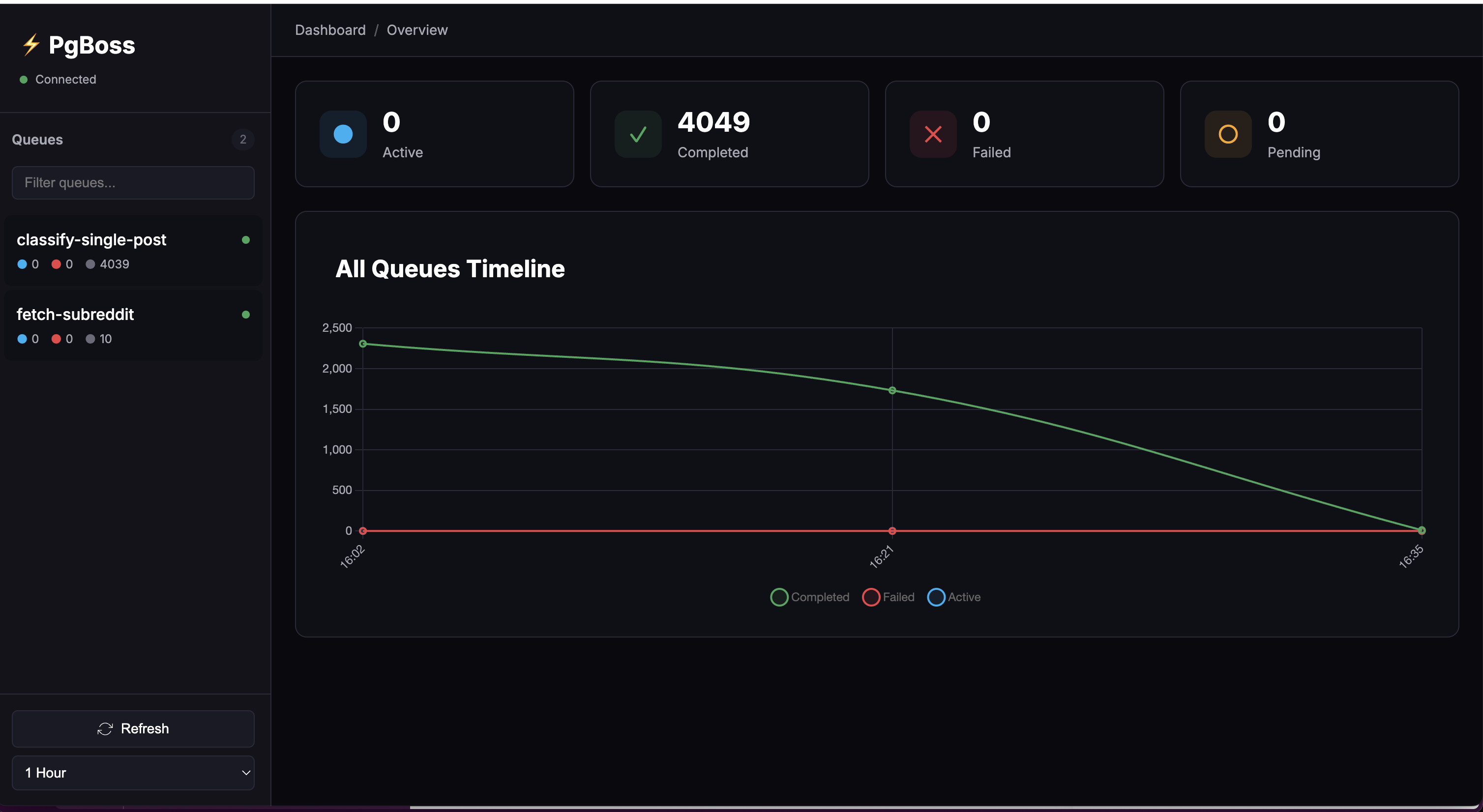
A comprehensive admin dashboard, debugging console, and monitoring tool for pg-boss job queues. Monitor job health, debug failed jobs, analyze performance metrics, and manage your background job processing with a powerful web-based interface.
🚀 Features
- 📊 Real-time Monitoring - Auto-refreshing queue statistics and job data
- 📈 Visual Analytics - Interactive charts showing job processing trends over time
- 🔍 Advanced Search - Filter jobs by state, date range, or JMESPath queries
- 💼 Job Management - View detailed job information and metadata
- 🎨 Modern UI - Clean, responsive design with dark theme support
- ⚡ Fast & Lightweight - Minimal dependencies, optimized performance
- 🔌 Easy Integration - Simple CLI installation, works with existing pg-boss setups
- 🐛 Debugging Tools - Inspect failed jobs, view error messages, and analyze job data
- 📊 Performance Metrics - Track job processing times, success rates, and queue throughput
- 🔧 Admin Controls - Manage queues and job states (retry/cancel placeholders for safety)
📦 Installation
Global Installation (Recommended)
npm install -g pg-boss-admin-dashboardLocal Installation
npm install pg-boss-admin-dashboard🏃 Quick Start
- Ensure you have a PostgreSQL database with pg-boss initialized
- Set your database connection string:
Or create aexport PGBOSS_DATABASE_URL="postgres://user:password@localhost:5432/your_db".envfile:PGBOSS_DATABASE_URL=postgres://user:password@localhost:5432/your_db - Start the dashboard:
pg-boss-admin-dashboard
The dashboard will automatically open at http://localhost:8671
💻 CLI Usage
pg-boss-admin-dashboard [options]

Options:
  --port=<number>    Port to run the dashboard on (default: 8671)
  --no-browser       Don't automatically open browser
  -h, --help         Show help message

Examples:
  pg-boss-admin-dashboard                    # Start on default port
  pg-boss-admin-dashboard --port=3000        # Start on custom port
  pg-boss-admin-dashboard --no-browser       # Start without opening browser
⚙️ Configuration
Environment Variables
| Variable | Required | Default | Description |
|----------|----------|---------|-------------|
| PGBOSS_DATABASE_URL | ✅ Yes | - | PostgreSQL connection string |
| PGBOSS_DASHBOARD_PORT | No | 8671 | Dashboard server port |
| PGBOSS_NO_BROWSER | No | false | Disable auto-opening browser |
Configuration Priority
- Command-line arguments (highest priority)
- Environment variables
.envfile in current directory.envfile in package directory- Default values (lowest priority)
🎯 Features in Detail
Queue Overview
- Real-time queue statistics with job counts by state
- Visual health indicators based on queue status
- Quick navigation between different queues
Job Statistics
- Time-series charts with configurable intervals (minute to year)
- Separate views for global and per-queue statistics
- Interactive charts with hover details
Job Filtering
- State Filter: Filter by created, active, completed, failed, retry, or cancelled
- Date Range: Filter jobs by creation date
- Text Search: Search across job IDs and data
- JMESPath Queries: Advanced JSON queries with
jq:prefix
JMESPath Examples
jq:data.userId == "123"              # Find jobs for specific user
jq:data.amount > "100"               # Find high-value jobs
jq:contains(data.tags, "urgent")     # Find urgent jobs
Job Details
- Complete job metadata display
- JSON data viewer with syntax highlighting
- Timing information and retry details
- Click-to-filter functionality
🔐 Security Considerations
- Never expose the dashboard to the public internet without authentication
- Use read-only database credentials when possible
- Consider using SSH tunnels for remote connections
- Implement authentication middleware for production deployments
Recommended Production Setup
// Add authentication middleware before starting dashboard
const authMiddleware = (req, res, next) => {
  // Your authentication logic here
  next();
};

// Use with Express app
app.use('/dashboard', authMiddleware, pgBossDashboard);
🛠️ Development
Prerequisites
- Node.js 14+
- PostgreSQL with pg-boss installed
- npm or yarn
Running from Source
# Clone repository
git clone https://github.com/lpetrov/pg-boss-admin-dashboard.git
cd pg-boss-admin-dashboard

# Install dependencies
npm install

# Set up environment
cp .env.example .env
# Edit .env with your database connection

# Run in development mode
npm run dev
Project Structure
pg-boss-admin-dashboard/
├── bin/                    # CLI executable
│   └── pg-boss-admin-dashboard.js
├── public/                 # Frontend static files
│   ├── index.html         # Main HTML
│   ├── app.js             # Application logic
│   └── styles.css         # Styling
├── client/                 # React version (in development)
├── index.js               # Express server
├── package.json           # Package configuration
└── README.md              # Documentation
🤝 Contributing
Contributions are welcome! Please feel free to submit a Pull Request.
- Fork the repository
- Create your feature branch (
git checkout -b feature/AmazingFeature) - Commit your changes (
git commit -m 'Add some AmazingFeature') - Push to the branch (
git push origin feature/AmazingFeature) - Open a Pull Request
Development Guidelines
- Follow existing code style
- Add tests for new features
- Update documentation as needed
- Ensure backward compatibility
📝 License
This project is licensed under the MIT License - see the LICENSE file for details.
🙏 Acknowledgments
- pg-boss - The job queue this dashboard monitors
- Express.js - Web framework
- Chart.js - Charting library
- JMESPath - JSON query language
📞 Support
- 💬 Issues: GitHub Issues
- 📖 Wiki: GitHub Wiki
Made with ❤️ by the pg-boss community