
pgenview
v0.0.1
Published
View Code Generator for Pebble
Downloads
13

Maintainers
 fschaper
Readme
A Pebble View Generator
Introduction
Writing UI code can be quite repetitive and tiresome. While working on our latest project for the pebble smartwatch we created (read: hacked!) a tool that eased some of the burdens by generating C source from a simple formatting language.
This line of a pview script
text $passed_text as 'text_line2' (width:60 height:17 top:6 left:22) using font 'my_custom_font' black on clear;corresponds to the following C code
// text layer 'text_line2'
{
    current->text_line2 = text_layer_create( (GRect){ .origin = { 6, 22 }, .size = { 60, 17 } } );
    Layer *layer = text_layer_get_layer( current->text_line2 );
    text_layer_set_font( current->text_line2, current->my_custom_font );
    text_layer_set_text( current->text_line2, passed_text );
    text_layer_set_background_color( current->text_line2, GColorClear );
    text_layer_set_text_color( current->text_line2, GColorBlack );
    layer_add_child( parent, layer );
}
Usage
We organize our code into views and subviews. Views are basically containers for a group of closely related interface components. As the other pebble user interface components, views will expose at least a *_create, *_delete and *_get_layer function.
Every view has to be defined in an seperate pview file.
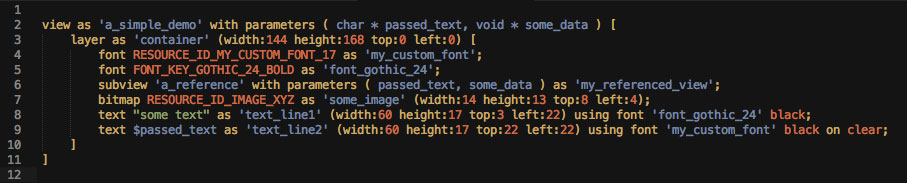
Running the pgenview command against our script will generate a a_simple_demo_view.h header and an a_simple_demo_view.c implementation file in the current working directory. Any existing files by that name will be overwritten.
The header file of the example above will expose the following interface for you to extend
//
// this is a generated file, do not edit!
//

#ifndef a_simple_demo_view_h
#define a_simple_demo_view_h

#include <pebble.h>

struct AReference;

typedef struct ASimpleDemoView {
	Layer *container;
	TextLayer *text_line1;
	TextLayer *text_line2;
	BitmapLayer *some_image;
	GBitmap *bitmap_some_image;
	GFont my_custom_font;
	GFont font_gothic_24;
	struct AReference *my_referenced_view;
} ASimpleDemoView;

Layer * a_simple_demo_view_get_layer( ASimpleDemoView * view );

ASimpleDemoView * a_simple_demo_view_create( char * passed_text, void * some_data );

void a_simple_demo_view_destroy( ASimpleDemoView *current );

#endif
For a detailed documentation of the pview script syntax please have a look at our wiki.
Installation
You can install pgenview via npm npm install -g pgenview
Support Files
In the support directory you will find syntax highlighting support for textmate and sublime text as well as the source files for our pebble font manager.
Hacking
We used Zaach Carters jison to create the parser for our generator. You can find the jison source file in the src/ directory. If you want to customize the generated code you should have a look at the mustache template files.
License
The MIT License (MIT)
Copyright (c) 2014 hmmh AG
Permission is hereby granted, free of charge, to any person obtaining a copy of this software and associated documentation files (the "Software"), to deal in the Software without restriction, including without limitation the rights to use, copy, modify, merge, publish, distribute, sublicense, and/or sell copies of the Software, and to permit persons to whom the Software is furnished to do so, subject to the following conditions:
The above copyright notice and this permission notice shall be included in all copies or substantial portions of the Software.
THE SOFTWARE IS PROVIDED "AS IS", WITHOUT WARRANTY OF ANY KIND, EXPRESS OR IMPLIED, INCLUDING BUT NOT LIMITED TO THE WARRANTIES OF MERCHANTABILITY, FITNESS FOR A PARTICULAR PURPOSE AND NONINFRINGEMENT. IN NO EVENT SHALL THE AUTHORS OR COPYRIGHT HOLDERS BE LIABLE FOR ANY CLAIM, DAMAGES OR OTHER LIABILITY, WHETHER IN AN ACTION OF CONTRACT, TORT OR OTHERWISE, ARISING FROM, OUT OF OR IN CONNECTION WITH THE SOFTWARE OR THE USE OR OTHER DEALINGS IN THE SOFTWARE.