
phonon-studio
v1.0.1
Published
Local AI text-to-speech web app powered by Ollama Phonon

Maintainers
 mohanchinnappan
Readme
Phonon Studio
Local AI text-to-speech — powered by Ollama Phonon, running entirely on your Mac.



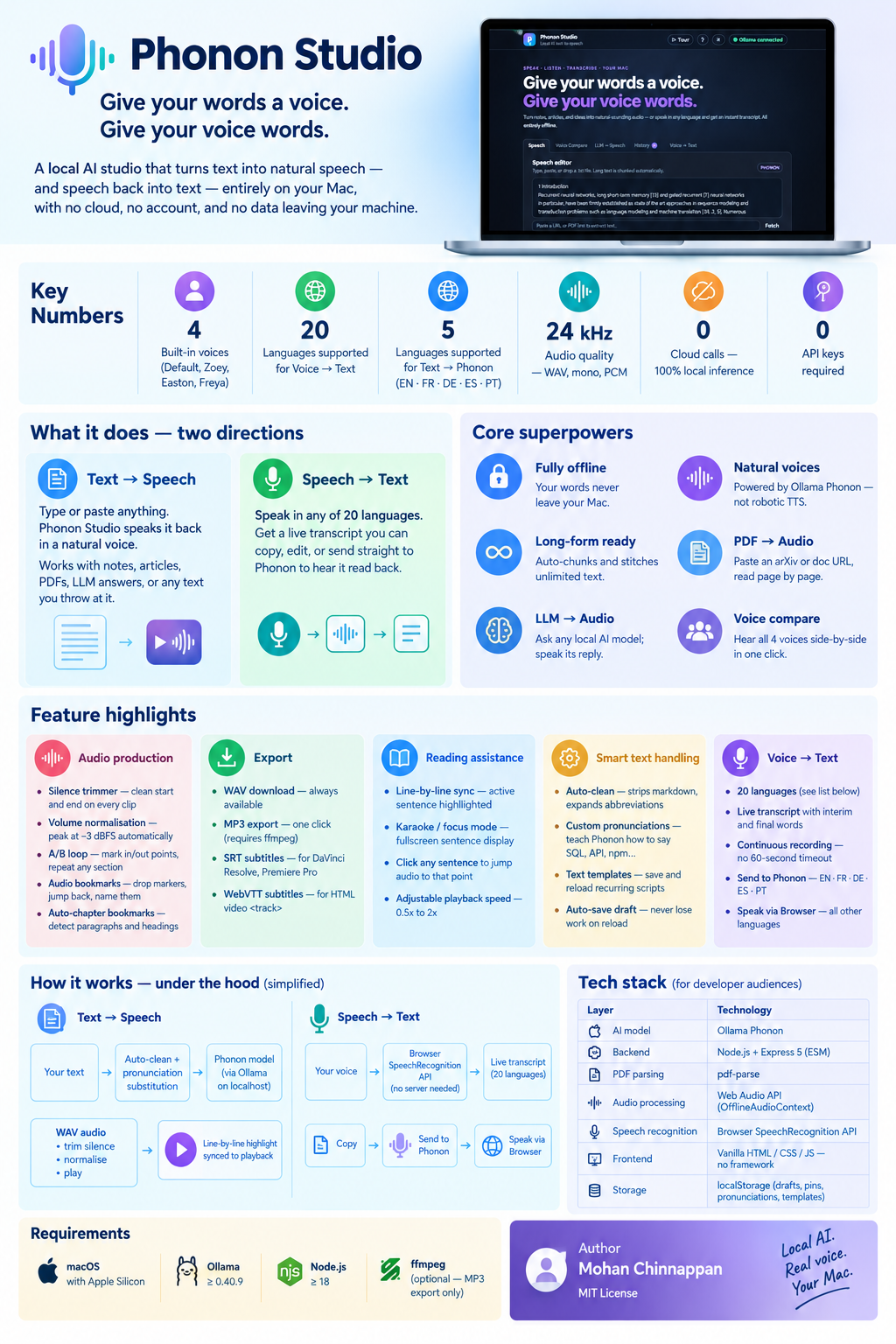
Screenshot
Demo
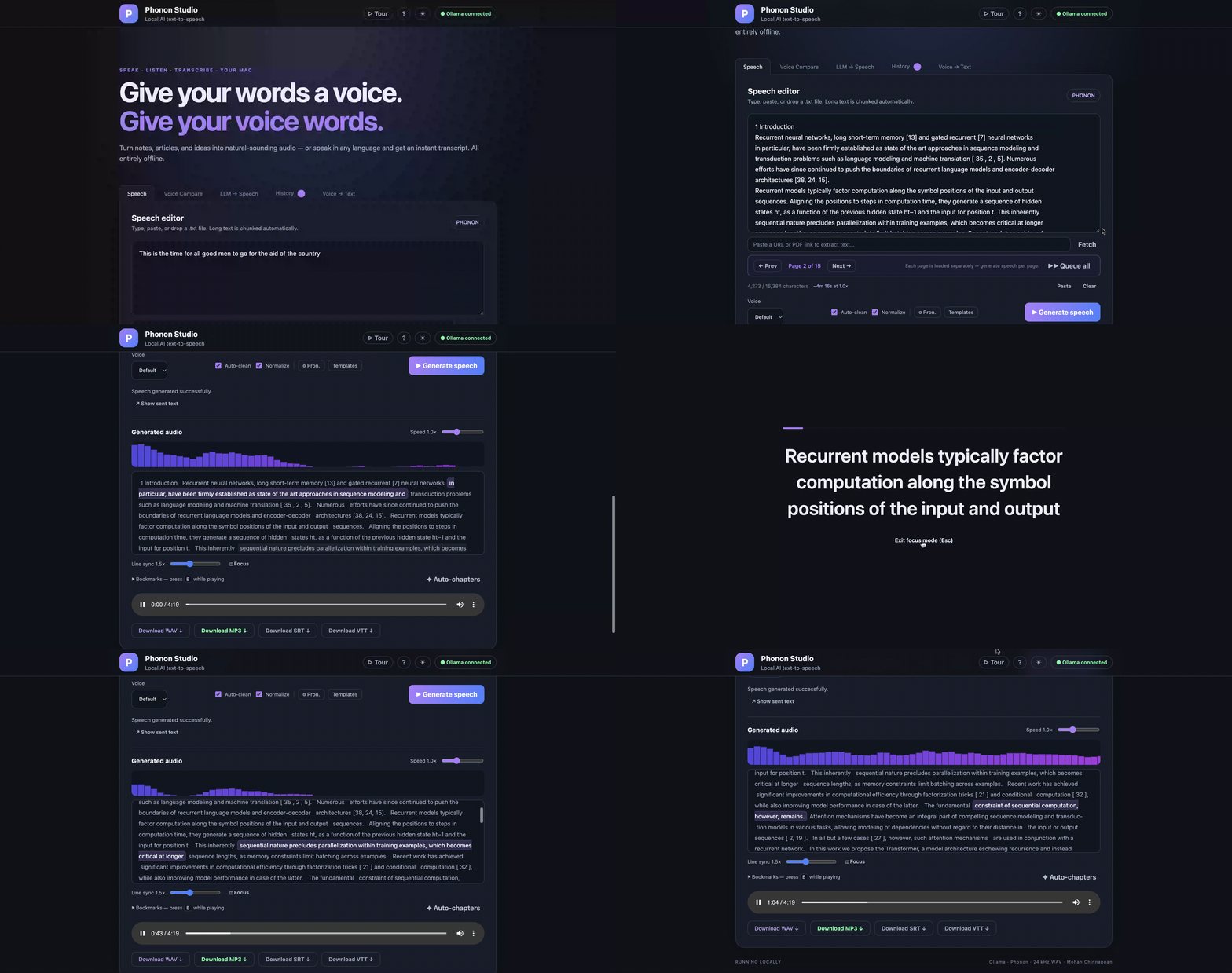
What is this?
Phonon Studio is a polished browser-based TTS app that turns any text into natural-sounding WAV audio using the Phonon model — no cloud account, no API key, no data leaving your machine.
Features
| Feature | Details |
|---|---|
| Local inference | Calls http://localhost:11434/v1/audio/speech |
| Voice selection | Default, Zoey, Easton, Freya |
| Auto chunking | Splits long text at sentence boundaries, stitches WAV |
| Voice compare | Generate all voices in parallel, side-by-side players |
| LLM → Speech | Ask any local Ollama model, send reply to Phonon |
| Waveform | Live animated frequency bars while audio plays |
| Speed control | 0.5× – 2× playback rate, no re-generation |
| WAV + MP3 download | MP3 via ffmpeg (optional) |
| Silence trimmer | Leading/trailing silence stripped from every generated WAV |
| History + pinning | Last 20 generations; ★ to pin entries across sessions |
| History filter | Filter history by voice |
| Auto-save draft | Textarea content persists across page reloads via localStorage |
| Estimated duration | Live ~Xm Ys estimate next to character count |
| Auto-clean text | Strips markdown, expands abbreviations before sending to TTS |
| URL → Speech | Paste a URL (HTML page or PDF) to extract and speak the text |
| PDF pagination | Multi-page PDFs load page-by-page with ← → navigation |
| Clipboard & drag/drop | Paste text or drop a .txt file |
| Line-by-line highlight | Active sentence highlighted in sync with audio; Line sync slider to tune lead/lag |
| SRT / VTT export | Download subtitle files from computed line timings — for video editors or web <track> |
| Custom pronunciations | Word → spoken form table (localStorage) applied before every generation |
| Karaoke / focus mode | Fullscreen sentence display with progress bar; ⛶ Focus button or auto on generate |
| Browser Speech fallback | When Ollama is offline, speak via window.speechSynthesis — amber indicator + button |
| Batch queue | Queue all PDF pages for sequential generation; per-page WAV downloads as they complete |
| Audio bookmarks | Press B to drop timestamps; seek chips + yellow waveform markers; click waveform to seek |
| Click-to-seek on lines | Click any sentence in the highlight panel to jump audio to that line's start |
| A/B loop | [ set loop-in · ] set loop-out; purple waveform region; auto-repeats section |
| Text templates | Save named text snippets to localStorage; quick-load into editor |
| Volume normalisation | Peak normalised to −3 dBFS after generation (toggle in controls) |
| Copy sent text | See exactly what was dispatched to TTS after all transforms |
| Auto-chapter bookmarks | Detect paragraph breaks and headings; create bookmarks at each chapter |
| Voice → Text | Speak in 20 languages; live transcript with copy, send to Phonon (EN/FR/DE/ES/PT), or speak back via browser TTS for all other languages |
| Keyboard shortcuts | Cmd+Enter generate · P play/pause · B bookmark · [/] loop · ? help |
| Guided tour | Step-by-step spotlight walkthrough of every feature |
| Splash screen | Welcome screen with feature highlights on first visit |
| Tooltips | Hover any control for an inline description |
| Dark / Light theme | Toggle in the topbar, saved to localStorage |
| Sticky header | Topbar stays visible while scrolling |
Requirements
- macOS with Apple Silicon (Phonon model requirement)
- Ollama ≥ 0.40.9 — install
- Node.js ≥ 18
- ffmpeg (optional, for MP3 export) —
brew install ffmpeg
Quick start
# 1. Pull the model
ollama pull phonon

# Install Phonon studio

npm install -g phonon-studio
Run
phonon-studio --port 4567 The app requires an explicit port. It will print a clear error and exit if neither
--portnorPORTis provided.
Usage
- Speech tab — type or paste text, pick a voice, press Generate speech
(or
Cmd+Enter). Long text is chunked automatically. Enable Auto-clean to strip markdown and expand abbreviations before synthesis. After generation, the active sentence is highlighted as the audio plays; use the Line sync slider to adjust if the highlight leads or lags the voice. - URL fetch — paste any URL (web page or PDF) and click Fetch. PDFs
load page-by-page with ← → navigation. The Attention Is All You Need paper
(
arxiv.org/pdf/1706.03762) is pre-filled as a demo. - Voice Compare tab — enter text in Speech, switch here, click Compare all voices to hear all four in parallel.
- LLM → Speech tab — pick an Ollama chat model, ask a question, click Send to Phonon to speak the response.
- History tab — replay or download any of your last 20 generations. Click ☆ to pin an entry so it survives page reloads.
- Voice → Text tab — pick a language, click Start recording, speak. The live transcript appears as you talk (interim words in italic, final text in normal weight). Click Copy text or, for EN/FR/DE/ES/PT, click Send to Phonon to load the transcript straight into the Speech editor.
- Keyboard shortcuts —
Cmd+Entergenerate,Pplay/pause,Bbookmark,[/]A/B loop in/out,?help,Escclose overlays/karaoke,←/→tour navigation. - Guided tour — click ▷ Tour in the header (or "Take a guided tour" on the splash screen) for a step-by-step walkthrough.
API
| Endpoint | Description |
|---|---|
| GET /api/health | Ollama status + model check + ffmpeg flag |
| GET /api/models | Available chat models |
| POST /api/speech | { text, voice } → WAV stream |
| POST /api/chat | { message, model } → { text } |
| POST /api/convert/mp3 | WAV body → MP3 (requires ffmpeg) |
| GET /api/fetch-url?url= | Fetch URL → extract text (HTML or PDF) |
Environment variables
| Variable | Purpose |
|---|---|
| PORT | Listening port (required) |
| OLLAMA_URL | Ollama base URL (default: http://127.0.0.1:11434) |
| PHONON_MODEL | TTS model name (default: phonon) |
License
MIT — see LICENSE
Author
Mohan Chinnappan