
physical-quantity
v1.3.8
Published
A web component bundle to represent physical quantities with automated unit conversion.
Downloads
190

Maintainers
 e3d
e3dReadme
physical-quantity
Web Components for physical quantities with built-in unit conversion.
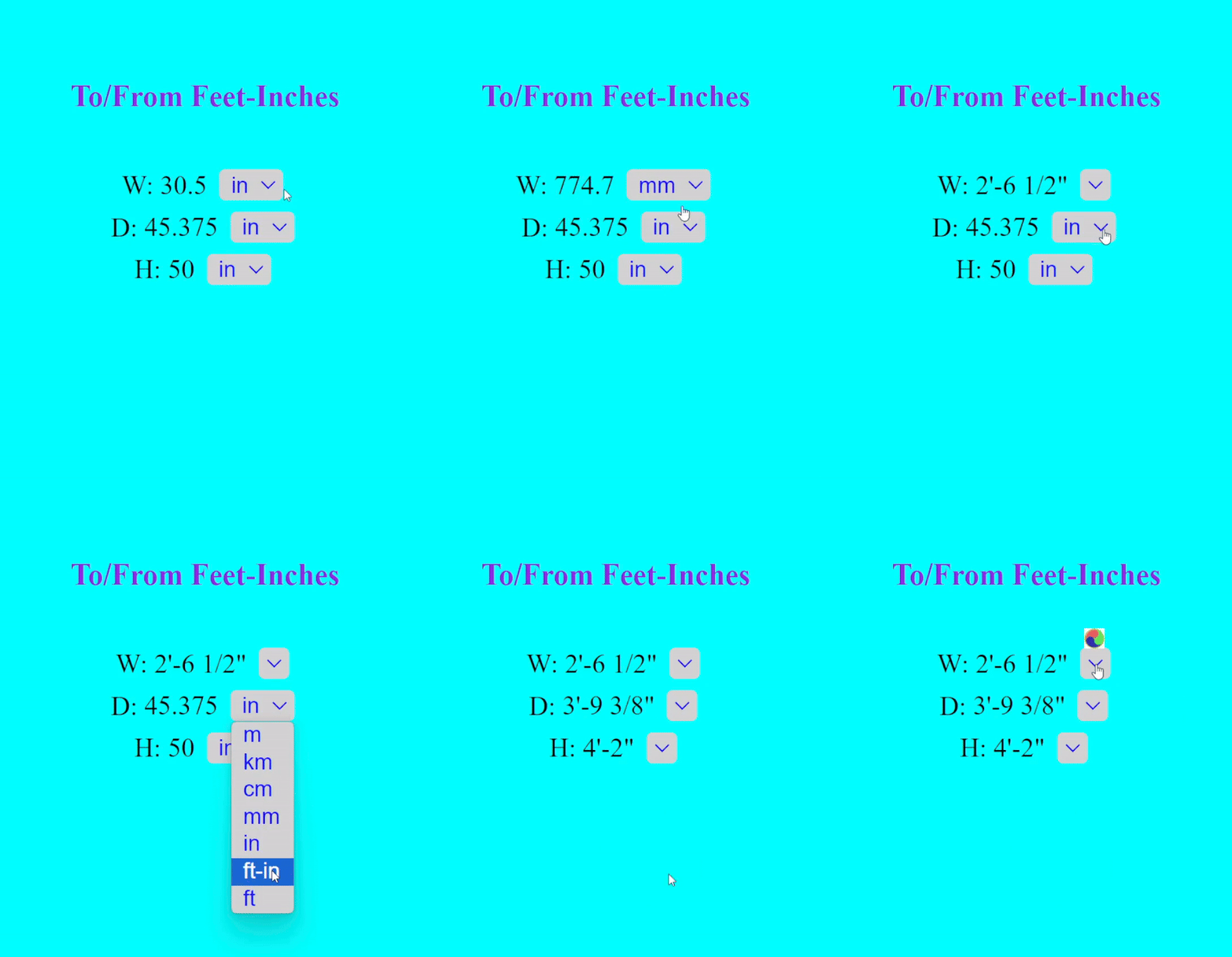
physical-quantity provides lightweight custom HTML elements for displaying and converting quantities directly in the page. It is designed for product specs, technical documentation, engineering content, educational material, and any interface where users benefit from viewing values in the units they already understand.
Visitors can switch units inline without leaving the page or opening a separate converter, keeping content compact while still giving readers access to the units they prefer.
Why use it
- Built-in unit conversion directly in the UI
- 570+ units across 60+ categories
- Works as standard Web Components with no framework required
- Supports single values, pairs, and triplets
- More concise than showing two unit systems side by side, with conversion among most units in the same category
- Easy to embed in websites, docs, product pages, and CMS content
This package is especially useful when your audience spans regions, industries, or disciplines that use different unit systems. Instead of filling the page with duplicate metric and imperial values, you can present one clean quantity component and let each visitor choose from most units in the same category.
Components
This package includes three custom elements:
<uc-qty> / <physical-quantity>
Displays a single quantity with a value field and a unit selector.
<uc-qty-pair>
Displays two quantities that share the same unit. Useful for:
- dimensions (
width x height) - coordinate pairs
- value ranges
<uc-qty-triplet>
Displays three quantities that share the same unit. Useful for:
- 3D dimensions (
length x width x height) - 3D coordinates
Installation
npm install physical-quantityQuick start
This package is designed to be useful with very little setup: include the script, add the custom element, and the quantity becomes unit-aware in the page.
ESM / bundler
<script type="module" src="node_modules/physical-quantity/dist/pq.es.js"></script>

<physical-quantity value="25.4" unit="mm"></physical-quantity>
<uc-qty-pair values="10x20" unit="cm"></uc-qty-pair>
<uc-qty-triplet values="10x20x30" unit="cm"></uc-qty-triplet>
CDN
<script src="https://unpkg.com/physical-quantity@latest/dist/pq.umd.js"></script>

<physical-quantity value="25.4" unit="mm"></physical-quantity>
<uc-qty value="2" unit="lbm" decimal-places="2"></uc-qty>
<uc-qty-pair values="10x20" unit="cm"></uc-qty-pair>
What it looks like
Watch the demo on YouTube Shorts⭐ NEW
Live Demo 0 - primary usages ⭐ NEW
Live Demo 1 - technical writing
Live Demo 2 - typical product specs
Live Demo 3 - typical product specs
Typical use cases
These components are most valuable anywhere physical measurements appear in content, specifications, or interfaces that serve users with different unit preferences.
E-commerce product pages
Show dimensions, weight, power, capacity, and other specifications in a way that international customers can immediately understand.
Technical documentation and manuals
Let readers switch units without scanning conversion tables or leaving the page.
Scientific and engineering content
Present measurements in a format that adapts to the reader’s preferred unit system without duplicating values throughout the page.
Educational material
Help students and learners interact with values in familiar units while reinforcing unit literacy.
Medical and health content
Support user-friendly presentation of measurements such as kg/lb, °C/°F, ml/oz, and similar values.
Features
The package focuses on practical display and conversion rather than forcing users to leave the page for a separate conversion workflow.
- 570+ units across 60+ categories — from common everyday measurements to engineering and scientific quantities such as Flow Rate, Viscosity, Electrical values, Density, Pressure, Temperature, and more
- Automatic conversion within the same unit category
- Customizable decimal places
- Integers displayed without unnecessary trailing decimals
- Clean, compact UI
- No framework required
- Works well for inline specs and structured dimensional data
Usage
Single quantity
<physical-quantity value="25.4" unit="mm" decimal-places="4"></physical-quantity>
<uc-qty value="2.5" unit="kg" decimal-places="4"></uc-qty>
<uc-qty value="25.4" unit="mm" show-unit-arrow="false"></uc-qty>
Quantity pair
<uc-qty-pair values="10x20" unit="cm"></uc-qty-pair>
<uc-qty-pair values="(10, 20)" unit="cm"></uc-qty-pair>
Quantity triplet
<uc-qty-triplet values="10x20x30" unit="cm"></uc-qty-triplet>
<uc-qty-triplet values="(10, 20, 30)" unit="cm"></uc-qty-triplet>
More examples
<physical-quantity value="1500" unit="g"></physical-quantity>
<physical-quantity value="1500" unit="psf"></physical-quantity>
<physical-quantity value="800" unit="kg/m³"></physical-quantity>
<uc-qty value="37.778" unit="°C" show-unit-arrow="false"></uc-qty>
<uc-qty value="100" unit="°F"></uc-qty>
<uc-qty value="2'-3" unit="ft-in"></uc-qty>
<physical-quantity value="2'-3 3/16" unit="ft-in"></physical-quantity>
<physical-quantity value="10" unit="kgf"></physical-quantity>
<physical-quantity value="10" unit="Volt"></physical-quantity>
Rendered example: Above Rendered in Web Browser
Example page
<!DOCTYPE html>
<html lang="en">
<head>
  <meta charset="UTF-8">
  <meta name="viewport" content="width=device-width, initial-scale=1.0">
  <title>Physical Quantity Component Example</title>
  <script src="https://unpkg.com/physical-quantity@latest/dist/pq.umd.js"></script>
</head>
<body>
  <physical-quantity value="25.4" unit="mm"></physical-quantity>
  <uc-qty value="25.4" unit="mm" decimal-places="4"></uc-qty><br>
  <uc-qty-pair values="10x20" unit="cm"></uc-qty-pair><br>
  <uc-qty-pair values="(10, 20)" unit="cm"></uc-qty-pair><br>
  <uc-qty-triplet values="10x20x30" unit="cm"></uc-qty-triplet><br>
  <uc-qty-triplet values="(10, 20, 30)" unit="cm"></uc-qty-triplet><br>
</body>
</html>
Attributes
Common attributes
value: initial value for<physical-quantity>/<uc-qty>unit: initial unitdecimal-places: number of decimal places to display; defaults to2show-unit-arrow: shows or hides the unit dropdown arrow; defaults totrue
Pair and triplet attribute
values: used by<uc-qty-pair>and<uc-qty-triplet>
Supported formats:
- dimensions:
AxBorAxBxC - tuples:
(A, B)or(A, B, C)
Unit behavior
When unit is recognized in the supported library, the component enables conversion within that category.
When unit is not recognized, the value is still displayed, but conversion is not applied.
For website visitors
The unit dropdown displays other available units from the same category. Users can switch units directly in the page.
Supported units
For the full list of supported units and categories, see the Units Reference.
Missing a unit or category? Email [email protected] with suggestions.
Use on WordPress
The same components are also available through the WordPress plugin CalcsLive Unit Converter & Sizing Calculator for Product Pages.
That gives WordPress users a no-build option via shortcodes:
[calcslive_qty value="25.4" unit="mm"]
[calcslive_qty value="2000" unit="g"]
[calcslive_qty value="2" unit="in"]
[calcslive_qty_pair values="10x20" unit="cm"]
[calcslive_qty_pair values="(10, 20)" unit="cm"]
[calcslive_qty_triplet values="10x20x30)" unit="cm"]
[calcslive_qty_triplet values="(10, 20, 30)" unit="cm"]
Works with
- Plain HTML pages
- Static sites
- Technical documentation
- Product pages
- CMS content
- WordPress
- Framework apps that support custom elements
Compatibility notes
Because this package is built as Web Components, it works naturally in plain HTML and in projects that can render custom elements.
For framework-based apps, the main requirement is that the framework allows custom elements to pass through to the DOM cleanly.
Contributing
Contributions, bug reports, feature requests, and unit suggestions are welcome.
Please contact the developer for bugs, improvements, or missing units.
Changelog
See CHANGELOG.md included in the package for version history.
License
MIT License. See LICENSE for details.
Contact
Questions, feedback, bug reports, or unit requests: