
pi-agent-suite
v2.12.0
Published
Adds a configurable multi-agent layer to pi, with context management, Codex quota status, a custom footer, and more.

Maintainers
 nrw9999
Readme
Pi Agent Suite
A set of PI Coding Agent extensions that adds agent support, configurable workflows, dynamic context compression, MCP servers, and other useful features.
- Agents
- Workflows
- Dynamic LLM context compression
- Independent verification of LLM actions and results
- Discussion between LLMs for solving complex problems
- Full list of extensions with detailed documentation
- MCP support and recommended MCP servers
Supported Pi version: Pi 0.87.x
Quick start
1. Install extensions package using pi
pi install npm:pi-agent-suite2. Copy demo agent and workflow files to your local Pi configuration
Copy Demo configuration files to ~/.pi/agent/agent-suite:
mkdir -p ~/.pi/agent/agent-suite
curl -fsSL https://github.com/n-r-w/pi-agent-suite/archive/refs/heads/main.zip | bsdtar -xf- --strip-components=4 -C ~/.pi/agent/agent-suite pi-agent-suite-main/docs/examples/agent-suite
3. Test it
- Start Pi in a project directory.
- Select the
Coderagent with/agentorCtrl+Alt+A. - Ask the agent about available subagents and workflows, for example: "What subagents, advisors, and workflows tools are available? How can you use them to solve a task? Give a very brief summary."
Expected response:
- **Subagents**
  - `SubAgentAnalyst`: research, analysis, reviews, architecture, specifications, and planning. No coding.
  - `SubAgentExtractor`: fast, accurate extraction of raw information. No analysis or business-logic interpretation.
  - I can start, steer, query, and wait for subagent sessions. Independent tasks can run in parallel.

- **Advisor**
  - `consult_advisor`: provides an independent second opinion on a focused question. It cannot access tools.

- **Workflows**
  - `Coding`: ready-made workflow for complex coding tasks.
  - I can activate it and transition through its allowed stages.
  - If no workflow fits, I can create a task-specific, staged workflow with advance and rework paths.

**Typical use:** activate a suitable workflow, gather evidence directly or through an extractor, delegate focused analysis to an analyst, consult the advisor for a second opinion when valuable, then complete and verify each workflow stage in order.- Ask the agent
Try running each subagent to see how it works., typeCtrl+Alt+Sor /subagents to open the subagent management screen, and see how the subagents run in parallel and return results.
Full configuration example
A complete example with a set of agents, workflows, and more: https://github.com/n-r-w/pi-config
What key problems does Pi Agent Suite solve?
Different tasks require unique combinations of rules, available tools, models, and reasoning levels
Solution: an agent system in which each agent can be configured for a specific task.
Management commands
Select the current active agent (a list of all agents with the main type is available):
- Command
/agent - Key binding
Ctrl+Alt+A
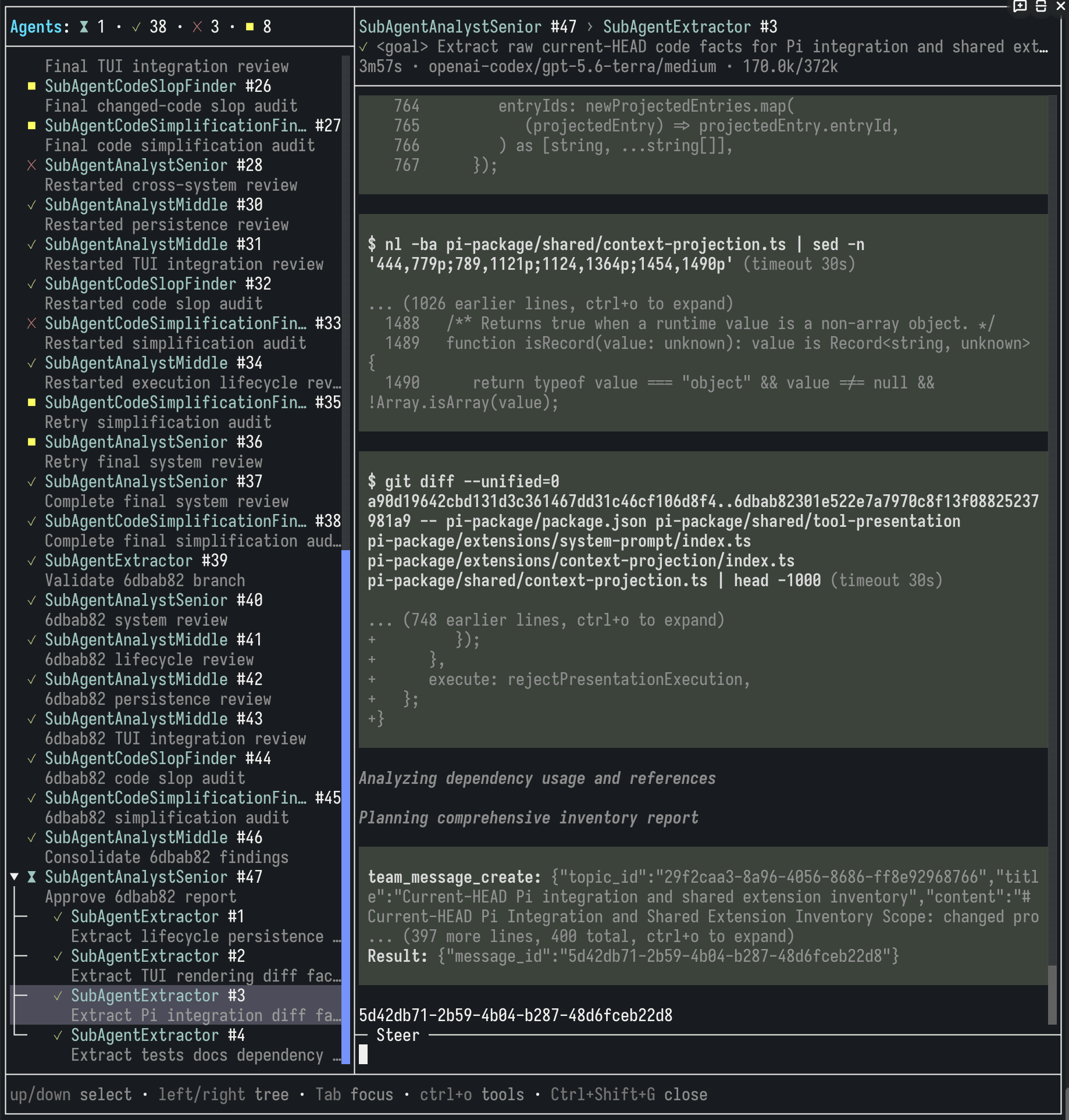
Open the UI for managing running agents:
- Command
/subagents - Key binding
Ctrl+Alt+S
Available tools
subagent_start- starts an available agent and returns a unique session identifier. The agent continues running in the background and can return a response either throughsubagent_waitor when its work is completesubagent_steer- sends a message to an existing agent sessionsubagent_wait- waits for one of several active agent sessions to finish and returns the result of the first agent that completessubagent_query- allows the model to call an agent and ask it a follow-up question without affecting its session.
Creating agents
Agent file location: ~/.pi/agent/agent-suite/agent-selection/agents/<agent_name>.md
description- the agent description, which will be:- displayed in the user interface when selecting an agent with the
maintype - added to the context for agents with the
subagentandbothtypes
- displayed in the user interface when selecting an agent with the
type- the agent type:main- an agent that can be called directly by the user but cannot be called by other agentssubagent- an agent that can be called only by other agents and is not directly available to the userboth- an agent that can be called by both the user and other agents
model- the model used by the agent. Parameters:id- model identifier (provider/model) or alias frommodel-aliases/config.json.thinking- model reasoning level (low, medium, high).
tools- the list of tools the agent can use to solve a task.- The
*wildcard is allowed. - If the tools field is omitted, the agent will use all available tools.
- If
tools: []is set, no tools will be available.
- The
agents- the list of child agents that the agent can call while working.- Access to
subagent_*tools is required. - If the agents field is omitted, the agent will not be able to call any other agents with the
subagentorbothtype. - If
agents: []is set, subagents will be unavailable.
- Access to
workflows(optional) - the list of workflows the agent can use to solve a task.- Access to
workflow_*tools is required. - If the workflows field is omitted, the agent will not be able to use any workflows.
- If
workflows: []is set, workflows will be unavailable.
- Access to
Example agent configuration file (Markdown):
description: Reviews code and checks implementation risks.
type: main
model:
  id: openai-codex/gpt-5.6-sol
  thinking: high
tools: ["consult_advisor", "convene_council", "subagent_*", "workflow_*", "read", "bash", "edit", "write", "grep", "find", "ls"]
agents: ["Extractor", "CodeSlopFinder"]
workflows: ["CodeReview"]
---
You are a code review agent. Check correctness, risks, and missing validation.
Use subagents to help you with the review.
Use `CodeReview` workflow to structure your process.
General agent system configuration (optional)
File: ~/.pi/agent/agent-suite/run-subagent/config.json
| Name | Required | Type | Default | Meaning |
| --- | --- | --- | --- | --- |
| enabled | No | Boolean | true | Enables or disables the agent system |
| maxDepth | No | Non-negative safe integer | 1 | Sets the maximum delegation depth |
| extensionDescriptionPromptFile | No | Non-empty absolute or home-prefixed path | Bundled prompts/extension-description.md | Replaces the shared Subagents rules |
| startDescriptionPromptFile | No | Non-empty absolute or home-prefixed path | Bundled prompts/start-description.md | Replaces subagent_start description |
| steerDescriptionPromptFile | No | Non-empty absolute or home-prefixed path | Bundled prompts/steer-description.md | Replaces subagent_steer description |
| waitDescriptionPromptFile | No | Non-empty absolute or home-prefixed path | Bundled prompts/wait-description.md | Replaces subagent_wait description |
| query | No | Object | {} | subagent_query tool configuration |
query fields:
| Name | Required | Type | Default | Meaning |
| --- | --- | --- | --- | --- |
| model.id | No | Non-empty string | Agent's current model | Custom model identifier (provider/model) or alias from model-aliases/config.json |
| model.thinking | No | off, minimal, low, medium, high, or xhigh | Agent's current thinking level | Custom thinking level |
| systemPromptFile | No | Non-empty absolute or home-prefixed path | Bundled prompts/query-system.md | Custom system prompt for subagent_query tool. |
Home-prefixed paths use ~, $HOME, or ${HOME}, either alone or followed by /....
General configuration examples
Minimum config example: the configuration file can be omitted entirely, in which case the default values will be used.
Full config example:
{
  "enabled": true,
  "maxDepth": 2,
  "extensionDescriptionPromptFile": "/absolute/path/to/subagents-rules.md",
  "startDescriptionPromptFile": "/absolute/path/to/subagent-start.md",
  "steerDescriptionPromptFile": "/absolute/path/to/subagent-steer.md",
  "waitDescriptionPromptFile": "/absolute/path/to/subagent-wait.md",
  "query": {
    "model": {
      "id": "openai-codex/gpt-5.6-sol",
      "thinking": "medium"
    },
    "systemPromptFile": "/absolute/path/to/subagent-query-system.md"
  }
}
The model must be reliably kept on track rather than simply relying on a complex multi-step prompt
Solution: the ability to create workflows represented by a graph of stages, each of which can be completed by a subagent.

Available tools
workflow_activate- activates an available workflow and places it in the model context.workflow_transition- transitions between stages of the active workflow.workflow_create- allows the model to create a custom workflow. It exists only in the context of the current session, is not saved to disk, and is activated immediately after creation.
Workflow structure
- Base prompt. It remains in the context and applies to all workflow stages.
- Stages. One initial stage and any number of intermediate and final stages are allowed.
- Stage prompt. It remains in the context only during that stage and does not clutter it with irrelevant requirements.
- Transition type between stages. It can be either
advance(move forward) orrework(return for revision).
Example workflow configuration file (YAML)
description: Use for read-only inspection of code and technical artifacts
prompt: |-
  1. Do not modify inspected files.
  2. Inspect only permitted scope.
  3. Apply relevant skills, patterns, exclusions, and output format.
  4. Support every reported finding or recommendation with inspected evidence.
stages:
  - id: define_scope
    description: Define inspection scope
    prompt: |-
      1. Determine files, changes, modules, or repository areas permitted by scope rules.
      2. Identify excluded generated code and out-of-scope artifacts.
      3. Stop and request clarification when inspection scope cannot be determined safely.
    initial: true
  - id:  load_rules
    description: Load inspection rules
    prompt: |-
      1. Load every relevant skill and project rules.
      2. Identify patterns, invariants, and exclusions that define a valid finding.
  - id: inspect_artifacts
    description: Inspect code and technical artifacts
    prompt: |-
      1. Inspect permitted scope systematically.
      2. Include configuration, build scripts, and other technical artifacts when allowed by scope rules.
      3. Record evidence and source locations for candidate findings.
  - id: verify_findings
    description: Verify findings are valid and material
    prompt: |-
      1. Verify each candidate against project behavior, rules, and context.
      2. Remove duplicate, speculative, insignificant, or out-of-scope findings.
      3. Confirm that every recommendation preserves required behavior when scope rules require behavior preservation.
      4. Return to inspection when evidence is incomplete.
  - id: report_findings
    description: Deliver findings using required format
    prompt: |-
      1. Report only findings permitted by scope rules.
      2. Include required source locations, evidence, impact, and recommendations.
      3. Deliver result through required channel.
      4. Return to inspection when parent feedback requires additional analysis.
    final: true
transitions:
  - from: define_scope
    to:  load_rules
    type: advance
  - from:  load_rules
    to: inspect_artifacts
    type: advance
  - from: inspect_artifacts
    to: verify_findings
    type: advance
  - from: verify_findings
    to: report_findings
    type: advance
  - from: verify_findings
    to: inspect_artifacts
    type: rework
  - from: report_findings
    to: inspect_artifacts
    type: rework
  - from: report_findings
    to: define_scope
    type: rework
Every workflow requires:
- one initial stage and at least one final stage
- non-empty stage IDs without spaces, tabs, line breaks, or other Unicode whitespace
- single-line workflow and stage descriptions
- a non-empty
promptfor every stage - an optional root
promptfor guidance that applies to every stage - unique stage IDs and valid transition endpoints
- an acyclic
advancegraph in which every stage is reachable - no outgoing
advancefrom final stages - at least one outgoing
advancefrom non-final stages reworktransitions only to strictadvanceancestors
Workflow system configuration (optional)
Allows the system prompts for workflow_* tools to be replaced with custom prompts.
{
  "extensionDescriptionPromptFile": "/absolute/path/extension-description.md",
  "createDescriptionPromptFile": "/absolute/path/create-description.md",
  "activateDescriptionPromptFile": "/absolute/path/activate-description.md",
  "transitionDescriptionPromptFile": "/absolute/path/transition-description.md"
}
Long sessions inevitably cause context window overflow and degradation during compaction
Solution: dynamic context compression that compresses large tool call results without significantly degrading reasoning quality. Compression occurs in several stages, gradually lowering the minimum size threshold for tool call results that are subject to compression.
Configuration
Configuration file: ~/.pi/agent/agent-suite/context-projection/config.json.
Parameters:
| Parameter | Required | Type or shape | Default | Meaning |
| --- | --- | --- | --- | --- |
| enabled | No | Boolean | false | Enables projection |
| projectCompactionSource | No | Boolean | true | Before custom compaction, generates missing summaries for eligible tool results in Pi's discarded range. false leaves results without existing summaries to Pi's standard 2,000-character truncation. |
| projectionRemainingTokensL1 | No | Non-negative integer | 70000 | Starts L1 projection when remaining context tokens are at or below this value. Must be greater than or equal to projectionRemainingTokensL2. |
| minToolResultTokensL1 | No | Non-negative integer | 4000 | Minimum token count for a tool result to be projected at L1. |
| projectionRemainingTokensL2 | No | Non-negative integer | 50000 | Starts L2 projection when remaining context tokens are at or below this value. Must be between L1 and L3. |
| minToolResultTokensL2 | No | Non-negative integer | 2000 | Minimum token count for a tool result to be projected at L2. |
| projectionRemainingTokensL3 | No | Non-negative integer | 30000 | Starts L3 projection when remaining context tokens are at or below this value. Must be less than or equal to projectionRemainingTokensL2. |
| minToolResultTokensL3 | No | Non-negative integer | 1000 | Minimum token count for a tool result to be projected at L3. |
| keepRecentTurns | No | Non-negative integer | 10 | Minimum number of newest tool-use turns kept visible. A tool-use turn is an assistant tool call plus its matching tool results. |
| keepRecentTurnsPercent | No | Number from 0 to 1 | 0.2 | Fraction of newest tool-use turns kept visible in long sessions. The extension uses the larger value from keepRecentTurns and this percentage. |
| projectionIgnoredTools | No | Array of unique non-empty strings | [] | Tool names whose results stay visible. consult_advisor and convene_council always stay visible, even when omitted from this list. |
| omittedNotice | No | Non-empty string | Result omitted. Run tool again for full result. | Text that replaces projected tool results when summary mode is disabled or a summary cannot be used. |
| summaryNotice | No | Non-empty string | Full result omitted. Summary below. Run tool again for full result. | Text written in <notice> when a projected tool result includes a generated summary. |
| summary | No | Object | Summary disabled | Configures optional generated summaries for projected tool results. |
If multiple projection levels use the same remaining-token threshold, the extension uses the lowest matching minToolResultTokens* value for those levels.
Summary parameters:
| Parameter | Required | Type or shape | Default | Meaning |
| --- | --- | --- | --- | --- |
| summary.enabled | No | Boolean | false | Enables generated summaries for newly projected tool results. |
| summary.model | No | Object | Current main model and thinking level | Configures the model used to generate summaries. |
| summary.model.id | No | Non-empty string | Current main model | Accepts either provider/model or an alias from model-aliases/config.json. |
| summary.model.thinking | No | off, minimal, low, medium, high, xhigh, or max | Current thinking level | Thinking level used for summary requests. |
| summary.maxConcurrency | No | Positive integer | 1 | Maximum number of summary requests that can run at the same time. |
| summary.retryCount | No | Non-negative integer | 1 | Number of retry attempts after the first summary request fails. |
| summary.retryDelayMs | No | Non-negative integer | 5000 | Delay between summary retry attempts, in milliseconds. |
| summary.systemPromptFile | No | null or absolute file path | Bundled system prompt | Custom system prompt file for summary generation |
| summary.userPromptFile | No | null or absolute file path | Bundled user prompt | Custom user prompt file appended after the tool result text |
Minimum config example:
{
  "enabled": true
}

Full config example:
```json
{
  "enabled": true,
  "projectCompactionSource": true,
  "projectionRemainingTokensL1": 70000,
  "minToolResultTokensL1": 4000,
  "projectionRemainingTokensL2": 50000,
  "minToolResultTokensL2": 2000,
  "projectionRemainingTokensL3": 30000,
  "minToolResultTokensL3": 1000,
  "keepRecentTurns": 10,
  "keepRecentTurnsPercent": 0.2,
  "projectionIgnoredTools": [],
  "omittedNotice": "Result omitted. Run tool again for full result.",
  "summaryNotice": "Full result omitted. Summary below. Run tool again for full result.",
  "summary": {
    "enabled": true,
    "model": {
      "id": "summary",
      "thinking": "low"
    },
    "maxConcurrency": 1,
    "retryCount": 1,
    "retryDelayMs": 5000,
    "systemPromptFile": null,
    "userPromptFile": null
  }
}
Models tend to trust what they do and need an independent mechanism to verify their actions and results
Solution: give the model access to an advisor that receives the full current context and can independently evaluate the model's actions and results.
The consult_advisor tool is available. It has its own system prompt and accepts a question formulated by the model.
Models with a high reasoning level are recommended.
Configuration parameters
| Parameter | Required | Type or shape | Default | Meaning |
| --- | --- | --- | --- | --- |
| enabled | No | Boolean | true | Enables or disables the consult_advisor tool |
| model | No | Object with optional id and thinking fields | Current session model and current thinking level | Selects the advisor model settings. |
| model.id | No | Non-empty string in provider/model format | Current session model | Selects the model used by the advisor. |
| model.thinking | No | One of off, minimal, low, medium, high, xhigh | Current thinking level | Selects the advisor thinking level. |
| promptFile | No | Non-empty absolute file path | Bundled advisor prompt | Uses a custom advisor prompt file |
| retry | No | Object with optional enabled, maxRetries, and baseDelayMs fields | Retry defaults | Controls retry behavior for retryable advisor provider failures. |
| retry.enabled | No | Boolean | true | Enables or disables retries. |
| retry.maxRetries | No | Non-negative integer | 3 | Sets the maximum number of retry attempts. |
| retry.baseDelayMs | No | Non-negative integer | 2000 | Sets the base retry delay in milliseconds. |
| debugPayloadFile | No | Non-empty absolute or relative file path | Not set | Writes the advisor request payload to this file for troubleshooting. Relative paths are resolved from the directory that contains config.json. |
Configuration examples
Minimum config example: the configuration file can be omitted entirely, in which case the default values will be used.
Full configuration example:
{
  "enabled": true,
  "model": {
    "id": "provider/model",
    "thinking": "high"
  },
  "promptFile": "absolute/path/to/advisor-prompt.md",
  "retry": {
    "enabled": true,
    "maxRetries": 3,
    "baseDelayMs": 2000
  },
  "debugPayloadFile": "./debug/consult-advisor-payload.json"
}
Solving complex problems requires discussion
Solution: give the model access to a council of experts that discusses the problem and reaches a shared solution.
The convene_council tool is available. It has its own system prompt and accepts a question formulated by the model.
In addition, convene_council receives the current session context packaged as a file that the council can read.
Unlike consult_advisor, council members have access to any tools. They can read files, run Bash commands, and so on.
The council consists of two members who can be selected from the list of available models.
Models with a high reasoning level are recommended.
Configuration parameters
Config file: ~/.pi/agent/agent-suite/convene-council/config.json.
Parameters:
| Parameter | Required | Type or shape | Default | Meaning |
| --- | --- | --- | --- | --- |
| enabled | No | Boolean | false | Enables the extension only when set to true. |
| llm1 | No | Object with optional model | Uses the current session model and thinking level | Configures the first participant. |
| llm1.model | No | Object with optional id and thinking | Uses the current session model and thinking level | Configures the first participant model. |
| llm1.model.id | No | Non-empty provider/model string | Current session model | Model for the first participant. |
| llm1.model.thinking | No | One of off, minimal, low, medium, high, xhigh | Current thinking level | Thinking level for the first participant. |
| llm2 | No | Object with optional model | Uses the current session model and thinking level | Configures the second participant. |
| llm2.model | No | Object with optional id and thinking | Uses the current session model and thinking level | Configures the second participant model. |
| llm2.model.id | No | Non-empty provider/model string | Current session model | Model for the second participant. |
| llm2.model.thinking | No | One of off, minimal, low, medium, high, xhigh | Current thinking level | Thinking level for the second participant. |
| participantIterationLimit | No | Positive integer | 3 | Maximum number of discussion iterations before returning a no-consensus result. |
| finalAnswerParticipant | No | One of llm1, llm2 | llm2 | Participant that writes the final answer after agreement. |
| responseDefectRetries | No | Non-negative integer | 1 | Number of retries for malformed participant responses or defective final answers. |
| tools | No | Array of non-empty tool-name patterns | Participants receive only read | Additional tools available to participants. read is always included. |
Configuration example
{
  "enabled": true,
  "llm1": {
    "model": {
      "id": "provider/model-a",
      "thinking": "high"
    }
  },
  "llm2": {
    "model": {
      "id": "provider/model-b",
      "thinking": "medium"
    }
  },
  "participantIterationLimit": 3,
  "finalAnswerParticipant": "llm2",
  "responseDefectRetries": 1,
  "tools": ["grep", "ls"]
}
Full list of extensions with detailed documentation
| Extension | Default behavior | What it does | Quick settings | Details |
| --- | --- | --- | --- | --- |
| system-prompt | Enabled | Replaces pi's base system prompt with a Markdown template and runtime variables. | system-prompt/config.json: enabled, templateFile. | docs/extensions/system-prompt.md |
| project-rules | Enabled | Appends recursive project Markdown rules from .pi/rules; global ~/.pi storage is excluded. | project-rules/config.json: enabled, rulesDir. | docs/extensions/project-rules.md |
| mcp-wrapper | No MCP tools until configured | Registers tools from configured MCP servers, caches tool metadata, and adds /mcp-refresh. | mcp-wrapper/config.json: settings.enabled, settings.timeouts, mcpServers. | docs/extensions/mcp-wrapper.md |
| enable-tools | Enabled | Enables configured built-in tools such as grep, find, and ls. | enable-tools/config.json: enabled, include, exclude. | docs/extensions/enable-tools.md |
| footer | Enabled | Shows project, optional git branch, runtime details, and additional extension statuses. | footer/config.json: enabled, model display options, showApiCost, showApiTokens, showGitBranch, showAdditionalStatusLine. | docs/extensions/footer.md |
| codex-fast | Disabled | Toggles fast mode for supported OpenAI Codex requests and marks the footer model with -F. | State: codex-fast/state.json. Toggle with /fast or Ctrl+Alt+F. | docs/extensions/codex-fast.md |
| codex-verbosity | Disabled | Adds text.verbosity to OpenAI Codex requests. | codex-verbosity/config.json: enabled, verbosity (low, medium, high). | docs/extensions/codex-verbosity.md |
| codex-quota | Disabled | Shows OpenAI Codex quota status in the footer. | codex-quota/config.json: enabled, refreshInterval, retryAttempts, retryInterval. | docs/extensions/codex-quota.md |
| custom-compaction | Enabled | Replaces fixed-request pi compaction with bounded adaptive summarization that can reduce oversized history before the final summary. | custom-compaction/config.json: enabled, model, prompt file paths, retry. | docs/extensions/custom-compaction.md |
| context-projection | Disabled | Replaces old large non-critical tool results in provider context with an omitted notice or summary; requires valid enabled custom compaction. | context-projection/config.json: enabled, projectCompactionSource, projection thresholds, recent-turn protection, omittedNotice, summaryNotice, summary. | docs/extensions/context-projection.md |
| compaction-trigger | Enabled | Blocks model requests at Pi's automatic compaction threshold, runs configured compaction after the interrupted run settles, and continues after success. | compaction-trigger/config.json: enabled, tolerancePercent; native Pi setting: compaction.reserveTokens. | docs/extensions/compaction-trigger.md |
| model-response-timeout | Enabled | Limits each provider response, removes incomplete assistant content after timeout, and delegates retries to Pi. | model-response-timeout/config.json: enabled, timeoutSeconds; Pi settings: retry. | docs/extensions/model-response-timeout.md |
| knowledge | Enabled | Supplies bounded global and branch-local project knowledge across sessions and accumulates it through workflow triggers. | Optional knowledge/config.json; data defaults to knowledge/data. | docs/extensions/knowledge.md |
| algorithms | Enabled | Runs registered algorithms manually via --trigger <type> and /trigger:<type> slash commands. | No configuration. | docs/extensions/algorithms.md |
| vision | Disabled | Adds the describe_image tool so a text-only model can delegate single-image analysis to a configured vision model. | vision/config.json: enabled, model, compression, retry. | docs/extensions/vision.md |
| remote-image | Disabled | Transfers a local clipboard image through an SSH reverse tunnel and inserts its temporary server path into remote pi. | Set remote PI_AGENT_SUITE_MODE=remote; local setup uses PI_AGENT_SUITE_SSH_TARGET. | docs/extensions/remote-image.md |
| workflow | Inactive until configured | Adds validated workflow activation, stage transitions, ordered stage-entry triggers, route-derived provider context, and a compact active-stage row in the shared session status panel. | Add .yaml files under workflow/workflows; optional prompt paths in workflow/config.json. | docs/extensions/workflow.md |
| completion-sound | Enabled | Plays a sound after successful top-level agent runs. | completion-sound/config.json: enabled, command, args, volume. | docs/extensions/completion-sound.md |
| cmux | Enabled | Sends cmux notification after successful top-level agent runs. | cmux/config.json: enabled. | docs/extensions/cmux.md |
| main-agent-selection | Enabled | Adds /agent and Ctrl+Alt+A for selecting reusable main agents. | agent-selection/config.json: enabled, diagnosticsEnabled. | docs/extensions/main-agent-selection.md |
| run-subagent | Enabled | Adds subagent_start, subagent_steer, subagent_wait, and saved-session subagent_query tools, an Agents row in the shared session status panel, and the /subagents (Ctrl+Alt+S) management screen. | run-subagent/config.json: enabled, maxDepth, descriptions, and query model/system prompt. | docs/extensions/run-subagent.md |
| usage | Enabled | Records independent local model-usage history and adds /usage with agent, model, cache, and estimated-cost statistics. | usage/config.json: enabled. Reset with /usage reset. | docs/extensions/usage.md |
| model-aliases | Optional shared config | Defines global model aliases that map to provider/model and optional default thinking. Used by all suite model selectors. | model-aliases/config.json: alias entries keyed by alias name. | docs/extensions/model-aliases.md |
| structured-prompt | Enabled | Adds /prompt and Ctrl+Alt+P for building structured user requests. | structured-prompt/config.json: enabled. | docs/extensions/structured-prompt.md |
| ask-llm | Enabled | Adds /ask for one-off model questions that are not saved to the current session. | ask-llm/config.json: enabled, model, systemPromptFile, retry. | docs/extensions/ask-llm.md |
| consult-advisor | Enabled | Adds the consult_advisor tool for an independent model opinion. | consult-advisor/config.json: enabled, model, promptFile, debugPayloadFile, retry. | docs/extensions/consult-advisor.md |
| convene-council | Disabled | Adds the convene_council tool for a bounded two-participant model discussion. | convene-council/config.json: enabled, llm1, llm2, participantIterationLimit, finalAnswerParticipant, responseDefectRetries, tools. | docs/extensions/convene-council.md |
MCP support and recommended MCP servers
These MCP servers can significantly improve overall efficiency (they require separate installation before use):
https://github.com/n-r-w/team-mcpfor collaboration desks between agents.https://github.com/n-r-w/asteriafor symbolic code search.
To use MCP servers, add them to the agent-suite/mcp-wrapper/config.json extension configuration:
{
  "mcpServers": {
    "team": {
        "type": "stdio",
        "command": "team-mcp"
    },
    "asteria": {
        "type": "stdio",
        "command": "asteria-mcp"
    }
  }
}