
pi-ask-user
v0.15.1
Published
Interactive ask_user tool for pi-coding-agent with searchable split-pane selection UI, multi-select, and freeform input
Downloads
8,284

Maintainers
 edlsh
edlshReadme
pi-ask-user
A Pi package that adds an interactive ask_user tool for collecting user decisions during an agent run.
Demo
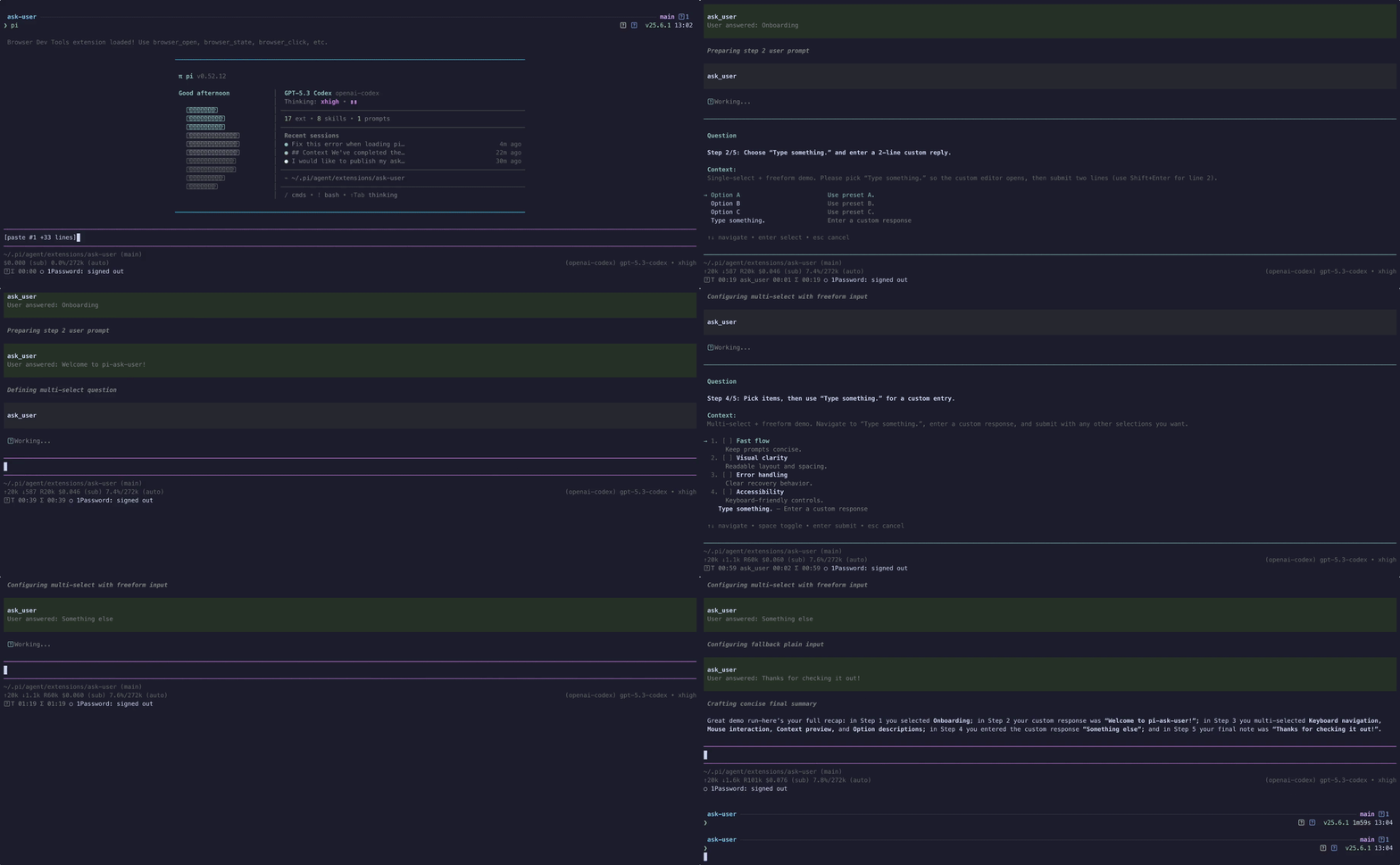
High-quality video: ask-user-demo.mp4
Features
- Searchable single-select option lists with wrapped titles and descriptions
- Responsive split-pane details preview on wide terminals, with a persistent single-column preference
- Multi-select option lists
- Optional freeform responses
- User-toggleable extra context on structured selections
- Context display support
- Responsive context collapse that keeps the question and choices visible on small terminals without discarding full context
- Configurable display mode:
overlay(modal, default) orinline(rendered directly in the flow) - Runtime overlay toggle: press the configured overlay-toggle key (
alt+oby default, configurable per call or via env var) while the prompt is open to temporarily hide/show the popup so you can read prior agent output, then press it again to bring it back - Pi-TUI-aligned keybinding and editor behavior
- Custom TUI rendering for tool calls and results
- System prompt integration via
promptSnippetandpromptGuidelines - Optional timeout for auto-dismiss in both overlay and fallback input modes
herdr:blockedlifecycle events while waiting for interactive input- Structured response and cancellation
detailsfor session state reconstruction - Graceful fallback when interactive UI is unavailable
- Bundled
ask-userskill for mandatory decision-gating in high-stakes or ambiguous tasks
Bundled skill: ask-user
This package now ships a skill at skills/ask-user/SKILL.md that nudges/mandates the agent to use ask_user when:
- architectural trade-offs are high impact
- requirements are ambiguous or conflicting
- assumptions would materially change implementation
The skill follows a "decision handshake" flow:
- Gather evidence and summarize context
- Ask one focused question via
ask_user - Wait for explicit user choice
- Confirm the decision, then proceed
See: skills/ask-user/references/ask-user-skill-extension-spec.md.
Install
pi install npm:pi-ask-userTool name
The registered tool name is:
ask_user
Parameters
| Parameter | Type | Default | Description |
|-----------|------|---------|-------------|
| question | string | required | The question to ask the user |
| context | string? | — | Relevant context summary shown before the question |
| options | {title, description?}[]? | [] | Multiple-choice options. The schema is a flat object shape (no anyOf, which some provider proxies strip or reject); plain strings and common alias keys (label, text, value, name, option) are still accepted at runtime |
| allowMultiple | boolean? | false | Enable multi-select mode |
| allowFreeform | boolean? | true | Add a "Type something" freeform option |
| allowComment | boolean? | env var or false | Expose a user-toggleable extra-context option in the custom UI (ctrl+g or the toggle row) and collect an optional comment in fallback dialogs |
| displayMode | "overlay" \| "inline"? | env var or "overlay" | Controls custom UI rendering: overlay shows the centered modal (current behavior), inline renders without overlay framing |
| singleSelectLayout | "auto" \| "list"? | env var or "auto" | Use the responsive details pane automatically or always render descriptions below their options |
| contextExpanded | boolean? | env var or false | Start with oversized context expanded. Per-call value overrides PI_ASK_USER_CONTEXT_EXPANDED |
| overlayToggleKey | string? | env var or "alt+o" | Shortcut for hiding/showing the overlay popup (overlay mode only). Pi-TUI key spec, e.g. "alt+o", "ctrl+shift+h". Pass "off" to disable. |
| commentToggleKey | string? | env var or "ctrl+g" | Shortcut for toggling the optional comment/extra-context row when allowComment: true. Pass "off" to disable. |
| timeout | number? | — | Auto-dismiss after N ms and return null if the prompt times out |
Example usage shape
{
  "question": "Which option should we use?",
  "context": "We are choosing a deploy target.",
  "options": [
    { "title": "staging" },
    { "title": "production", "description": "Customer-facing" }
  ],
  "allowMultiple": false,
  "allowFreeform": true,
  "allowComment": true,
  "displayMode": "inline"
}
displayMode: "inline" uses the same interaction logic but skips overlay mode when calling ctx.ui.custom(...). RPC/headless fallback behavior is unchanged.
Personal preferences via environment variables
Configure your defaults globally by setting these in your shell profile (~/.zshrc, ~/.bash_profile, etc.):
export PI_ASK_USER_DISPLAY_MODE=inline
export PI_ASK_USER_SINGLE_SELECT_LAYOUT=list
export PI_ASK_USER_ALLOW_COMMENT=true
export PI_ASK_USER_OVERLAY_TOGGLE_KEY=alt+h
export PI_ASK_USER_COMMENT_TOGGLE_KEY=alt+c
export PI_ASK_USER_CONTEXT_EXPANDED=true
Environment variables must be present in the process that launches Pi. If Pi is launched from a desktop app or a different shell, changes in ~/.zshrc may not be inherited; launch Pi from a terminal where echo $PI_ASK_USER_DISPLAY_MODE shows the expected value.
Display mode
Effective order:
- Per-call
displayModeparameter (if provided) PI_ASK_USER_DISPLAY_MODE(if set to"overlay"or"inline")- Fallback default:
"overlay"
Unrecognised values are silently ignored and fall back to "overlay".
Single-select layout
Effective order:
- Per-call
singleSelectLayoutparameter (if provided) PI_ASK_USER_SINGLE_SELECT_LAYOUT(when set tolist)- Fallback default:
auto
auto shows the details pane on wide terminals. list keeps descriptions below their options at every width.
Optional comments
Effective order:
- Per-call
allowCommentparameter (if provided) PI_ASK_USER_ALLOW_COMMENT(true,1,yes, oron; corresponding false values are also accepted)- Fallback default:
false
Context expansion
Oversized context collapses behind a one-line summary so the question and choices stay visible. To start expanded instead:
- Per-call
contextExpandedparameter (if provided) PI_ASK_USER_CONTEXT_EXPANDED(true,1,yes, oron; corresponding false values are also accepted)- Fallback default:
false
ctrl+e still toggles from whichever state the prompt opened in.
Shortcuts
Effective order for both overlayToggleKey and commentToggleKey:
- Per-call parameter (if provided)
- Matching env var (
PI_ASK_USER_OVERLAY_TOGGLE_KEY/PI_ASK_USER_COMMENT_TOGGLE_KEY) - Built-in defaults:
alt+oandctrl+g
Pass "off", "none", or "disabled" (at any level) to disable the shortcut entirely. Invalid specs are silently dropped and the next source is used. Specs follow the Pi-TUI KeyId format: [mod+]...key where modifiers are ctrl, shift, alt, super, in any order, joined by + (e.g. ctrl+g, alt+shift+x, escape, tab).
Controls
While an ask_user prompt is open:
| Key | Action |
|-----|--------|
| alt+o (configurable via overlayToggleKey) | Hide/show the overlay popup so you can read the agent's prior output. Available in overlay mode only. The first time you hide it, a notification reminds you which key brings it back. |
| ctrl+g (configurable via commentToggleKey) | Toggle the optional comment/extra-context row (when allowComment: true). |
| ctrl+e | Expand or collapse oversized context while choosing an option. If another configured ask shortcut owns it, the prompt shows ctrl+x or ctrl+y instead. |
| enter | Confirm the focused option, submit a freeform response, or submit/skip an optional comment. |
| esc | Clear the search filter, exit freeform/comment mode, or cancel the prompt. |
| ↑ / ↓, ctrl+k / ctrl+j | Navigate options. ctrl+k / ctrl+j (vim-style) work while typing in searchable prompts without disturbing the filter. |
If you prefer never to see the overlay, set displayMode: "inline" per call or PI_ASK_USER_DISPLAY_MODE=inline globally.
Cancellation
Aborting a tool call dismisses its active prompt, including freeform and RPC dialogs. Cancelling or timing out an optional RPC comment cancels the whole answer; press Enter with an empty comment to submit the selection without a comment.
The custom UI uses one timeout for the prompt. In the dialog fallback, the configured timeout applies separately to each dialog stage.
Mobile-sized terminals
If context wraps beyond the available decision area, ask_user collapses it into a one-line summary so the question and at least one choice remain visible. Press the context key shown in the prompt (ctrl+e by default) to expand or collapse the complete context; expanded context remains bounded and scrollable with the existing prompt-scroll keys in both display modes.
Events
While an interactive prompt is open, the extension emits herdr:blocked with { active: true, label: "Waiting for user response" }. It emits { active: false } in finally, including cancellation and error paths. Hosts without a listener are unaffected.
When a displayed prompt resolves with an answer or cancellation, it emits ask:answered or ask:cancelled. Calls aborted before a prompt opens emit neither outcome event. Every installed extension receives these, so by default they carry only what is needed to correlate the prompt with its outcome:
// ask:answered
{ question: string; response: { kind: "selection" | "freeform" } }
// ask:cancelled
{ question: string }
Set PI_ASK_USER_EMIT_FULL_EVENTS=true (or 1, yes, on) to restore the full payloads — context, the offered options on cancel, and the complete response including selections, comment, and freeform text. Leave it unset unless another extension you trust needs the answer itself; the full response is always available to the agent through the tool result's details.
Known limitations
- Overlays cannot draw over inline images (#8). Pi-TUI's overlay compositor skips rows occupied by terminal images (Kitty/iTerm2 graphics), so an
ask_useroverlay that intersects an image is partially or fully invisible. This must be fixed upstream in pi-tui (compositeLineAtreturns image rows unchanged). Until then,displayMode: "inline"(orPI_ASK_USER_DISPLAY_MODE=inline) sidesteps the overlay compositor entirely and should keep the prompt visible.
Result details
Answers and cancellations include structured prompt details for rendering and session state reconstruction:
type AskResponse =
  | { kind: "selection"; selections: string[]; comment?: string }
  | { kind: "freeform"; text: string };

interface AskToolDetails {
  question: string;
  context?: string;
  options: QuestionOption[];
  response: AskResponse | null;
  cancelled: boolean;
}
Malformed options, unavailable interactive UI, and UI failures throw so Pi records a failed tool call rather than a successful answer. These host-created error results do not guarantee the AskToolDetails shape. Error rendering also accepts older stored results with details: { error: string }.
Contributing
See CONTRIBUTING.md for development setup and checks.
Changelog
See CHANGELOG.md.