
pi-autosuggestions
v0.8.5
Published
zsh-autosuggestions-style ghost completions for the pi coding agent — history-based inline suggestions, path completion in bash mode, blinking beam cursor

Maintainers
 0xplayerone
Readme
pi-autosuggestions
zsh-autosuggestions-style ghost completions for the pi coding agent, with the path-completion layer fish and zsh users expect from a modern setup.
As you type, a suggestion appears dimmed, inline, right after your cursor —
no dropdown, no Tab required. Press → to accept it all, Alt+f to accept it
one word at a time.
you type:  !cd Desk
you see:   !cd Desktop/     ( dimmed "top/", first char is your blinking cursor )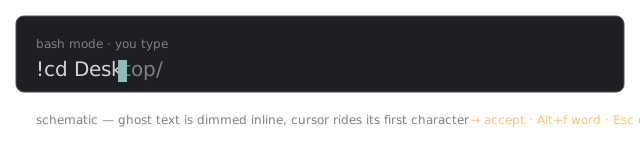
Install
pi install npm:pi-autosuggestions
# or pinned:
pi install npm:[email protected]
# or from git:
pi install git:github.com/0xPlayerOne/pi-autosuggestions
Configuration
/autosuggest — toggle cross-session history for ghost suggestions (stored
in ~/.pi/agent/pi-autosuggestions.json; applies from the next session).
Default: off (history is session-scoped).
Scope
| Layer | Where it works |
| -------------------------- | ------------------------------------------------------ |
| History ghost suggestions | Everywhere — normal prompts and !/!! bash mode |
| Path completion + dropdown | Bash mode only (!/!! commands) |
| Command-name completion | Bash mode only, first word after ! |
| Beam cursor | Everywhere |
History is session-scoped by default: the ghost suggests prompts you
submitted in the current session. Opt into cross-session history with
/autosuggest — the extension then seeds suggestions from your previous
pi sessions in the same working directory (read from pi's own session files;
nothing leaves your machine). If you mostly run ! commands, the ghost will
mostly appear in bash mode — it isn't restricted there, it just has nothing
to suggest elsewhere.
Candidate cycling: with multiple history matches, Alt+Down / Alt+Up
rotate the ghost through the alternatives (most recent first).
The cursor is the terminal's native one (see the cursor section below): white in terminals honoring OSC 12, theme-colored elsewhere — notably Warp paints it blue and ignores cursor-color overrides (warpdotdev/Warp#3210).
Features
zsh-autosuggestions behavior
- History strategy — every prompt you submit is remembered; start typing a
prefix of a previous prompt and its continuation appears as dimmed ghost text,
most recent match first. Works everywhere in the editor, not just bash mode —
exactly like
zsh-autosuggestionsworks on every shell line. →— accept the whole suggestion (autosuggest-accept)Alt+f/Ctrl+→— partial accept: take the next word (autosuggest-accept-word), like zsh's defaultalt+fbindingEsc— dismiss the suggestion until your next edit- Suggestion hides when the cursor leaves end-of-line, returns when you come back
Subcommand completion (bash mode)
For well-known commands the first argument completes from a built-in subcommand table instead of the filesystem:
| Input | Result |
| ------------ | ----------------------------------------------------------------- |
| !git s | dropdown — show, stash, status, … (marked git subcommand) |
| !git statu | inline ghost s → status |
| !git zz | no subcommand match → falls back to path completion |
Covered commands: git, npm, pnpm, yarn, bun, docker, kubectl,
cargo, brew, gh, go, uv, pip, poetry, terraform, helm,
wrangler, vercel, mise, asdf, systemctl, apt, pacman.
Deeper arguments (flags, file args) still complete from history or the
filesystem.
Dynamic completions (bash mode)
Some completions are live — the extension reads your project instead of a static table (results cached for 10s):
| Input | Source |
| ------------------------------------------------------------------ | ------------------------------------------ |
| !git checkout f / !git switch / !git merge / !git rebase | branch names from git branch |
| !npm run d / !pnpm run / !bun d (implicit for yarn/pnpm/bun) | scripts from the nearest package.json |
| !make d | targets parsed from the nearest Makefile |
| !docker compose u | compose subcommands |
| !docker start n / logs / exec … | running container names |
| !kubectl get p | resource types |
| !ssh / !scp | hosts from ~/.ssh/config |
Command completion (bash mode)
The first word after ! completes against executables on your $PATH —
like zsh's command position, no plugins needed:
| Input | Result |
| ------- | ---------------------------------------------------- |
| !gi | dropdown — git, gh, gimp, … (marked command) |
| !whoa | inline ghost mi → whoami |
File paths that also match are listed after the commands. Per-command
subcommand completion (git st → status) is zsh's compdef system and is
out of scope — use history or type it.
Path completion (fish/zsh-completion flavored)
In bash mode (!command), a second strategy completes filesystem paths:
| Input | Result |
| ------------------ | -------------------------------------------------------- |
| !cd | dropdown — all entries |
| !cd D | dropdown — filtered to D* |
| !cd Dow | inline ghost nloads/ |
| → / Tab | accept |
| accept a directory | immediately suggests its first entry (zsh-like chaining) |
- Command position aware —
!cd(no space yet) lists everything; picking an entry inserts it as the first argument - Priority: multiple path options → stock dropdown (fully interactive); zero or one option → ghost, with history winning over paths
- Works for
!!hidden commands and any bash argument, not justcd
Native blinking bar cursor
The editor's fake block cursor is replaced by your terminal's native blinking
bar cursor — the same behavior as Apple Terminal's bar style: it overlays the
cell edge without ever covering the character, blinks on its own, and pauses
blinking while you type. On ghost rows the bar rides the suggestion's first
character. The extension forces the cursor white (OSC 12) and requests the
blinking-bar shape (DECSCUSR CSI 5 q) so it doesn't inherit the terminal
theme's cursor color; both are restored to your terminal's defaults when pi
exits. If blinking stays off (e.g. Warp), check the terminal's own cursor-blink
setting (Warp: Settings → Appearance → Cursor → Blinking).
A software beam cursor is kept as a fallback if the hardware cursor is
unavailable.
Keybindings
| Keys | Action |
| --------------------- | ------------------------------ |
| → / Tab | Accept the whole suggestion |
| Alt+f / Ctrl+→ | Accept one word |
| Esc | Dismiss until the next edit |
| Alt+Down / Alt+Up | Cycle multiple history matches |
Troubleshooting
| Symptom | Likely cause | Fix |
| ------------------------- | ------------------------------------------------------- | -------------------------------------------------------------------------------- |
| No ghost appears | Nothing in history matches, or cursor left end-of-line | Type a prefix of a previous prompt; ghosts only show at end-of-line |
| Ghost shows in odd places | updateGhost runs on every render by design | Esc dismisses; it returns on your next edit |
| Cursor stays a block | Terminal ignores DECSCUSR / OSC 12 (e.g. Warp) | Check the terminal's cursor settings; the software beam fallback covers the rest |
| Broken after a pi update | Private pi-tui hooks drifted | Failures surface at startup — update the extension; types pin the breakage |
| Completions feel stale | Dynamic caches (branches, scripts, containers) live 10s | Wait a beat or retype; history ghosts are always live |
Attribution
This extension reimplements the interaction model of:
- zsh-autosuggestions — the
ghost-suggestion UX, history strategy, accept/partial-accept widgets
(
autosuggest-accept,autosuggest-accept-word), and fish, which pioneered autosuggestions natively - The zsh completion system's menu behavior for the dropdown fallback
Differences from the shell originals: suggestions are scoped to the current session (pi has no persistent shell history file yet), and history matching is line-scoped. Strategy order mirrors zsh-autosuggestions: history first, then completions.
Compatibility
- Built and tested against pi 0.85.0
- Hooks pi-tui editor internals that are private in the type declarations; a major pi update may require a touch-up. Failures are visible at startup, never silent.
Performance
Build time, test time, suggestion latency, memory, and publish footprint are covered by reproducible regression budgets. See the performance audit for local and CI commands.
License
MIT