
pi-basic-subagents
v1.0.0
Published
Minimal subagents for pi, where each subagent is a regular pi session with the same tools and access as your agent.


Readme
pi-basic-subagents

Minimal subagents for pi, where each subagent is a regular pi session with the same tools and access as your agent, rather than task-specific restricted subagents.
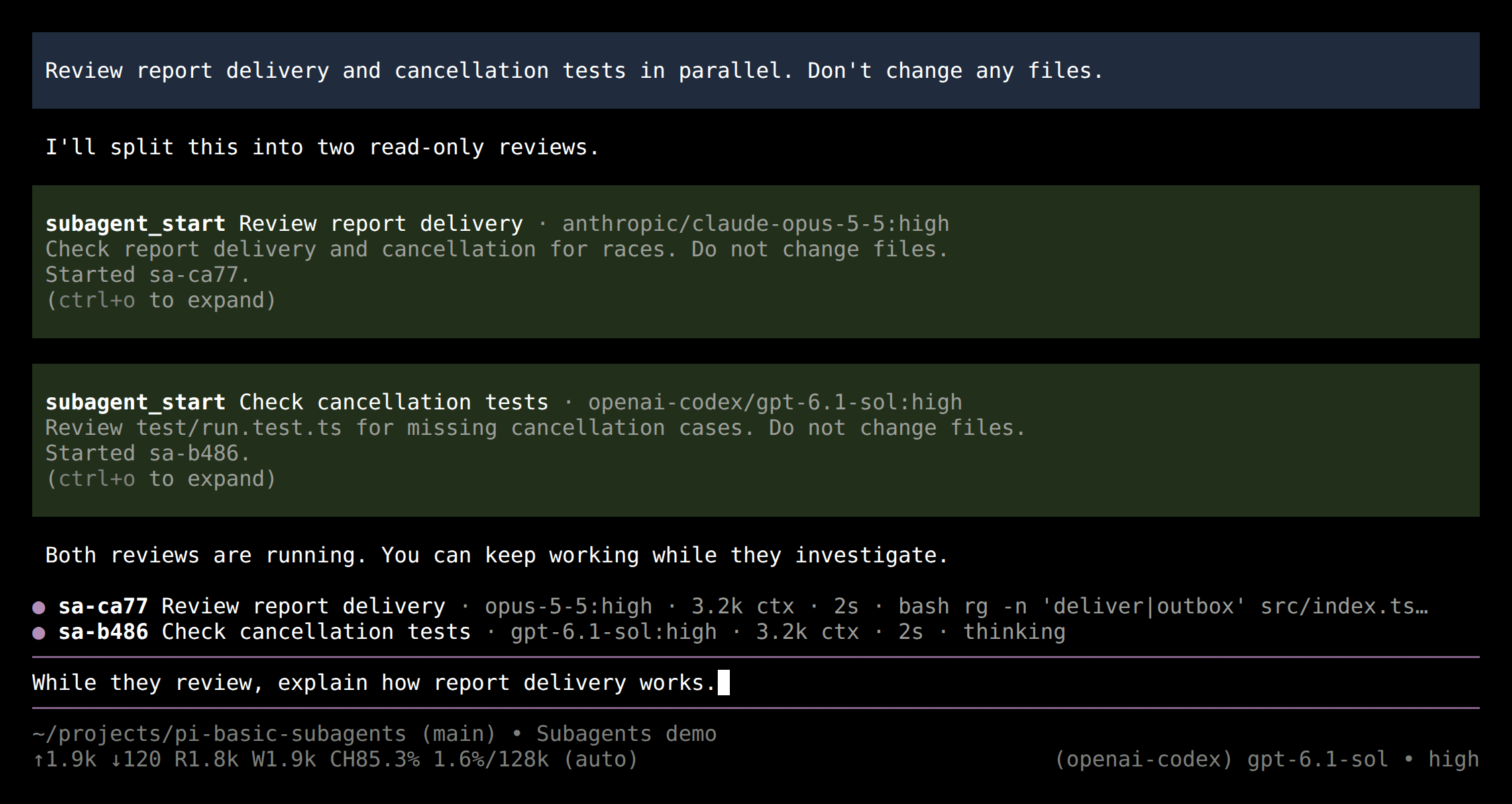
Scripted demo with real pi sessions and tools; model names are illustrative.
Install
pi install npm:pi-basic-subagentsDesign
- Just a pi session. Each subagent runs in your project with your settings, extensions, MCP servers, skills, and
AGENTS.md, and its transcript is a normal pi session you can open. - Minimal. No agent definitions, prompts, or tool lists to write: install it and ask your agent to delegate. It exposes three tools for your agent, modeled on Claude and Codex so models already know them. No commands, skills, or additions to your agent's system prompt; subagents get a few lines telling them how to work and report. No workflow engine: your agent scripts subagents with codemode.
- Never blocking. Your agent starts a subagent and can steer or stop it while it works; the subagent reports back when it finishes. Your agent stays free to talk to you.
Use
Ask for it in plain words; your agent calls the tools:
Have a subagent research the best queuing approach while you fix the failing test.
Have two subagents review this work, one using Opus and one using GPT, and compare what they find.
Starting a subagent returns right away, so you can keep talking to your agent. Running subagents show live above the editor with their model, context size, and time. When one finishes, its report lands in your conversation and wakes your agent. Your agent can steer running subagents, or resume finished ones, by sending them messages. With codemode, it can also script many subagents and pass on only what matters.
There are no subagent types: your agent's prompt carries any constraints, such as not changing anything. A subagent uses the same model as your agent unless your agent picks another.
To steer subagent usage and model choices, add guidance to your AGENTS.md, for example:
## Subagents

Delegate to subagents only when asked. Choose model and thinking level by task:

- Complex implementation or research: `gpt-6.1-sol:medium`
- Well-specified edits to 1–3 files: `gpt-6-luna:low`
- Reviews: `claude-opus-5-5:high` or `gpt-6.1-sol:high`
Configuration
Optional. Set any of these under basicSubagents in ~/.pi/agent/settings.json, or in .pi/settings.json in a trusted project, which overrides it per setting:
{
  "basicSubagents": {
    "maxConcurrent": 5
  }
}
| Setting | Default | Description |
|---|---|---|
| maxConcurrent | 20 | How many subagents can run at once per session. |
| maxDepth | 1 | How many layers of subagents are allowed below your session. At 1, subagents can't start their own. |
Compared to other subagent packages
The most used pi subagent packages, and the example that ships with pi, as of October 2026 (pi-subagents 0.78.0, @tintinweb/pi-subagents 0.22.0, pi-subagent-manager 0.29.1, pi's subagent example in 1.3.0):
| | pi-basic-subagents | pi-subagents | @tintinweb/pi-subagents | pi-subagent-manager | pi's example |
|---|---|---|---|---|---|
| Subagent runs as | its own pi process | inside your pi process (foreground) or a separate runner (background) | inside your pi process | inside your pi process | its own pi process |
| Gets your extensions, MCP, skills, AGENTS.md | yes | depends on agent and mode | yes; AGENTS.md only in general-purpose | your conversation and tools; no skills or AGENTS.md | yes |
| Setup | none | none (7 built-in agents) | none (3 built-in agents) | none (6 built-in agents) | agent files and symlinks |
| Custom agents, per-agent tools and model | no | yes | yes | yes | yes |
| Model-facing tools | 3, plus 1 that waits, for codemode scripts | 1 main, plus helpers | 3 | 8 | 1 |
| Background runs, reports wake your agent | yes | yes | yes | optional | no (blocks) |
| Steer / stop / resume | yes / yes / yes | yes / yes / except stopped | yes / UI only / up to 10 min after it finishes | yes / yes / yes | no / no / no |
| Subagent can ask your agent questions | no (stops and reports) | yes | no | no | no |
| Workflows & orchestration | via codemode | custom scripts, parallel, lanes | custom scripts, parallel, pipelines | nested subagents | parallel, chains |
| Manage git worktrees | no | yes | yes | no | no |
| Source lines | ~1.1k | ~101k | ~21k | ~13k | ~1.1k |
FAQ
Why is there no tool for my agent to wait for subagents?
So you can keep talking to your agent. Given a wait tool, models tend to call it right after starting subagents, shutting you out until they finish; Claude Code removed its wait tool for the same reason (research memo). Waiting happens only in codemode scripts, which get subagent_start_and_wait: like await agent() in Claude Code's workflows, it returns the subagent's report, so a script can fan out with Promise.all and return only what your agent needs. Stopping a script (Esc) stops the subagents it's waiting on, and calls past maxConcurrent fail, so batch big fan-outs.
Why one-way communication? What if a subagent gets stuck?
A subagent works in the background, where nobody is watching to answer questions, and your agent, busy with its own work, is a poor stand-in. So a subagent makes routine judgment calls itself and states its assumptions in its report. At a decision that would change the outcome, it stops and reports what needs deciding. Your agent, or you through it, answers with a message, which resumes the subagent with its full history.
Can a subagent be read-only?
Only by instruction. Your agent can tell it not to change anything, but it has the same tools as any pi session, and read-only work often needs bash, which can edit any file. For enforced limits, use a sandbox or a permission system.
Can two subagents work on the same files?
They can, and they can collide: subagents work in your project directory, not a copy, so that your project's settings and trust apply to them. Give parallel subagents separate files, or ask for isolation when you delegate: a subagent can create a git worktree and work there.
Can I see what a subagent did?
Expand its report for the transcript path. Each finished report is also saved as a Markdown file next to the transcript. pi --session <path> opens it; to continue the work yourself, use pi --fork <path>, which leaves the original for your agent to resume.
What happens to running subagents when I quit pi?
They're stopped (so are they on /reload, /new, and /resume). When you reopen the session, your agent hears which ones were cut short and where any missed reports are, and can resume them with a message.
Learn more
- docs/spec.md: exactly how the tools and subagents behave
- docs/ux.md: what it draws and why
- CONTRIBUTING.md: how it works, developing, and releasing