
pi-cc-header
v1.1.1
Published
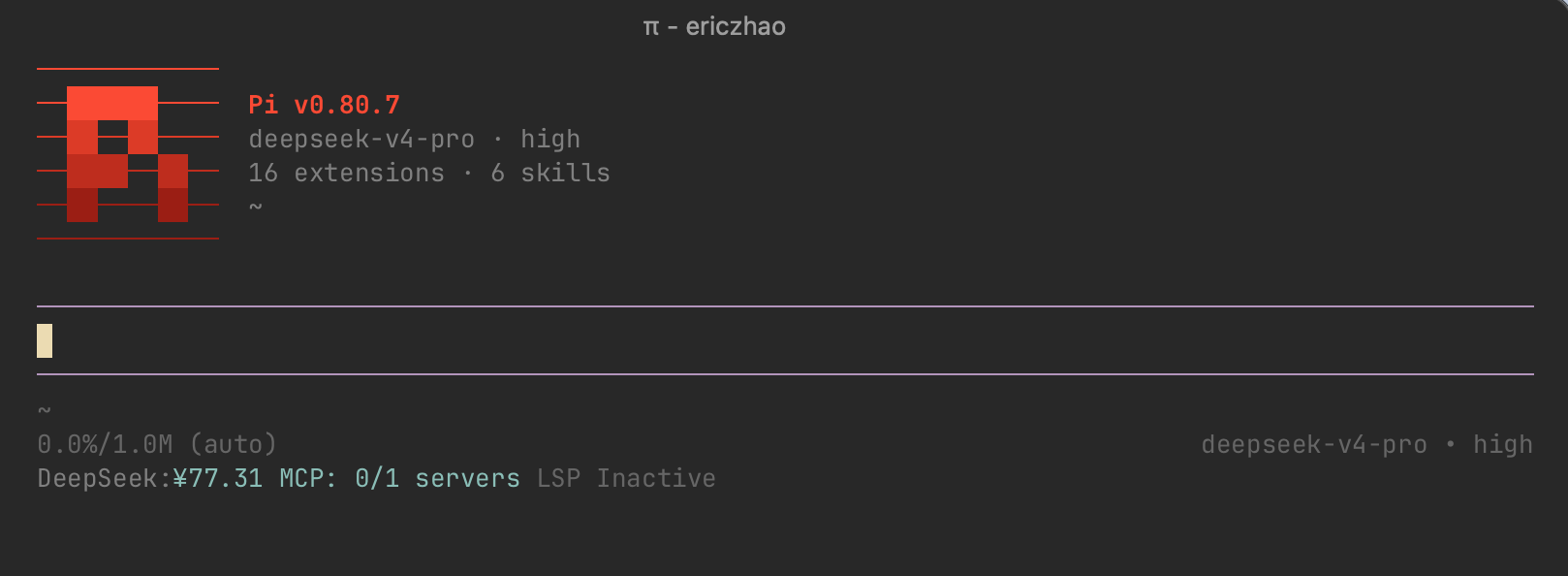
Claude Code–style startup header for Pi — animated Pi logo with a 9-color palette, toggleable IBM stripes and Minecraft themes; configurable info bar displays version, model, resource stats, AGENTS.md marker, cwd, and a customizable slogan.

Maintainers
 eriiic7z
Readme
pi-cc-header
Claude Code–style startup header for Pi — animated Pi logo with a 9-color palette, toggleable IBM stripes and Minecraft themes; configurable info bar displays version, model, resource stats, AGENTS.md marker, cwd, and a customizable slogan.
Install & Important Note
pi install npm:pi-cc-headerTakes effect on your next session (window, same below) or /reload. Please read this document in full, especially the Reset, disable & uninstall section, to ensure proper use of this extension.
This extension follows Pi's runtime config directory. If you use a custom agent dir such as ~/.config/pi/agent via PI_CODING_AGENT_DIR, pi-cc-header reads and writes the active settings.json there instead of assuming ~/.pi/agent.
Note: switching to a new config directory does not migrate your existing
/hcetc. settings — reconfigure them in the new location, or copy your oldsettings.jsonover.
If your Pi config is managed declaratively or lives on a read-only filesystem, set:
{
  "ccHeader": {
    "readOnlyConfig": true
  }
}
With ccHeader.readOnlyConfig=true, the extension will not try to write settings.json at startup or when running header commands. Visual changes still apply for the current session, but they are not persisted, and /hcl becomes unavailable until you remove the flag declaratively.
Features
- 14-frame Pi logo animation, adjustable speed (25/50/75/100 ms)
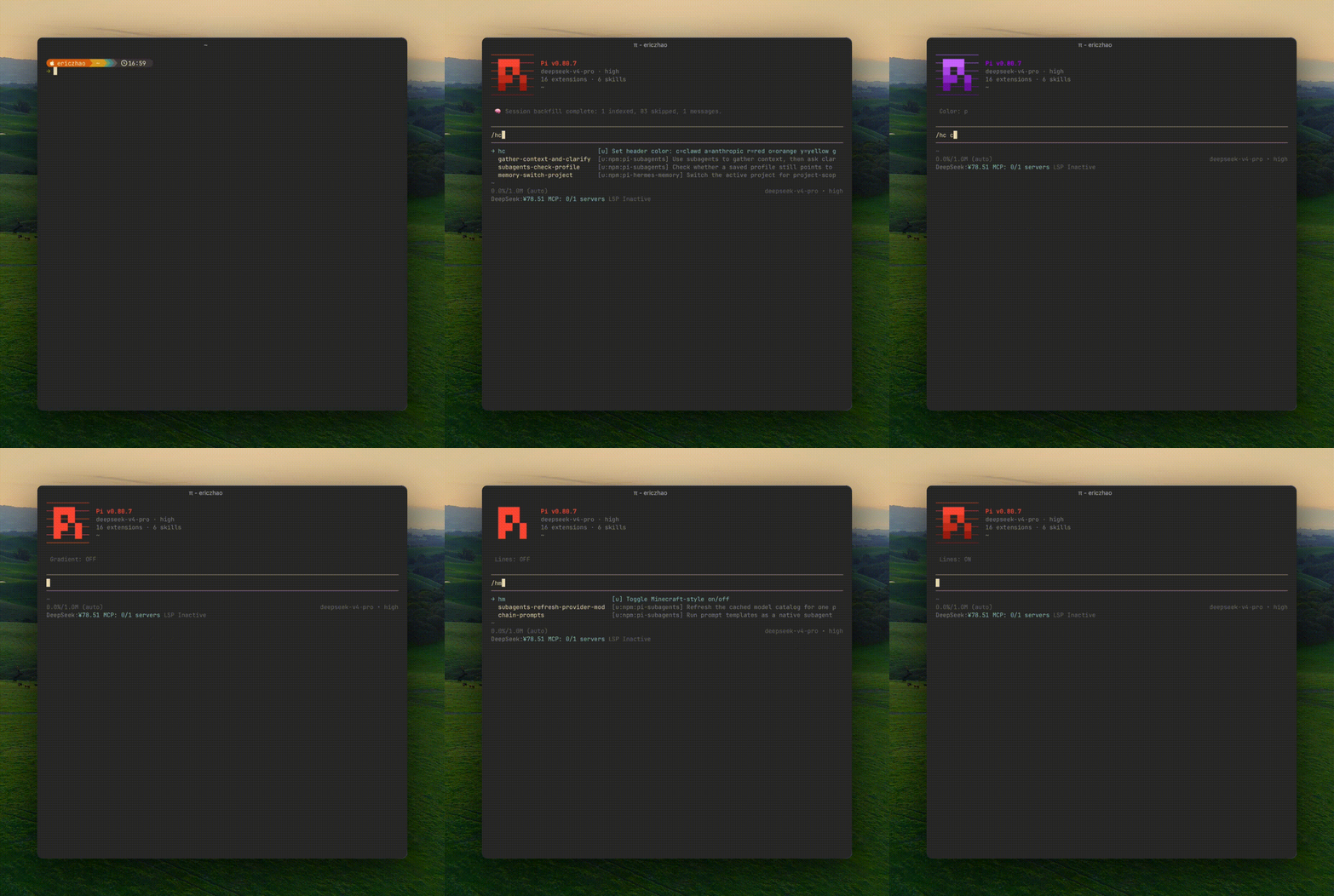
- 9-color palette: Anthropic brand orange, Clawd crab red, and more
- IBM-style horizontal stripes
- Minecraft-style pixel theme and 4-level 24-bit true-color gradient
- Version number coloring
- Startup status bar: version, model, thinking level, skills (with pkg skills count), prompts, extensions (with uninstalled extension residue marker), cwd, and AGENTS.md state marker
- Customizable slogan displayed in the header
Commands
| Command | Description | Takes effect |
| --- | --- | --- |
| /hc c/a/r/o/y/g/w/b/p / /hc | Set logo color or show current with color key table | Immediate |
| /hi | Toggle IBM-style on/off | Immediate |
| /hm | Toggle Minecraft-style on/off | Immediate |
| /hsp / /hsp | Set / show animation speed (25/50/75/100) | Immediate |
| /hv / /hv <all\|pi\|off> | Cycle or set version label color | Immediate |
| /hps | Toggle pkg skills visibility (6 skills / 6/7 skills) | Immediate |
| /hs / /hs / /hs -c / /hs -d | Set / toggle / toggle color / delete slogan (max 85 chars) | Immediate |
| /hdf | Reset to developer defaults | Immediate |
| /htg | Enable / disable pi-cc-header | Next session |
| /hcl | Clear all pi-cc-header config from settings.json | Immediate |
Reset, disable & uninstall
- Use
/hdfto reset all settings to developer defaults (Clawd crab red). Changes take effect immediately. This does not save your current config — you will need to reconfigure from scratch. - Disabling pi-cc-header with
/htglocks all style commands (except/htgitself) to prevent blind configuration. Run/htgagain to re-enable with your previous config — changes take effect the next session. - Before uninstalling, run
/hclto clear all pi-cc-header keys from settings.json and remove the header. Thenpi uninstall npm:pi-cc-headerfor a clean removal.
Credits
Logo animation adapted from pi.dev/install.sh.
Thanks to @hacxy — Fixed logo animation flicker & settings.json data loss protection.
Thanks to @ReStranger — Fixed config path resolution to follow custom Pi config directories; added read-only config mode (ccHeader.readOnlyConfig) for NixOS and read-only filesystems.
Thanks to @mediocrebaby — Fixed config path resolution for Windows compatibility.
中文
Claude Code 风格的 Pi 启动头部 — 像素动画 Pi logo,九色调色板,可开关的 IBM 横线和 Minecraft 主题,搭配可配置信息栏,展示版本信息、模型信息、资源统计、AGENTS.md 标记、路径信息,以及可定制标语。
安装与提醒
pi install npm:pi-cc-header安装后在 下一次会话(窗口,下同) 或 /reload 生效。请务必完整阅读本文档,特别是重置、禁用与卸载小节,以确保您正常使用本扩展。
本扩展会跟随 Pi 当前实际使用的配置目录。如果您通过 PI_CODING_AGENT_DIR 使用 ~/.config/pi/agent 之类的自定义 agent 目录,pi-cc-header 会在该目录下读写当前生效的 settings.json,不会再假定路径一定是 ~/.pi/agent。
注意:切换到新的配置目录后,原有的
/hc等自定义设置不会自动迁移,需要在新目录中重新设置,或手动复制旧的settings.json。
如果您的 Pi 配置由 Nix / Home Manager 等声明式工具管理,或者配置目录本身是只读文件系统,请加入:
{
  "ccHeader": {
    "readOnlyConfig": true
  }
}
启用 ccHeader.readOnlyConfig=true 后,扩展在启动和执行头部命令时都不会再尝试写入 settings.json。界面变更仍会在当前会话内生效,但不会持久化;同时 /hcl 也会不可用,需通过声明式配置移除该字段后再卸载。
功能
- 14 帧 Pi logo 动画,动画速度可调(25/50/75/100 ms)
- 九色调色板:Anthropic 品牌橙、Clawd 螃蟹红等
- IBM 风格水平横线
- Minecraft 风格像素主题,4 级 24-bit 真彩色渐变
- 版本号颜色设定
- 启动状态栏:版本、模型、思考级别、技能统计(含随包 skills 统计)、提示词模板统计、扩展统计(含已卸载扩展残留标记)、当前目录,以及 AGENTS.md 状态标记
- 可定制标语
命令
| 命令 | 说明 | 生效方式 |
| --- | --- | --- |
| /hc c/a/r/o/y/g/w/b/p / /hc | 设置 logo 颜色或显示当前颜色及色键表 | 即时生效 |
| /hi | 开关 IBM 横线 | 即时生效 |
| /hm | 开关 Minecraft 风格 | 即时生效 |
| /hsp / /hsp | 设置 / 显示动画速度(25/50/75/100) | 即时生效 |
| /hv / /hv <all\|pi\|off> | 循环或设定版本号颜色模式 | 即时生效 |
| /hps | 切换随包 skills 可见性(6 skills / 6/7 skills) | 即时生效 |
| /hs <文字> / /hs / /hs -c / /hs -d | 设置 / 开关 / 切换颜色 / 删除标语(最长 85 字符) | 即时生效 |
| /hdf | 恢复开发者默认配置 | 即时生效 |
| /htg | 启用 / 禁用 pi-cc-header | 下一次会话生效 |
| /hcl | 清除 settings.json 中所有 pi-cc-header 配置 | 即时生效 |
重置、禁用与卸载
- 使用
/hdf可将用户配置恢复为开发者默认配置(Clawd 螃蟹红),更改即时生效,此命令不会保存用户配置,重置后用户需重新进行配置。 - 使用
/htg禁用 pi-cc-header 后,所有样式命令会被锁定无法使用(/htg除外),防止盲操配置。重新执行/htg即可恢复禁用前的配置。更改将在下一次会话生效。 - 执行
/hcl将清空 settings.json 中所有 pi-cc-header 相关的配置项并移除头部,用于卸载本扩展前的清理——先/hcl,再pi uninstall npm:pi-cc-header,无残留。
致谢
Logo 动画取自 pi.dev/install.sh。
感谢 @hacxy — 修复 logo 动画闪烁 & settings.json 数据丢失保护。
感谢 @mediocrebaby — 修复 Windows 兼容性配置路径解析。
感谢 @ReStranger — 修复配置路径跟随自定义 Pi 配置目录;新增只读配置模式(ccHeader.readOnlyConfig),支持 NixOS 及只读文件系统。