
pi-connect
v0.1.3
Published
Unified OAuth and API key login for pi with an OpenCode-inspired UI. Connect 15+ providers with one /connect command.
Downloads
391

Maintainers
 hk-vk
hk-vkReadme
pi-connect
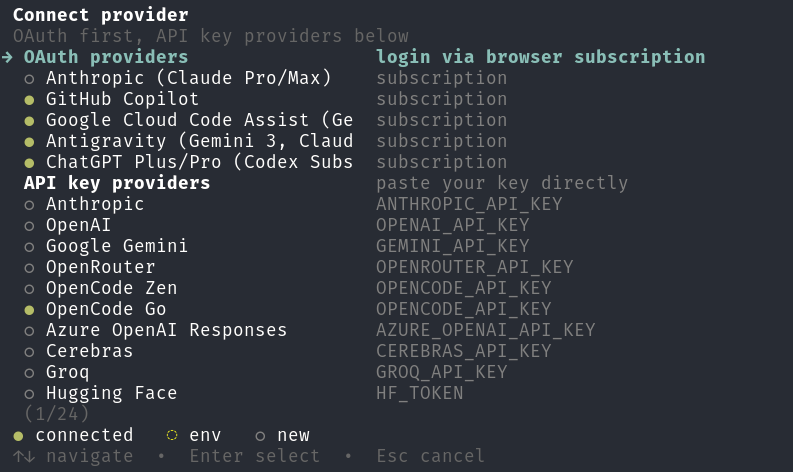
Unified OAuth and API key login for pi with an OpenCode-inspired UI.
Connect 15+ providers with one /connect command.
Official pi providers list:
- https://github.com/badlogic/pi-mono/blob/main/packages/coding-agent/docs/providers.md
Install
pi install git:github.com/hk-vk/pi-connectUsage
/connect — connect any provider
OAuth (browser login) or API key (paste your key) — one unified UI for all providers supported by pi.
/connectOpens a picker like this:
╭───────────────────────────────────╮
│ Connect provider                  │
│                                   │
│ ○ Anthropic     OAuth             │
│ ○ ChatGPT       OAuth             │
│ ○ Copilot       OAuth             │
│ ○ OpenAI        API key           │
│ ○ OpenRouter    API key           │
│ ○ OpenCode      API key           │
│ ○ Gemini        API key           │
│ ○ Groq          API key           │
│                                   │
│ ● connected  ◌ env  ○ new        │
╰───────────────────────────────────╯
Status:
● connected= saved inauth.json◌ env= available from environment variable○ new= not configured yet
Direct connect
/connect openai
/connect anthropic
/connect openrouter
/disconnect — remove a saved credential
/disconnectSupported — 15+ providers
OAuth:
- Anthropic (Claude Pro/Max)
- ChatGPT Plus/Pro (Codex)
- GitHub Copilot
- Google Gemini CLI
- Google Antigravity
API key:
- Anthropic
- OpenAI
- OpenCode
- OpenRouter
- Google Gemini
- Groq
- Mistral
- Cerebras
- xAI
- ZAI
- Azure OpenAI
- Vercel AI Gateway
- Hugging Face
- Kimi
- MiniMax
See the official pi provider documentation for the full list and auth details:
- https://github.com/badlogic/pi-mono/blob/main/packages/coding-agent/docs/providers.md
License
MIT