
pi-endless
v0.1.0
Published
One chat that never ends, for pi: the chat itself is the memory (Taelin's OptChat/UniiChat recipe). Opt-in per conversation; zoom, search and date tools; nothing is ever lost.

Maintainers
 catoncat
Readme
pi-endless
One chat that never ends, for pi. Open a named conversation, talk for months, close your laptop, come back: the agent still has everything. No compaction, nothing lost, constant context size.
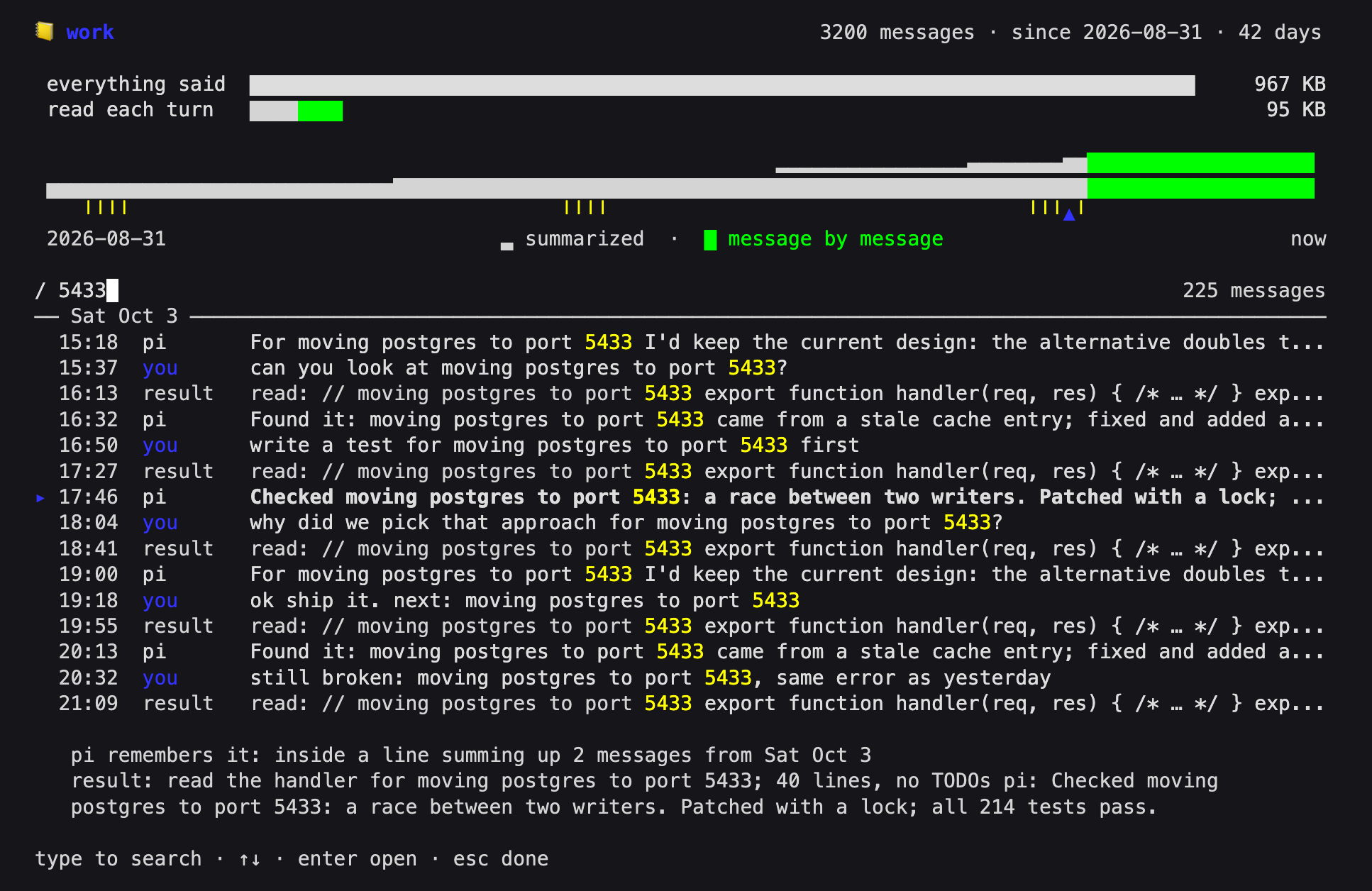
An implementation of Victor Taelin's OptChat / UniiChat recipe: the chat itself is the memory. Every message is logged verbatim; a cheap model compresses the log into a binary tree of one-line summaries in the background; each turn the model sees a bounded view of the whole history (recent lines fine, old ones coarse) and zooms into any line down to the original message.
Opt-in by design: until you open a conversation, pi is exactly pi.
Status: 0.1, experimental. Used daily by the author; the long-run path (batch merges, multi-level summaries) is checked by replaying real sessions with a real summarizer (scripts/replay-session.ts). Expect rough edges and tell us about them.
Install
pi install npm:pi-endless(or pi install git:github.com/catoncat/pi-endless). Requires pi ≥ 1.0.4 (tested on 1.0.4 and 1.1.0) and a model to summarize with: the cheapest flash/mini/haiku-class model of the provider you chat with is picked automatically; /mem model changes it.
Use
pi --mem main # open (or create) the conversation "main"or, inside any pi session, /mem open main. You get a fresh session bound to that conversation, a card showing where you left off, and three extra tools for the model: zoom, search, date. Then just chat. One conversation per topic works well: pi --mem homelab, pi --mem thesis.
| Command | What it does |
|---|---|
| /mem | the map of the conversation (above): / searches every message ever said, as you type; the lines the model reads, by day, enter down to the original words; how much was said vs read each turn (the conversation picker when none is open) |
| /mem open <name> · /mem close | open or create a conversation in a new session (<Tab> completes) · back to plain pi |
| /mem status | messages, summaries pending, summarizing model, cost this session |
| /mem model | choose the summarizing model; type to search (new conversations use it too) |
| /mem rename <new> · /mem delete <name> · /mem list | the old name keeps a pointer · moves to ~/.pi/memory/.trash/ · all conversations |
| /mem view · /mem zoom 1024+256 · /mem search <text> | the raw view and lookups, as the model sees them |
Open the same conversation in as many windows as you like: it follows whichever one you talk in. A turn picks up everything said in other windows; if another window is in the middle of answering, the new turn waits until it is done; when a turn ends in one window, the others show it as a card. Nothing is asked and nothing is lost.
Conversation names can be anything that makes a directory name, 中文 included. UI language follows LANG (zh* → Chinese), or set MEM_LANG=en|zh.
Use your conversations from anywhere
pi-mem reads your conversations without opening pi: from a shell, a script, or another agent. It never writes and never takes a conversation away from the window using it.
pi-mem list                              # conversations, newest first
pi-mem search "db port"                  # every conversation; -c homelab for one
pi-mem message homelab 255               # one original message, and how the model remembers it now
pi-mem view homelab --lines 50           # what the model reads each turn
pi-mem since homelab 2026-10-11T08:00    # what happened since; --json everywhere for programs
As an MCP server (pi-mem mcp; tools list search view zoom message since, all read-only):
claude mcp add --scope user pi-mem -- pi-mem mcp
codex mcp add pi-mem -- pi-mem mcp
or in pi's ~/.pi/agent/mcp.json: "pi-mem": { "command": "pi-mem", "args": ["mcp"], "exposure": "deferred" }. The library behind it is src/api.ts (Conversation.open(name), search, listConversations).
Privacy and your data
- Everything is kept, verbatim, forever: what you say, the replies, tool calls and their output (clipped to 30,000 characters), in
~/.pi/memory/<name>/(MEM_HOMEto move it). Thinking is never kept. If a tool printed a secret, it is in there. - Everything goes to the summarizing model too. By default that is a model of the provider you already chat with; if it has none, another provider's, and pi-endless tells you which when the conversation opens.
/mem modelchanges it. pi-memleaves tool calls and tool output out of every answer unless you pass--include-tools(includeToolsover MCP).- Plain files:
main/*.jsonlthe log,tree/*.jsonlthe summaries,view.json,config.json. Back them up, grep them, move them like any other files. - Delete a conversation with
/mem delete <name>(moves it to~/.pi/memory/.trash/; empty the trash yourself) or remove its directory. Uninstall withpi remove npm:pi-endless; your conversations stay in~/.pi/memory/until you delete them.
Cost
Summaries are the cost. Measured on a replay of 700 real messages (Chinese and English, heavy tool output) with DeepSeek V4 Flash: 1,030 summarizer calls, 27.9 M prompt tokens of which 92 % were cache hits, 155 K output tokens. About 40 K prompt tokens per logged message, nearly all cached. Choose a cheap model with prompt caching: at Claude Haiku 4.5 prices that is roughly $8 per 1,000 messages, cheaper tiers proportionally less. /mem status shows calls, tokens and cost for the session. The chat itself gets cheaper: a constant-size view that stays in the provider's prompt cache instead of a context that grows until compaction.
How it works (short)
- Log:
user,pi(replies),tool,echo(results, clipped to 30,000 chars),work(subagent reports). Thoughts are never logged. - Tree: each message becomes a ≤ 512-byte line (short ones stay verbatim); adjacent lines merge in pairs, again and again. Each node is built once.
- View: a list of nodes covering the whole chat, 64–128 KB. It grows one line per message and, past 128 KB, merges the most-due sibling pairs down to 64 KB in one batch:
due = (T − last message of the pair) / 2^level. This is Taelin's rollback-netcodepushgeneralized to any budget, so old lines almost never change and the prompt cache holds. Between batches the view only grows at its end. - Turn:
[system][view][previous exchange][time · cwd][your message]. The model zooms when a line is too vague;searchfinds exact names in the original messages. - Summarizer: a cheap model, 8 calls in parallel, with a 16–32 KB view of its own. Size is enforced by the harness (token cap + cut at the last separator), so it works with models that cannot count bytes.
- Long turns rebuild their context from memory instead of overflowing.
Deliberate deviations from the recipe, with reasons: docs/recipe.md. Design notes: docs/DESIGN.md.
Development
git clone https://github.com/catoncat/pi-endless && cd pi-endless
bun install                # dev dependencies
npm run check && bun test  # types; view math, persistence, read-only safety, request prefix stability, map width, API privacy
npm run build              # dist/pi-mem.mjs, the CLI and MCP server
pi install .               # try it
Against real models (each costs cents to a few dollars):
node scripts/smoke.mjs                         # end to end over `pi --mode rpc`: open, chat, rename, two windows, delete
node scripts/cache-check.mjs <provider/model>  # does the provider serve turns from its prompt cache?
bun scripts/replay-session.ts <session.jsonl> <provider/model> --max 700   # weeks of use in minutes
node scripts/check-recipe.mjs [--write]        # has the upstream recipe changed? --write keeps a local copy of the pinned text
Credits
- Victor Taelin — the recipe (gist) and OptMem.
- jonaslsaa/pi-optchat — an earlier pi implementation of the v1 recipe, useful prior art.
MIT.
中文
给 pi 的一条永不结束的对话。 打开一个有名字的对话,聊几个月,合上电脑,再回来:agent 什么都记得。没有 compaction,什么都不丢,上下文恒定大小。实现的是 Victor Taelin 的 OptChat / UniiChat 配方:聊天本身就是记忆。默认不开:不打开对话时,pi 就是 pi。当前 0.1,实验性。
pi install npm:pi-endless
pi --mem main        # 打开(或新建)对话 main;会话里也可 /mem open main。一个主题一本效果最好
| 命令 | 作用 |
|---|---|
| /mem | 对话全景:/ 边打边搜说过的每句原话(命中标在时间轴上,并告诉你模型现在记得的样子);模型读的每一行按天排,enter 一路展开到原话(没开时弹选择器) |
| /mem open <名字> · /mem close | 新会话里打开/新建 · 回到普通 pi |
| /mem status · /mem model | 状态与本会话费用 · 选压缩模型(打字即搜) |
| /mem rename · /mem delete · /mem list | 改名(旧名留指针)· 移到回收站 · 所有对话 |
同一本对话可以在任意多个窗口里开着,在哪个窗口说话它就跟到哪;那边正在回答时这边等它答完;不弹窗、不丢东西。
在别处用:pi-mem list / search / message / view / since(只读,--json),或 MCP:claude mcp add --scope user pi-mem -- pi-mem mcp。
隐私:所有内容(含工具输出)逐字永久存在 ~/.pi/memory/<名字>/,也会发给压缩模型(默认用你聊天所用服务商的便宜模型,不是同一家时打开对话会明说);pi-mem 默认不返回工具输出(--include-tools 才给)。删除用 /mem delete,卸载用 pi remove npm:pi-endless(对话文件留着,自己删)。
费用:主要是写摘要。700 条真实消息实测(DeepSeek V4 Flash):每条约 4 万提示 token,92% 命中缓存;选带提示缓存的便宜模型。
与配方的差异和原因见 docs/recipe.md;设计见 docs/DESIGN.md。