
pi-favorites-commands
v0.2.1
Published
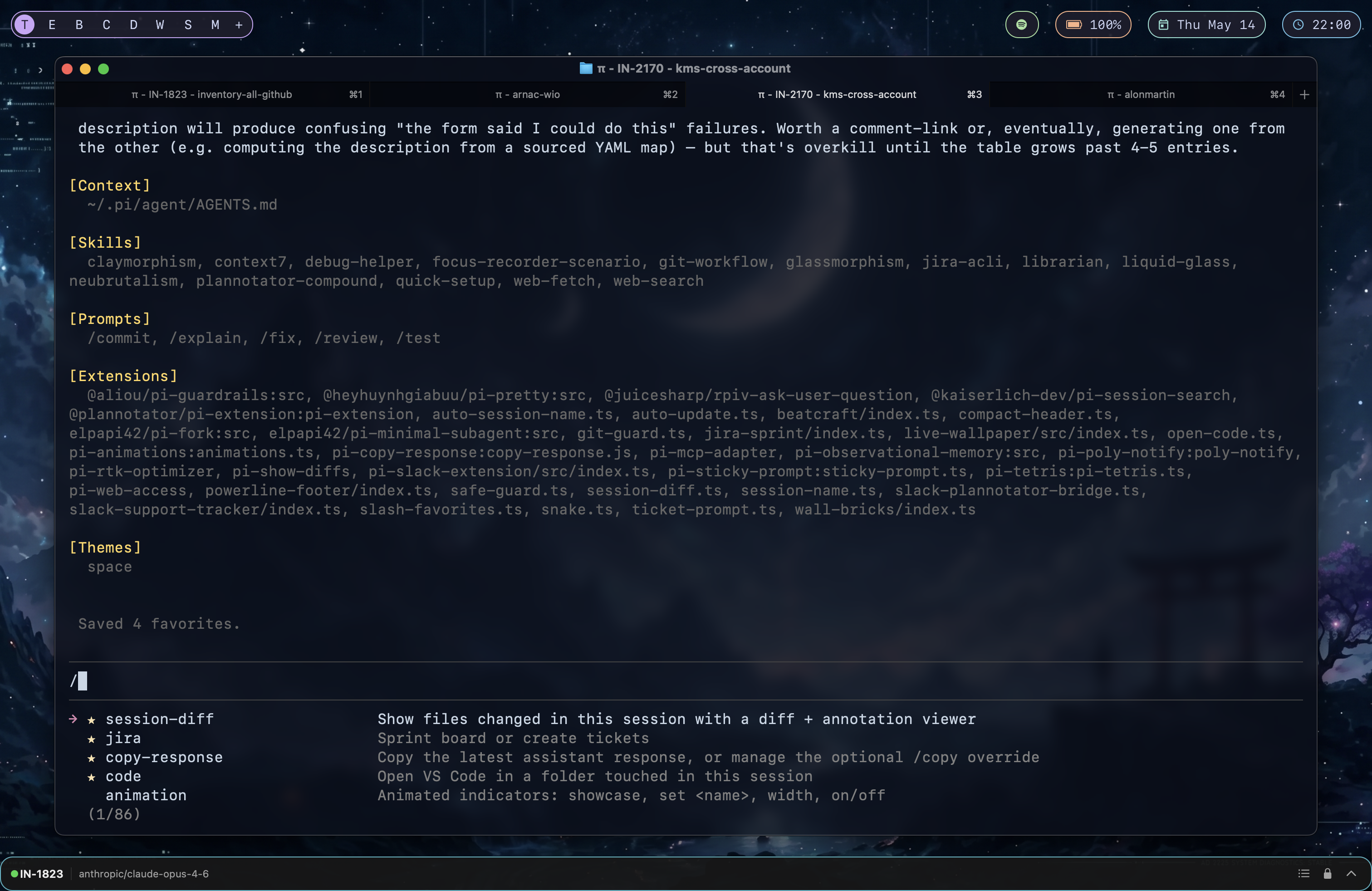
Star and reorder your favorite slash commands in pi. Favorites appear at the top of the / autocomplete dropdown with a ★ glyph, in the order you choose.
Downloads
53

Maintainers
 alonmartin2222
Readme
pi-favorites-commands
Star and reorder your favorite slash commands in pi. Favorites appear at the top of the
/autocomplete dropdown with a ★ glyph, in the order you choose.
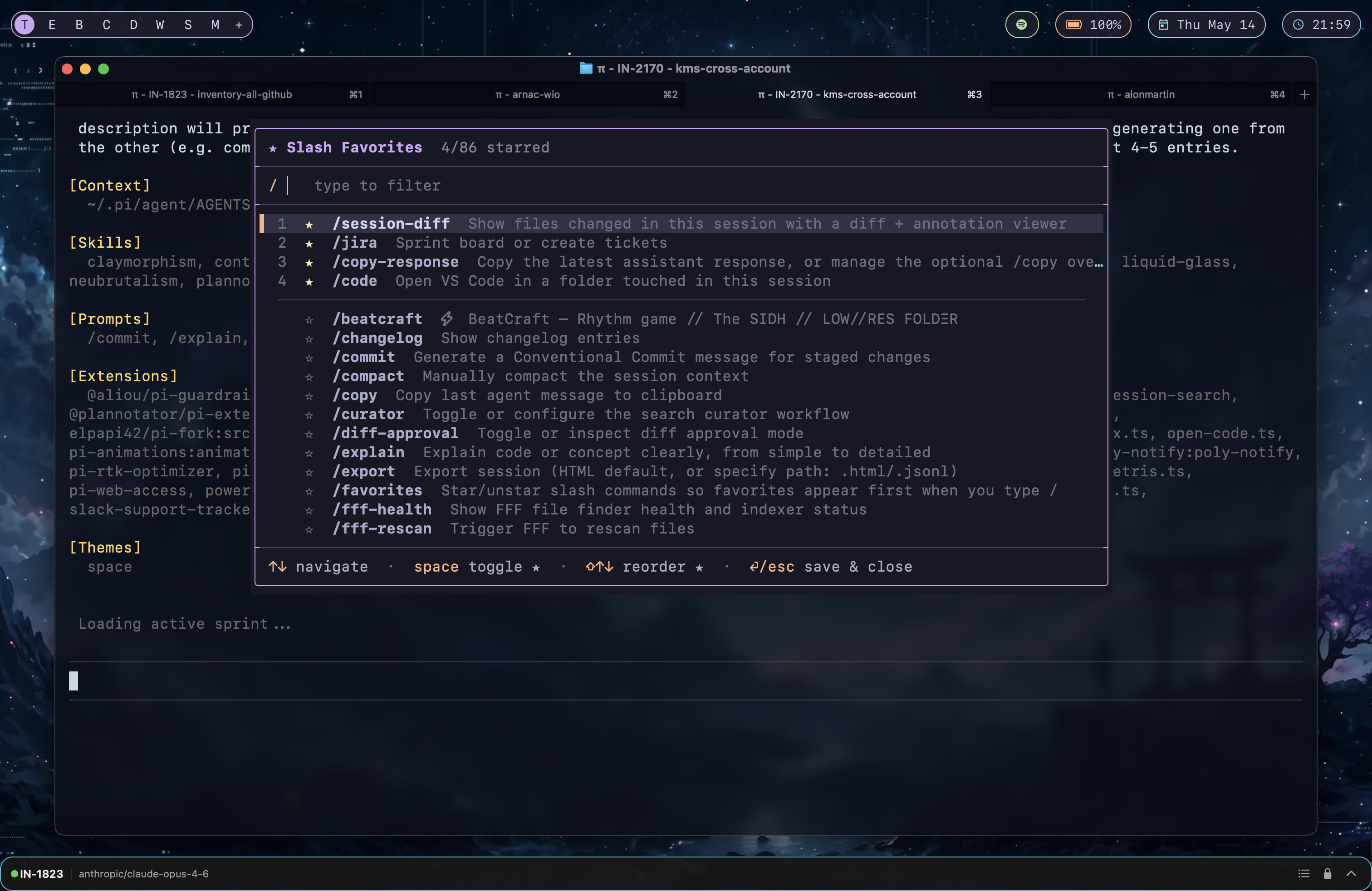
| /favorites manager | / dropdown |
| :---: | :---: |
|  |
|  |
|
Why
Pi has a lot of slash commands once you install a few extensions, themes,
skills, and prompt templates. The autocomplete dropdown sorts them
alphabetically, which means /code and /session-diff — the two you
actually use ten times a day — live a long scroll away from /c.
This extension lets you star the commands you use most and reorder
them however you like. Stars are persisted to disk and survive /reload
and pi restarts.
Features
- ⭐ Star any slash command — built-ins (
/settings,/compact, …), extension commands, prompt templates, and skill commands all work. - 🔝 Favorites surface first when you type
/, in your custom order, each prefixed with a yellow ★ so they're easy to spot. - ↕️ Manual reorder with
⇧↑/⇧↓inside the manager — no alphabetical lock-in. - 🔎 Live filter — type to search the picker by command name or description.
- 💾 Persistent — saved to
~/.pi/agent/data/slash-favorites.jsonas a plain JSON array. Edit it by hand if you want. - 🪶 Zero runtime deps — pure TypeScript, uses only
@mariozechner/pi-coding-agentand@mariozechner/pi-tui(peer-provided by pi itself).
Install
pi install npm:pi-favorites-commandsReload pi (/reload) or start a fresh session. The autocomplete provider
is installed automatically.
Usage
Manage stars
/favoritesOpens a centered overlay with every slash command in your session (built-ins + extension + prompt template + skill commands that pi itself reports).
| Key | Action |
| -------------- | --------------------------------------------------------- |
| ↑ / ↓ | Move cursor |
| space | Toggle ★ on current command |
| ⇧↑ / ⇧↓ | Move the selected favorite up / down within the ★ section |
| Any text | Filter commands by name or description |
| backspace | Edit filter |
| ⏎ / esc | Save & close |
Newly-starred commands are appended to the end of your favorites list
so you can decide where they belong. The numeric rank shown next to each
★ is the position you'll see them in when typing /.
Use the favorites
Just type /. Your starred commands are at the top of the dropdown, in
your order, each prefixed with a yellow ★. Unstarred commands follow
alphabetically.
Storage
Favorites live at:
~/.pi/agent/data/slash-favorites.jsonIt's a plain JSON array of command names in display order. Example:
[
  "code",
  "jira",
  "session-diff",
  "copy-response"
]
You can edit it by hand or sync it across machines via dotfiles.
How it works
Pi exposes hooks for extensions to replace the editor component. This
extension installs a CustomEditor subclass that pins its autocomplete
provider to a small wrapper around pi's built-in
CombinedAutocompleteProvider. The wrapper:
- Sorts the command list so favorites come first (in user order), then the rest alphabetically.
- Decorates each suggestion's
labelwith★for starred entries so the glyph appears next to the command in the dropdown — without affecting what actually gets inserted when you press⏎.
Pi's core re-installs the default autocomplete provider on several
internal events (theme changes, reload, etc.). The custom editor shadows
setAutocompleteProvider with an instance method that re-runs our sort
on every external call, so favorites stay pinned at the top even after
those events.
Caveats
- Pi's built-in slash command list is mirrored locally inside the extension (it isn't exported from the public API). If pi adds a new built-in, file an issue and I'll bump the mirror.
- Wrapping the autocomplete provider means per-command argument
autocomplete hooks (
getArgumentCompletions) are bypassed. Direct typing of/some-cmd <arg>still works — only the dropdown suggestions for arguments are affected.
Requirements
- pi (
@mariozechner/pi-coding-agent) - Node ≥ 20
License
MIT — see LICENSE.