
pi-file-preview
v0.2.3
Published
Click a file link (with :line-range) in the pi TUI to preview it, or Quick Open with fd. Local files and SSH remotes.

Maintainers
 nephen
Readme
pi-file-preview
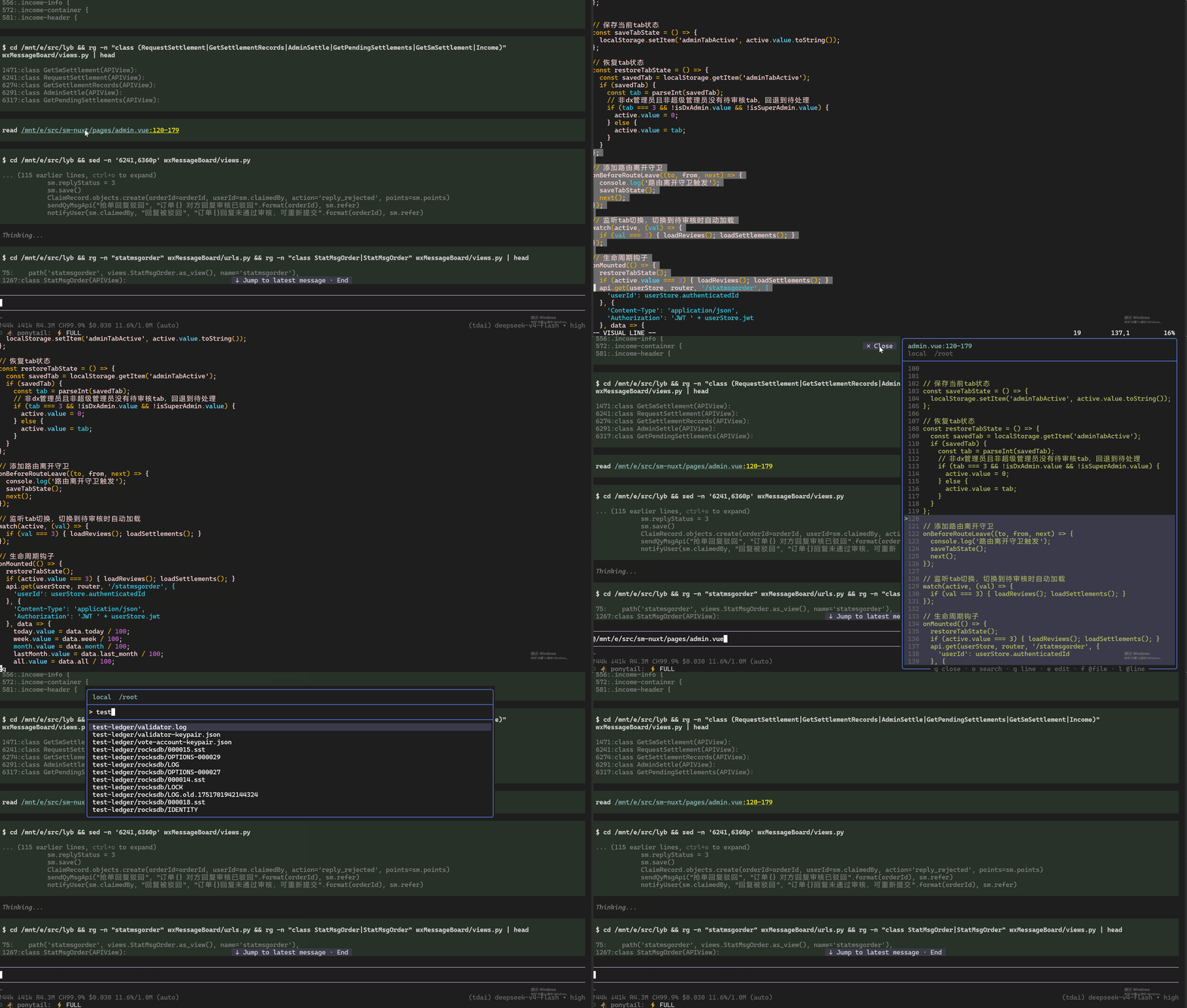
Click a file link in the pi TUI and preview the file in a panel on the right — with the referenced line range highlighted. Click the floating × Close chip in the panel's top-right corner (or press q) to dismiss it.
Quick Open (Alt+O or /preview) searches the workspace with fd. While the preview is focused: g jumps to a line, e opens the file in the external editor (same as Ctrl+G: externalEditor / VISUAL / EDITOR), f inserts @file, l inserts @file:line. Remap in settings.json (filePreview.keys).
Works on fullscreen TUI ("tuiMode": "fullscreen" in ~/.pi/agent/settings.json).
Install
pi install npm:pi-file-previewor straight from git:
pi install git:github.com/nephen/pi-file-previewor try it without installing:
pi -e npm:pi-file-previewThen restart pi (or /reload in the session).
Needs fd or rg on PATH (pi ships both locally). Remote search needs fd, fdfind, or rg on the SSH host. fd first, then rg --files.
Usage
Click a file link. Any file:// hyperlink pi prints (e.g. in tool output) opens the preview. pi usually prints the location as path/to/file.ts:110-149 — the extension folds that :110-149 suffix into the hyperlink so clicking it opens the file at those lines, scrolled to the start, with the range highlighted.
Quick Open searches the current workspace (SSH remote cwd if connected, otherwise local cwd):
Alt+O
/preview
Type to filter, Enter to preview. file:line / file:line:col / file:start-end jumps like VSCode Quick Open:
src/ugreen/ugos_serv/server/security/ssl/cert_parser.cc:44Or open a path directly:
/preview src/index.ts:110-149
/preview src/index.ts
Keys — preview panel
| Key | Action |
| --- | --- |
| q / Esc / Ctrl+C | Close |
| click × Close | Close (floating chip, top-right of the panel) |
| o / Alt+O / Ctrl+P | Quick Open (switch file) |
| g | Go to line |
| e | Edit in external editor, then reload the preview |
| f | Append @file to the editor |
| l | Append @file:line (or @file:start-end if the click range is still current) |
| click a line | Set current line (gutter >) |
| ↑ / ↓ | Scroll one line |
| PgUp / PgDn | Scroll one page |
| Home / End | Jump to top / bottom |
| mouse wheel | Scroll |
Ctrl+P in the editor still cycles models. Quick Open from the editor is Alt+O by default (Ghostty eats Ctrl+Shift chords). Esc / Ctrl+C always close the preview.
Remap keys
In ~/.pi/agent/settings.json (string or array). /reload to apply. Don't bind a bare letter to quickOpen — it steals typing in the editor.
{
  "filePreview": {
    "keys": {
      "quickOpen": "alt+o",
      "search": "o",
      "goto": "g",
      "edit": "e",
      "mention": "f",
      "mentionLine": "l",
      "close": "q"
    }
  }
}
Clicking a second link while the panel is open reuses it (no stacking). @ inserts stay in the editor; they are not sent.
Remote (SSH) files
On each open, preview looks for a remote target (no extra protocol):
--ssh/--ssh-cwdPI_SSH_TARGET.pi/ssh.json/.pi-web/ssh.json({ "target": "user@host:/path" })
If a plugin also emits ssh:status / remote:status, that live connect/disconnect wins over leftover config. Otherwise it stays local. The preview header shows local <cwd> or SSH user@host <cwd>.
- Quick Open lists files with
fdinremoteCwd - Preview reads via
sedon the remote (does not prefer a same-named local file) eruns the editor on the remote overssh -t(needs a TTY editor on the host, e.g. vim/nano)@filepaths are relative toremoteCwd
Disconnecting while Quick Open is up closes the picker. Set PI_SSH to the ssh binary if ssh is not on PATH. Custom SSH ports need a Host alias in ~/.ssh/config.
Notes
- Files are read as UTF-8; binary files report
binary fileinstead of rendering. - Syntax highlighting uses pi's own highlighter; unknown file types fall back to plain text.
- Only ~60 lines of context are read around the target range (max 800 lines per fetch), so opening a huge file stays cheap.
- File listing uses
fdif present, otherwiserg --files(nogit ls-files).--no-require-gitis added when the workspace root has no.git, so nested project.gitignore/node_modulesstill apply. - This extension patches pi's
Text/ alt-screen URL handling at runtime to routefile://clicks to the panel. That is version-sensitive: if pi's TUI internals change, links may stop being intercepted (they then fall back to the default open behaviour). Issues/PRs welcome.
License
MIT