
pi-hang-guard
v0.3.6
Published
Watchdog for the pi coding agent: detects bash commands that produce no output (hung builds, silently stuck dev servers) and warns you instead of waiting forever.

Maintainers
 ducaoya
Readme
pi-hang-guard
English · 中文文档
A command watchdog for pi: it warns you when a command stops producing output, instead of leaving you staring at a process that will never print anything again.
pi's bash tool has no default timeout and only judges success by exit code. So the worst case — "the process is alive but already broken" — never produces a failure signal. A dev server that failed to compile, a watcher that hit a syntax error, a build waiting on stdin, a request that hung on the network: pi keeps waiting and you have no idea what is going on.
This extension closes that gap by using silence as the signal. It reads pi's streaming tool events, so for bash it knows exactly when the process last produced output. 90 seconds of silence is a real signal. "It has been running for 90 seconds" is not.
⏱ bash 1m30s idle · server/watch · npm run devbash 2m30s idle (over the 150s threshold, server/watch)
command: npm run dev
Likely stuck. Running in observe mode, so nothing is interrupted automatically — press Esc to interrupt.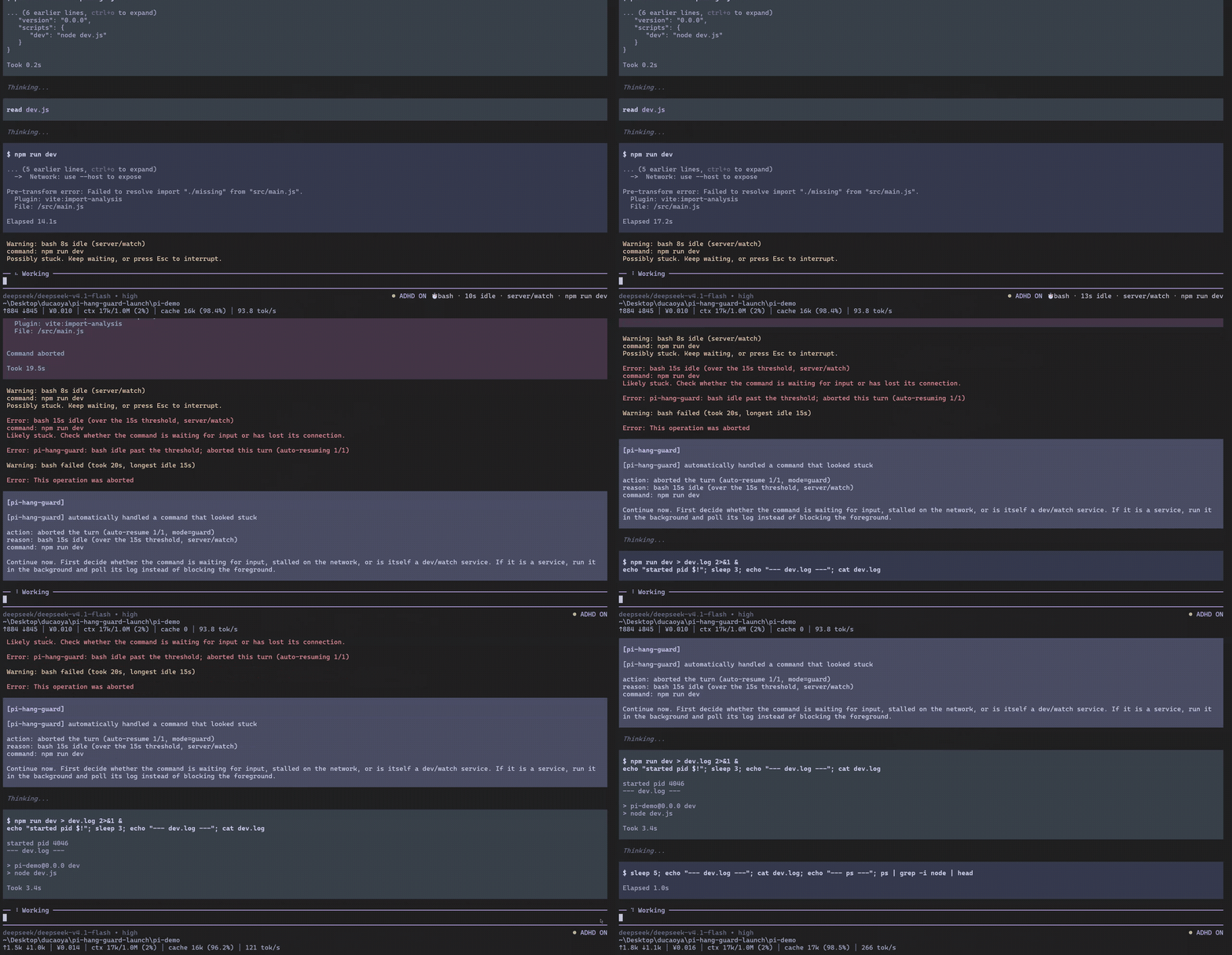
Demo runs in guard mode with the silence thresholds lowered to 8s / 15s. Defaults are observe / 90s / 150s.
Where this fits
This is a single-purpose tool, not a bundle. It does one thing: notice a bash command that stopped producing output.
- Zero runtime dependencies — nothing else to install, nothing else that can break it
- Observe-only by default — no process is killed and no turn is aborted until you opt into
guard/yoloyourself - Read-only by construction — it never overrides a built-in tool, never rewrites your command, never touches a tool's input
- 82 test cases plus a real-pi RPC check — the event ordering is verified against a live
pi --mode rpcsession, not only against a fake clock - Documented in English and Chinese, kept in sync
If what you want is a full workstation bundle — structured workflows, memory, kanban boards, parallel agents — that is a different tradeoff and a suite will serve you better. If you want one watchdog that stays out of the way, this is it.
Install
# from npm
pi install npm:pi-hang-guard

# from git (tracks the default branch; append a tag to pin a version, see
# https://github.com/ducaoya/pi-hang-guard/tags )
pi install git:github.com/ducaoya/pi-hang-guard

# from a local directory (development, sources are not copied)
pi install /absolute/path/to/pi-hang-guard

# try it without installing
pi -e /absolute/path/to/pi-hang-guard
Or add it directly to ~/.pi/agent/settings.json:
{
  "packages": ["/absolute/path/to/pi-hang-guard"]
}
Restart pi afterwards, or run /reload.
Uninstall:
pi remove pi-hang-guard # or pi remove /absolute/path/to/pi-hang-guardUsage
What it does and does not do
The default is pure observation (mode: "observe"): it watches and warns, never kills a process, never aborts a turn. Only after you explicitly enable guard / yolo will it abort the turn once the critical threshold is reached (yolo also tries a soft kill first) — see Automatic action below.
In every mode it never overrides a built-in tool, never rewrites your command, and never touches the input of a tool event — it only reads events. If it fails, the worst case is one bad notification.
When it warns
| Situation | Warns? |
| --- | --- |
| A bash command produced no output for longer than the threshold (default 90s warning / 150s critical) | ✅ |
| A non-streaming tool (read/write/edit/grep/find/ls) ran longer than its threshold (default 180s / 600s) | ✅ |
| A known-slow command (docker build, npm ci, git clone, cargo build…) | ✅ with raised thresholds (300s / 600s) |
| A command that bounds itself (timeout 600 …, --timeout 30) | ⏭️ measured by wall-clock runtime instead |
| Output keeps flowing (a 6-minute build that keeps logging) | ❌ never |
| Interactive commands (vim, less, grep paging, git rebase -i, git add -p, npm login, docker exec -it, bare ssh) | ⏭️ not watched at all |
| pi is waiting for you (permission dialog, selector) | ❌ the clock freezes, this is not a hang |
Commands
| Command | Effect |
| --- | --- |
| /guard or /guard status | Show mode, locale, running tools, thresholds, actions taken, config path, config warnings |
| /guard on / /guard off | Enable / disable for this session |
| /guard reload | Re-read the config file |
Disable for a single run:
pi --no-guardAutomatic action (0.2+, default off)
The default is pure observation (mode: "observe"): it only warns and does nothing else. Once enabled, a tool whose silence crosses the critical threshold is handled according to the mode:
| mode | When the critical threshold is reached | Does the conversation continue? |
| --- | --- | --- |
| observe (default) | only warns | yes, it keeps waiting |
| guard (recommended) | aborts the turn (ctx.abort()) | no, but a new run is started automatically with a structured report so the model can keep working |
| yolo | first tries to kill the already-tracked child processes; if that fails, or after the grace period, aborts the turn | yes if the soft kill worked, otherwise like guard |
Enable it (either way):
# for one run
PI_GUARD_MODE=guard pi

# permanently
{ "mode": "guard" }Guardrails on the auto-resume (it cannot run away):
- at most
maxAutoResumes(default 1) per session - at least
actionCooldownSec(default 60s) between two actions - each tool is handled once
- only interrupts this extension initiated are resumed; if you press Esc, nothing is ever resumed for you
- modes without a UI (
-p,--mode json) do not resume by default (resumeWithoutUIturns that on)
The report looks like this (the model continues from it):
[pi-hang-guard] automatically handled a command that looked stuck

action: aborted the turn (auto-resume 1/1, mode=guard)
reason: bash 3m12s idle (over the 150s threshold, server/watch)
command: npm run dev
captured output tail:
…

Continue now. First decide whether the command is waiting for input, stalled on the network, or is itself a dev/watch service. If it is a service, run it in the background and poll its log instead of blocking the foreground.
About the limits of
yolo: the soft kill relies on pi's internal process registry, but an officially installed pi is the bundled build (binpoints atdist/bundle/cli.js, whose chunks export nothing). The registry there is a private copy, so the soft kill cannot reach any process. The extension detects this and degrades straight to aborting the turn, stating the reason in the report (soft kill unavailable: …). It never claims a soft kill it did not perform. The soft kill is only real when pi runs from source.
Configuration
Config file: ~/.pi/agent/hang-guard.json (change the directory with $PI_CODING_AGENT_DIR, or point at a file with $PI_GUARD_CONFIG).
A missing or broken config never affects a tool call: the guard falls back to defaults and reports a warning.
{
  "enabled": true,
  "mode": "observe",
  "locale": "en",
  "idleWarnSec": 90,
  "idleCriticalSec": 150,
  "idleWhitelistWarnSec": 300,
  "idleWhitelistCriticalSec": 600,
  "runtimeWarnSec": 180,
  "runtimeCriticalSec": 600,
  "maxNotificationsPerCall": 2,
  "softKillGraceSec": 15,
  "maxAutoResumes": 1,
  "actionCooldownSec": 60,
  "resumeWithoutUI": false,
  "showStatusBar": true,
  "notifyOnCompletion": true,
  "tickIntervalMs": 1000,
  "streamingTools": ["bash"],
  "classify": {
    "extraWatcher": ["^my-custom-server"],
    "extraInteractive": ["^psql\\b"],
    "idleWhitelist": ["slow-import"]
  }
}
| Key | Default | Meaning |
| --- | --- | --- |
| enabled | true | Master switch |
| mode | "observe" | observe / guard / yolo, see above |
| locale | "en" | Language of every message the guard shows you: en or zh |
| idleWarnSec | 90 | How long without output before a warning |
| idleCriticalSec | 150 | How long without output before the critical alert (also the threshold that triggers action) |
| idleWhitelistWarnSec / idleWhitelistCriticalSec | 300 / 600 | Raised thresholds for known-slow commands (docker build, npm ci, git clone…) |
| runtimeWarnSec / runtimeCriticalSec | 180 / 600 | Wall-clock thresholds for non-streaming tools and self-timed commands |
| maxNotificationsPerCall | 2 | Notification budget per tool call (setting it to 1 also drops the critical alert) |
| softKillGraceSec | 15 | Under yolo, how long to wait after a soft kill before aborting the turn |
| maxAutoResumes | 1 | Maximum auto-resumes per session (0 = abort without resuming) |
| actionCooldownSec | 60 | Minimum time between two automatic actions |
| resumeWithoutUI | false | Allow auto-resume in modes without a UI (-p/json) |
| showStatusBar | true | Show the live counter for flagged tools in the footer |
| notifyOnCompletion | true | Report the outcome when a previously flagged tool finishes |
| tickIntervalMs | 1000 | How often the guard re-evaluates |
| streamingTools | ["bash"] | Tools that emit streaming events (silence detection applies only to them) |
| classify.extraWatcher / extraInteractive / idleWhitelist | [] | Extend the built-in lists; a broken regex is ignored, never an error |
Output language
Every message the guard shows you — footer status, notifications, /guard replies, the report handed to the model, and config warnings — is English by default. Set the language with either:
PI_GUARD_LOCALE=zh pi # for one run{ "locale": "zh" }PI_GUARD_LOCALE overrides the config file. An unsupported value is ignored with a warning (in the language that survives).
Two things stay English on purpose: yolo's capability diagnostics (soft kill unavailable: …), because they quote internal build state, and the key=value lines of /guard status (running=, actions=…), because they are meant to be parsed.
Environment variables
Priority, low to high: defaults → config file → PI_WATCHDOG_* → PI_GUARD_*.
| Variable | Effect |
| --- | --- |
| PI_GUARD_OFF=1 / PI_GUARD_ON=1 | Force disable / enable |
| PI_GUARD_MODE | observe / guard / yolo |
| PI_GUARD_LOCALE | en / zh |
| PI_GUARD_IDLE_WARN_MS, PI_GUARD_IDLE_CRITICAL_MS | Silence thresholds (milliseconds) |
| PI_GUARD_RUNTIME_WARN_MS, PI_GUARD_RUNTIME_CRITICAL_MS | Wall-clock thresholds (milliseconds) |
| PI_GUARD_SOFT_KILL_GRACE_MS | Soft-kill grace period (milliseconds) |
| PI_GUARD_ACTION_COOLDOWN_MS | Minimum time between two automatic actions (milliseconds) |
| PI_GUARD_MAX_AUTO_RESUMES | Maximum auto-resumes per session (0–10) |
| PI_GUARD_RESUME_WITHOUT_UI=1 | Allow auto-resume without a UI |
| PI_GUARD_TICK_MS | Re-evaluation interval (milliseconds) |
| PI_GUARD_CONFIG | Config file path |
| PI_WATCHDOG_OFF, PI_WATCHDOG_WARN_MS, PI_WATCHDOG_CRITICAL_MS | Legacy names, still supported |
FAQ
Why doesn't it interrupt by default?
Aborting a turn (or killing a process) is destructive. 0.1.x only observed things; 0.2 added the ability to act but keeps observe as the default, so you can first confirm that the thresholds suit your machine before switching to guard. In every mode, pressing Esc interrupts a hung command by hand.
That safety-first default hides the point of the tool, so the guard nudges once: the first time a tool actually crosses the critical threshold in observe mode, that alert carries a one-line hint about guard. It fires once per session — not once per hang — and only when the host can act at all, so it never becomes nagging.
Will a long build be flagged by mistake? No. As long as output keeps coming, the silence clock keeps being reset. Only real silence counts.
I installed it and nothing happens?
Check that /guard status shows on. If the session started before the install, run /reload or restart pi.
Can the automatic action hit the wrong thing?
It only acts on silence past the critical threshold, once per tool, with a cooldown and at most one auto-resume. Under the default observe it never acts at all — observe for a while before switching to guard.
What happens if I install both the local source and the npm package?
pi fails loudly and refuses to load (both extensions register --no-guard, a flag conflict) rather than loading twice silently. pi remove first, then pi install.
License
MIT
Architecture, detection model, test strategy and the release process are documented in
AGENTS.md.