
pi-hledit
v1.1.7
Published
Pi wrapper for hledit hash-anchored file edits. Rejects stale writes before they happen for AI coding agents.

Maintainers
 dabitoo
Readme
pi-hledit


Hashline edit support for Pi: hledit hash-anchored file editing tools for AI coding agents.
pi-hledit is a thin wrapper — it registers a single pi tool that shells out to the hledit CLI. All edit-safety behavior described below lives in hledit itself.
Demo
Animated stale-edit demo (underlying hledit CLI):
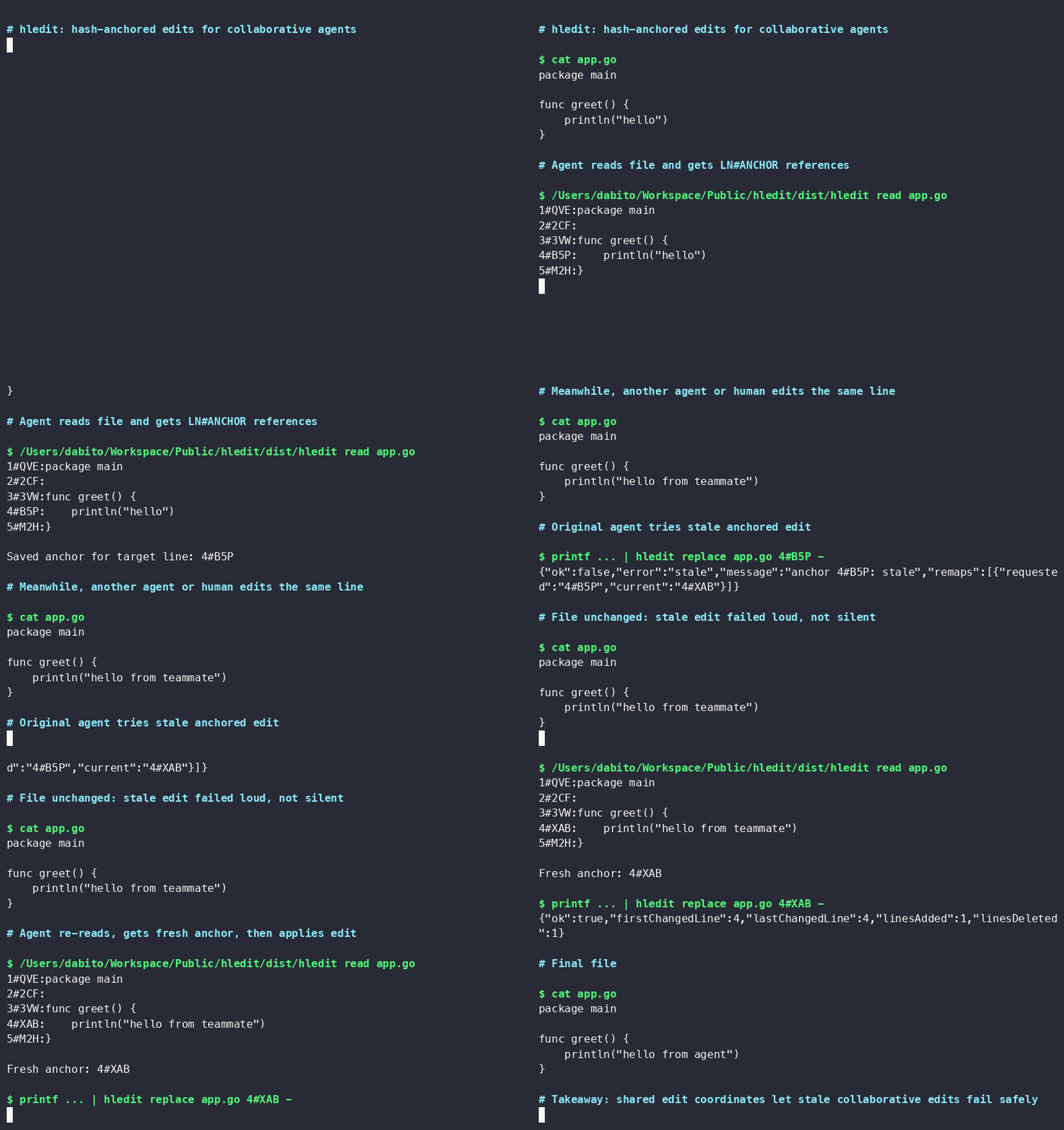
The GIF shows hledit read producing LN#ANCHOR references, a stale edit rejected with {"ok":false,"error":"stale"}, then a successful edit after re-reading a fresh anchor. Source: hledit's README.
Related packages
hledit— the standalone Go CLI this extension wraps. Usable directly without Pi.
Install
Requirements
- Go toolchain and the hledit CLI — install it first:
go install github.com/dabito/hledit@latestCompatibility notes:
- Line delta summaries (
Lines: +N -M) requirehledit >= 1.2.4. Olderhleditversions still work; they just omit the line delta summary.
Make sure hledit is on PATH for pi, or set HLEDIT_BIN:
export HLEDIT_BIN="$HOME/go/bin/hledit"Then install the pi extension:
pi install npm:pi-hleditThen reload or restart pi:
/reloadAlternative: install from git
pi install git:github.com/dabito/pi-hleditVerify
/hledit-statusBy default the extension runs hledit from PATH. If pi cannot find it, set HLEDIT_BIN before starting pi. /hledit-status also shows the active diff rendering config.
What it does
Registers a single hledit tool for pi agents:
- read — read a file with LN#HASH anchors for stale-safe editing
- edit — replace, insert, delete, or replace a range by anchor
- batch — apply multiple edits atomically in one call
- grep — filter lines by substring to reduce token usage
Successful
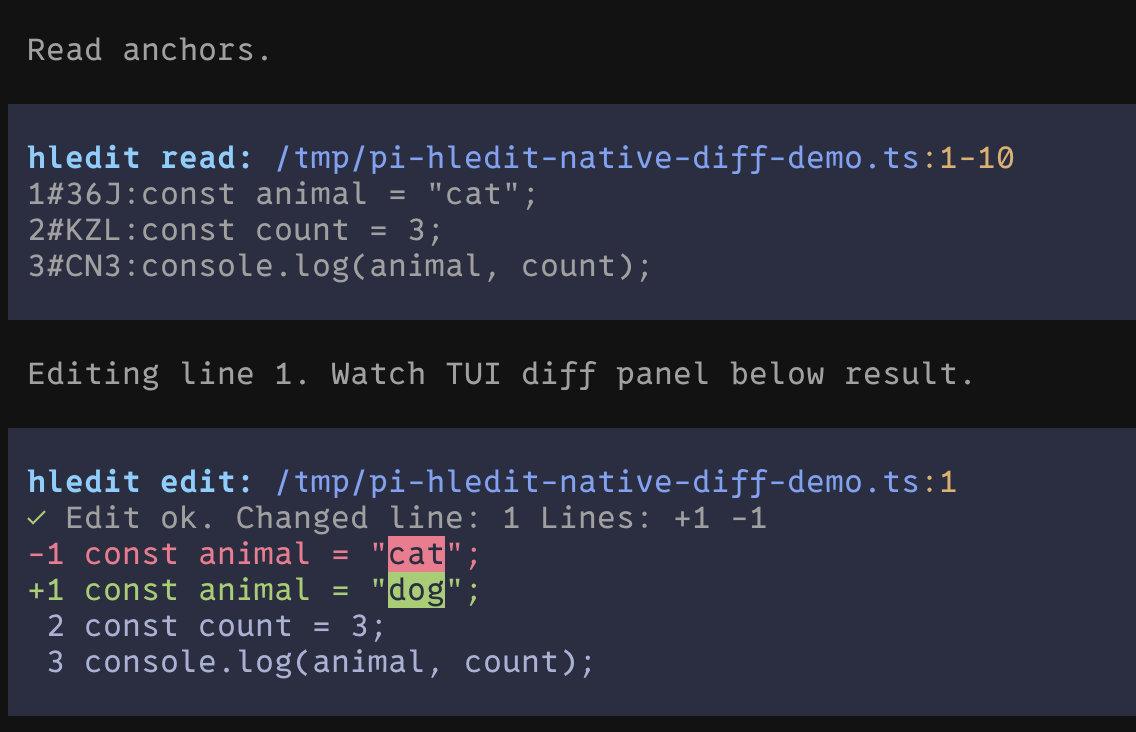
editandbatchcalls render a compact UI-only diff through Pi's nativerenderDiffUI. Model-facing tool output stays metadata-only.
Diff rendering config
Diff rendering is UI-only and can be tuned with environment variables before starting pi:
| Env var | Default | Description |
|---|---:|---|
| PI_HLEDIT_DIFF_MAX_LINES | 80 | Max rendered diff lines, including the omission marker. Minimum accepted value: 3. |
| PI_HLEDIT_DIFF_CONTEXT | 2 | Context lines around changed ranges. Minimum accepted value: 0. |
| PI_HLEDIT_DIFF_MAX_CELLS | 40000 | Max LCS comparison cells before diff body is omitted. Minimum accepted value: 1. |
Invalid values fall back to defaults.
Run /hledit-status inside pi to see the effective diff config after environment defaults/overrides are applied.
Tool parameters
| Param | Ops | Description |
|---|---|---|
| op | all | read, edit, or batch |
| path | all | File path, resolved from pi cwd |
| offset | read | 1-indexed start line for ranged reads; default 1 when ranged |
| limit | read | Max lines for ranged reads; default 2000 when ranged |
| grep | read | Substring filter for read output; still line-capped, not byte-capped |
| context | read | Surrounding lines around each grep match; defaults to 2 when grep is set, use 0 for match-only output |
| action | edit | replace, insert, delete, or replace-range; default replace unless end_anchor/legacy after imply otherwise |
| anchor | edit/batch | Start LN#HASH anchor from latest read |
| end_anchor | edit/batch | End LN#HASH anchor for range replace/delete |
| content | edit | Replacement/inserted content; delete uses empty stdin |
| after | edit | With action:'insert', insert after anchor; omitted means insert before |
| edits | batch | JSON array of batch edits using op, anchor, optional end_anchor, and lines |
hledit CLI has a --context option for contextual grep. This wrapper exposes it as context; omit it for the small default (2) or set 0 for match-only output.
Examples
Read anchors:
{ "op": "read", "path": "src/file.ts", "offset": 1, "limit": 80 }Contextual grep with small default window:
{ "op": "read", "path": "src/file.ts", "grep": "validateToken" }Match-only grep:
{ "op": "read", "path": "src/file.ts", "grep": "validateToken", "context": 0 }Replace one line:
{ "op": "edit", "path": "src/file.ts", "action": "replace", "anchor": "12#NKA", "content": "const ok = true;" }Insert before or after an anchor:
{ "op": "edit", "path": "src/file.ts", "action": "insert", "anchor": "12#NKA", "content": "const added = true;" }{ "op": "edit", "path": "src/file.ts", "action": "insert", "anchor": "12#NKA", "after": true, "content": "const added = true;" }Delete a line:
{ "op": "edit", "path": "src/file.ts", "action": "delete", "anchor": "12#NKA" }Replace a range:
{ "op": "edit", "path": "src/file.ts", "action": "replace-range", "anchor": "12#NKA", "end_anchor": "18#VRC", "content": "new block" }Batch edits use wrapper-friendly fields. pi-hledit translates them to the CLI-native {"edits":[{"pos":"..."}]} request before spawning hledit batch. Prefer a structured edits array; the legacy JSON string form remains supported during transition.
{
  "op": "batch",
  "path": "src/file.ts",
  "edits": [
    { "op": "replace", "anchor": "12#NKA", "lines": ["const ok = true;"] },
    { "op": "delete", "anchor": "20#ABC", "end_anchor": "22#CDE", "lines": [] },
    { "op": "insert", "anchor": "30#EFG", "lines": ["const added = true;"] }
  ]
}
Legacy string form:
{
  "op": "batch",
  "path": "src/file.ts",
  "edits": "[{\"op\":\"replace\",\"anchor\":\"12#NKA\",\"lines\":[\"const ok = true;\"]}]"
}
Why hash-anchored editing?
Traditional text-matching edits fail silently when the file changes between read and write. Hash anchors detect stale context before any write, and reject stale writes before they happen — the agent gets an error and can re-read, instead of silently patching the wrong line.
Behavior notes
- Plain
{op:'read'}(nooffset/limit/grep) is bounded: it defaults tooffset:1,limit:2000, same as an explicit ranged read. grepfilters which lines are returned but the result is still line-capped bylimit, not byte-capped — a match set larger thanlimitis truncated with a pagination hint fromhledit, not silently dropped.action:'delete'sends empty content (empty stdin) tohledit; there is no separate delete-specific field.- Batch insert is insert-before only — the current
hledit batchCLI has no insert-after field.
Failure modes
- Stale anchor — the target line changed since the anchor's
read. The edit is rejected with an error instead of writing to the wrong line; re-read and retry with a fresh anchor. - Malformed batch JSON — the
editsstring fails to parse; the tool returns an actionable error naming the expected shape rather than spawninghledit. - hledit not found — if
HLEDIT_BIN/PATHdon't resolve to the CLI, the tool returns the install hint (go install github.com/dabito/hledit@latest).
Limitations
- This wrapper exposes
hledit's--contextflag ascontextfor grep reads; omit it for default2, or set0for match-only output. - Batch edits are applied by a single
hledit batchinvocation (validate-all-then-write), not by this wrapper independently — atomicity guarantees come from the CLI, not from pi-hledit's own code. - No sandboxing beyond what
hledititself does: paths are resolved relative to pi's cwd and passed through to the CLI as-is.
Development
npm test # typecheck, contract tests, lintContract tests live in test/contract.test.ts and cover read-arg building, edit action resolution, batch translation, and the registered tool's rendering.