
pi-jarvis
v1.8.0
Published
A Pi side-conversation overlay with shared persistent memory and an optional searchable full-session archive.

Maintainers
 crustyhacker
Readme
pi-jarvis
A cinematic side-conversation overlay for Pi
A second lane of thought—with shared memory and an optional searchable history archive.
pi-jarvis adds /jarvis: a polished overlay where you can ask for status, inspect the repo when you explicitly allow it, and send a quiet note or a confirmed redirect back to the main lane.
Remember what matters. Find the original history when you need it. Main Pi and Jarvis share persistent memory; the separate, opt-in full-session archive adds indexed history search across sessions and, when explicitly requested, projects.





     _    _    ____ __     _____ ____
    | |  / \  |  _ \\ \   / /_ _/ ___|
 _  | | / _ \ | |_) |\ \ / / | |\___ \
| |_| |/ ___ \|  _ <  \ V /  | | ___) |
 \___//_/   \_\_| \_\  \_/  |___|____/

       PI / A SECOND LANE OF THOUGHT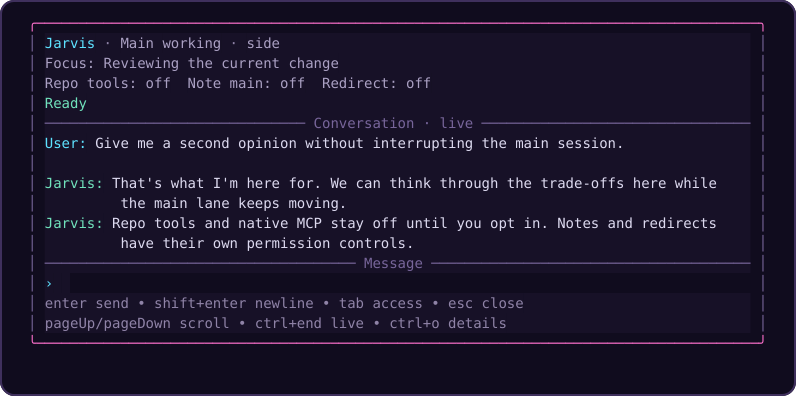
Renderer preview with a custom dark palette and demo conversation—not a live provider session. Your Pi theme controls the normal overlay.
The pitch
The main Pi session should stay on the critical path.
/jarvis gives you a second cockpit for the work that should not interrupt that primary flow:
- checking what the main agent is doing right now
- seeing what changed since the last
/jarvisturn - asking for triage, summaries, or a second opinion
- inspecting the repo with local tools when you turn them on
- sending a non-interrupting note back to the main session
- redirecting the main session only after explicit confirmation
Think of it as a side conversation with real context, not a detached scratchpad.
Typical prompts
- "What is the main agent doing right now?"
- "Summarize the last validation failure and tell me what matters."
- "Check this file while the main session keeps moving."
- "Compare what changed since my last
/jarvisturn." - "Redirect the main session, but make me confirm it first."
Two complementary memory features
| | Shared memory | Optional full-session archive |
|---|---|---|
| Purpose | Remember useful preferences, corrections, decisions and references | Find original recorded conversations, tool activity and session history |
| What it keeps | Curated notes plus bounded finalized user/assistant text captures | Complete accepted finalized Pi journal entries, with provenance and paged raw reads |
| Default | On in trusted projects, with separate capture/recall controls | Off; recording and model access are separately controlled |
| Retrieval | Automatic recall from global/current-project memory; explicit broader search | Local indexed search and session browsing; no automatic context injection |
| Manage it | /jarvis-memory · overlay /memory | /jarvis-archive · overlay /archive |
Both work across main Pi and Jarvis, independently of Repo tools and whether the overlay is open. Each has its own local SQLite store and global/project controls. Turning one off does not turn the other off.
Privacy matters: storage is local plaintext. Archive content is unredacted and can include secrets; granting model access can send retrieved content to your model provider. “Full” means accepted finalized data exposed by Pi—not hidden provider reasoning or a crash-safe audit log. Historical import is explicit. See the memory controls and archive limits before enabling more access.
At a glance
| Capability | What you get |
|---|---|
| Shared memory | Main Pi and Jarvis remember useful discussions across sessions; enabled by default, with global/project controls and a master off switch |
| Optional full-session archive | Off by default; raw finalized entries, local indexed cross-session search, separate model permission and explicit historical import |
| Persistent side lane | /jarvis keeps its own isolated conversation state and restores prior side-session history |
| Live awareness | Jarvis sees the current main-session summary plus a delta since the last /jarvis turn |
| Permission-gated tools | Local read, bash, edit, write, and configured native MCP stay off until you enable Repo tools |
| Safe main-session handoff | Note main is quiet; Redirect is confirmation-gated |
| Independent model control | Follow the main model or pin /jarvis to a separate model |
| Cleaner UX | A one-time neon ASCII intro, then compact diagnostics, scrollback, multiline drafts, and independent activity/queue feedback |
How it fits into Pi
flowchart LR
    U[You] -->|primary work| M[Main Pi session]
    U -->|open /jarvis| J[Jarvis overlay]
    M -->|summary + recent delta| J
    M <-->|independent memory controls| S[Shared local memory]
    J <-->|independent memory controls| S
    M -->|recording opt-in| A[Separate local history archive]
    J -->|recording opt-in| A
    A -. separately authorized model reads .-> M
    A -. separately authorized model reads .-> J
    J -->|Repo tools enabled| R[Local tools\nread • bash • edit • write]
    J -->|Repo tools enabled| C[Configured native MCP\nside-owned connections]
    J -. Note main .-> M
    J -. Redirect after confirmation .-> M
Operating model
flowchart TD
    A["Main session keeps moving"] --> B["/jarvis opens in overlay"]
    B --> C["Jarvis sees current main-session context"]
    C --> D{"What do you need?"}
    D -->|Status / summary / analysis| E["Jarvis handles the side task"]
    D -->|Repo inspection| F["Enable Repo tools"]
    D -->|Influence the main lane| G["Enable Note main or Redirect"]
    G --> H{"Redirect?"}
    H -->|Yes| I["Per-send confirmation"]
    H -->|No| J["Quiet follow-up note"]
Why use /jarvis instead of the main lane?
Use /jarvis when you want:
- a second opinion without changing the primary plan yet
- a quick repo inspection while the main agent keeps moving
- a compact explanation of current progress or validation state
- a controlled way to send guidance back to the main session
Stay in the main lane when you want:
- the main plan to change immediately
- the main session itself to execute the next step directly
- no side conversation overhead at all
Quick start
1) Install
pi install npm:pi-jarvisThis package is meant to run inside a Pi installation that already provides the Pi runtime packages. Those host packages are declared as optional peers so npm does not install a second copy of the full Pi/AI provider stack just to add this extension.
Requires Pi 1.0.0 and Node.js 22.19.0 or newer. Version 1.6.0 supports local repository tools and opt-in native Pi MCP as described below; it does not load the legacy pi-mcp-adapter or bundle another Pi runtime.
2) Restart or reload Pi
pi install registers the package automatically. For local development, build and load ./dist/index.js with pi -e ./dist/index.js.
New in 1.7.0: shared memory is enabled by default in trusted projects, including main Pi even if you never open the overlay. A first-use notice explains capture and recall. Already using another memory extension? Run /jarvis-memory off before your first prompt; this disables both main and Jarvis memory without deleting anything.
New in 1.8.0: the separate full-session archive is OFF by default. Nothing is imported or recorded by that subsystem until you opt in. See Full-session archive.
3) Open Jarvis
/jarvisOr open it and send the first message immediately:
/jarvis summarize the last validation failure and suggest the fastest next move4) Turn on more power only when you want it
- leave
Repo toolsoff for context / analysis without repository or MCP access; shared memory has separate controls - turn
Repo toolson when you want localread,bash,edit,write, and configured native MCP capabilities - turn
Note mainon when you want Jarvis to quietly message the main session - turn
Redirecton when you want Jarvis to propose a redirect that you still explicitly confirm
Command surface
/jarvis
Opens the side overlay. If text follows the command, that text becomes the first side-session prompt.
/jarvis-model
In Pi's terminal UI, running /jarvis-model with no argument opens a searchable model picker. In RPC, JSON, and print modes it reports the current selection; exact model-setting commands still work. /jarvis itself requires the terminal UI and does not start hidden work in other modes.
/jarvis-model [--project|--global] <provider/model>
Pins /jarvis to a specific model without changing the main session model. A plain /jarvis-model <provider/model> writes a project-local override to .pi/jarvis.json.
/jarvis-model [--project|--global] follow-main
Restores the chosen scope to follow-main. A project-scoped follow-main override still wins over a global pinned setting.
/jarvis-model [--project|--global] clear
Removes the selected scope so /jarvis falls back through the remaining config layers to the built-in default.
/jarvis-thinking [--project|--global] auto|follow-main|off|minimal|low|medium|high|xhigh|max
Sets the thinking level used by /jarvis without changing the main session thinking level. A plain /jarvis-thinking <level> writes a project-local override to .pi/jarvis.json.
autopreserves the built-in behavior: follow the main thinking level only when/jarvisfollows the main model; pinned/jarvismodels useoff.follow-mainfollows the main thinking level even when/jarvisis pinned to a separate model.- Explicit levels request that thinking level; Pi clamps it to the selected model's supported levels.
- Changes to main thinking immediately synchronize when
/jarvisfollows it. - xAI
/jarvismodels still force thinkingoff.
/jarvis-thinking [--project|--global] clear
Removes the selected scope so /jarvis thinking falls back through the remaining config layers to the built-in auto default.
/jarvis-memory
Reports shared-memory status. Use /jarvis-memory help for controls and data-management commands. Memory controls default to global, unlike model/thinking controls. See Shared memory below.
/jarvis-archive
Reports the separate full-session archive's status. It defaults OFF, with independent capture and model-access controls. /jarvis-archive help documents enablement warnings, paging, explicit import, and deletion. See Full-session archive.
Side-session commands inside /jarvis
The /jarvis input handles a small set of built-in commands against the isolated side-session:
/compact [instructions]compacts the/jarvisconversation context./treeprints the/jarvissession tree with entry IDs./tree <entry-id>navigates the/jarvissession tree to that entry./tree --summarize <entry-id> [instructions]navigates and summarizes the branch being left./newstarts a fresh/jarvisside-session without changing the main Pi session./memory …or/jarvis-memory …manages shared memory immediately, without sending a model prompt or waiting for queued side work. Initial forms such as/jarvis /memory offare also handled locally, without booting a side session./archive …or/jarvis-archive …manages the separate optional archive locally, without model/queue work; initial/jarvis /archive …works without booting a side session.
Full-session archive
This is a separate, optional subsystem, not a change to shared memory's curated notes or bounded text captures. It is OFF by default, independent of Repo tools, Note main, Redirect, and overlay open/close. Model reads are also off by default, even after recording is enabled. No archive content is automatically injected into prompts.
Enable only after reviewing the risks
/jarvis-archive                                    # status; no archive-record reads
/jarvis-archive --project on --confirm-sensitive    # record here only
/jarvis-archive on --confirm-sensitive              # enable globally
/jarvis-archive model-access on --confirm-sensitive # allow model search/read; recording alone doesn't
/jarvis-archive capture off                         # pause recording default, retain access
/jarvis-archive off                                 # global MASTER OFF; keep stored data
/jarvis-archive clear --confirm-sensitive           # remove global settings; fallback may re-enable
Controls default to global; use --project for an override. Resolution is per-field project > global > defaults (enabled: false, capture: true, modelAccess: false), except an explicit global off overrides every project. capture off and model-access off set defaults that a project can override; inspect effective status. Use clear --confirm-sensitive to remove a scoped setting, never data. Malformed/unreadable settings and untrusted projects pause all archive access. Full off blocks even manual record inspection; recording-only/model-only pauses do not prevent explicit human reads. Separate files avoid interfering with memory/model settings:
- Global:
<active-agent-dir>/extensions/pi-jarvis-archive.json - Project:
.pi/jarvis-archive.json - Shape:
{ "archive": { "enabled": true, "capture": true, "modelAccess": false } }
Enabling/model-access commands require the literal warning acknowledgment, and direct-file enablement shows a first-use warning. This archive is unredacted plaintext and may retain passwords, tokens, private files, and sensitive tool output. Model access can send retrieved data to the active provider. It is not a sandbox, encryption mechanism, or a substitute for carefully managing secrets.
What “full” means
Accepted new, finalized Pi journal entries are retained as complete JSON, without memory's secret filtering, 16 KiB text cap, or 10,000-record eviction. This includes user/assistant/system messages, exposed thinking, tool calls/results and details, failed/aborted output that Pi retained, inline image payloads, custom entries, compaction/context edits, and branch metadata. Session headers retain provenance, including parent-session links. Search indexes textual content locally with SQLite FTS5; binary image data and opaque signatures are retained but not text-indexed. There is no OCR, embedding service, or background model call.
“Full” does not mean an infallible wire/stream audit log. Hidden provider reasoning, keystrokes, intermediate stream/tool updates, non-persisted commands/events, external attachment files, and output already truncated by Pi/tools are not recovered. Referenced files are never automatically opened or copied. Later message-redaction hooks run before capture. Raw history includes abandoned branches and superseded context, not just the effective current model context.
Recording begins after an activation baseline, never by importing pre-existing entries. Captures occur at finalized turn/settlement and supported session boundaries, not per token. The side owner takes a final snapshot of already-finalized entries before disposal, while recording remains authorized. Crashes, late shutdown hooks, unsupported journal APIs, failed storage, or permission transitions can leave gaps; warnings report observation/storage failures without replaying uncertain writes. Pending/disabled-period content is not backfilled after re-enable. Explicit 64 MiB raw-entry and indexing ceilings reject oversized work rather than truncating it. Normalization uses bounded chunks; pathological Unicode combining/composition contexts beyond 64K UTF-16 units also reject explicitly. Conservative index budgeting can reject excessive whitespace/normalization expansion even if its final folded text would be smaller. No automatic eviction or strict total-disk quota is imposed: monitor space and prune deliberately. Large synchronous writes/indexing can pause the UI. Search/page order may change as other sessions append/delete records; pagination is not a frozen snapshot.
Search and inspect
/jarvis-archive search deployment decision
/jarvis-archive search --all --offset 20 deployment
/jarvis-archive session --all <session-id> 0
/jarvis-archive read --all <record-id> 0
/jarvis-archive read --all --metadata <record-id> 0
/jarvis-archive stats --all
Search/session pages return bounded excerpts of normalized indexing text with IDs, project, lane, timestamps and parent entry IDs. Excerpts are not exact quotations; use read for original case and content. Follow nextOffset to continue. Exceptionally large/escape-heavy provenance is explicitly labeled with abbreviated field names, never allowed to block record access; read --metadata (model tool part: "metadata") pages the exact original metadata. read returns complete raw JSON through pages; its offsets count Unicode codepoints, not bytes or UTF-16 units. Results are bounded to 24,000 bytes of JSON plus an untrusted-data notice; stored payloads are not shortened. Use explicit --all to access other projects. Models get only three read-only tools—jarvis_archive_search, jarvis_archive_read, and jarvis_archive_session—when model access is enabled. No model controls, import, or deletion tools exist. Tools recheck current permissions/trust/cancellation and reject stale definitions.
Global accessibility is within the same active Pi agent directory, not cloud sync or other users' machines. Project controls govern operations initiated here; existing records from a paused project remain accessible through explicit all-project queries from another allowed project. Disabling is not deletion. Returned model-tool results persist normally in Pi and can be captured again as part of a later journal entry.
Explicit import and retention
/jarvis-archive import --confirm-sensitive /absolute/path/to/session.jsonl
/jarvis-archive forget-session --confirm <session-id>
/jarvis-archive prune --confirm 2026-01-01T00:00:00.000Z
/jarvis-archive prune --all --confirm 2026-01-01T00:00:00.000Z
Import is human-only, requires enabled recording and an explicit regular v3 JSONL file, and preserves the source header's project/session identity—even if different from the current project. No directory scan or silent historical import occurs; legacy session versions require a separately reviewed conversion first. Completed entries survive a partial/cancelled import, with counts reported; duplicate entries are skipped, differing payloads for an existing identity are rejected, and originals are never modified. Deletion defaults to this project; --all is explicit. Stable identity tombstones prevent re-import of deleted entries, not every semantic copy or other previously unarchived entry.
Storage is lazy SQLite under <active-agent-dir>/extensions/pi-jarvis-archive/archive.sqlite, defaulting to ~/.pi/agent/extensions/pi-jarvis-archive/archive.sqlite. Owned directories/files use private permissions where supported, with defensive link/type checks and concurrent-writer transactions. There is no background watcher: observed settings changes are propagated between mounted lanes, while other processes recheck at operation boundaries. Deletion does not erase original Pi files, prior search-result copies, already-sent model context or backups, and does not guarantee reclaimed disk space or forensic erasure. For a complete reset, stop all Pi processes using the store and remove only its archive directory yourself; that also removes tombstones. Shared memory stays separate and unchanged. To stop both Jarvis persistence layers, use both /jarvis-archive off and /jarvis-memory off; neither disables Pi's original session transcripts.
Shared memory
Main Pi and Jarvis use one local memory service, independent of the overlay lifecycle. Useful Jarvis discussions can inform a later main session and vice versa—even when Note main is off. Memory does not steer or queue messages into the other session; it supplies historical context when recalled. Close/reopen, /new, and project changes do not erase it.
What is remembered
- Bounded conversation captures (not the optional full-session archive): only newly finalized user/assistant text observed after loading this feature, labeled with project, main/Jarvis lane, session ID, event identity and timestamps. No silent historical import or reconstruction from old session files.
- Curated notes: your active model can save concise preferences, corrections, project decisions and references during normal foreground work. Stable scoped titles update/deduplicate notes. You can save or edit notes explicitly too. Curation depends on the model choosing the tool; it is not a separate background summarizer.
- Bounded recall: a small request-local selection of global/current-project notes and matching conversation excerpts, using local keyword search. Other projects are available through explicit
search --allor the model's cross-project search tool. Project scope uses the canonical working directory, not a remote repository name; separate worktrees remain separate scopes unless a note is global.
There are no embeddings, background model calls, telemetry, or memory-server connections. Retrieval and saving tools can add normal foreground model turns/tokens. Recalled text is sent to the active model as untrusted historical data, not instructions. Automatic recall is capped at 6,000 UTF-8 bytes of record JSON plus a short notice; tool search results are capped at 12,000 bytes with explicit excerpt/omission markers. Automatically injected memory guidance and recall are request-local, not appended to Pi's persisted transcript. Explicit memory-tool calls/results are recorded normally by Pi and may contain saved facts; model replies may repeat them too.
Controls
/jarvis-memory                         # status, without reading stored memories
/jarvis-memory off                     # global MASTER OFF for main + Jarvis
/jarvis-memory on                      # enable globally; project restrictions still apply
/jarvis-memory capture off             # saving default off (project overrides apply)
/jarvis-memory recall off              # recall default off (project overrides apply)
/jarvis-memory --project off           # pause memory in this project
/jarvis-memory --project clear         # remove this project's memory settings
/jarvis-memory --global clear # remove global settings, not stored dataenabled, capture, and recall default to true. Each field resolves project → global → default, except global enabled: false is a master switch that no project can override. Untrusted projects and unreadable/malformed settings pause all memory. Use --project capture off or --project recall off to pause that capability specifically here; inspect status for the effective setting. The full off switch means no capture, memory-record reads, injection, tool execution, or background work; existing data remains on disk. Even inspection requires re-enabling memory. Explicit management commands still work with only capture or recall turned off. Turning memory off does not erase facts/tool results already in the current conversation or already-viewed output.
Controls share the existing settings files and preserve model/thinking/unknown keys:
{
  "memory": { "enabled": false }
}
Place this in <agentDir>/extensions/pi-jarvis.json to disable memory before installation/startup (normally ~/.pi/agent/extensions/pi-jarvis.json; honors PI_CODING_AGENT_DIR). Project overrides live in .pi/jarvis.json. Memory settings writes are atomic and use a bounded cooperative lock; legacy model/thinking writers do not share that lock, so avoid concurrent configuration changes. Corrupt shared settings are never automatically repaired or overwritten—even by model/thinking set or clear commands. Repair the JSON manually while preserving privacy settings. A crashed config writer can leave a .memory.lock file; remove it only after confirming no writer is running.
Inspect, edit and forget
/jarvis-memory list                    # recent global/current-project records
/jarvis-memory search deployment       # local keyword search
/jarvis-memory search --all deployment # explicitly search every project
/jarvis-memory show <id>
/jarvis-memory remember --global Answer style | Prefer concise answers.
/jarvis-memory remember Build choice | This project uses npm, not pnpm.
/jarvis-memory edit <id> Replacement fact, preserving the note's scope/title.
/jarvis-memory forget <id>
/jarvis-memory forget-all --confirm     # this project's records only
/jarvis-memory forget-all --confirm --global
/jarvis-memory forget-all --confirm --all
Put data scope flags after the action. list --global and search --global … restrict results to global records; show --all <id> and forget --all <id> explicitly allow another project's record. Lists and searches are bounded; narrow your query to find older records. Model-requested deletion is limited to one current/global record and requires human confirmation; commands above are explicit user actions. Confirmation is cancelled on observed permission change, abort or disposal, and a concurrently changed record must be reviewed again. Settings are rechecked at operation boundaries; other processes do not receive a live push notification.
Storage and privacy
The store is <agentDir>/extensions/pi-jarvis-memory/memory.sqlite, with SQLite transaction/WAL coordination across processes. It is opened lazily; Node 22/24 may print an experimental SQLite warning on first actual use. On POSIX, the owned directory is mode 0700 and database mode 0600; this is local plaintext, not encryption or a sandbox. Backups of your agent directory may include it.
Only newly finalized visible text is captured—not thinking blocks, tool results/calls, images, custom/system messages, failed/aborted assistant outputs, or old session files. Metadata-only event anchors are resolved after Pi's message-finalization/redaction hooks, at turn/settlement boundaries. Pending captures are discarded on permission/session changes or disposal, not replayed after re-enable. Recognizable credential blocks are omitted and common secret formats redacted, but filtering is best-effort and cannot detect every sensitive detail. Pause capture or disable memory for sensitive work. Notes containing detected secrets are rejected rather than silently changed. Oversized captures (over 16 KiB UTF-8) are omitted, not truncated into misleading facts; curated-note writes over that limit fail explicitly.
Retention is bounded to the newest 10,000 captured messages and 1,000 curated notes. Archive rollover never truncates Pi's original history; notes are not automatically discarded at their limit. Forgetting tombstones the record identity so the same captured event/scoped note title is not automatically restored; an explicit remember command can restore a forgotten title. This is not semantic erasure of every mention: other records, original Pi transcripts, already-sent model context and backups may still contain the fact. SQLite deletion is logical, not forensic secure erasure.
The combined live-record/tombstone budget is 100,000 identities: new identity saves fail at capacity rather than dropping deletion markers; existing records always reserve room for forgetting. First database open performs synchronous integrity checks and can briefly pause on a large archive. SQLite WAL files can temporarily grow while another process holds a reader snapshot; there is no strict total-directory disk quota. To completely reset/delete this local store without re-enabling memory, stop every Pi process using it, then remove only the pi-jarvis-memory directory yourself. This also removes tombstones, not original Pi transcripts.
Model and thinking resolution
flowchart TD
    A[Project config\n.pi/jarvis.json] -->|if present| B{valid?}
    B -->|yes| P[Use project overrides]
    B -->|no or missing| C[Global config\n<agentDir>/extensions/pi-jarvis.json]
    C -->|if present| D{valid?}
    D -->|yes| G[Use global overrides]
    D -->|no or missing| E[Built-in defaults]
    E --> F[Model default: follow-main]
    E --> H[Thinking default: auto]
Resolution order
Model and thinking settings resolve through the same config layers, then fall back to separate built-in defaults:
- project config:
.pi/jarvis.json - global config:
~/.pi/agent/extensions/pi-jarvis.jsonor the equivalent path under a custom Pi agent dir - built-in defaults: model
follow-main, thinkingauto
Global writes do not displace an existing project override. Config writes use same-directory atomic replacement and preserve unrelated keys; unreadable files are never treated as malformed JSON and overwritten. Malformed JSON must be manually repaired: set/clear commands will not replace or delete a corrupt shared file and risk resetting memory privacy controls. Avoid simultaneous configuration writes from multiple Pi processes: cross-process locking is not implemented.
Overlay controls
The overlay header exposes three controls, all off by default:
| Control | What it does | Safety model |
|---|---|---|
| Repo tools | Enables local read, bash, edit, and write, plus configured native MCP | Explicit opt-in |
| Note main | Sends a concise, non-interrupting note to the main session | Explicit opt-in |
| Redirect | Sends a redirecting instruction to the main session | Explicit opt-in + per-send confirmation |
Note main and Redirect can be forcibly disabled when the active /jarvis model is incompatible with bridge tools. Closing the overlay revokes all three permissions and cancels pending confirmations. Already-running local operations are not undone; newly starting calls are blocked.
Long redirects are paged: review every page with Up/Down or PageUp/PageDown before pressing Y. Resize if the terminal is too small to review safely. Configured Pi selection keybindings are respected.
First-open neon intro
The first /jarvis open for each main-session ID shows the ASCII wordmark with a 1.8-second cyan/violet/pink chrome sweep. It is decorative, not a loading screen: startup and queued prompts continue normally, and the editor and permission controls remain usable. Type or paste to dismiss it immediately; your input is preserved. Escape still closes the overlay. Confirmation review and warnings/errors take priority.
Reopening Jarvis, side /new, tree navigation, and returning to a previously opened main session do not replay it. The once-per-session memory lives in the loaded extension; restarting Pi or /reload resets it. Small terminals use a compact wordmark or skip the intro entirely. Light themes and 256-color terminals are supported; there is no flashing or terminal blinking.
To skip the intro, start Pi with PI_JARVIS_NO_ANIMATION=1. A non-empty NO_COLOR or TERM=dumb also suppresses it. These switches affect the intro, not Pi's other animations or colors.
Keyboard and drafts
Version 1.5.0 adds compact diagnostics, scrollback, and a multiline draft editor.
| Key | Action | |---|---| | Enter | Send the draft; toggle a focused permission control | | Shift+Enter / Ctrl+J | Insert a newline | | Tab / Shift+Tab | Cycle between the editor and permission controls | | Space | Toggle a focused permission control | | PageUp / PageDown | Scroll conversation history; reaching the bottom resumes live following | | Ctrl+End | Jump back to live output | | Ctrl+O | Expand/collapse model, main-context delta, and access details | | Ctrl+L | Dismiss notices | | Escape | Close; during redirect review, cancel the confirmation instead |
The compact header keeps main status, the side model, main focus, and permissions visible. Activity and waiting-message counts remain visible while reading older output; counts exclude the active request. The latest notice appears separately; expand details for more of a long notice.
The multiline editor uses Pi's public editor and configured editing keybindings. Up/Down move within a draft; Up at the beginning of the first line (or in an empty editor) recalls prompts. Down past recalled prompts restores the draft. Pasted indentation and newlines are preserved, with Pi's normal tab-to-spaces normalization. Oversized drafts (over 64 KiB) and terminal-control payloads are rejected explicitly, never silently truncated or sent.
Unsent drafts survive closing and reopening /jarvis in the same running Pi session. They are not saved to disk. Side /new, main-session replacement, and switching to an unrelated side-session reference clear them; navigating the side tree only resets the transcript view. Closing still revokes all three overlay permissions; shared memory follows its separate persistent controls.
Scrollback follows new output until you scroll up. To bound rendering work, the overlay retains up to 500 recent entries and 512K UTF-16 code units of source text, with a 64K-unit per-entry limit. Omitted content is marked explicitly; these display limits do not modify persisted conversation history. Resizing preserves the reading position on a best-effort basis.
Permission flow
flowchart TD
    A[Overlay opens] --> B[Repo tools off]
    A --> C[Note main off]
    A --> D[Redirect off]

    B -->|enable| E[Jarvis may use local tools]
    E --> H[Configured native MCP]

    C -->|enable| I[Jarvis may send a quiet note to main]
    D -->|enable| J[Jarvis may request redirect sends]
    J --> K[Every redirect still requires confirmation]

    L[Incompatible /jarvis model] --> M[Note main disabled]
    L --> N[Redirect disabled]
Redirect flow
sequenceDiagram
    participant You
    participant Jarvis
    participant Main as Main session

    You->>Jarvis: Enable Redirect
    You->>Jarvis: "Tell the main session to stop and inspect overlay teardown"
    Jarvis->>You: Confirmation request
    You-->>Jarvis: Approve
    Jarvis-->>Main: Redirect instruction
    Main-->>You: Continues on new priority
Session behavior
/jarviskeeps its own isolated conversation state- prior side-session history is restored from a session file under
jarvis-sessions/ - main-tree navigation reconciles the side-session reference instead of continuing in an unrelated side thread
- reset/shutdown invalidates old queues; failed commands and uncertain sends are not automatically replayed
- side-session project resources honor the main session's project-trust decision
- Jarvis sees current main-session state plus a compact delta since the last
/jarvisturn /compact,/tree, and/newentered inside/jarvisoperate on the side-session, not the main session- plain
/jarvis-model <provider/model>writes the project model override; use--globalto change the global default - plain
/jarvis-thinking <level>writes the project thinking override; use--globalto change the global default - thinking-step streaming is intentionally collapsed to a cleaner animated fallback for readability
Example usage
Ask for live status
/jarvis what is the main agent doing right now?Ask for triage while the main lane keeps moving
/jarvis summarize the last failing test and tell me the fastest likely fixUse Jarvis as a repo-side helper
/jarvis inspect overlay.ts for teardown or redraw risksSend a non-interrupting note back to the main session
- Open
/jarvis - Enable
Note main - Ask Jarvis to send the note
Send a redirect safely
- Open
/jarvis - Enable
Redirect - Ask Jarvis to redirect the main session
- Confirm the send
Compatibility note
This repository's validation baseline is Pi 1.0.0, using host-provided @earendil-works/pi-ai, @earendil-works/pi-coding-agent, and @earendil-works/pi-tui. Older Pi versions are not supported by this release.
Physical models use the main host's public model registry for requests and credentials, including custom providers and runtime-only authentication. Virtual/router models are not supported: Pi's public extension registry does not expose session-aware virtual routing. Pin /jarvis-model <provider/physical-model> if the main session uses a virtual model.
Native MCP
Pi already provides MCP; Jarvis 1.6.0 opts its separate SDK session into Pi's native factories when Repo tools is enabled.
- Repo tools is the opt-in for both local tools and native MCP. While initially off, Jarvis does not start MCP connections or expand MCP configuration credentials/commands.
- Enabling it starts separate, side-owned connections to configured servers from the active agent directory's
mcp.jsonand, only when trusted, the project's.pi/mcp.json. Main-session connections are neither reused nor disconnected. Servers registered only by main-session extensions are not automatically inherited. - Native direct, deferred/tool-search, codemode, and resource tools keep Pi's configured exposure. Jarvis rechecks live permission and session lifetime for calls, including nested calls and previously prepared tool references. Server annotations are hints, not permission grants.
- Disabling Repo tools, closing the overlay, or disposing the side runtime invalidates that permission generation, hides its tools, aborts owned call signals, and requests native disconnection. Re-enabling creates a fresh generation rather than reviving stale calls.
- Cancellation is best effort, not rollback or a sandbox. Pi may allow already-started connection handshakes, authentication refresh/cleanup, or remote operations to finish or time out after revocation. A pending native handshake may outlive the shutdown request until Pi finishes or times it out.
- Manage servers and OAuth sign-in in main Pi (
/mcporpi mcp ...), not through a side-session administration command. Jarvis does not register a side/mcpmanager. Codemode's classifier/image-model helpers are disabled in the side session.
Use narrowly scoped credentials and trust your configured servers. Enabling Repo tools permits the configured MCP capabilities; it is not a read-only grant.
Development
Install dependencies:
npm installType-check:
npm run checkRun tests:
npm testBuild the published package contents:
npm run buildPreview and verify the npm payload contract:
npm run verify:releaseCheck the mandatory annotated version-number tag policy for committed history:
npm run check:tagsRegenerate the shared logo and actual-renderer demo artwork after visual changes:
npm run render:brandingThis uses deterministic fixtures, without opening a terminal, calling a provider, or connecting to MCP servers.
Release automation
GitHub Actions validate branch pushes and pull requests on Node 22.19.0 and 24. They require an annotated stable vX.Y.Z tag on every reachable post-policy-baseline commit and run tests, build, and package verification. Every commit bumps the matching package and documentation versions; prerelease (dev, alpha, beta, RC), build-metadata, and SHA-only tags do not qualify. Fork PR jobs are read-only.
A matching annotated vX.Y.Z tag runs exact-tag validation and creates a GitHub release with the validated npm tarball. npm publication stays manual; no npm publishing token is configured. Existing assets are verified, never overwritten with different bytes.
CI reports violations; protected-branch/tag rules must be configured separately for enforcement. See RELEASING.md for atomic tagged pushes, fork/merge handling, reruns, and manual npm publication.
License
pi-jarvis is released under the MIT License. See LICENSE.