
pi-jump-tree
v0.3.1
Published
Pi extension for showing the current session tree leaf ID and jumping to entries by ID or label.

Maintainers
 xryul
xryulReadme
pi-jump-tree
Easily jump between sessions and tree leaves.
Each Pi session has a session ID, and each leaf/node in the session tree has an entry ID. This extension shows both in the footer so you can copy and then easily come back to it via e.g.: /jump <session-id>:<leaf-entry-id>.
Demo
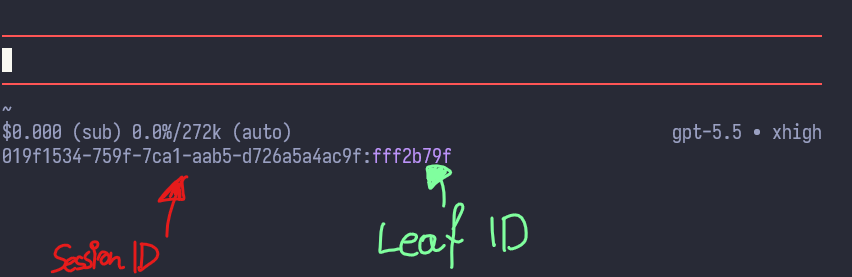
Footer format:
<session-id>:<leaf-entry-id>Use that value directly with /jump to reopen the session and navigate to that leaf.
Open Pi directly at a saved target with:
pi --jump <session-id>:<entry-id-or-mark>The --jump flag resolves the session, starts Pi with that session, then runs the same /jump navigation before you continue working.
Commands
/jump <entry-id-prefix>- jump to an entry in the current session tree by entry ID./jump <session-id>:<entry-id-or-mark>- switch to the matching session and jump to an entry ID or mark./jump-to-mark <mark>- jump to a marked entry in the current session. Typing/jump-to-markshows all marks for selection/autocomplete./mark-leaf [mark]- mark/bookmark the current leaf./unmark-leaf- remove the mark/bookmark from the current leaf./unmark [entry-id-prefix|mark|mark:<mark>|#<mark>]- remove a mark from a specific entry; with no argument, removes the current leaf mark.
Examples
pi --jump 019efa01-049b-7ee0-be17-6969205499de:a1b2c3d4
/jump 019efa01-049b-7ee0-be17-6969205499de:a1b2c3d4
/jump 019efa01-049b-7ee0-be17-6969205499de:release-checkpoint
/jump a1b2c3d4
/jump-to-mark release-checkpoint
Cross-session jumps
Qualified jump targets are portable across projects. For example:
/jump 019efa01-049b-7ee0-be17-6969205499de:ec619574The part before : is matched against known Pi session IDs, including sessions outside the current working directory. If a matching session file is found, the extension switches to that session, then resolves the part after : as an entry ID or mark inside that session.
Session ID matching is dash-insensitive, so UUID-style IDs work with or without dashes. These are equivalent:
/jump 019efa01-049b-7ee0-be17-6969205499de:ec619574
/jump 019efa01049b7ee0be176969205499de:ec619574
Session lookup searches Pi's default session store and the current session manager's session directory. If multiple sessions match a prefix, Pi asks you to choose. Autocomplete is current-session only, so cross-session targets may need to be pasted or typed manually.
During cross-session lookup, the footer temporarily shows progress, for example:
jump scanning all sessions [42/180 · 23%]It then restores the usual <session-id>:<leaf-entry-id> footer once lookup finishes or the jump completes.
Runtime restore registry
This extension also publishes a small runtime restore registry. It is not an audit log, history store, or backup. It is a live mapping that answers:
Given this terminal pane's TTY, what
pi --jump ...command would reopen the Pi conversation branch currently running in that pane?
This lets terminal workspace tools restore Pi panes after a terminal restart. The tool snapshots the command while Pi is still running, stores it in its own workspace save file, then replays it when recreating the pane.
Behavioral contract
While a Pi process using this extension is alive:
instances/<pid>.jsondescribes that Pi process.If Pi can detect its terminal TTY,
by-tty/<sanitized-tty>.jsondescribes the Pi process currently associated with that TTY.sessionIdis the Pi session ID.leafIdis the current session-tree leaf.If
leafIdis notnull,jumpCommandis equivalent to:pi --jump <sessionId>:<leafId>The registry is refreshed on session start, message/turn/agent completion, tree navigation, compaction, and session rename.
Refreshes are debounced and skipped when the restore target has not changed, so
updatedAtdoes not cause constant disk writes.On session shutdown, the per-PID file is removed. The per-TTY file is removed only if it still belongs to the same process.
Stale files for dead PIDs are cleaned during startup.
Important invariant: the registry represents current live pane state only. A restore tool should read it at workspace save time, not at restore time, because after a reboot or terminal restart the original Pi process and its registry file may be gone.
Registry files
~/.pi/agent/logs/pi-jump-tree/runtime/instances/<pid>.json
~/.pi/agent/logs/pi-jump-tree/runtime/by-tty/<sanitized-tty>.json
TTY keys remove a leading /dev/ and replace non-[A-Za-z0-9._-] characters with _. For example, /dev/ttys007 becomes ttys007.json.
Example entry:
{
  "schemaVersion": 1,
  "pid": 21651,
  "tty": "/dev/ttys007",
  "cwd": "/Users/<username>/project",
  "sessionId": "019efa01-049b-7ee0-be17-6969205499de",
  "leafId": "a1b2c3d4",
  "sessionFile": "/Users/<username>/.pi/agent/sessions/...jsonl",
  "sessionName": "optional",
  "jumpTarget": "019efa01-049b-7ee0-be17-6969205499de:a1b2c3d4",
  "jumpCommand": "pi --jump 019efa01-049b-7ee0-be17-6969205499de:a1b2c3d4",
  "updatedAt": "2026-07-02T17:00:00.000Z"
}
If a session has no current leaf yet, leafId is null and no jumpCommand is written.
How users benefit
The registry makes Pi sessions restorable by other automation. For example, a WezTerm workspace restore plugin can:
- Save the WezTerm window/tab/pane layout.
- For each pane, look up the pane's TTY in this registry.
- If the pane contains Pi, save
jumpCommandnext to the pane'scwd. - Later, recreate the pane and run
jumpCommand.
Result: after closing or restarting the terminal, the restored pane can reopen the same Pi session and tree leaf automatically:
pi --jump 019efa01-049b-7ee0-be17-6969205499de:a1b2c3d4You can also use it manually for debugging:
cat ~/.pi/agent/logs/pi-jump-tree/runtime/by-tty/ttys007.json | jq .jumpCommandThen run the printed command in a new terminal pane.
Tool integration contract
A terminal restore tool should use the registry like this:
- At save time, get the pane's TTY from the terminal emulator.
- WezTerm example:
pane:get_tty_name()returns values like/dev/ttys007.
- WezTerm example:
- Convert the TTY to the same sanitized key described above.
- Read
~/.pi/agent/logs/pi-jump-tree/runtime/by-tty/<sanitized-tty>.json. - If
schemaVersion === 1andjumpCommandexists, save Pi restore metadata into the tool's own workspace state. - At restore time, create the pane in the saved
cwdand send/run the saved command. - If no registry file or no
jumpCommandexists, fall back to normal terminal restore behavior.
Minimal saved-pane metadata:
{
  "cwd": "/Users/<username>/project",
  "restore": {
    "type": "pi-jump",
    "sessionId": "019efa01-049b-7ee0-be17-6969205499de",
    "leafId": "a1b2c3d4",
    "command": "pi --jump 019efa01-049b-7ee0-be17-6969205499de:a1b2c3d4"
  }
}
Pseudo-code:
tty = pane.tty_name
key = sanitize_tty(tty)
entry = read_json("~/.pi/agent/logs/pi-jump-tree/runtime/by-tty/" + key + ".json")

if entry.schemaVersion == 1 and entry.jumpCommand exists:
  savedPane.restore = {
    type: "pi-jump",
    sessionId: entry.sessionId,
    leafId: entry.leafId,
    command: entry.jumpCommand
  }

# Later, during restore:
if savedPane.restore.type == "pi-jump":
  send_text(savedPane.restore.command + "\r\n")
Consumers should prefer by-tty files for pane lookup. The instances/<pid>.json files are mainly for diagnostics or process-oriented discovery. Treat registry files as local trusted metadata; if your restore tool supports untrusted workspace files, construct the command from sessionId and leafId rather than blindly executing arbitrary saved text.
Notes
Marks are stored as Pi session labels in the session JSONL file. They are session-scoped, not global.
If a mark conflicts with an entry ID prefix, use /jump <session-id>:mark:<mark> to force mark lookup.
Pi's built-in /session command is handled before extension commands, so this extension exposes the current session/leaf target through the footer/status area instead.
Install locally
Symlink this directory into ~/.pi/agent/extensions/pi-jump-tree, then run /reload in pi.