
pi-md-reader
v0.1.2
Published
Read Markdown files inside Pi with a paged overlay reader: contents panel, search, scrollbar, and reload — rendered with Pi's own Markdown theme.
Downloads
73

Maintainers
 yacinekouhli
Readme
pi-md-reader

Read .md files inside Pi with a paged overlay reader: contents panel,
search with highlights, scrollbar, and reload — rendered through Pi's own Markdown renderer,
so headings, tables, code fences and LaTeX look exactly like they do in the transcript.
No leaving the harness, no cat, no scrolling back through tool output to re-read a plan.
pi install npm:pi-md-reader/md fuzzy picker over the Markdown files in your project
/md TECHNO-10997-plan.md open one file directly (Tab completes paths)
/md ~/notes/design.md absolute and ~/ paths work
Ctrl+Alt+M open the picker from anywhereThe reader
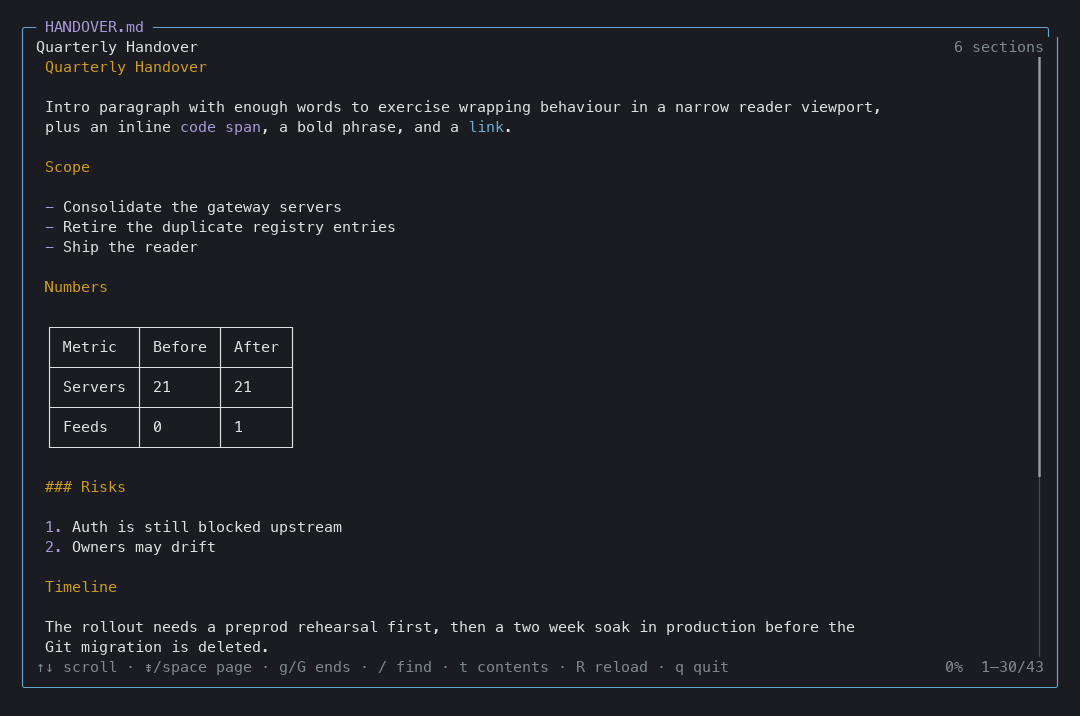
The path sits in the border, the section you are reading sits on the left, and the reading
position sits on the right. The file is watched, so if the agent edits it while you read,
the border shows ● and R picks up the new content.
Contents panel
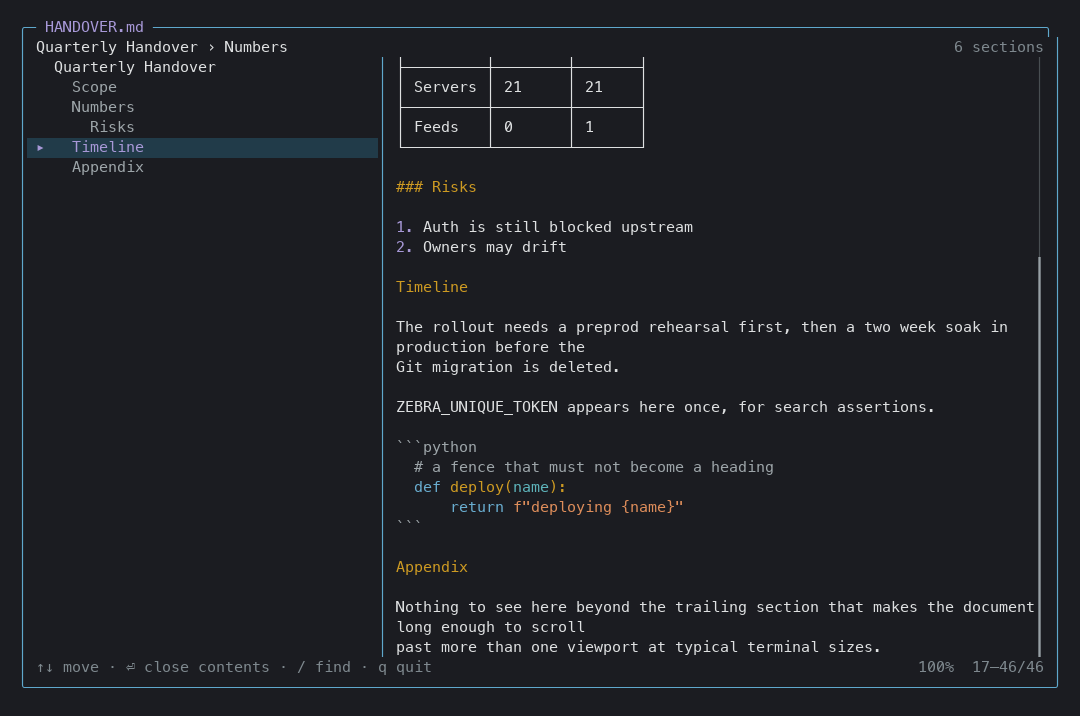
t opens a panel of every heading, indented by level. ↑↓ walks the headings and scrolls
the document with you; ⏎ closes the panel. The breadcrumb above tracks where you are.
Search
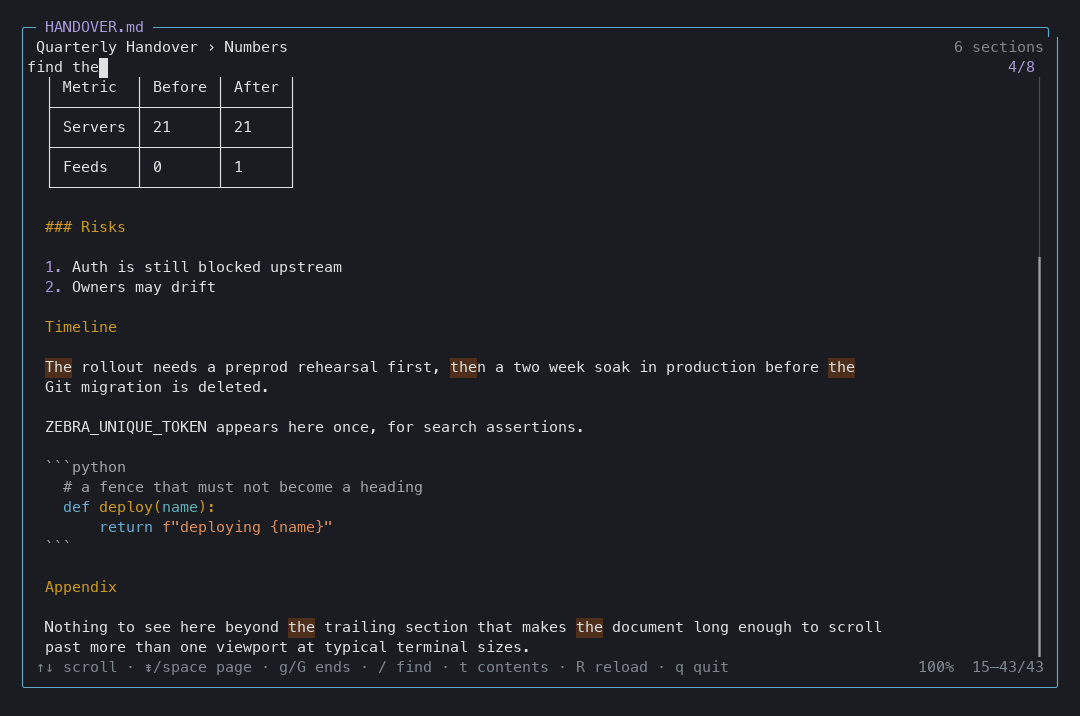
/ searches the rendered text with a live match counter, highlights every hit, and jumps to
the current one. n / N step through matches. esc clears the highlight before it closes
anything else.
Picker
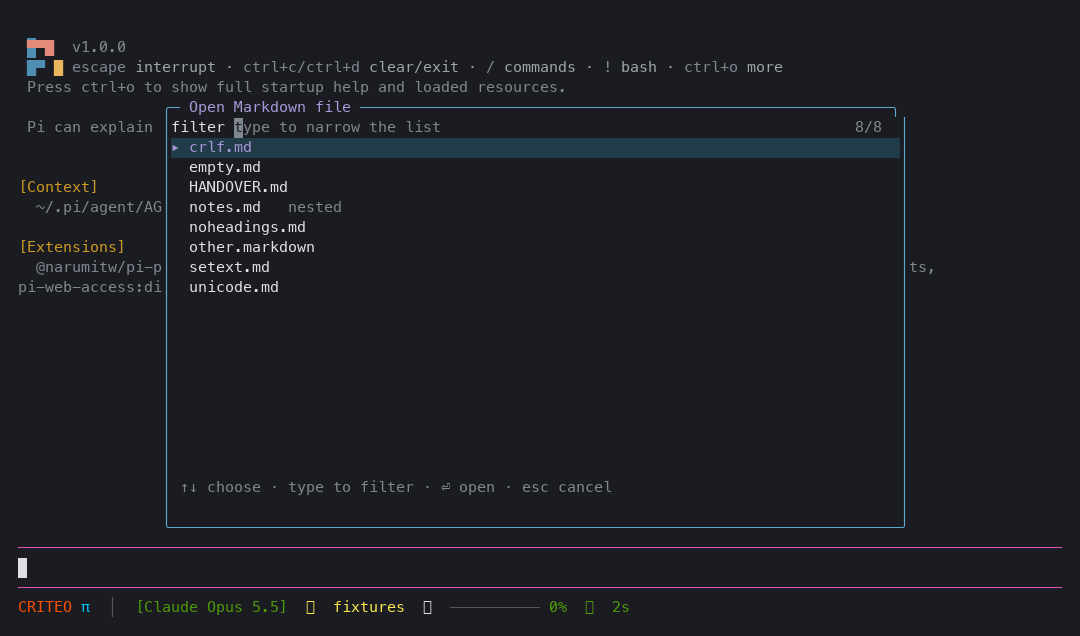
/md with no argument indexes the Markdown in your project — including nested directories
and both .md and .markdown — and filters fuzzily as you type.
Keys
| Key | Action |
| --- | --- |
| ↑ ↓ j k | scroll one line |
| ⇟ space ⏎ | page down |
| ⇞ b | page up |
| g / G | jump to the top / bottom |
| / | search; n / N for the next / previous match |
| t | contents panel; ↑↓ walks headings, ⏎ closes |
| R | reload from disk |
| q / esc | close (esc unwinds search, then the panel, then the reader) |
The mouse wheel scrolls. Clicks are absorbed by the reader so nothing leaks into the transcript behind it.
Design notes
- It renders with Pi's own renderer. The reader instantiates a
Markdowncomponent from@earendil-works/pi-tuiwithgetMarkdownTheme(), so it cannot drift from the transcript, and it follows the active theme when you switch themes. - It is a real pager. The overlay is opaque, takes the full terminal, pins its height so scrolling never reflows the screen, and adapts down to a 58-column window without overflowing a single line.
- Headings are lexed, not guessed. Heading anchors are found with the same Markdown parser
that renders the document, then planted in the source as zero-width characters. The contents
panel, the breadcrumb and the search therefore agree with what is on screen — including
setext headings, headings with inline code, and
#inside a code fence. - Search offsets are terminal columns, measured with
visibleWidth, so highlighting lands on the right cells on lines containing CJK, emoji, or combining characters. - Long documents stay cheap. Rendering is cached per width and invalidated on reload, so a 400-line document redraws in one pass when the window is resized.
Install
pi install npm:pi-md-reader        # from npm
pi install git:github.com/Yacinekouhli/pi-md-reader   # from git
Development
pi --extension ./extensions/md-reader.ts # try it without installingTests
test/run.sh is an end-to-end test: it boots a real pi inside a PTY, sends keystrokes,
decodes the terminal with pyte, and asserts on the screen a user would actually see —
scrolling, the contents panel, search, reload-after-edit, the picker, empty/headingless/CRLF/
setext/Unicode documents, absolute paths, missing files, and a narrow-terminal pass that fails
if any line overflows. It writes test/artifacts/e2e-summary.md.
python3 -m venv /tmp/e2evenv && /tmp/e2evenv/bin/pip install pyte pillow
test/run.sh
test/screenshot.py regenerates the screenshots in this README from live sessions and checks
each rendered image against the terminal buffer before saving it, so a broken render fails
instead of being committed.
/tmp/e2evenv/bin/python test/screenshot.pyPublishing
Releases are driven by tags and use npm's OIDC trusted publishing, so no npm token is stored anywhere:
npm version patch          # or minor / major: bumps package.json and creates the tag
git push --follow-tags
.github/workflows/publish.yml then runs the end-to-end tests, verifies the tag matches
package.json, refuses to publish a version that already exists, publishes, and confirms the
registry reports the new version. The trusted publisher
is registered against the workflow filename publish.yml; renaming that file breaks publishing
until the npmjs.com setting is updated to match.
Running the workflow manually validates and packs without publishing, since only a v* tag
reaches the publish job.
Registering the trusted publisher
Needs npm >= 11.15.0. Older npm cannot create a trust relationship: the registry requires a
permissions array in the request, and npm only started sending it in 11.15.0. On npm 11.12.1
the command fails with a bare 400 Bad Request, roughly one second after the 2FA prompt
succeeds — which makes it look like an authentication problem when it is not.
npm trust github pi-md-reader \
  --file publish.yml \
  --repo Yacinekouhli/pi-md-reader \
  --allow-publish \
  --yes
npm trust list pi-md-reader      # verify
--allow-publish grants npm publish over OIDC and is required; without a permission flag the
request is rejected. --allow-stage-publish is the alternative when releases should be staged
for maintainer approval instead of published outright. Check the version first:
npm --version                    # needs >= 11.15.0
npm install -g npm@^11.15.0      # or use a local copy, see below
If upgrading npm globally is undesirable, a local copy works and leaves the system npm alone:
mkdir -p ~/.local/share/npm-trust && cd ~/.local/share/npm-trust
npm install [email protected]
~/.local/share/npm-trust/node_modules/.bin/npm trust github pi-md-reader \
  --file publish.yml --repo Yacinekouhli/pi-md-reader --allow-publish --yes
There is no submission step for pi.dev/packages: the gallery indexes
npm packages carrying the pi-package keyword.
A note for the first release of any new package: npm requires the package to exist before a trusted publisher can be configured, so the initial version has to be published manually:
test/preflight.sh          # checks the manifest, tarball, version, and account 2FA state
npm publish --access public
License
MIT