
pi-nvim-context
v0.4.0
Published
Bridge Neovim to standalone Pi sessions for accumulated context and explicit model-powered editor suggestions

Maintainers
 omacl
omaclReadme
pi-nvim-context

Connect Neovim to a standalone Pi coding agent session for two deliberate workflows:
- Gather visible, editable context in Pi's input without submitting it.
- Ask the active Pi model for an explicit cursor completion, instruction-guided insertion, or selection rewrite without starting a Pi agent turn.
Unlike bridges that immediately submit editor context as a Pi turn or manage files automatically, pi-nvim-context keeps gathered context in Pi's editable draft until you submit it. Its separate completion and rewrite commands do not alter Pi's conversation history, and it never automatically saves or reloads buffers.
An inline completion model such as GitHub Copilot can keep owning automatic Insert-mode completion and Tab; Pi is invoked only through explicit mappings.
Status: pre-1.0 preview. The core workflow is tested and in daily use, but configuration and protocol details may still change.
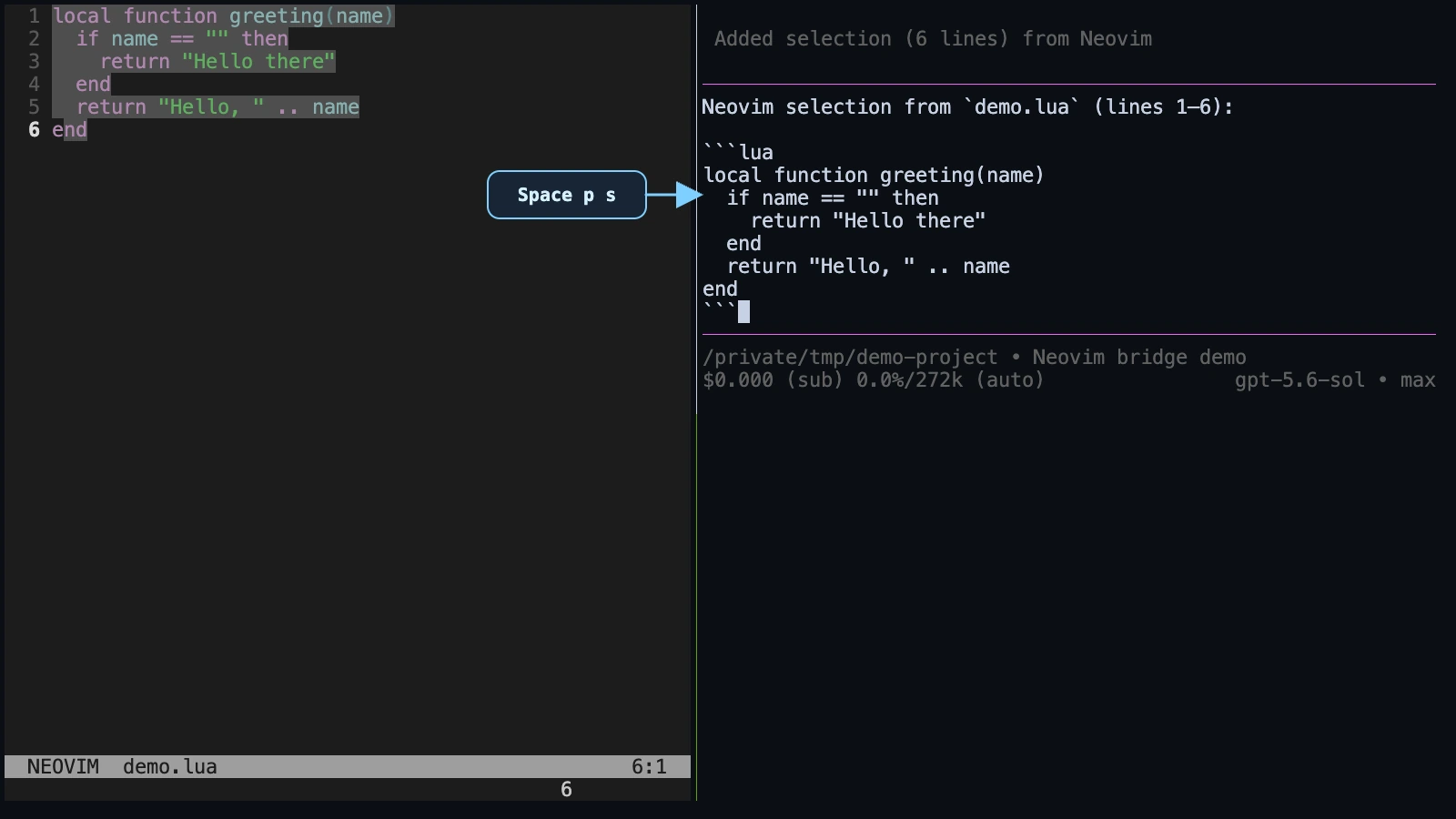
The preview uses Space as <leader>.
Features
Context gathering
Repeated mappings accumulate context in Pi's input editor. Switch to Pi when ready, write the question, and press Enter normally.
- current file reference
- current cursor location and in-memory line
- exact visual selection, with an optional attached comment or question
- current Neovim diagnostics
- complete in-memory buffer, including unsaved edits
Direct editor suggestions
- short completion at the cursor, shown as Neovim virtual text at the exact insertion boundary
- instruction-guided insertion at the cursor
- instruction-driven visual-selection rewrite
- wrapping full previews for multiline or wide insertions and rewrite diffs
- regenerate, inspect, accept, cancel, and dismiss actions
- exact
changedtick, target-range, and original-text validation - one undoable Neovim edit on acceptance
- no automatic save or buffer reload
The Pi extension exposes a private Unix socket. On first use for each Neovim working directory, the plugin asks you to confirm an exact-directory Pi link; a different-directory session is available only through the explicit picker.
Requirements
- Pi 0.84.4 or newer
- Neovim 0.11 or newer
- macOS or Linux (Unix sockets)
Installation
This repository contains both halves of the bridge. Install it once as a Pi package and once as a Neovim plugin; neither installation automatically supplies the other half.
1. Pi extension
Install the published Pi package from npm:
pi install npm:pi-nvim-contextAlternatively, install the current GitHub branch:
pi install git:github.com/omaclaren/pi-nvim-contextFor development from a local checkout instead:
pi install /absolute/path/to/pi-nvim-contextRun pi list to verify the source, then fully restart Pi. /reload is not enough after installing, updating, or switching package sources.
2. Neovim plugin
With lazy.nvim:
{
  "omaclaren/pi-nvim-context",
  config = function()
    require("pi-nvim-context").setup()
  end,
}
With Vim-Plug:
Plug 'omaclaren/pi-nvim-context'Then configure it after plug#end():
lua require("pi-nvim-context").setup()For local development, give the plugin manager the absolute checkout path instead. Restart existing Neovim processes after installing or changing the plugin.
First run
The plugin does not set mapleader. Its default mappings use <leader>; Vim and Neovim use backslash (\) unless your configuration changes it. To use Space, set the leader before calling setup():
vim.g.mapleader = " "With Vimscript, use let mapleader = " " instead.
- Start an interactive Pi TUI from the project directory.
- Start Neovim with the same effective working directory;
:pwdshows the value used for linking. - Run
:PiContextPick(default:<leader>pp) and confirm the exact-cwd Pi session. - Run
:PiContextFile(default:<leader>pf). The file reference should appear in Pi's editable input without being submitted. - With Pi idle, run
:PiSuggestto try a direct completion, or continue adding context before writing your question in Pi.
Use /nvim-context in Pi and :PiContextStatus in Neovim to inspect both sides of the bridge.
Default mappings
For a compact reference covering Pi context, direct edits, and optional Copilot and clipboard examples, see CHEATSHEET.md.
Context
| Mapping | Action |
|---|---|
| <leader>pp | Explicitly link the current Neovim cwd to a Pi session |
| <leader>pf | Add the current file |
| <leader>pl | Add the current file, cursor location, and current line |
| Visual <leader>ps | Add the exact selection and its file/range |
| Visual <leader>pS | Add the selection with an optional comment (uppercase S) |
| <leader>pd | Add current-buffer diagnostics |
| <leader>pb | Add the complete in-memory buffer |
| <leader>pi | Show Neovim cwd, linked Pi, and bridge status |
| Normal or Visual <leader>ph | Toggle the annotation header in Pi's current draft |
Add a comment to a selection
Use Visual <leader>pS (Shift-S) to capture the selection and enter a comment such as What does this mean?. The selection and [an: ...] annotation are appended together to Pi's editable draft; neither is submitted. Enter with a blank comment sends just the selection. Escape cancels the entire operation without sending anything. Plain <leader>ps still sends immediately without a comment prompt.
The selection is captured before the dialog opens. Changing the source text, file name, working directory, or Pi link while entering the comment cancels the send. Comments are limited to max_comment_bytes (4 KiB by default); a combined selection/comment that exceeds the payload limit is rejected rather than silently losing the comment.
Annotations sit outside the selection's code fence, using the convention recognised by Pi Studio and pi-annotated-reply. Balanced brackets, Markdown links, and inline code are preserved; unmatched annotation delimiters are escaped. If you later send from Studio, keep Inline annotations: On: its remembered Hide setting strips annotations on Run/Critique as well as hiding them in previews. Sending directly from Pi's terminal draft leaves them intact.
Successful sends show a small, non-focusable floating notice for two seconds, rather than using Neovim's transient command-line message area. It shows a short summary and Pi session ID, remains visible in Visual mode, and disappears without a key press. Repeated sends replace the notice rather than stacking windows. Full session details remain in the picker and :PiContextStatus; warnings and errors still use vim.notify. Set success_notice_ms to change the duration, or notify = false to suppress routine success notices.
Toggle the draft's annotation header
Press <leader>ph in Neovim (Normal or Visual mode), or run :PiContextAnnotationHeader, to add one small header at the top of the linked Pi session's current input draft. Press it again to remove the header. The header explains that [an: note] marks user comments on the accompanying selections; its syntax example is backticked so Studio does not mistake it for another annotation.
Pi also shows a short on/off confirmation, which refreshes its terminal display immediately without needing a keystroke.
This is an explicit edit to the current draft, not a persistent setting. Selection sends never automatically insert or repeat a header, and nothing is submitted. Pi performs the read/modify/write directly; its draft text is not sent back to Neovim. The shortcut leaves Neovim's buffer and selection untouched.
Only a recognised header at the very beginning is removed. Standard Studio and pi-annotated-reply headers are recognised too; all following text, including any existing end marker, is preserved exactly. Edited or unfamiliar leading annotated-reply headers are left unchanged with an error rather than guessed at or duplicated. Drafts larger than 4 MiB are refused, never truncated.
This operation requires the updated Pi extension as well as the Neovim plugin. Fully restart both after updating, then relink with :PiContextPick if needed. On connection errors the toggle is not automatically retried: the action may already have happened, so inspect Pi's draft before trying again.
Suggestions and edits
| Mapping | Action |
|---|---|
| <leader>pc | Ask Pi for a completion after the Normal-mode cursor character |
| <leader>pg | Enter an instruction and ask Pi to insert text at that position |
| Visual <leader>pr | Enter an instruction and ask Pi to rewrite the selection |
| Normal Tab | Accept while a Pi result is visible, when temporary Tab acceptance is enabled and available |
| <leader>pa | Accept the visible Pi completion, insertion, or rewrite |
| <leader>pn | Generate a materially different result |
| <leader>pv | Focus a full preview so it can be scrolled; q returns to the source |
| <leader>px | Cancel or dismiss the Pi request/result |
<leader>pp and <leader>ph are also available while a Visual selection is active, so opening the Pi picker cannot fall through to native Visual-mode paste. Enabled Normal-only mappings within the configured Pi prefix are also intercepted in Visual mode with a warning rather than passing their final key to a native Visual command. A pre-existing exact Visual mapping is preserved, and custom Normal mappings outside the Pi prefix remain Normal-only.
Corresponding commands are:
:PiContextPick
:PiContextFile
:PiContextLocation
:PiContextSelection
:PiContextSelectionComment
:PiContextDiagnostics
:PiContextBuffer
:PiContextStatus
:PiContextAnnotationHeader
:PiSuggest
:PiSuggestGuided
:PiRewrite
:PiSuggestAccept
:PiSuggestAgain
:PiSuggestDismiss
:PiSuggestPreview
Inline completion coexistence (Copilot example)
No inline completion plugin is required. pi-nvim-context leaves Insert-mode Tab untouched, allowing a model-backed completion plugin such as GitHub Copilot to retain its normal acceptance mapping. While a Pi result is visible, the plugin temporarily installs a buffer-local Normal-mode Tab mapping when that feature is enabled and the source buffer does not already own one; accepting or dismissing the result removes it.
As an optional compatibility detail, direct Pi requests make a best-effort call to dismiss a visible copilot.vim suggestion, so the previews do not overlap. Nothing happens when copilot.vim is absent.
A practical division of labour is:
- Inline completion model (for example, Copilot): automatic, low-latency Insert-mode completion and
Tabacceptance. - Pi completion: explicit, short continuation with the active Pi model and thinking off.
- Pi guided insertion: explicit cursor insertion following the instruction you enter, with low thinking when supported.
- Pi rewrite: explicit selected-range edit following your instruction, with low thinking when supported.
- Full Pi agent: whole-file, multi-file, tool-using, or autonomous work.
Direct-suggestion context and model use
Cursor completions send up to 12,000 characters before and 6,000 after the cursor. Guided insertions additionally send your instruction; rewrites send the exact selected text and your instruction. Prefix, selection, and suffix are sent as separate strings, avoiding UTF-8 byte versus JavaScript UTF-16 offset errors.
Guided insertions do not use tools or search external sources. If an instruction asks for references, supply the needed bibliographic details or use the full Pi agent to research and verify them.
Direct suggestions:
- use the explicitly linked standalone Pi session's active model and resolved authentication;
- run only while that Pi session is idle;
- do not use tools, submit a Pi turn, append to session history, or automatically inherit the full Pi conversation;
- do not include other project files unless their text is already inside the bounded editor excerpt;
- are discarded if the Neovim buffer changes while generation is running or while a result is visible.
An openai-codex/... active model uses subscription-backed authentication. An openai/... model uses API-billed OpenAI Platform authentication. Other providers use their configured credentials and billing; direct suggestions can therefore incur model-provider charges.
Explicit Pi linking
Context and suggestion operations never silently fall back to a Pi session in another directory.
On the first operation for a Neovim working directory:
- Neovim discovers bridge-enabled Pi sessions with an exact working-directory match.
- It always asks you to confirm which matching session to link, even when there is only one.
- If there is no exact match, it sends nothing and explains that Pi may need restarting in that directory.
Use <leader>pp to open the explicit picker at any time. This picker includes every discovered bridge, puts exact matches first, and labels different-directory sessions with a warning. Choosing one there is the deliberate cross-directory override.
Links are scoped per Neovim working directory. Changing directories switches to that directory's independent link and cancels any pending Pi editor suggestion; returning to a directory restores its remembered link. One directory's choice never overrides another's. <leader>pi shows the current Neovim directory, linked Pi name/cwd/PID, and the number of exact matches.
A Pi process that was already running when this package was installed or updated is invisible until it fully restarts and loads the bridge. Suggestion commands also filter out older bridges that do not advertise suggestion support.
Updating and removing
Update an npm-installed Pi package with pi update npm:pi-nvim-context; for a Git-installed package, use pi update --extensions. Update the Neovim half through the same plugin manager used for installation—for example, :Lazy update pi-nvim-context or :PlugUpdate pi-nvim-context. Then fully restart both Pi and Neovim.
For a local checkout, pull the repository yourself and restart both processes. Remove the Pi half using the same source type used to install it:
pi remove npm:pi-nvim-context
# or
pi remove git:github.com/omaclaren/pi-nvim-context
Also remove the Neovim plugin specification and run the plugin manager's cleanup command.
Troubleshooting
- No bridge appears: fully restart an interactive Pi TUI in the intended directory, then run
/nvim-context. Print/RPC modes do not start the bridge. - No exact-cwd session appears: compare Pi's reported cwd with Neovim's
:pwd. Run:PiContextPickonly if a cross-directory link is intentional. - A suggestion says Pi is busy: wait for the current Pi agent turn to finish; direct suggestions run only while the linked session is idle.
- Model requests fail: check
:messages, the active Pi model, its authentication, and its provider billing. Context gathering does not require a model call. - A result disappears: changing the target buffer, text, or working directory invalidates stale work by design.
- An update seems absent: update both installed halves and fully restart both processes; do not rely on Pi's
/reloadafter a package-source change.
Configuration
require("pi-nvim-context").setup({
  notify = true,
  success_notice_ms = 2000,
  timeout_ms = 1500,
  max_payload_bytes = 240 * 1024,
  max_selection_bytes = 100 * 1024,
  max_comment_bytes = 4 * 1024,
  max_buffer_bytes = 200 * 1024,
  max_diagnostics = 50,

  suggest_timeout_ms = 70 * 1000,
  rewrite_timeout_ms = 130 * 1000,
  suggest_prefix_chars = 12 * 1000,
  suggest_suffix_chars = 6 * 1000,
  max_rewrite_bytes = 100 * 1024,
  preview_width = 92,
  preview_height = 18,
  accept_with_tab = true,

  keymaps = {
    prefix = "<leader>p",
    pick = "<leader>pp",
    file = "<leader>pf",
    location = "<leader>pl",
    selection = "<leader>ps",
    selection_comment = "<leader>pS",
    diagnostics = "<leader>pd",
    buffer = "<leader>pb",
    status = "<leader>pi",
    annotation_header = "<leader>ph",
    suggest = "<leader>pc",
    guided = "<leader>pg",
    rewrite = "<leader>pr",
    accept = "<leader>pa",
    again = "<leader>pn",
    dismiss = "<leader>px",
    preview = "<leader>pv",
  },
})
Set an individual mapping to false, or set keymaps = false and map the Lua functions yourself. Set accept_with_tab = false to keep Normal-mode Tab untouched in both the source and preview buffers. If a source buffer already has its own buffer-local Normal Tab mapping, the plugin preserves it and :PiSuggestAccept remains available.
Behavior and safety
- Context gathering calls Pi's
ctx.ui.pasteToEditor()and never submits the draft. - The header toggle reads Pi's current draft and updates it with
ctx.ui.setEditorText(); it does not call the model, submit a turn, or change conversation history. - Direct suggestions call the model independently and never alter Pi's input editor.
- Context and suggestion traffic is sent only after an explicit mapping or command.
- Socket directories are user-specific and mode
0700; socket and manifest files are mode0600. - The bridge starts only for interactive Pi TUI sessions.
- Request, context, selection, and response sizes are bounded.
- Closing a request from Neovim aborts its in-flight model call.
- Accepting a result calls
nvim_buf_set_text()once and never writes the file. - Like any Pi extension or Neovim plugin, the installed code runs with your user account's permissions; review third-party code before installing it.
Related work and inspirations
Release history
See CHANGELOG.md.
Development
npm ci
npm run typecheck
npm test
npm pack --dry-run
Tests cover the private socket lifecycle, completion, guided-insertion and rewrite requests, Pi-input isolation, stale-session cleanup, Unicode-safe Neovim ranges, full previews, temporary acceptance mappings, formatting, truncation, commented-selection sends and cancellation, annotation formatting, floating-notice lifecycle, safe draft-header toggling, commands, and mappings.