
pi-obsidian-cli
v0.8.3
Published
Dynamic pi extension wrapping the official Obsidian CLI with fixed permission gating, 52 typed read-only catalog tools, audited fixed-purpose wrappers, and an interactive TUI browser
Downloads
136

Maintainers
 frnn
frnnReadme
pi-obsidian-cli



Dynamic pi extension wrapping the official Obsidian CLI (v1.13+) with fixed permission gating, 52 typed read-only catalog tools, audited fixed-purpose wrappers, prompt guidelines, and an interactive TUI browser.
Talks directly to the obsidian binary — no MCP server or Obsidian plugin dependency, with no extra setup beyond enabling the CLI in Obsidian.
Read the project story and design rationale: Safe Obsidian tools for Pi agents.
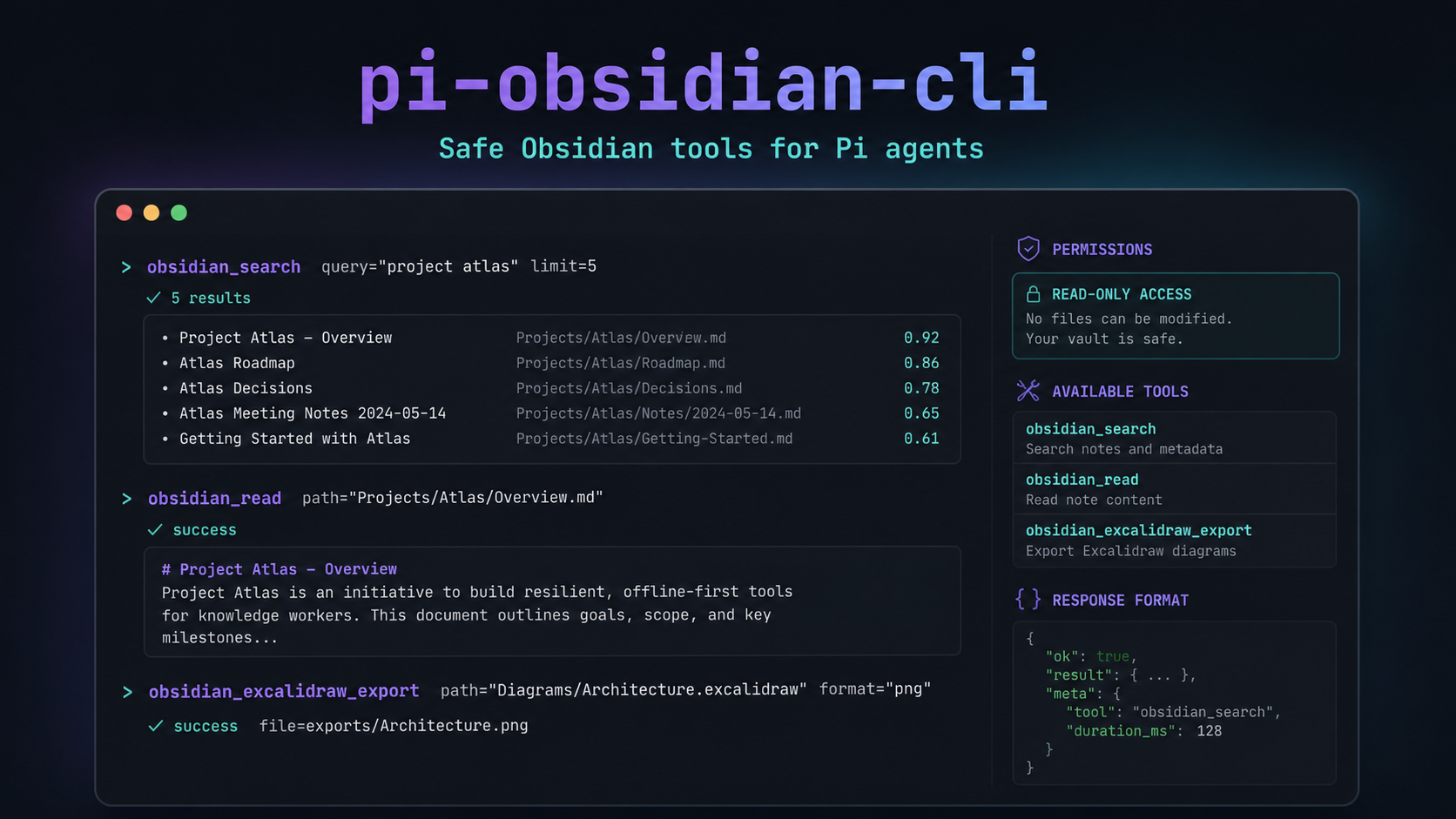
Safety Defaults
- Read-only permissions are enabled by default.
- No write-capable profiles are registered by default.
- Generic
evalis disabled by default. - DataviewJS requires explicit opt-in and confirmation.
- Fixed-purpose wrappers are audited separately from generic evaluation.
Quick Start
Install from npm (recommended)
pi install npm:pi-obsidian-cliInstall from git
pi install git:github.com/frNNcs/pi-obsidian-cliInstall from local clone (development)
git clone https://github.com/frNNcs/pi-obsidian-cli
cd pi-obsidian-cli
npm ci
Then install from the local path (run these from your terminal, not inside a pi session):
# Project-local (writes .pi/settings.json in the current project; the local path
# is referenced as-is — no copy, no symlink — and takes effect after /reload):
pi install -l /absolute/path/to/pi-obsidian-cli

# Global (writes pi's global settings.json; same no-copy behaviour):
pi install /absolute/path/to/pi-obsidian-cli
Note: Use absolute paths with
pi install. Relative paths may not resolve correctly inside pi's runtime. If pi asks for trust, run/trustin a pi session or pass--approveon the CLI.
After installing, configure your vault in pi's settings.json:
{
  "obsidianCli": {
    "vault": "my-vault",
    "permissionMode": "read-only"
  }
}
Reload with /reload and you're done.
Prerequisites
- Node.js >= 22.19.0
- Obsidian 1.13+ running
- CLI enabled: Settings → General → Advanced → Command line interface
obsidianbinary on yourPATH
Development
See docs/development.md for the full step-by-step circuit: clone → npm ci → typecheck → test → install locally → release.
Quick reference:
npm ci                    # clean install from lockfile
npm run check             # TypeScript type-check (tsc --noEmit)
npm run pack:dry          # validate packaging integrity

# Test with pi — loads ONLY this extension, no duplicates:
pi --no-extensions -e ./index.ts
What You Get
52 Typed Read-Only Catalog Tools
The current Obsidian CLI catalog exposes 52 read-only commands as dedicated tools with typed parameters, structured JSON/TSV output, and contextual defaults (active file, vault):
| Category | Tools |
|----------|-------|
| Files & Folders | obsidian_read, obsidian_files, obsidian_folders, obsidian_file, obsidian_folder, obsidian_outline |
| Search | obsidian_search, obsidian_search_context |
| Tasks & Tags | obsidian_tasks, obsidian_tags, obsidian_tag |
| Properties | obsidian_properties, obsidian_property_read |
| Links & Graph | obsidian_links, obsidian_backlinks, obsidian_orphans, obsidian_deadends, obsidian_unresolved |
| Bases | obsidian_bases, obsidian_base_query, obsidian_base_views |
| Daily Notes | obsidian_daily, obsidian_daily_path |
| Sync | obsidian_sync_status, obsidian_sync_history, obsidian_sync_read, obsidian_sync_deleted |
| History | obsidian_history, obsidian_history_list, obsidian_history_read |
| Plugins & Themes | obsidian_plugins, obsidian_plugin, obsidian_themes, obsidian_theme |
| Workspace | obsidian_workspace, obsidian_tabs, obsidian_recents |
| Special | obsidian_active_file, obsidian_resolve_link |
Audited Fixed-Purpose Wrappers
These wrappers are separate from the read-only catalog and can be enabled without enabling generic eval:
obsidian_excalidraw_exportobsidian_excalidraw_mermaidobsidian_active_fileobsidian_resolve_linkobsidian_dataview_queryobsidian_tasks_queryobsidian_dailycreation
obsidian_dataviewjs_run remains separate and opt-in because it evaluates user-supplied JavaScript and always requires confirmation.
Permission Gating (Fixed by Code, Not Prompt)
Three modes with risk classification (read / write / danger):
{
  "obsidianCli": {
    "permissionMode": "read-only",
    "exclude": ["eval", "command", "dev:*", "restart", "reload"],
    "confirmDestructive": true
  }
}read-only— only read commands (default, safe)all— everything minusexcludecustom— only commands matchinginclude(minusexclude)
Blocked commands fail with an explanation of exactly which setting to change — the policy cannot be negotiated from the prompt.
Fixed-script tools and confirmation. Audited fixed-purpose wrappers run when allowFixedScripts is enabled (the default) without enabling generic eval. Fixed wrappers do not prompt themselves; write-capable operations use the central confirmation path. The general obsidian tool and arbitrary eval commands remain governed by permission mode and exclude.
Interactive TUI Browser
Run /obsidian to open the browser:
- Filter with
/+ Tab autocomplete (longest common prefix, cycles with Tab/Shift+Tab) - Risk badges (
◦ read·● write·▲ danger) - Argument editor with inline flag reference
- Scrollable output with TSV column alignment
mcycle permission mode (session-only)vset vault ·rrediscover catalog
Inline mode: /obsidian read path=Notes/hello.md runs directly.
Prompt Guidelines
Dedicated tools carry concise usage guidance (promptGuidelines) telling the LLM to use them instead of built-in read/bash/grep/ls/find for vault operations.
Configuration Reference
| Key | Default | Description |
|-----|---------|-------------|
| binary | "obsidian" | Path to the CLI binary |
| autoLaunch | false | Allow the CLI to launch the Obsidian GUI when the app is not running. Disabled by default; keep Obsidian open before using obsidian_* tools. |
| vault | (active) | Default vault name or id |
| permissionMode | "read-only" | "read-only" / "all" / "custom" |
| include | [] | Patterns for custom mode ("read", "base:*") |
| exclude | ["eval","command","dev:cdp","dev:debug","restart","reload","plugin:install","plugin:uninstall","theme:install","theme:uninstall"] | Always-blocked patterns |
| exposeReadOnlyTools | true | Register typed tools per command |
| promptSnippets | true | Show tools in system prompt "Available tools" |
| confirmDestructive | true | Confirm write/danger in TUI; reject them without a UI |
| timeoutMs | 30000 | Per-invocation timeout |
| maxOutputBytes | 51200 | Output returned to LLM |
| statusBar | true | Footer: vault · mode · catalog |
| preferJson | true | Request format=json where supported |
| contextMode | "active-tab" | "active-tab"/"manual" — default file/folder from active tab |
| resolveWikilinks | true | Resolve [[wikilinks]] to vault paths |
| allowFixedScripts | true | Enable audited wrappers without enabling generic eval |
| allowDataviewJs | false | Opt in to user-supplied DataviewJS execution; requires confirmation |
| toolProfiles | {} | Optional named profiles; write-capable profiles are never registered by default |
Settings live under "obsidianCli" in pi's main settings.json.
By default, the extension performs a process pre-flight and fails fast when Obsidian is not running, so calling a tool never opens the GUI unexpectedly. Set "autoLaunch": true only if you explicitly want the CLI to retain its automatic app-launch behavior.
Config file locations (pi's search order):
- Global:
~/.config/pi/agent/settings.json(or~/.pi/agent/settings.jsonif configured) - Project:
.pi/settings.json(relative to the project root)
When the project is trusted, project settings override global values for keys such as permissionMode and include; exclude entries are always additive. Treat trusted project settings as permission-bearing configuration and review them before enabling trust.
Architecture
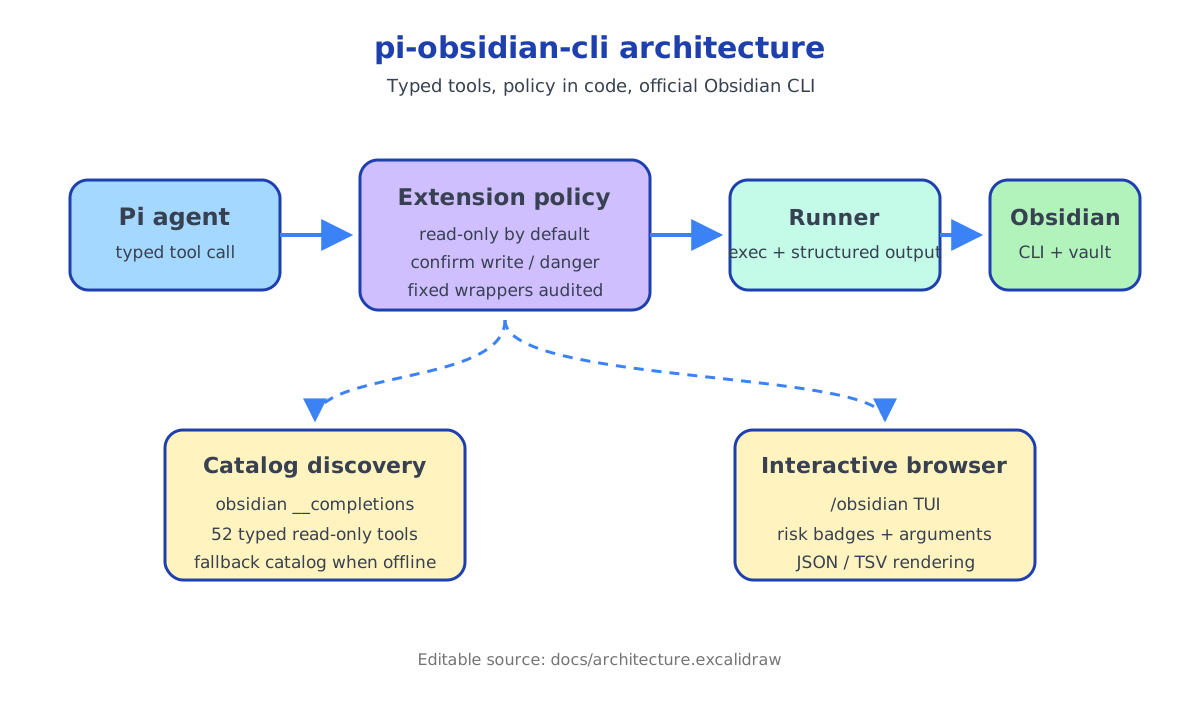
The editable Excalidraw source is available at docs/architecture.excalidraw.
Catalog Discovery
obsidian __completions returns a JSON map of every command, including usage, description, and flags. The catalog varies per vault because plugins can add namespaces such as sync:* and base:*; discovery falls back to fallback-catalog.json when the app is unreachable.
Dependencies
Zero runtime dependencies. All pi packages and typebox are peerDependencies — they are provided by the pi runtime at execution time, not bundled with this extension.
| Dependency | Role | Provided by |
|------------|------|-------------|
| @earendil-works/pi-coding-agent | Extension API, events, types | pi runtime |
| @earendil-works/pi-agent-core | Core SDK types | pi runtime |
| @earendil-works/pi-ai | AI provider interface | pi runtime |
| @earendil-works/pi-tui | TUI key bindings, text utils | pi runtime |
| typebox | Tool parameter schemas | pi runtime |
In devDependencies (for tsc --noEmit only):
@types/node— Node.js type definitionstypescript— the type checker itself- All five peer packages at the pinned versions used to develop against
Troubleshooting
"Extension not trusted" / tools don't appear
Run /trust in pi to trust the extension. If running from the CLI with --no-extensions -e, use:
pi --no-extensions -e ./index.ts --approveDuplicate tools after installing from local path
If you previously had a manual copy in ~/.config/pi/agent/extensions/obsidian-cli/, pi will load both. Remove the manual copy:
rm -rf ~/.config/pi/agent/extensions/obsidian-cli
# or, if your pi uses ~/.pi:
rm -rf ~/.pi/agent/extensions/obsidian-cli
Then /reload in pi. Verify with /tools — you should see each obsidian_* tool exactly once.
"pi: command not found" or "pi install not recognized"
Ensure @earendil-works/pi-coding-agent is installed globally:
npm install -g @earendil-works/pi-coding-agentObsidian CLI connection errors
- Make sure Obsidian is running before invoking any tool
- Check that Command line interface is enabled in Obsidian settings
- Verify the
obsidianbinary is on yourPATH:which obsidian - If the binary has a different name/path, set
obsidianCli.binaryin settings
Local path install doesn't pick up changes
pi install -l /path registers the local path in pi's settings (.pi/settings.json for project-local, or global settings.json). The path is referenced as-is — files are neither copied nor symlinked into pi's extension directory. Changes to the source files should be picked up after /reload. If not:
- Verify the path is recorded correctly: check
extensionsin your.pi/settings.jsonor globalsettings.json - Force a reload:
/reload - If all else fails, reinstall:
pi install -l /absolute/path/to/pi-obsidian-cli
Known Quirks
daily:pathdouble-slash: The upstream Obsidian CLI returns paths likeDaily//2026/07-julio/2026-07-31.md.obsidian_dailyfixes this; regulardaily:pathshows the raw value.createexits 0 on error: The CLI always exits 0. Errors are detected from output text patterns.- Catalog drift: Regenerate
fallback-catalog.jsonafter Obsidian updates:obsidian __completions > fallback-catalog.json
Release Checklist
npm run checkpasses onmainnpm run pack:dryshows correct file list- Manual smoke test:
pi --no-extensions -e ./index.ts - Bump
versioninpackage.json(semver) - Commit and tag:
git tag vX.Y.Z && git push origin main --tags - Verify install from git:
pi install git:github.com/frNNcs/pi-obsidian-cli - (Optional) Publish to npm:
npm publish→pi install npm:pi-obsidian-cli
License
MIT