
pi-omapi
v0.1.0
Published
An 8-bit, omarchy-native face for pi: animated block logo, dense status strip, and hand-tuned themes.

Maintainers
 matheusmedrado
Readme
omaPi
A pi package that replaces the agent's interface with an 8-bit one: an animated block logo, a dense status strip, and themes built to make code legible rather than decorative.
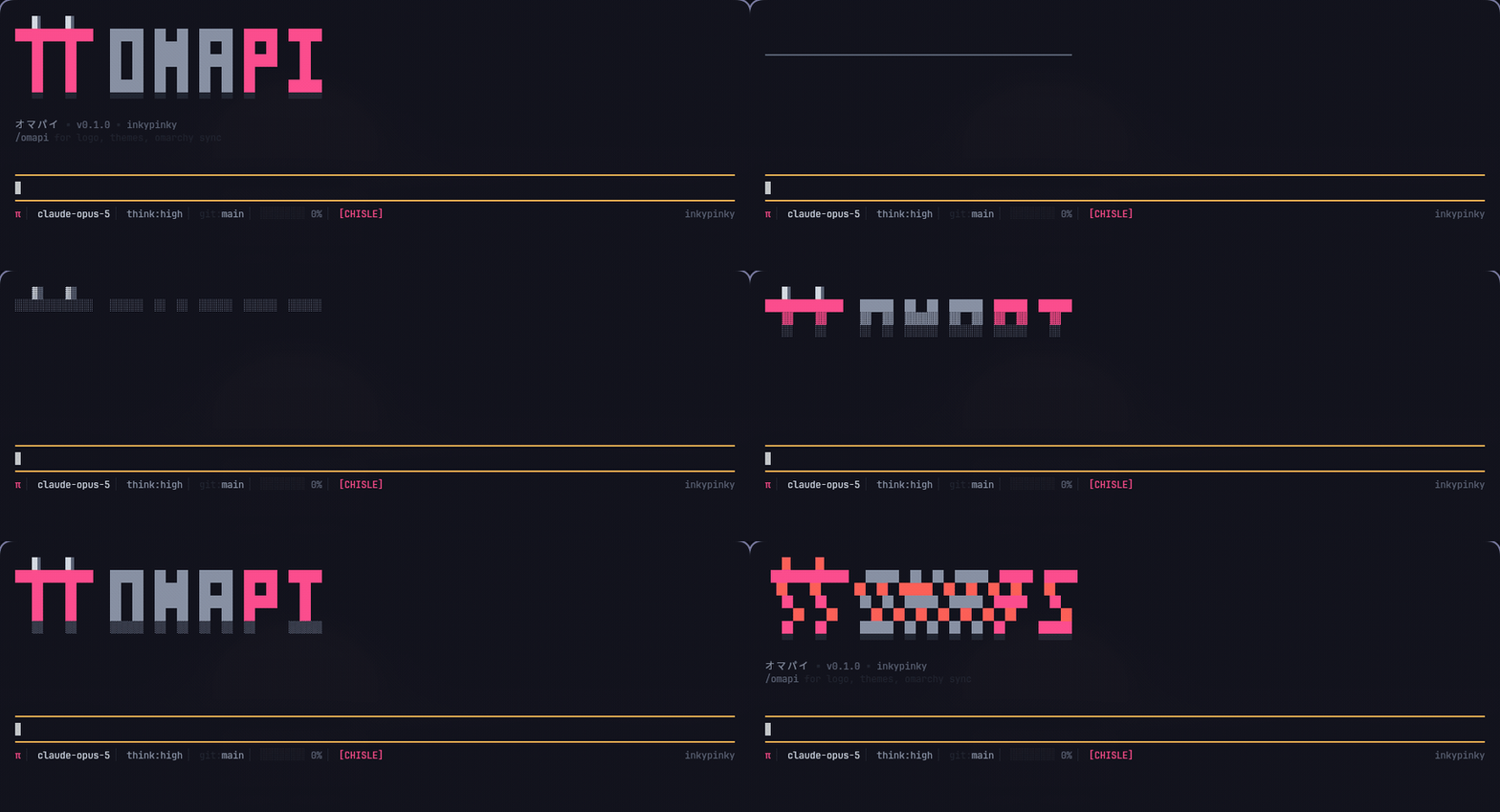
Install:
pi install npm:pi-omapiRestart pi. Nothing else is required — the defaults take over the header, footer, working indicator, and colors immediately.
What changes
| Surface | Before | After |
|---------|--------|-------|
| Header | pi logo and keybinding hints | Block mascot and pixel wordmark, revealed by a CRT boot sequence |
| Footer | pi's default status line | Model, thinking level, git branch, context meter, omarchy theme, other extensions' statuses |
| Working indicator | Spinner | Dither pulse (░▒▓█) |
| Colors | Whatever theme pi is set to | Three omaPi themes, or a live-tracked omarchy theme |
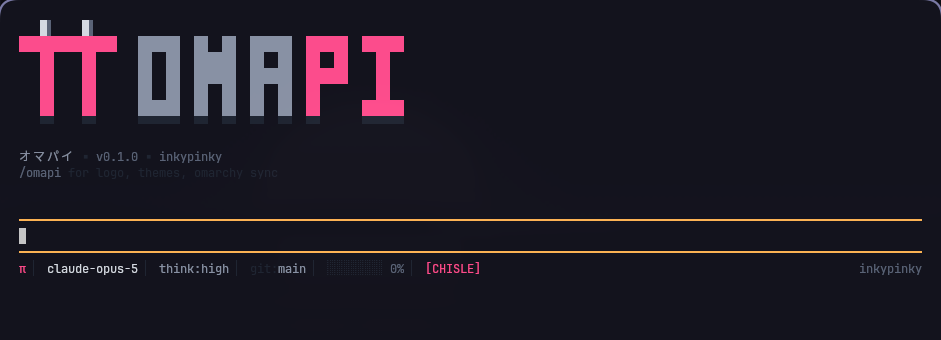
The boot sequence is four phases: a scanline sweep across the empty block, a raster fill that
materializes each row through a dither ramp, a two-frame glitch, then the settled mark with a
reflection row underneath. It plays on startup and on demand with /omapi logo.
Every glyph used is a block or box-drawing character from the ranges every monospace font ships. No Nerd Font glyphs, no emoji, so nothing renders as a replacement box. The layout holds a constant height across all animation frames, so the transcript below it never jumps.
Themes
All three define the full set of pi color tokens, including the search-match, scrollbar, and
thinkingMax tokens that are optional in the schema. Syntax colors are picked for
separability — keyword, function, string, number, and type land on distinct hues rather than
five shades of the same one.
| Theme | Base | Accent | Character |
|-------|------|--------|-----------|
| omapi-famicom | Cool near-black ink | Hot magenta | CRT phosphor green strings, amber numbers, indigo types. The signature look. |
| omapi-denshi | Dark steel | Teal | Amber highlights and violet types. Analog lab equipment. |
| omapi-washi | Washi paper, light | Vermilion | Sumi ink text, indigo functions, matcha strings. |
/omapi theme omapi-famicom   pin a theme
/omapi theme follow          track the omarchy theme instead
pi --use-theme <name> always wins for that run; omaPi will not override an explicit choice
from the command line.
Omarchy integration
Omarchy renders every application's theme from the active theme's colors.toml through
templates in /usr/share/omarchy/default/themed/, and a file at
~/.config/omarchy/themed/<name>.tpl overrides the packaged one. omaPi ships a replacement
pi.json.tpl:
/omapi omarchy install
omarchy theme set <your-theme>
The generated theme is still named omarchy-system, so pi's settings and every other tool
keep working. What improves is the mapping: syntax hues are spread across the palette's
bright variants instead of collapsing onto the accent, panels and borders are tinted with the
theme accent, and the tokens the stock template leaves unset are filled in.
Independently of the template, omaPi watches ~/.local/state/omarchy/current/theme.name, so
running omarchy theme set retints a pi session that is already open.
Note that with followOmarchy enabled (the default), omaPi selects omarchy-system at
startup, overriding the theme saved in pi's settings. Turn it off with
/omapi followOmarchy off to hand that decision back to pi.
Commands
/omapi                        show current settings
/omapi logo                   replay the boot animation
/omapi theme <name>           pin an omaPi theme
/omapi theme follow           follow the active omarchy theme
/omapi omarchy install        install omaPi's pi.json.tpl
/omapi header on|off          the logo header
/omapi animate on|off         the boot animation
/omapi kana on|off            the katakana tagline
/omapi footer on|off          the status strip
/omapi indicator on|off       the dither working indicator
/omapi followOmarchy on|off   omarchy theme tracking
Configuration
Settings persist in ~/.config/omapi/config.json and are written by the commands above.
| Key | Default | Effect |
|-----|---------|--------|
| header | true | Replace pi's header with the omaPi logo |
| animate | true | Play the boot sequence on startup |
| kana | true | Katakana tagline; needs a CJK fallback font |
| footer | true | Replace pi's footer with the status strip |
| indicator | true | Replace the streaming spinner |
| followOmarchy | true | Track the active omarchy theme |
| theme | unset | Pinned theme name; overrides followOmarchy |
OMAPI_FRAME_MS overrides the animation frame duration (default 45).
Font
Designed against Departure Mono Nerd, a pixel monospace whose lo-fi technical drawing matches the mark:
yay -S --answerclean None --answerdiff None otf-departure-mono-nerd
omarchy font set "DepartureMono Nerd Font"
Any monospace works — the art is block glyphs only — but the pixel font is what it was drawn for.
Development
bun install
bun run typecheck
bun run preview   # render the header and footer to stdout
bun run frames    # dump every animation frame
The preview script renders the real components against a stand-in palette, so the logo can be iterated on without launching pi.
Screenshots are regenerated from an actual session (needs Hyprland, kitty, grim, ffmpeg, and ImageMagick):
scripts/capture.sh [theme] # writes docs/preview.png and docs/boot.gifIt launches pi in a kitty window with remote control enabled, waits for the session to be
ready, then triggers /omapi logo while the screenshot loop is already running — otherwise
the capture races startup and only records the empty sweep.
pi installs packages with npm install regardless of what is used here; bun is this repo's
development workflow, not a requirement for users.
License
MIT