
pi-open-tui
v0.3.11
Published
A polished TUI for Pi coding agent: animated logo header, Starship-style footer, rounded editor with model metadata, and prompt-box user messages.

Maintainers
 oldsuns
Readme
pi-open-tui
English | 简体中文
一个为 Pi 编程代理打造的终端界面扩展,将 pi-haiku、pi-claude-code-tui 与 pi-zentui 的优秀设计整合为统一、可配置的使用体验。
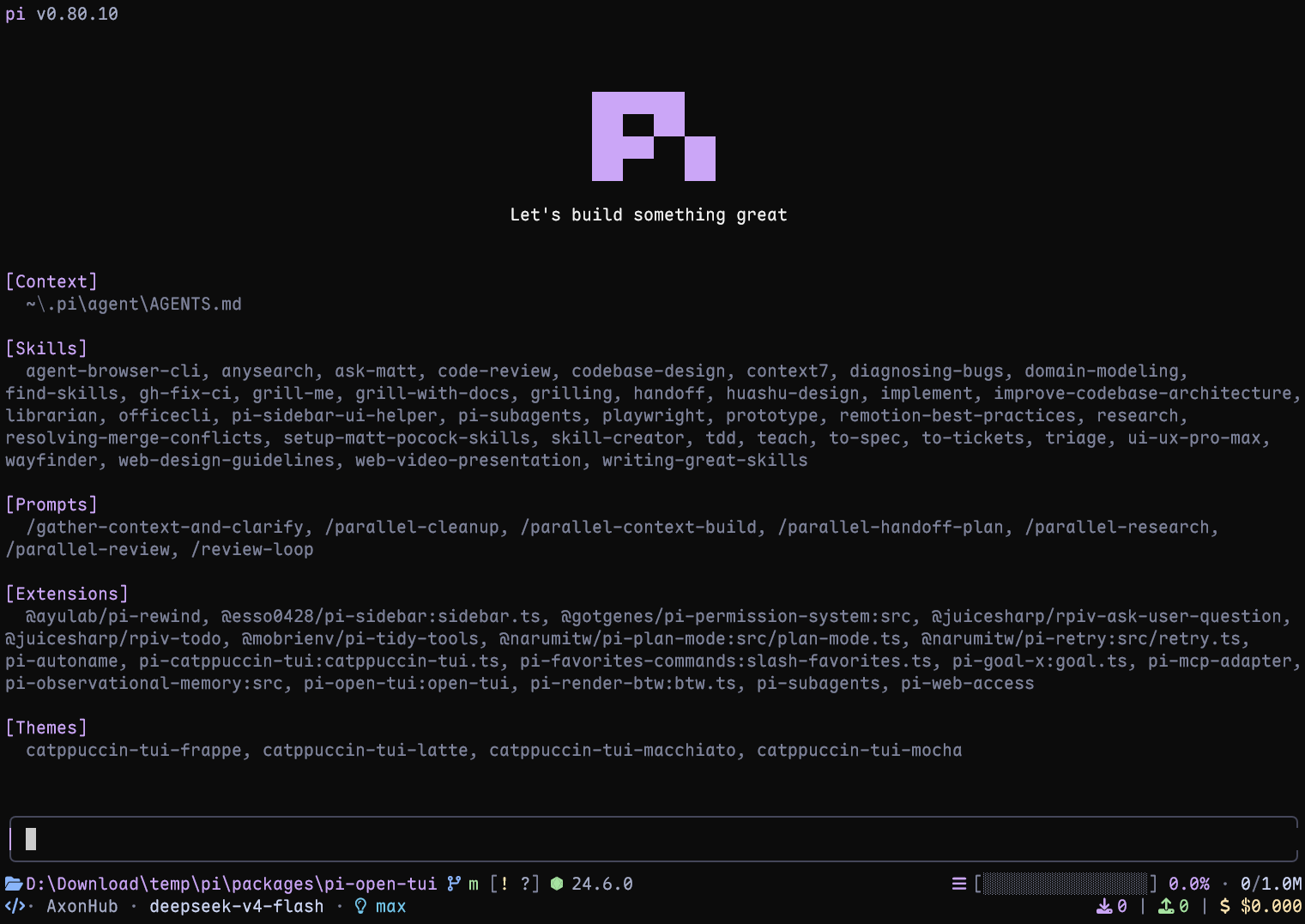
功能亮点
- Pi 顶栏:显示模型、思考等级、当前目录和常用斜杠命令提示
- 自适应底栏:集中展示 Git 状态、运行环境、上下文用量、Token、费用和扩展状态
- 带边框的编辑器:支持块状、竖线和下划线三种光标样式
- 项目环境感知:识别 50 多种运行环境,并展示 ahead/behind、已暂存、已修改、未跟踪、stash 和 detached HEAD 等 Git 状态
- 单轮遥测:展示 TPS、首 Token 延迟(TTFT)、耗时、停顿、Token 数量和模型标价速率
- 思考预览:模型工作时,在 Pi 隐藏思考块的
Thinking...位置显示实时字幕,展示推理内容的末尾片段 - 交互式设置:通过
/open-tui配置,并支持英文和简体中文界面
环境要求
- Pi 1.0 或更高版本
- 支持 UTF-8 和彩色输出的终端
- 使用完整图标集时需要 Nerd Font(可选;内置可移植 Unicode 图标)
安装
安装扩展:
pi install npm:pi-open-tui也可以只在当前会话中试用:
pi -e npm:pi-open-tui字体与图标
可从 Nerd Fonts 官方下载页或 GitHub 最新版本下载任意已修补字体。安装后,请在终端配置中选择该字体,并重启终端。
默认的 auto 模式检查终端环境,而不是已安装的字体文件。在支持 UTF-8 的交互式 TTY 中,它会使用 Nerd Font 图标,即使 Pi 运行在 runner 或子 shell 中。如果图标显示为方框、乱码或错误符号,请打开 /open-tui,在外观页选择合适的模式:
nerd:终端已配置 Nerd Font 时,强制使用 Nerd Font 图标unicode:可移植 Unicode 图标(文件夹、分支、笔记本电脑、灯泡、插头、沙漏等),无需修补字体;emoji 字形通过终端的 emoji 回退渲染ascii:使用纯文本图标,无需安装修补字体auto:在支持 UTF-8 的交互式 TTY 中使用 Nerd Font 图标;SSH 会话使用可移植 Unicode 图标(字体由客户端终端决定,通常没有 Nerd Font);非交互式输出、TERM=dumb或明确配置为非 UTF-8 的 locale 使用 ASCII
如果已经安装字体,但 auto 仍选择 ASCII,请手动切换为 nerd。使用 VS Code、Windows Terminal 等应用时,只在操作系统中安装字体还不够,还需要在对应的终端配置中选中该字体。如果 SSH 客户端终端确实安装了 Nerd Font 并希望在 SSH 下使用完整图标,请将模式显式设为 nerd。
配置
运行 /open-tui 打开设置窗口,其中包含常规、外观、底栏和遥测四个页面。设置保存在 ~/.pi/agent/open-tui.json:
{
  "enabled": true,
  "inlineFooter": false,
  "settingsLanguage": "zh",
  "cursorStyle": "block",
  "icons": {
    "mode": "auto"
  },
  "footerSegments": {
    "cwd": true,
    "hostname": false,
    "sessionName": false,
    "gitBranch": true,
    "gitStatus": true,
    "gitCommit": false,
    "runtime": true,
    "context": true,
    "tokens": true,
    "cost": true,
    "extensionStatuses": true,
    "capitalizeProviderName": true
  },
  "telemetry": {
    "enabled": true,
    "tps": true,
    "ttft": true,
    "duration": true,
    "tokens": true,
    "stalls": true,
    "cost": true
  },
  "thinkingPeek": {
    "lines": 1
  }
}
主要选项:
| 选项 | 可选值 | 说明 |
| --- | --- | --- |
| settingsLanguage | en、zh | 切换 /open-tui 设置界面的语言 |
| inlineFooter | true、false | 将两条主要 Footer 信息行移入编辑器上下边框以节省垂直空间,默认关闭;扩展状态行仍显示在编辑器外 |
| cursorStyle | block、bar、underline | bar 和 underline 需要终端支持光标形状转义序列 |
| icons.mode | auto、nerd、unicode、ascii | 控制底栏和遥测通知使用的图标 |
| footerSegments | 布尔开关 | 分别控制底栏中的各项数据 |
| footerSegments.capitalizeProviderName | 布尔开关 | 将底栏中提供商名称的首字母大写;设为 false 时保留原始大小写 |
| telemetry | 布尔开关 | 控制遥测总开关和各项指标 |
| thinkingPeek.lines | 0、1、2 | 关闭、单行或双行思考预览 |
sessionName 仅在会话有名称时显示;hostname 会显示主机名的短名称(主机名的第一个标签,例如从 mba.example.com 显示为 mba),并使用服务器图标;gitCommit 会在 detached HEAD 状态下显示短哈希和标签;关闭 extensionStatuses 会隐藏整行扩展状态,其中也包括 MCP 状态。每条状态会保留其扩展通过 ctx.ui.theme.fg() 设置的颜色;未设置颜色的状态使用 muted 主题色显示。
开启 inlineFooter 后,两条常规 Footer 信息行会移入编辑器边框,从而节省垂直空间。顶部边框左侧显示 Git 分支,右侧信息组以当前目录开头;开启 sessionName 时,会话标题也会显示在左侧。Header 和扩展状态行保持独立显示;终端较窄时优先截断低优先级 Footer 数据,保留右侧统计信息和边框角。
单轮遥测
每次 Agent 完整运行结束后,pi-open-tui 会显示一条临时结果,并将其中的多个工具调用轮次合并统计:
> TPS 42.5 tok/s | ~ TTFT 1.2s | + 29.7s | ↑ 567 | ↓ 1.2k | ! stall 1x / 4.3s | $ $3.60/MTPS 的计算方式是:将本次运行中服务商报告的全部 Assistant 输出 Token,除以各个生成轮次的总耗时。计时范围从 turn_start 到 Assistant 的 message_end,包含 TTFT、隐藏推理、缓冲和停顿,但不包含轮次之间的工具执行时间。没有输出 Token 或无法测得生成时间时,会显示 TPS —。
$ / M 表示根据 usage.cost.total 得到的模型标价速率,不是底栏中的会话累计费用。所有遥测字段都可以在遥测页单独开关。
思考预览
开启 Pi 的 Hide thinking 后,任务运行期间 pi-open-tui 会在原生隐藏思考块的 Thinking... 位置显示紧凑的实时字幕。/open-tui 中提供关闭、单行、双行三种模式:
- 模型推理时,思考内容的末尾片段会随 spinner 滚动(
~ think ⠋ …); - 开始输出正文时定格为对勾(
~ think ✓); - 双行模式中,上一条和最新一条思考内容使用相同的文字缩进;如果最新一行超出宽度,则两行随新 Token 持续显示它的最新末尾片段,不再保留上一条;
- 任务结束后恢复原生
Thinking...标签。
~ think ⠋ 上一条思考
          最新一条思考
该字幕仅在模型真正输出推理内容后出现,非推理模型不会显示。可见性由 Pi 自身的 Hide thinking 开关控制,切换后立即生效。每一行都按显示宽度截断(全角字符计 2 列),因此包含中文的思考文本也不会溢出终端。可在 /open-tui 的常规 → 思考预览中切换,或直接修改 open-tui.json 中的 thinkingPeek.lines。
本地开发
npm install
npm test
npm run typecheck
pi -e .
致谢
本项目基于多个 Pi 社区包的工作:
- pi-haiku — 双行底栏结构和工作计时器
- pi-claude-code-tui — Pi Logo 帧与圆角编辑器边框技术
- pi-zentui — Starship 风格底栏、运行环境检测、会话生命周期和设置界面模式
- pi-tps — 单轮计时、停顿检测和保守的 TPS 计算方式
Logo 帧源自 Pi 官方安装脚本(pi.dev/install.sh)。运行环境检测和 Git porcelain 解析借鉴了 pi-zentui 的结构。
特别感谢 LINUX DO 社区的支持。